L3 HW Offloading RB5009

From Device on 192.168.1.x network to 10.0.0.0/8 likely goes from device to 5009 then to Switch then to 10.x.x.x device.
(Hopefully often the 5009 will issue a redirect so traffic from device on 192.168.1.x will know to go direct to Switch, but
device might well ignore it)

That would be 100% correct. I’ve verified that with a trace route.


Return traffic goes from 10.x.x.x to switch and then direct to the device on 192.168.1.x bypassing the 5009

This, I don’t know. The switch does have a route of 0.0.0.0 0.0.0.0 192.168.1.1 but since the switch is also a router and since the switch is sitting on the LAN, you may just be right…

Ah, you may be on to something…

/usr/local/bin # traceroute 192.168.1.16
traceroute to 192.168.1.16 (192.168.1.16), 30 hops max, 38 byte packets
 1  10.0.19.1 (10.0.19.1)  20.095 ms  1.253 ms  1.266 ms
 2  192.168.1.16 (192.168.1.16)  0.237 ms  0.282 ms  0.172 ms

The trace route doesn’t even show the switch IP as one of the interfaces being traversed.

OK. OK. I have some more work to do here before I just decide to return this thing…

OK so help me with the rules please:

rule 1:
in interface = bridge, src ip address=192.168.1.0/24 dest ip address = 10.0.0.0/8 action = notrack
rule 2
in interface = bridge, src ip address=10.0.0.0/8 dest ip address = 192.168.1.0/24 action = notrack

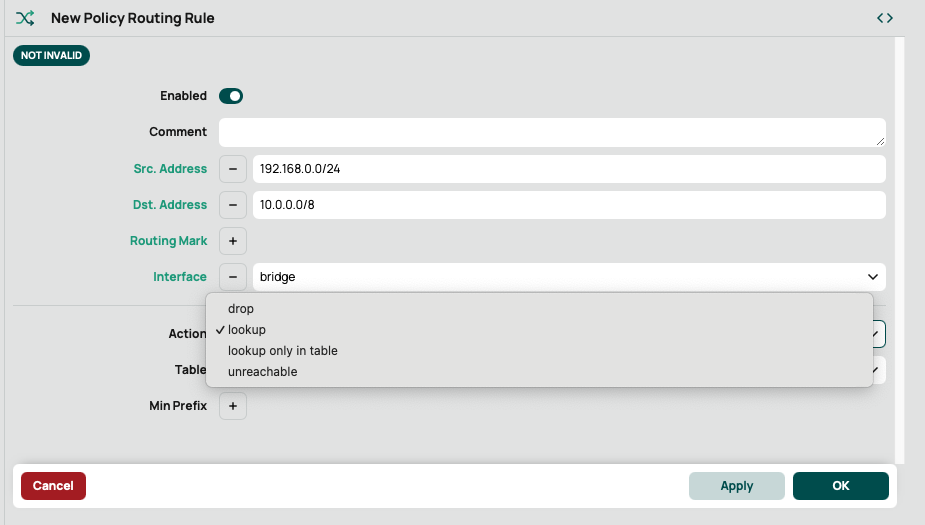
Here’s what I see in the router when setting up the rule. There’s no action of “notrack” -

I have also taken a look at the CLI interface but I am not having any luck there either. I’m assuming “lookup only in table” is the correct selection but not sure.
Screenshot 2025-01-19 at 8.19.36 AM.png

Hi there.

I have deployed quite a few rb5009 devices and in fact I have used one for home use for a few years. I am very pleased with it. I think your device choice is spot on, this device is probably the best bang for buck if you have a multi-gig setup.

As to what you can expect from this device:

  • in pure software routing (including NAT, stateful firewalling, policy routing, queueing - so all features available): around 4 Gbps
  • with what Mikrotik calls “fasttrack” - a software acceleration technique, that precludes the use of some features (policy routing, some queueing, etc.) but does NAT and stateful firewalling, expect 7-8 Gbps (what is different in the way Mikrotik does it compared to other vendors is that it can be applied to traffic selectively - so e.g. you can choose to accelerate inter-VLAN, but apply ACM queues for internet traffic, etc.)
  • with no stateful firewalling (e.g. the “notrack” thingy that was mentioned) you can get quite close to 10 Gbps

These speeds can be achieved on any combination of internet/vlan-tagged/untagged/inter-vlan etc. paths.

So basically your routing is most probably somehow set up incorrectly. If you would give a detailed diagram, including the L3 switch, and include the setup of the L3 device, we could probably find out what your exact problem is or suggest an appropriate configuration. (Lots of other devices include/apply some settings “by default” or “automatically” - basically Mikrotik exposes the “ip” commands in Linux through a simplified interface, but the settings are just as detailed. You have to spell out things exactly - so simply saying that it works with something else configured somehow doesn’t really help. Maybe the rb5009 has to be configured differently, maybe another device, maybe both…)

One such “default” that can very easily be the source of your problems is that many manufacturers include a default “hairpin nat” rule, that is if an internal host addresses another internal host (sometimes only on the same network, sometimes for all internal networks… the exact form varies), then the source IP of the forwarded packet is changed from the sender to the address of the router. This does provide quite a bit of help in making otherwise incorrect configurations work, but it’s best to fix what’s broken instead of papering over it. (Mikrotik of course supports hairpin nat, it just has to be configures explicitly. In some cases it is considered necessary - and easier than correcting the network design - but generally networks designed from first principles do not need it.) Such a rule for example would solve the “triangular routing” problem . but again: it’s better practice to configure routing properly.

Please pay attention to the fact that the rb5009 comes with a default firewall configuration. This is only suitable for an “I have one internet and one home subnet” type configuration, so for yours it has to be modified. Did you do these modifications? Did you so them correctly?

Posting a full config helps a lot. (A config export can be created in the terminal with the /export file=whatever.rsc command. This has to be downloaded to your computer afterwards for further use. Please review what you post, and mask any details that you don’t wish to make public.) If you post a config please do it in a code block (the 5th icon in the forum interface.) You may - as you wish - post excerpts from your config (to accentuate a given part), but please always include the full one as well, because some configurations done in different parts of the config can easily affect each other.

The “notrack” suggestion is not bogus. It instructs the OS not to lookup or create connection tracking entries for given packets, and as such has performance benefits. Of course without connection tracking only stateless filtering of traffic (what many manufacturers call ACLs) is available, and of course no NAT (only for the packets that are notracked). This is a firewall feature, so that is where you will find it (IP->Firewall) and it has to be placed in the RAW table and prerouting chain. (The option is available both in winbox, webfig and cli.)

Just a suggestion: first fix the routing problem, and only after you reach the limitations that I have written above set out to optimize the design, e.g. use fasttrack, notrack, etc. While you have more serious problems these only confuse things.

Sorry for the wall of text and good luck!
The things rplant suggested are firewall (raw) rules (in prerouting I believe), not routing rules (policy routing).

https://help.mikrotik.com/docs/spaces/ROS/pages/250708066/Firewall

If you actually want to get some answers, and fix the issue, the best place to start is providing your config.
/export file=anynameyouwish ( minus router serial number, any public WANIP information, keys etc.)

(ps dont see any cheap RB5009s yet on amazon.com)

Thanks all,

Let me look some more at the docs and see if I can figure some of this stuff out. Very informative.

Right now, I don’t have much of a config in the router as I had factory defaulted it. So let me start playing with it some more, make the changes and test it out. Then if needed, I can reply back with more info and the config…

OK. I think I found the spot in the firewall section to add the rules under RAW.

There is also a section in firewall rules where you can set a fasttrack connection which has hardware offloading. Is that something to use as well?

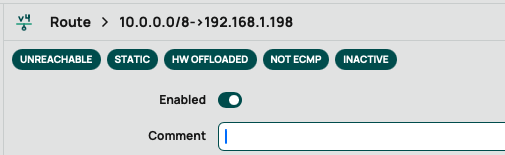
And when I now go into the routing table rule, it now shows the rule as hardware offloaded…
Screenshot 2025-01-19 at 11.13.54 AM.png

The rb5009 does not do HW offload. The HW would be capable of it, but the limitations are so severe that it will probably never happen. See this post: http://forum.mikrotik.com/t/l3-hw-offload-support-on-rb5009/157163/13

Your route is showing the “HW offload” flag because the route is “unreachable”. (This is a quirk in the interface…)

Sorry to be the bearer of bad news, but (IMHO) you won’t get very far with GUI only tools, the Mikrotik configuration settings are already at the same time scattered all over the place and mixed up together that without some use of terminal/command line they are impossible or near to impossible to understand/set/review.

Winbox (and/or webfig) have their use (besides launching a terminal), as some actions are much easier in the GUI, of course.

Since you are seemingly a Linux terminal user you should not have much difficulty in getting used to the Mikrotik’s one.

Try opening a terminal and running in it:

/ip route print

isn’t it easier to read?
And also to post as text (possibly inside code tags)?

Here’s the route:

Flags: D - DYNAMIC; I - INACTIVE, A - ACTIVE; c - CONNECT, s - STATIC; H - HW-OFFLOADED
Columns: DST-ADDRESS, GATEWAY, DISTANCE
#      DST-ADDRESS      GATEWAY        DISTANCE
0  IsH 10.0.0.0/8       192.168.1.198         1
  DAc  192.168.88.0/24  bridge

So far the Mikrotik CLI has not been very kind to me. I’ve hard a hard time figuring out how to navigate it.

Here’s the relevant firewall section of the config (entire config attached):

add action=fasttrack-connection chain=input dst-address=10.0.0.0/8 \
    hw-offload=yes in-interface=bridge src-address=192.168.0.0/23
add action=fasttrack-connection chain=input dst-address=192.168.0.0/23 \
    hw-offload=yes in-interface=bridge src-address=10.0.0.0/8
/ip firewall nat
add action=masquerade chain=srcnat comment="defconf: masquerade" \
    ipsec-policy=out,none out-interface-list=WAN
/ip firewall raw
add action=notrack chain=prerouting dst-address=10.0.0.0/8 in-interface=\
    bridge src-address=192.168.0.0/23
add action=notrack chain=prerouting dst-address=192.168.0.0/23 src-address=\
    10.0.0.0/8
/ip route
add disabled=no dst-address=10.0.0.0/8 gateway=192.168.1.198 routing-table=\
    main suppress-hw-offload=no

Now, I do have the following as well from when I was messing with the IP routing rules section. Should this be removed?

/routing rule
add
add
add action=lookup-only-in-table disabled=no dst-address=10.0.0.0/8 interface=\
    bridge src-address=192.168.0.0/24 table=main
add action=lookup-only-in-table disabled=no dst-address=192.168.0.0/24 \
    interface=bridge src-address=10.0.0.0/8 table=main
add

Keep in mind I have not changed the default IP on this back to my LAN yet. So I have not yet tested anything…
config.rsc (7 KB)

Quick update…

After applying these settings, I set the router up for my LAN address space, DHCP pool, static leases, etc. I then put it into the network…

Wow. What a difference! It’s now forwarding all the traffic beautifully! I don’t know which if all the items I listed in the post above are all needed, but things are working very well right now at least on first look…

Cool. What is not needed:

  • fasttrack cannot (and silently will not) be applied to notracked traffic (fasttrack modifies the conntrack entry, which is nonexistent for untracked) - for a given traffic it is either/or
  • the routing rules - the default is to look at the main table for any routing decision

OK. Both of these make sense. And basically notracked traffic is already fasttracked because it is not tracked if I understand it right.

When you say the main table - are you talking about the firewall table then?

Table refers to Routing Table(s). There is the main table which holds the majority of routes ( associated with IP addresses and subnets ) WAN etc.
Special Tables… not in main, created by admin for the purposes of sending traffic out a different table than the normal routing tables normally used.

Do not understand these rules as they are duplicate in nature ( already have a fastrack rule) and they refer to subnets that have nothing do to with your router??

add action=drop chain=forward comment=
“defconf: drop all from WAN not DSTNATed” connection-nat-state=!dstnat
connection-state=new in-interface-list=WAN
add action=fasttrack-connection chain=input dst-address=10.0.0.0/8
hw-offload=yes in-interface=bridge src-address=192.168.0.0/23
add action=fasttrack-connection chain=input dst-address=192.168.0.0/23
hw-offload=yes in-interface=bridge src-address=10.0.0.0/8

Also should not be using Routing Rules unless you know what you are doing!!

Also related is the unk reason for raw firewall rules…If I had to say it, one doesnt care about needed traffic but is mortally afraid, a phobia if you will, of two subnets.

I a sense yes. Just to make it perfectly clear:

  • in case of notrack, no conntrack entry is created (this means that no stateful rules can be applied to the packets)
  • in case of fasttrack, a conntrack entry is made normally and then a special flag is set on it. In this case, the first few packets go through the firewall normally, and what should be done to them is recorded in the conntrack entry. Further packets traverse a very shortened path. Some packets are still sent on the normal path anyway in order to update timers/timeouts. This means that fasttrack can do more than notrack, it can do stateful filtering and NAT. There are other things that are skipped: e.g. IPSec, policy routing, most queues. The main use case for fasttrack is for the home user who wants to use minimum hardware resources but wants NAT or for inter-vlan routing with stateful filtering.

No. I mean the main routing table (when adding routes you write: /ip/route add … table=main …) and then in routing rules (/routing/rules) you specify (lookup-only-in-table) to use the main routing table for these packets. The use of the main routing table is the default. Even if you have other routing tables (which you don’t) main is still the default. You only have to use the routing rules if you have multiple routing tables.

No.
It Is the table you printed, containing routes.
By default on Mikrotik there Is only one routing table, called “main”.
But more tables can be added.
All traffic will use this main table, unless explicit modifiers are used.
There are two such mechanisms:

  1. mangle ( firewall mangle rules)
  2. policy routing (routing rules)
    You can think at both of them as sieves that can filter traffic and change the routing table that will be used on the filtered packet.
    Loosely, routing rules are simpler and can filter only larger particles, while mangle rules are much more complex but can filter much smaller particles.

Just a little addendum: For now I would skip the raw rules entirely. Configure everything to your satisfaction. Verify. Measure. And if you want/need more performance, add them back in.

That’s why I was asking if I needed them. And they absolutely refer to my subnets. 192.168.0.0/23 is my LAN and my VLANs all live in segments of 10.0.0.0/8.


Also should not be using Routing Rules unless you know what you are doing!!

Also related is the unk reason for raw firewall rules…If I had to say it, one doesnt care about needed traffic but is mortally afraid, a phobia if you will, of two subnets.

I was just following along with what people said here that the rules to configure the interfaces are in the firewall.


The things rplant suggested are firewall (raw) rules (in prerouting I believe), not routing rules (policy routing).

https://help.mikrotik.com/docs/spaces/R > … 6/Firewall

OK. I’m confused.

1.) Creating just the route by itself does not work well. That’s why I am here.
2.) rplant suggested a number of suggestions regarding notrack.
3.) jaclaz says those settings in raw commands in the firewall.

I’ve got some people telling me to do one thing and others to not do it…

??

To help us, and to help yourself, the clarity starts with you…

a. identify all the users/devices (external, internal and including admin)
b. identify all the traffic the above groups must accomplish
c. detail the WAN ( how many, public, private static, dynamic etc, if more than one, load balance or failover etc. )