L3 HW Offloading RB5009

I think I’ve done that. But for clarity:

WAN is just cable internet. That’s it.

Cable modem with 2.5 Gbit connection going to port 1 on the router.

10 Gbit fiber connection to my L3 switch.

LAN is on 192.168.0.0/23 subnet. I also have a number of VLANs that are all in the 10.0.0.0/8 subnet.

The router is at IP 192.168.1.1. The switch has a LAN IP of 192.168.1.198 that is on a routable VLAN.

The goal is to route traffic from the 192.168.0.0/23 subnet to the 10.0.0.0/8 subnet. For devices on the 10.0.0.0 VLANs their gateway is the VLAN IP address on the switch.

Normal routing table goes:

Destination: 10.0.0.0
Mask: 255.0.0.0
Gateway: 192.168.1.198

Just making a normal route entry in the MikroTik resulted in extremely slow performance when trying to get to the 10.0.0.0 VLANs. Brutally slow.

This should be sufficient to describe things.

To clarify:

  1. Your routes (or other settings) were previously somehow messed up. You have reset the router. Things magically work :slight_smile: - we will probably never know what was wrong. Neither routing/rules or raw firewall helped or will help you with that.
  2. The suggestion - as I have written - is not bogus. But it is an optimization. This router will happily route approx. 4 Gbps without any of it. If you later want more performance, add it. My suggestion is to first configure things correctly, then optimize - in that order.
  3. The routing/rules as in your export do absolutely nothing. They instruct the router to do what it would do anyway. For your case there is no need to touch routing/rules. They should be empty.

By the way the route:

/ip route
add disabled=no dst-address=10.0.0.0/8 gateway=192.168.1.198 routing-table=main suppress-hw-offload=no

creates a routing situation where packets may be (will be) sent back and forth between your Mikrotik and your L3 switch.

Consider the case that on the 10.0.0.0/8 network you actually use 10.0.1.0/24, 10.0.2.0/24 and 10.0.3.0/24 for you devices. Now consider that a packet is sent to 10.0.222.3. Your Mikrotik (as per the 10.0.0.0/8 route) will forward it to your L3 switch. It in turn (because it has the default 0.0.0.0/0 route) will forward it to your Mikrotik. And so it goes until TTL is exhausted (roughly 64 times), consuming resources.

Your routes should be:

/ip route
add disabled=no dst-address=10.0.1.0/24 gateway=192.168.1.198 routing-table=main suppress-hw-offload=no
add disabled=no dst-address=10.0.2.0/24 gateway=192.168.1.198 routing-table=main suppress-hw-offload=no
add disabled=no dst-address=10.0.3.0/24 gateway=192.168.1.198 routing-table=main suppress-hw-offload=no
add disabled=no dst-address=10.0.0.0/8 blackhole

I’m just using these subnets as an example. That’s why a network diagram detailing the addressing would be useful.

EDIT

I’ve read your response to anav’s question.

Your setup is straightforward enough. What you wrote is all you need to set. This is a powerful router, so performance should have been (and will be) more than adequate. There are tricks to get even more, but your problem was some sort of misconfiguration (maybe in some other part of the config.)

GLuck, then, as you seem to have all well in hand. Not even sure why you posted.

Yeah, I get that but the likelihood is incredibly small as the traffic being passed is all from an app that has the IP addresses of all the devices in the VLANs. It’s already setup in advance. But you make a good point in general.


I’ve read your response to anav’s question.

Your setup is straightforward enough. What you wrote is all you need to set. This is a powerful router, so performance should have been (and will be) more than adequate. There are tricks to get even more, but your problem was some sort of misconfiguration (maybe in some other part of the config.)

I’m not certain what Anav’s problem is. I have been asking plenty of questions but just trying to get clarity on a few.

Anyhow here is what I am going to do:

1.) Remove ALL rules sans the port forward rule
2.) Test performance
3.) If performance is OK, then I must have had something mucked up the first time I had the router installed
4.) If performance is not OK, then I will add these back in:

/ip firewall raw
add action=notrack chain=prerouting dst-address=10.0.0.0/8 in-interface=\
    bridge src-address=192.168.0.0/23
add action=notrack chain=prerouting dst-address=192.168.0.0/23 src-address=\
    10.0.0.0/8

I will report back…

Cool - I can just disable them without having to delete them. Nice!

OK. Quick answer.

Removed all but the route entries and performance slowed back to a crawl.

Added back in the notrack RAW entries and it all is working fine:

/ip firewall raw
add action=notrack chain=prerouting dst-address=10.0.0.0/8 in-interface=\
    bridge src-address=192.168.0.0/23
add action=notrack chain=prerouting dst-address=192.168.0.0/23 src-address=\
    10.0.0.0/8

So it looks like I have a situation where I have triangular routing. Packets from 192.168.0.0 go through the router but packets from 10.0.0.0 do not.

These two rules definitely help.

Okay.

You seem to misunderstand (or I’m not clear enough) what “rules” means:

  • there a routing rules (/routing/rules) - these you don’t need
  • there are firewall rules (/ip/firewall):
    • filter rules (/ip/firewall/filter) - these should be there
    • nat rules (/ip/firewall/nat) - if NATing or port forwarding, etc. you need these
    • mangle rules (/ip/firewall/mangle) - you don’t need these
    • raw rules (/ip/firewall/raw) - you don’t need these, but can help with performance
  • and there are routes (/ip/route) - these you obviously need

If without the raw rules “performance grinds to a crawl”, then you have some other misconfiguration. They may help, but on a correctly configured router they should at most increase performance 2-3x.

Post another full export!

EDIT

Ohh, so you do have routing misconfigured. Triangular routing explains what you are seeing. And it explains why the raw rules solve it.

Triangular routing should be eliminated. Even if currently raw rules solve it for you, it will cause headaches later on.

I will post later on how to resolve it…

I’m all ears for how to solve that. Do I have something wrong on my switch? Traceroute from my 10.0.0.0 devices out to a LAN device does not go through the router. So seems like that’s where I need to fix this?

Just to rehash. The problem (triangular routing) is this:

  • The devices on the 192.168.0.0/23 - when sending to the 10.0.0.0/8 subnet - send it to the Mikrotik at 192.168.1.1 (resolving it via default), because they don’t know where the router for the 10.0.0.0/8 subnet is located.
  • The devices in the 10.0.0.0/8 subbet - when sending to the 192.168.0.0/23 subnet - resolve it to the L3 switch, which in turn sees 192.168.0.0/23 as directly connected.

There are two approaches to solve the situation:

Solution 1

Make the devices on 192.168.0.0/23 aware of the correct (shortest) route to 10.0.0.0/8. There is a dedicated DHCP option (121 - classless route) for just this purpose. From Google:

“The DHCPv4 option Classless Static Route allows a DHCP server to pass a list of static routes to a DHCP client, which then enters those routes into its routing table.”

This is fully supported in the Mikrotik DHCP server.

Please be aware that while most normal (Linux, BSD, Windows, MAC, Android, iOS) systems respect this option, some embedded (IoT, smart whatever) devices sometimes don’t.

Solution 2

This is the one I would encourage. Configure the L3 switch to send traffic to 192.168.0.0/23 through the Mikrotik.

This done by:

  • Allocate a subnet just for routing purposes. Let this be 192.168.111.8/30. This subnet has to be defined both on the Mikrotik and the L3 switch. This subnet is for routing purposes only.
  • Configure addressing: let Mikrotik take 192.168.111.9 and the L3 switch take 192.168.111.10
  • Correct the route on the Mikrotik to 10.0.0.0/8 via 192.168.111.10
  • Correct the route on the L3 switch to 192.168.0.0/23 via 192.168.111.9

Please note that for this to work, on the Mikrotik side:

  • you have to remove the port that connects to the L3 switch from the bridge
  • add the port connecting to the L3 switch to the interface list LAN

Use no. 2. In all larger/well designed networks it is handled this way.

Just a guess, but regarding the triangular routing issue: NA9D, you mentioned having a Layer 3 switch configured with all your VLANs and your 192.x network. Is this switch capable of inter-VLAN routing? If so, it might help eliminate unnecessary hops and improve efficiency, as traffic between the VLANs would be routed directly on the switch instead of through the router.

So question - So create a new VLAN on the switch?

Now I have both normal LAN traffic and the VLAN traffic on the switch. It seems like doing what you suggest will break the LAN connection between the 192.168.0.0 LAN and the switch. Are you talking about adding second connection between the switch and the router? Or a trunk?

Yes. It is capable of InterVLAN routing. I can set the L3 switch as the gateway for my LAN network and that works. And traffic between the 10.0.0.0 VLANs works fine. That’s all good. It’s just getting the routing correct between the 192.168.0.0 network and the 10.0.0.0 network.

This is again where a diagram would be infinitely useful. It can be ascii art or whatever.

What is the situation? Am I correct:

  • The thingies on the 10.0.0.0/8 subnet are connected to your L3 switch?

What is the rest?

  • Clearly the L3 switch is connected to the Mikrotik. On one port only? 10Gbps?
  • Are the 192.168.0.0/23 devices connected to the other ports on the Mikrotik? Are they connected to the switch?

Yes, what I suggest will break the direct (unrouted) link between the L3 switch and the 192.168.0,0/23 subnet. That is precisely the goal. This connection leads to the triangular routing situation. The L3 switch should only send packets to this subnet through the Mikrotik.

Depending on the exact make/model of the L3 switch this will probably mean creating a new VLAN. This can go out to the Mikrotik either as tagged (trunk) or untagged (access), depending on how you wish. If it is tagged, of course it will have to be untagged on the Mikrotik, but this is easily done. If untagged, you have the seemingly strange situation that the given VLAN exists only in the “imagination of the switch”, but that is how most L3 switches are in fact configured, and it is correct.

EDIT

Another question: What is your goal exactly: Do you want the Mikrotik to serve only as a DHCP server and handle NAT? Or would you like it to do other things a well (filter traffic, so for example the 192.168.0.0/23 can “talk to” the 10.0.0.0/8 devices, but not vice versa, etc., or maybe provide a VPN gateway…)?

Either way you will have to do this additional routing subnet thing. Just other configuration afterwards depends on this choice.

This is a really long post but you guys wanted to know the details so here you go…

This is again where a diagram would be infinitely useful. It can be ascii art or whatever.

See below and I’ll explain in more detail after I answer your questions

What is the situation? Am I correct:

  • The thingies on the 10.0.0.0/8 subnet are connected to your L3 switch?

Yes. Correct

What is the rest?

  • Clearly the L3 switch is connected to the Mikrotik. On one port only? 10Gbps?
  • Are the 192.168.0.0/23 devices connected to the other ports on the Mikrotik? Are they connected to the switch?

The L3 switch is connected to the Mikrotik by a 10 Gbit SFP+ connection. It is the only connection at this time, but the open ports are there should I need them.

Everything else is connected to the L3 switch. There is a second L2 switch that is also on the network and connected to the L3 switch.

Another question: What is your goal exactly: Do you want the Mikrotik to serve only as a DHCP server and handle NAT? Or would you like it to do other things a well (filter traffic, so for example the 192.168.0.0/23 can “talk to” the 10.0.0.0/8 devices, but not vice versa, etc., or maybe provide a VPN gateway…)?

Either way you will have to do this additional routing subnet thing. Just other configuration afterwards depends on this choice.

I want the Mikrotik (or whatever router) to act as DHCP server, DNS relay, NAT, VPN gateway, firewall, router, etc.

I “could” use the L3 switch as a “LAN” router where I set things up where it is the gateway for all the devices on my LAN. It works as I had it that way yesterday, but then anything on the LAN traversing to the outside world (most of the traffic) would need to be handled at the L3 level by both the switch and the router as opposed to if the router was the gateway, then the switch is only operating on L2 for any traffic to the outside world.

Below is the network diagram scribbled by me. An artist I am not! Let me explain the VLANs as we use them as part of distributing IP video over a network. I write software to work with video devices from a company called Just Add Power (wwww.justaddpower.com). At a basic level there are two sorts of video devices - an encoder and a decoder. The encoder takes and HDMI signal from a video device (camera, cable box, AppleTV, Roku, etc) and encodes that into an IGMP multicast stream. On the other end the decoder, receives the IGMP multicast stream and converts it back to HDMI where it connects to a TV. Because we want video to have priority above all else on the network where the encoder resides, it is set up to basically just transmit data as fast as possible. If you were to put one of these devices on your LAN, it would take down your LAN very rapidly. So we isolate each different video source into its own VLAN. Now whatever decoders are in an encoder’s VLAN receive its signal. If I want to watch something different I move the encoder connected to the TV I am watching to a different VLAN. We do all of our video switching at the Layer 2 level and we are actively changing the programming of the switch depending on what we want to watch. Using this topology we can build literally any size video system. Examples of places using this product are Ceasar’s Palace in Las Vegas, multiple Twin Peaks and Buffalo Wild Wings restaurants. PGA Pro Superstores, and more. I personally manage a hockey arena in Florida that has something like 250 displays and 60 video sources spread across 8 switches. And we do similar routing with all of these and I have never had this issue show up at any customer nor have I had anyone complain to me. This situation I am having is unique and we have been building out these systems for the past 10 years in the manner I will explain. It’s a little “non-standard” in terms of normal networking but it works.

We set up ports on our switches to use “General” mode where you need to assign both a VLAN and a PVID. For those who don’t know, the PVID is what is used as the “transmit” VLAN while listening happens on any other VLAN(s) assigned to that switch port. All traffic by the way is untagged.

All the decoders are put into their own VLAN which we typically call VLAN 10. Their PVID is then 10. So in my network, all the decoders get an IP address in the 10.0.10.0/8 space. But here’s where it gets interesting. The VLAN on the switch is set up as 10.0.10.1/24. And that’s on purpose. Yes it break some rules but it works quite well for the way we do things. This way only traffic that is in the 10.0.10.1/24 network is allowed on the VLAN but the device can talk to any other device in the 10.0.0.0 subnet. Remember I said before that we move the decoders between transmitter VLANs to decide what we want to watch. But then I said they are on VLAN 10. This is the magic of “general” switchport mode. You can have that port in multiple VLANs. So the primary VLAN that device will transmit on is the PVID. But it will LISTEN on all other VLANs that it is connected do.

Now the encoders we want to completely isolate. So they can be put into much smaller networks. I’m using pretty big and inefficient subnets here basically waisting a ton of addresses in a class A subnet. Who cares as it’s a private network and I can configure it how I want! In our bigger installations we use much smaller subnets for everything (and actually have a pretty slick standard for how we do it), but the same concept still applies. Anyhow, the transmitters get a similar type of arrangement. In my case the first encoders gets assigned to VLAN 11 with an IP address of 10.0.11.100/8. VLAN 11 is given an address of 10.0.11.1/24. Now the port this encoder is connected to on the switch gets assigned to VLAN 11 with a PVID of all. But it also gets assigned to VLAN 10.

Do you follow what is happening now? Transmitters talk to receivers on their VLAN and receivers talk back to transmitters on their VLAN. Where IGMP multicasting is in reality a single duplex one way form of communication, we’ve now enabled two way communication and ability for our devices to easily communicate with each other and the outside world.

In a lot of commercial cases, what we call the “video switch” just handles only video and any control traffic on the LAN is just routed into it. We tell the IT people not to think of it as a network switch but a video appliance on the network that gets an IP and traffic routed to it like anything else. Now what they do on their routers to set the routes - I don’t know. I’ve seen specific VLANs that they create just to put our switches on their network. In other cases it just goes on the LAN.

In smaller places and like in my home, the switch shares both video traffic and normal LAN traffic.

My diagram is below.

I
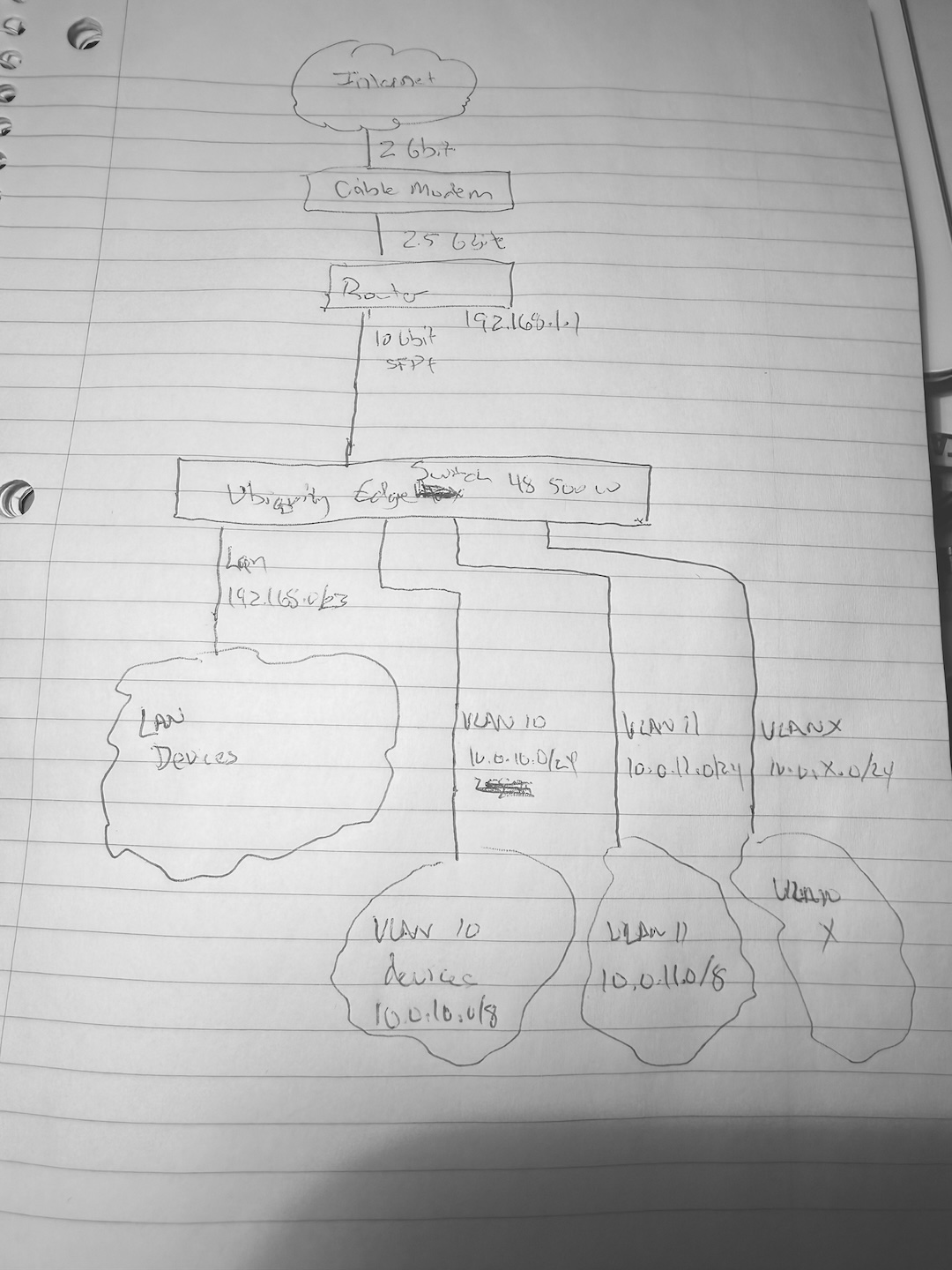
FullSizeRender.jpg

A further comment. So part of what I do that requires a lot of bandwidth is we can capture images on our devices and view them on the computer. This integrates well with my software that controls the system. The newest and highest end devices have an MJPEG stream option but we can still capture images nearly as fast as what you get from the MJPEG stream. But most devices are bitmap image captures that we then transfer across the network.

The video below shows what this is like. It’s not at all intended to be what you watch for high quality viewing. Instead it gives someone operating the system the ability to view what is playing where. We can’t allow full quality decode on a computer because of copyright restrictions on the content.

https://www.youtube.com/watch?v=jFMIzZ5XbUM

It actually makes sense now. Your network design with the mismatching prefix lengths and real-time switching of vlans is not networking best practice, but whatever works for you. Maybe if you haven’t started out 10 years ago, you could make use of more modern multicast protocols, but you goal is obviously not to redesign the system, so I won’t comment on it further :slight_smile:

So you really want the the Mikrotik to route between both the internet, the 192.168.0.0/23 and 10.0.0.0/8 worlds. Gotcha.

The EdgeSwitch is a bit limited in its L3 capabilities and the configuration is a bit nonstandard. I am not intimately familiar with it, so please take everything I say about configuring it with a grain of salt.

Your best bet in this case is to make the connection between the Mikrotik and the switch a trunk connection with two vlans. One would be the vlan for the 192.168.0.0/23 subnet. On this vlan no routing whatsoever should take place on part of the switch; it should simply act as a managed switch, with untagged ports towards your devices and a tagged port to the Mikrotik. The other vlan should be the one carrying the routing subnet, and to this an address (in my exmaple 192.168.111.10) and a default route (in my example via 192.168.111.9) should be assigned. (Previously I wrote that a route to 192.168.0.0/23 should be added. I misspoke, obviously a default should be added.)

It is possible to do this without vlan tagging and trunking, but this is the cleaner way.

The Mikrotik should obviously be configured to accept these two vlans and make proper use of them.

The simplest (but not best!) way to do this is to remove this (10G) port from the bridge, add two vlan interfaces to it (with the appropriate tags), put one (the one carrying the 192.168.0.0/23 subnet) back into the bridge, and on the other vlan an address should be assigned.

While this should work for testing purposes, this is in fact not the correct design. The rb5009 includes a quite powerful Marvell switch chip, which has good vlan support. The nice design is to have all relevant ports bridged, enable VLAN filtering and use the managed switch the designers included according to its purpose.

VLAN filtering on Mikrotiks is a topic in and of itself, and there are many tutorials on this forum available to help you. So I would suggest you to try out the first (non-optimal) approach, and then add VLAN filtering after its working. You seem quite familiar with linux, so a good place to learn about this is to read up on the linux DSA (Distributed Switching Architecture), because this is what enabling the setting “VLAN filtering” actually invokes. As with many other things, how you configure it on linux is exactly how you have to configure in the Mikrotik world.

Actually Just Add Power started doing this in 2010 but that was strictly L2 switching at the time. Yeah, you potentially could use more modern multicast protocols but this works and quality of video is the most important factor here. We are talking streaming bandwidths of as high as a gigabit.


So you really want the the Mikrotik to route between both the internet, the 192.168.0.0/23 and 10.0.0.0/8 worlds. Gotcha.

Ideally. Ubiquity’s own help docs show a similar proposal to what you have made…


Your best bet in this case is to make the connection between the Mikrotik and the switch a trunk connection with two vlans. One would be the vlan for the 192.168.0.0/23 subnet. On this vlan no routing whatsoever should take place on part of the switch; it should simply act as a managed switch, with untagged ports towards your devices and a tagged port to the Mikrotik. The other vlan should be the one carrying the routing subnet, and to this an address (in my exmaple 192.168.111.10) and a default route (in my example via 192.168.111.9) should be assigned. (Previously I wrote that a route to 192.168.0.0/23 should be added. I misspoke, obviously a default should be added.)

OK. So the VLAN for the 192.168.0.0/23 stuff is easy as it’s already on its own VLAN since you can’t use the management VLAN for routing. So that’s easy - add it to a trunk.

Now the problem is the 10.0.0.0 data. I could add every VLAN to the trunk except now we are going to be passing gigabits of data up to the Mikrotik. That seems like it should not be necessary. I guess I create a second VLAN for the 10.0.00 L3 traffic and set a route on the Ubiquity switch to route into that subnet? I’m a little foggy on that one. I’ll check the Ubiquity docs since they are very similar to what you propose.

Edit: AND RATS!!! The stupid Ubiquity has a maximum of 15 routable VLANs and I am already there. I can’t add another… Grrr…

VLAN filtering on Mikrotiks is a topic in and of itself, and there are many tutorials on this forum available to help you. So I would suggest you to try out the first (non-optimal) approach, and then add VLAN filtering after its working. You seem quite familiar with linux, so a good place to learn about this is to read up on the linux DSA (Distributed Switching Architecture), because this is what enabling the setting “VLAN filtering” actually invokes. As with many other things, how you configure it on linux is exactly how you have to configure in the Mikrotik world.

When you say I am quite familiar with Linux, you are too kind! Honestly, I am pretty limited. But let me see if I can get this concept to work on the Mikrotik as you explained. I’m just at a loss as to why I have never had to jump through these hoops with every other router I have had. I just entered the route and off I went. I guess that still doesn’t mean things were set up “correctly.” It’s clear that the routing from the LAN to the 10.0.0.0 subnet is going through the router. But the return traffic is not.


Another Edit..

Upon thinking about this further, I am thinking that the only way I can do this is to trunk ALL the VLANs up to the Mikrotik. There’s still plenty of bandwidth in the 10 Gbit link. Then do all the routing there. Wish I didn’t have to send the IGMP data up the trunk but I’m not sure how to do this otherwise…

Hi,

A little off topic now maybe.

I trialled a much simplified version of this system on a Hex (much slower/smaller), to verify some things I thought I knew…

It turns out as mentioned by @lurker888, marking the packets as notrack does seem to mean they can’t be fasttracked.
(under ip settings you can see the fasttrack packet counters)
They still get accepted in the next default rule usually, but all these packets have to traverse the full firewall.

I then trialled forcing the return traffic exiting the switch to go via the router (hex) instead of direct to the device, (return via the router is how the router wants the traffic to go), and with the notrack rules disabled.

This allowed the packets to be fasttracked, and its performance then was a worthwhile amount faster than using the notrack marking.

I did have to jump through some hoops to get the network in a state to get these results though.

By default, when trying to connect to devices behind the L3 Switch, the hex would send an icmp packet to my PC, saying if you want to get to that IP address, use this other gateway (the L3 switch). And my pc would then talk direct to the L3 switch, and it was quicker again, and no work needed by the router at all. But likely not compatible with all devices.

The DHCP option mentioned by @lurker888 is likely to result in a similar outcome.

I had to disable the send redirects, and secure redirects options (under ip settings) and then reboot the hex, before it would not send these.

This resulted in maybe similar connectivity issues to the device on the other subnet to what you had. Tcp didn’t seem to work, pings seemed fine.
With notrack rules getting it to work quite well, and symmetric routing and fasttrack being better again.

The question is how do I force my switch to send all LAN subnet traffic to the router instead of direct. I tried adding a route and it didn’t do anything.

That’s it. You can’t. The route you add would conflict with the directly connected one. A separate subnet is the correct way.

Especially if you are doing multicast stuff, there is no way around properly configured routing.