Why do we want to trunk all VLANs to the Mikrotik? Correctly addressed packets will get to it due to routing on the second VLAN. (I’m not saying you shouldn’t do this - I just don’t understand the reason.)
Even if we wish to trunk all ports to the Mikrotik, this does not involve routing, simply make this port a tagged member of the given VLANs and the switch will direct appropriate packets there due to switching behavior.
Well… The reasons why Mikrotik is a bit different:
The rb5009 device that you bought incorporates both a managed switch and a router. Both pretty powerful. For things to work optimally, you have to basically configure two devices. Generally other vendors - even when they incorporate the same hardware (which at these price points is rare) - neuter the interface and either call themselves routers and present the switching component as SVIs, or call themselves switches and severely limit the routing part.
Other vendors’ SOHO/SMB routers have a default “hairpin nat” rule, which changes the source IP of packets to that of the router, and therefore the router gets the reply packet as well. (Of course once receiving the reply, it changes the dst addr back…) This is not the correct way to do this, and - while it mostly works - breaks in unpredictable ways. (Although in some specific cases it is a necessary thing to do.)
This is the first time you mention that you use IGMP
Please be aware that multicast traffic is not routed by normal routing mechanisms. Some help is needed in these cases. This can be IGMP. Mikrotik does IGMP proxying (and snooping if needed). If you do trunk these VLANs to the Mikrotik, as I have proposed above, and IGMP snooping is turned on in your switch, then only the feeds that a device has subscribed to will actually flow to the Mikrotik.
I don’t know if this will work at all, it depends a lot on the L3 switch.
You could reconfigure the DHCP server on the 5009 to point the default route of the LAN network at the L3 switch IP Address.
Then the devices would send their packets to the switch (for both internet traffic, and VLAN traffic)
And hopefully the switch will just bounce internet traffic straight back to the 5009, while passing the VLAN traffic through.
Then the 5009 would forward this traffic to the internet and forward the return traffic direct to the device.
Still strictly triangle/asymmetric routing, however the switch will likely be stateless, and not care, and the 5009 doesn’t see any asymmetric traffic.
And Lan-Vlan traffic is purely between the device, the switch and the vlan, so should be very fast.
Agreed. It doesn’t involve routing. But it passes a lot of traffic over the fiber link. My problem is the Ubiquity switch doesn’t have any more routable VLANs available. So I can’t create another VLAN to route all the 10.0.0.0 traffic into on the switch. If I brought all the VLANs up to the MikroTik, then I could handle all the routing between them there. That was my point. But I’d rather not do that.
Well… The reasons why Mikrotik is a bit different:
The rb5009 device that you bought incorporates both a managed switch and a router. Both pretty powerful. For things to work optimally, you have to basically configure two devices. Generally other vendors - even when they incorporate the same hardware (which at these price points is rare) - neuter the interface and either call themselves routers and present the switching component as SVIs, or call themselves switches and severely limit the routing part.
Other vendors’ SOHO/SMB routers have a default “hairpin nat” rule, which changes the source IP of packets to that of the router, and therefore the router gets the reply packet as well. (Of course once receiving the reply, it changes the dst addr back…) This is not the correct way to do this, and - while it mostly works - breaks in unpredictable ways. (Although in some specific cases it is a necessary thing to do.)
That is actually really cool and you are right - for the price point that is great. I think my EdgerouterX is using a hairpin NAT. I’m not positive but I seem to remember something about that.
[quote=“, post:57, topic:181304”]
Another Edit..
Upon thinking about this further, I am thinking that the only way I can do this is to trunk ALL the VLANs up to the Mikrotik. There’s still plenty of bandwidth in the 10 Gbit link. Then do all the routing there. Wish I didn’t have to send the IGMP data up the trunk but I’m not sure how to do this otherwise…
[/quote]
This is the first time you mention that you use IGMP >
I mentioned it earlier. That’s what our hardware uses to send the video data. We don’t use IGMP snooping or any of those sorts of protocols with it. It’s all left on Layer 2. The reason is we don’t want this traffic to be managed or controlled by the switch. We want it just to flow.
Also, I don’t want the MikroTick to manage any IGMP traffic. My point about all the traffic going to the MikroTik is that if I create the VLANs on the MikroTik and then trunk all the VLANs up to it, all the traffic on the VLANs will flow through the connection between the switch and the Mikrotik. This is roughly about 3 to 4 Gbit/sec of traffic.
Well, for that matter if I set the gateway IP in the DHCP server to be the IP address of the L3 switch, then it works. Maybe that’s the easiest way to solve this. My only comment was that now internet traffic is going through an extra router hop (ie: the L3 switch) but it’s probably very fast anyhow. Is this what you are saying to do?
Edit: Looks like setting things this way adds about another 1 to 12 ms to get to the router. The router response is very fast - like 0.5 ms. The switch does seem to be somewhat slow, but now I have no routing issues. I guess it can work this way..
Let me respond to several comments in one post. I will omit citations, it’s just too much work.
To IGMP/IGMP snooping. IGMP snooping actually does happen at L2. If you don’t want to use it that’s fine. Actually IGMP snooping implementations have well known interop issues, so maybe it’s for the best. As I gather you’re selling to clients who don’t really mind a couple hundred dollars of additional equipment, but would be absolutely furious if a live event were to be disrupted by these issues. Again, none of my business.
If your trunking scenario can be handled in L2, then the rb5009 is capable of handling wire speed on all ports, and this will not entail any CPU load - it’s offloaded the the switch chip in the device.
Designating the L3 switch as the gateway does solve the issue with triangular routing, but that means that you have no control over the traffic in the rb5009 device. To elaborate: you do have control the traffic between what’s connected to the rb5009 and the 192.168.* and 10.* subnets, but between the 192.168.* and 10.* you have no control.
I would assume (yeh, stupid me ) that the higher latency of 12ms comes from some sort of traceroute. I would advise you not to take such measurements as a basis for assessing packet routing latency, because in L3 switches, routing is offloaded to hardware (ASIC), but to preserve silicon real estate these only includes functions for normal forwarding scenarios (incl. blackhole), and when some response such as TTL exceeded are needed - which traceroute relies on - it calls upon the CPU to get involved, which can be arbitrarily slow. This does not mean that other normal traffic would be similarly delayed.
EDIT
I wrote:
You said that you want the second. If you designate the EdgeSwitch as the router for the 192.168.0.0/23 network, then you are going with the first. (Which may in fact be what you want… no harm in that, it’s a solid design.)
Yes, we trade stability and performance for cost. You hit the nail on the head! You’d be amazed how funky people get about being able to view their TV!
As for trunking up to the rb5009, it’s not a concern of the hardware, it’s more of the idea of the amount of constant traffic over the link. It runs pretty much a constant 3 to 5 Gb over the uplink. Since we have a 10Gb link, I guess that’s no issue. Worth a shot and I might do it.
Truthfully, I’ve made too many changes at once. I had a different switch that was doing my inter-VLAN routing and I removed that and switched routing to the Ubiquity switch the same time I swapped routers. And I’m seeing funky routing out of the Ubiquity switch. I think it’s the Ubiquity switch since right now, I’m not using the rb5009 for the routing. So maybe it’s a good idea to send everything up to the rb5009 and do all my routing there…
Well… what you wrote may be correct, depending on other settings. The gist of it is there.
Before commenting further, please answer this: are you aware of the behavior of bridges in Linux (the same in Mikrotik) to “enslave” the interfaces assigned to them? (You seem to be…) Are you setting VLAN filtering to enabled on the bridge? (If you are not, then please don’t do so before creating a backup of your config - you can very easily lose full and all connectivity to the router)
I am not really aware of the behavior of bridges in Linux. I am aware of how VLANs work in systems like Cisco, HP, Ubiquity, etc.
I know the bridge is basically the overall fabric of the switch.
Right now, I have created all my VLANs, assigned IPs to them, but they are all just assigned to the bridge. I think what’s I need to do is set the tagging on them and assign them to the SFP port which is my connection between the L3 switch and the Mikrotik. But I’m afraid that when I do that, if I do it wrong I will lose all connectivity. I don’t know if the MicroTik has an RS-232 connection available through its USB port but I’m afraid of breaking things! So I want to proceed carefully.
The way Cisco et al behaves is different from the way Linux does it.
You are right in many ways:
assigning vlans to the bridge! Way to go!
you are way right to assume that you will lose all connectivity if you incorrectly configure the switch - you will. Again: way to go!
You will have to pull the trigger on no. 2 sooner of later. What you can do to mitigate this:
create a backup of your confoguration
configure a port “off-bridge” - this means to remove e.g. ether8 from the bridge, and set up an address (otherwise unused) on it to access the router while troubleshooting (with def fw don’t forget to add the port to the LAN iface list)
If you follow the second advice, you have as long as it takes to get you VLAN config in order. Please follow the first, this is an assurance that if a total connectivity failure comes up, you can resume where you left off. (In Mikrotiks, pressing the reset button while under power cycle instructs the device to return to factory defaults, which allows you to try again. It’s an inconvenience but it will not be bricked.)
OK. Trying to make this off-bridge port. Below is what I have set up, but if I disconnect the SFP port and connect port 8, I get no connectivity. I’m not able to ping 192.168.1.254…
And this is what I don’t understand. If I have Ethernet 8 removed from the bridge, then if I have an IP address assigned to it but the port is not connected to my network, then I should not be able to ping that address. But I can. So I have something wrong…Seeems like I haven’t really removed it from the bridge…
Something isn’t right. I cannot ping the new address at all - even when my computer is connected directly to port 8 on the router and I have an address in the 192.168.100.0 subnet…
/interface ethernet
set [ find default-name=ether1 ] l2mtu=9216 mtu=9216
set [ find default-name=ether2 ] l2mtu=9216 mtu=9216
set [ find default-name=ether3 ] l2mtu=9216 mtu=9216
set [ find default-name=ether4 ] l2mtu=9216 mtu=9216
set [ find default-name=ether5 ] l2mtu=9216 mtu=9216
set [ find default-name=ether6 ] l2mtu=9216 mtu=9216
set [ find default-name=ether7 ] l2mtu=9216 mtu=9216
set [ find default-name=ether8 ] l2mtu=9216 mtu=9216
set [ find default-name=sfp-sfpplus1 ] l2mtu=9216 mtu=9216
<snip>
/interface list
add comment=defconf name=WAN
add comment=defconf name=LAN
/ip pool
add name=dhcp ranges=192.168.0.3-192.168.0.255
/ip dhcp-server
add address-pool=dhcp interface=bridge lease-time=1w name=defconf
/disk settings
set auto-media-interface=bridge auto-media-sharing=yes auto-smb-sharing=yes
/interface bridge port
add bridge=bridge comment=defconf interface=ether2
add bridge=bridge comment=defconf interface=ether3
add bridge=bridge comment=defconf interface=ether4
add bridge=bridge comment=defconf interface=ether5
add bridge=bridge comment=defconf interface=ether6
add bridge=bridge comment=defconf interface=ether7
add bridge=bridge comment=defconf interface=sfp-sfpplus1
add bridge=bridge comment=defconf interface=none
/ip neighbor discovery-settings
set discover-interface-list=LAN
/interface list member
add comment=defconf interface=bridge list=LAN
add comment=defconf interface=ether1 list=WAN
add interface=ether8 list=LAN
/ip address
add address=192.168.1.1/23 comment=defconf interface=bridge network=\
192.168.0.0
<snip>
add address=192.168.100.254/24 interface=ether8 network=192.168.100.0
Where am I doing it wrong??
The 8th spot on the bridge is assigned to none:
add bridge=bridge comment=defconf interface=none
Ethernet 8 is added to LAN:
/interface list member
add comment=defconf interface=bridge list=LAN
add comment=defconf interface=ether1 list=WAN
add interface=ether8 list=LAN
Post ping response. It is “ICMP dst unreachable” or timeout or something else?
When you have item unknown in for example bridge config, that means that there are some messed up references in the configuration database (reference to an item that somehow no longer exists). You are best off deleting those entries.
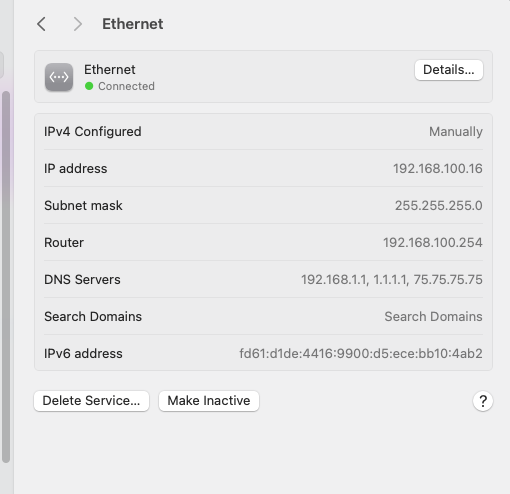
jon@Jons-Mac-mini ~ % ping 192.168.100.254
PING 192.168.100.254 (192.168.100.254): 56 data bytes
Request timeout for icmp_seq 0
Request timeout for icmp_seq 1
Request timeout for icmp_seq 2
Request timeout for icmp_seq 3
ping: sendto: No route to host
Request timeout for icmp_seq 4
ping: sendto: Host is down
Request timeout for icmp_seq 5
ping: sendto: Host is down
Request timeout for icmp_seq 6
This means that there is a problem on your PC (Windows, I would assume.) The route is not correctly installed. If the route were installed you would get the message “unreachable”.
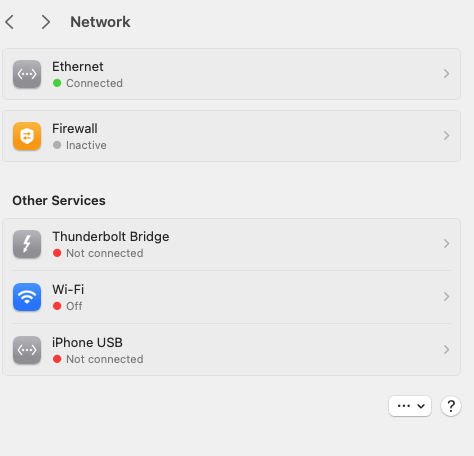
Maybe you have a connection from you PC both to WiFi, which provides Internet access, and to this network which does not, Consumer OS’s have habit of preferring ones that do (and completely neglecting ones that don’t) networks that don’t provide Internet access. Try disconnecting wifi. Altogether: configure your PC for a static address only on the given interface.
And still no ping. Do you get a ping/connectivity from elsewhere?
EDIT
I mean connecting to another port of the router, etc.
EDIT2:
Reread the thing. Of course it’s a mac. “no route” means that the route to directly connected is not installed. Although many developers do, I have never used a mac as my main machine. Why this would occur - no idea.