LAN to LAN basics

Hey everyone!

So some time ago I bought a RB2011UiAS-RM for my homelab in order to get a little better at networking and finally I started to play around it a bit.
Now that I’m actually getting my hands on it I can understand the various forum / reddit comments “RouterOS is quite powerful but quite difficult”. So true that I had to reser the router to basic settings a could of times due to my oopies.
No big deal as it’s just a playground and nothing critical depends on it.

I managed to get a stable initial config. My current situation is as depicted in the screenshot
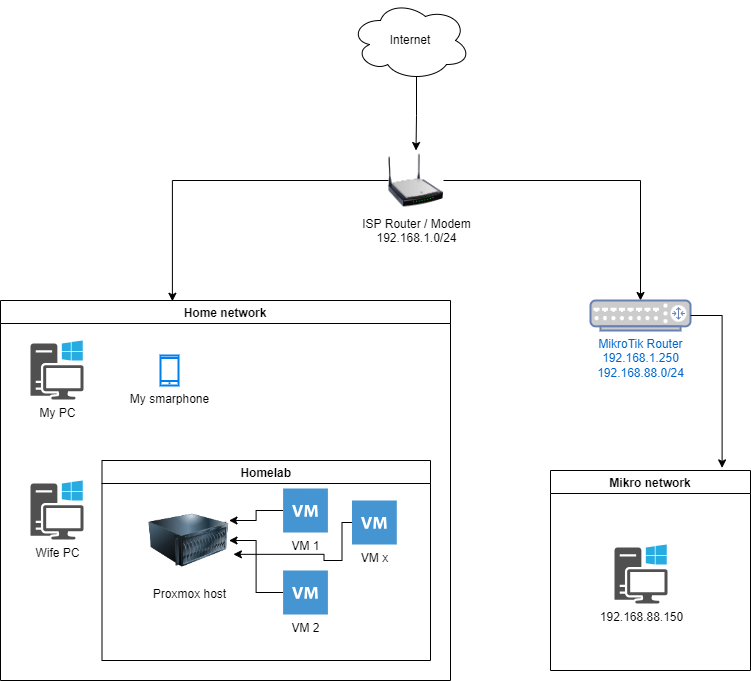
home-net.drawio.png
From now on, I’ll refer to the subnets as “home subnet” (ISP provided the usual 192.168.1.xxx) and “mikro subnet” (the default one, 192.168.88.xxx for simplicity)

I’m at a point where the PC in the “mikro subnet” (.88.150) is able reach to the outside world as well as reaching a couple of test VMs in the home subnet (I’ve not tested everything, but the basic, such the pihole instance which is on the 192.168.1 IS reachable from the the .88.x).

My next (ideal) step would be have the opposite, so everything in the home net to be able to reach everything inside the mikro net (in the above example, the RDP to the .88.150 pc).
I’m quite sure what I’m missing is a config (probably on the ISP router?) in order to say “hey request for .88.150 should be sent to the mikrotik, so .1.250”, but my knowledge outside of basic networking and firewalls is quite limited.

Also, as a separate question: is possible to have a port on the mikrotik working just as a “passthrough”? (I’m sure it’s not the right term).
So basically I’d like to connect a device, say on ether8 on the mikrotik and have it on the same 192.168.1 subnet (so in this case the mikrotik would be basically a managed / glorified switch for that port).

As pointed earlier, I’m quite experienced when it come to sysadmin jobs but quite limited when it’s related to anything that is not enabling an additional firewall rule on iptables, and that’s one of the points of me getting to play with the routerboard.

Cheers to anyone who will be willing to spend a couple of minutes reading / replying to this!

For starters: nice drawing !
A lot of first posters never show something like it.
It surely helps to get a better idea of what you want to do.

ROS has a quite steep learning curve.
Your approach is resource intensive, yes.
But IMHO the best way to learn.

Your ISP router doesn’t know about that 192.168.88.0/24 subnet and where to go for it.
What could be done however is to use port forwarding so your home subnet goes using RDP to your MT router using 192.168.1.250:RDP-port and in your MT router that gets translated to 192.168.88.150:RDP-port.
See DST NAT :
https://help.mikrotik.com/docs/display/ROS/NAT#NAT-DestinationNAT.

Again yes (did you expect something else :laughing: )

There are a couple of ways to achieve this.
Easiest (I think) is to create a second bridge (label it bridgeWAN so it is clear what it is for) and add your “WAN” port to it (the one connecting to your ISP modem), remove ethernet port from the normal bridge and then add it back to the new bridgeWAN (in your example that would be ether8).
Disable RSTP on bridgeWAN.
Your DHCP client which currently will be on ether1 (assuming that’s your WAN) should also be moved to bridgeWAN.
Change WAN interface list to include bridgeWAN.

Ideally this is done using VLAN and a single bridge. But the above listed approach should also work.
Various reasons to try to use a single bridge (performance using HW offloading being the most important) but for lab toying, this should do.

Others may chime in with alternative options.

Hoelvo has described it quite well.
I would only that dont hit us with dribs and drabs. We hate chasing a different story!!
The diagram is a great start, next identify all the requirements

a. identify all the user(s)/device(s) / groups of users and devices including the admin ( consider both external and remote users too )
b. identify the traffic needs of all, without discussing the configuration (use case approach).

Otherwise, we may suggest a config and then you say by the way I also want to do this, which may change the design approach substantially.

The problem here is that very likely the ISP modem/router is simply not capable of routing between the two LAN subnets.
Conceptually ISP routers have only two interfaces, an outside one (be it DSL, FTTH, FTTC, ethernet, whatever) or WAN and an inside one or LAN.
This single inside one is internally connected to a switch, that usually has 4 ports.
So it is easier to imagine the device as a modem (with an IP of 192.168.1.1) connected to a 5 port unmanaged switch (with no IP address).
The home network, and the Mikrotik are connected to two ports of this unmanaged switch.

A client in subnet 192.168.1.0/24 with a gateway of 192.168.1.1 knows two things:

  1. that any device with IP address in the 192.168.1.0/24 is directly reachable
  2. that for any address outside the above range, it should ask to the device at 192.168.1.1

The device at 192.168.1.1 can either:
a. recognize that an address in 192.168.88.0/24 is a private address and do nothing
b. try to find it on the “out” or WAN side and clearly fail at It

So, you should (IMHO) think about moving the Mikrotik to a more central position, connected to both the home and Mikrotik network and to the modem/router.

Sorry for the delay and thanks everyone for the feedback!

@jaclaz description of the ISP router / modem is quite good and I couldn’t explain it any better / simpler!
I did take a look on it and it SEEMS is able to do some kind of routing, to which extent, I’m not yet sure as I’ve yet to try it.

So, you should (IMHO) think about moving the Mikrotik to a more central position, connected to both the home and Mikrotik network and to the modem/router.

Totally agree on that one. I realized that by having the MikroTik as the default gateway for the devices (so basically ISP router → MikroTik → everything else) would be way easier.
I’ve not yet done this change as mentioned before I’m still learning and I’ve already done some errors which lead to a reset of the router, so I’m not really confident (yet) in putting it in front of everything.
There is nothing “mission critical” but brining down the internet would lead to a very angry wife, so I must / want be “production ready” before moving it in front of everything :smiley:

@anav, good points

a. identify all the user(s)/device(s) / groups of users and devices including the admin ( consider both external and remote users too )

This one is simple. The users are me and my wife. The devices are (mostly) user appliances (smartphones, PCs). No external or remote users.

b. identify the traffic needs of all, without discussing the configuration (use case approach).

Also simple (I think). Right now everything in the home subnet (192.168.1.x) should be able to connect to everything in the mikro subnet (192.168.88.x) and viceversa.

I’m totally aware this is not ideal / useless, (and probably a waste of time). It’s just to get a hold on the config and where / how to look for things
The route suggestion I got earlier is a good starting point for this.

@holvoetn, thank you for your feedback!
I will look into the routes part and / or the port forwarding you mentioned, this should be a good starting point!

Regarding the second question, not really sure I understood it correctly, so please have patience with me!
If I got it right, I should configure a second bridge which contains just the WAN interface (ether1) and the wanted interface (ether8) and disable RSTP on this new bridge, all while removing ether8 from the default / main bridge.

Currently the DHCP client is disabled as ether1 has a static address. I should add / enable it and instead of having it directly on ether1 it should point to the bridge.

Then I’d expect that anything that I plug into ether8 should get an address in the 192.168.1.x. Are my assumptions / understanding correct?
If yes (emphasis on the "if) then I’d expect I’ll be able to set a static address on the ether8 interface (either from the MikroTik or by a MAC reservation on the main router).

Thank you again for the feedback and the patience to explain things to a newbie!
(and sorry for the wall of text)

SInce you have no wireless requirements, you can go “virtual” and use GNS3 with CHR, it is very handy to make tests and understand the syntax of ROS and also experiment with “crazy” setups, even if once you have a configuration working it needs to be tested on the real device/network, I find it very useful, particularly for getting familiar with WInbox and terminal commands.
The free CHR is throttled to a very low transfer speed, but apart from that it is fully functional.

Here is an old MUM presentation about it:
https://mum.mikrotik.com/presentations/ME16/presentation_3571_1476769666.pdf

Thanks for the suggestion, I believe that’s actually a good idea as I managed to lock myself out (even while using safe mode) trying to implement the “passthrough”.

I’ll definitively need some RFTM and practice on this…

I think the world is divided between those that report how they self-locked themselves out of a Mikrotik quite a few times when experimenting/learning and those that don’t.
The latter ones are liars :wink: .
On a device like the RB2011 where number of ports should not be a problem, a good idea is to take a single port “out of everything” (out of bridge, with no V-LANs, VRF’s, etc.), let’s say ether8, make sure it is LAN in interface list, assign to it a 192.168.88.x and possibly another unused address on your 192.168.1.x network and test that Winbox access is possible both via IP and MAC.
Then use one of the other ports/access to setup the router.
You can still manage to lock yourself out of the other ports, but unless you do really silly things in your firewall input settings, locking oneself out if a simple port requires some creativity.
The above is general, with the RB2011 you also have the serial port as an emergency access (that of course must be tested before having the need for it).
Still the GNS3/CHR is simply much more convenient for experimenting.

Hi everyone,

Thanks for the insight you provided and also thanks to a couple of days of tinkering with it, I think I got the basics and managed to get quite confident in navigating and updating the configs.
I did even managed to completely reset and configure it from scratch without locking myself out!

Following another thread on the forum (http://forum.mikrotik.com/t/how-to-create-most-basic-vlan/153816/1) I was able to get the VLAN up and running without much trouble.
I’m in a situation where anything connected to the MikroTik (VLAN or not) is able to reach internet and navigate.

Now, the last steps, which is also the first if you look at this thread.

In the initial post, I wanted to have one or more ports being basically “a switch”, getting (or setting) an IP from the “WAN” subnet.
holvoetn provided some nice suggestions with the steps of using a dedicated bridge, which, worked partially.

Basically following the suggestions, I was able to get an IP in the same range as the WAN but everything else (so the interfaces on the main bridge) were cut off and no more connections from them.
Not sure if this was my fault or maybe some firewall rules missing.

What would the process for this using the VLANs? If possible at all of course…
What I would like to achieve is:

ISP Router (192.168.1.x) > MikroTik (192.168.1.250) > Configure one interface (say ether10) as 192.168.1.251 > Attach an AP to ether10 to be reachable from ISP subnet
Every device attached to the AP on 192.168.1.251 should get an IP in the 192.168.1.x subnet.

I’ve already got the AP setup in such a way, so there is no issue there but it’s connected directly to the ISP router / modem. I would like to connect it to the MikroTik.

And if you’re asking why such complicated design, two reasons:

  1. I’d like to get better networking skills (bragging right? maybe…)
  2. the AP will be the connections for most of the IoT stuff in the home and I’d like to have some kind of monitor (which the current ISP router does not provide)

If you say “this is going to be difficult”, bring it on, I’m not running away at the first issue / difficulty. If you say “this is impossible”, I’ll be a little bit disappointed but well, if it’s not possible, it’s not possible.

Cheers everyone for the help so far (and for the future)!

You’ll have to go through this thread (which is the officially unofficial Mikrotik guide for VLAN by Pcunite):
http://forum.mikrotik.com/t/using-routeros-to-vlan-your-network/126489/1

A provided full config, for review would be helpful (minus router serial Number, and any public WANIP information )

I had already came across that post and it’s definitively helpfull!
Right now I can say that I’m “comfortable” with the VLANs, at least seems I got them to work with basic settings.
Still I didn’t yet manage to accomplish what I’m looking for.


Here’s the full config, minus the serial number and I’ve removed the details for the Wireguard VPN which is up and running.
Where I’ve obscured the details it’s labeled, but being (mainly) details on the VPN I don’t think this is related to what I’m trying to understand / accomplish

# 2024-09-05 08:53:43 by RouterOS 7.15.3
# software id = EUTR-V7DK
#
# model = RB2011UiAS
/interface bridge
add arp=proxy-arp comment="Main Bridge" name=EternityWall vlan-filtering=yes
/interface wireguard
add comment="MercuryWall - WireGuard VPN" <details removed>
/interface vlan
add comment="VLAN - Generic" interface=EternityWall name=Dark-Angels vlan-id=1
add comment="VLAN - Passthrough" interface=EternityWall name=Raven-Guard vlan-id=19
add comment="VLAN - Generic" interface=EternityWall name=Space-Wolves vlan-id=8
/interface list
add comment="Main entry point - WAN" name=WAN
/interface wireless security-profiles
set [ find default=yes ] supplicant-identity=MikroTik
/ip pool
add comment="Primary Pool for default DHCP" name=primary-pool ranges=10.0.0.100-10.0.0.150
add comment="Pool for VLAN \"Dark-Angels\"" name=Dark-Angels ranges=10.1.0.10-10.1.0.20
add comment="Pool for VLAN \"Space-Wolves\"" name=Space-Wolves ranges=10.8.0.50-10.8.0.60
/ip dhcp-server
add address-pool=primary-pool comment="Main DHCP Server" interface=EternityWall name=main-dhcp
add address-pool=Dark-Angels comment="DHCP Server for \"Dark-Angels\"" interface=Dark-Angels name=dhcp-DarkAngels
add address-pool=Space-Wolves comment="DHCP Server  for \"Space-Wolves\"" interface=Space-Wolves name=dhcp-SpaceWolves
/port
set 0 name=serial0
/interface bridge port
add bridge=EternityWall interface=ether2
add bridge=EternityWall interface=ether3
add bridge=EternityWall interface=ether4
add bridge=EternityWall interface=ether5
add bridge=EternityWall disabled=yes interface=ether6
add bridge=EternityWall interface=ether7
add bridge=EternityWall disabled=yes interface=ether8
add bridge=EternityWall disabled=yes interface=ether9
add bridge=EternityWall interface=ether10
add bridge=EternityWall comment="VLAN \"Dark-Angels\"" interface=ether6
add bridge=EternityWall comment="VLAN \"Space-Wolves\"" interface=ether9 pvid=8
add bridge=EternityWall comment="VLAN \"Raven-Guard\" - Passthrough" disabled=yes interface=ether7 pvid=19
/interface bridge vlan
add bridge=EternityWall comment="Assign \"Dark-Angels\" VLAN" tagged=EternityWall untagged=ether6 vlan-ids=1
add bridge=EternityWall comment="Assign \"Space-Wolves\" VLAN" tagged=EternityWall untagged=ether9 vlan-ids=8
# EternityWall not a bridge port
add bridge=EternityWall comment="Assign \"Raven-Guard\" VLAN - Passthrough" disabled=yes tagged=EternityWall untagged=ether7 vlan-ids=19
/interface ethernet switch vlan
add independent-learning=no ports=ether1,ether5 switch=switch1 vlan-id=1
/interface list member
add comment="Main entry point - WAN" interface=ether1 list=WAN
/interface wireguard peers
<peers info removed>
/ip address
add address=10.0.0.1/24 comment="Main subnet" interface=EternityWall network=10.0.0.0
add address=192.168.1.250/24 comment="Entry point" interface=ether1 network=192.168.1.0
add <details removed> comment="WireGuard Network" interface=MercuryWall <details removed>
add address=10.1.0.1/24 comment="Entry point for \"Dark-Angels\" VLAN" interface=Dark-Angels network=10.1.0.0
add address=10.8.0.1/24 comment="Entry point for \"Space Wolves\" VLAN" interface=Space-Wolves network=10.8.0.0
/ip dhcp-server network
add address=10.0.0.0/24 gateway=10.0.0.1
add address=10.1.0.0/24 comment="Network for \"Dark-Angels\" VLAN" gateway=10.1.0.1 netmask=24
add address=10.8.0.0/24 comment="Network for \"Space-Wolves\" VLAN" gateway=10.8.0.1
/ip dns
set allow-remote-requests=yes servers=<internal DNS in the 192.168.1.x subnet>
/ip firewall address-list
add address=10.0.0.0/24 comment="Main LAN list" list=Main-LAN
add <details removed> comment="Wireguard VPN \"Mercury Wall\" list" list=Wireguard
/ip firewall filter
add action=drop chain=forward comment="Drop \"invalid\" on FORWARD" connection-state=invalid
add action=accept chain=input comment="Allow PING" protocol=icmp
add action=accept chain=input comment="Allow WireGuard VPN" <details removed>
add action=accept chain=input comment="Allow from WireGuard network" src-address-list=Wireguard
add action=accept chain=input comment="Allow WinBox" <details removed>
add action=accept chain=input comment="Allow \"established\" and \"related\" on INPUT" connection-state=established,related
add action=accept chain=input comment="Allow from Home Network" in-interface=ether1
add action=accept chain=input comment="Allow from \"Main-LAN\"" src-address-list=Main-LAN
add action=accept chain=forward comment="Allow \"new\" from \"Main-LAN\" on FORWARD " connection-state=new src-address-list=Main-LAN
add action=accept chain=forward comment="Allow \"estabilished\" and \"related\" on FORWARD" connection-state=established,related
add action=drop chain=input comment="Drop everything else on INPUT"
/ip firewall nat
add action=masquerade chain=srcnat comment="Main NAT" out-interface=ether1
add action=masquerade chain=srcnat comment="WireGuard VPN - NAT" out-interface-list=WAN
/ip route
add comment="Primary gateway" disabled=no distance=1 dst-address=0.0.0.0/0 gateway=<ISP router / gateway in the 192.168.1.x subnet> routing-table=main suppress-hw-offload=no
/ip service
set ftp disabled=yes
set api disabled=yes
set api-ssl disabled=yes
/system clock
set time-zone-name=Europe/Rome
/system identity
set name=HolyTerra
/system note
set show-at-login=no

PS: please ignore the various names for the VLANs and interfaces, my inner nerd won when I started setting it up

Thanks!

Very likely completely unrelated to the issue you still need to solve, but using VLAN1 is what we highly specialized technicians :open_mouth: commonly call “looking for troubles”.

JFYI:
http://forum.mikrotik.com/t/vlan-configuration/176351/1

Good point, thanks for suggestion!

Just to note, on the first page of the article you stated you had already read… PCUNITES vlan bible.

quote: Native, Base, & MGMT (management) VLAN:
As you create your VLANs and pick VLAN IDs for each one, understand that the base network that you used to initiate your first connection to a router or switch is often termed the Native VLAN. In our examples, we do not use this default network. Instead we implement a Base VLAN (our name for the management VLAN) with an ID of 99. Over this network will be device to device traffic (routing, etc.). We also default Winbox availability here as well.
A word of caution if you are thinking of using VLAN 1 in your network design. Most vendors use VLAN 1 as the native VLAN for their hardware. MikroTik uses VLAN 0. If you try to create a VLAN 1 scenario with MikroTik, and expecting tagged frames, it will be incompatible with other vendors who default VLAN 1 as untagged. Therefore, unless you are prepared to change the default behavior in MikroTik and/or other vendors, it is simpler to use VLAN 2 and higher.

Yeah, jaclaz pointed out the same.

I interpreted that part of the article as “it would be better to” not “it’s nearly mandatory to” as also in the couple of tests I’ve performed I didn’t have much issues in this regard, I mean, the basic tests worked fine. Now I suspect that was due pure luck and things done properly…

Well, thanks again for pointing out this (and clarifying to me that it’s to be interpreted as more than a simple suggestion).

There are AFAICU mainly two consequences of using VLAN1:

  1. possible incompatibilities with other vendor devices
  2. possible incompatibilities with Mikrotik internal usage of VLAN1 for some settings, i.e.: http://forum.mikrotik.com/t/management-vlan-issue/175412/1

I am pretty sure that expert, knowledgeable users like - say - tdw, Sob or Sindy can use VLAN1 just fine (because they do understand the implications), but for all the rest of us it is much easier to leave it alone, since it costs nothing.

How can you say that not using VLAN 1 costs us nothing? I paid 1.85€ for an UTP patch cord for use with trunk connection. If I can’t use VLAN 1, I’m loosing 0.00045 € due to reduced functionality !!!

Im going to slap an electron carbon tax fine on you for a waste of a post ( or awful humour ) take your pick :stuck_out_tongue_winking_eye:

@mkx
Well, I paid 1.80 for that same cable, so it costs us nothing - combined - we are still ahead, and we can even afford to pay the unjust and unfair duty the Sheriff of Nottingham just imposed on us.