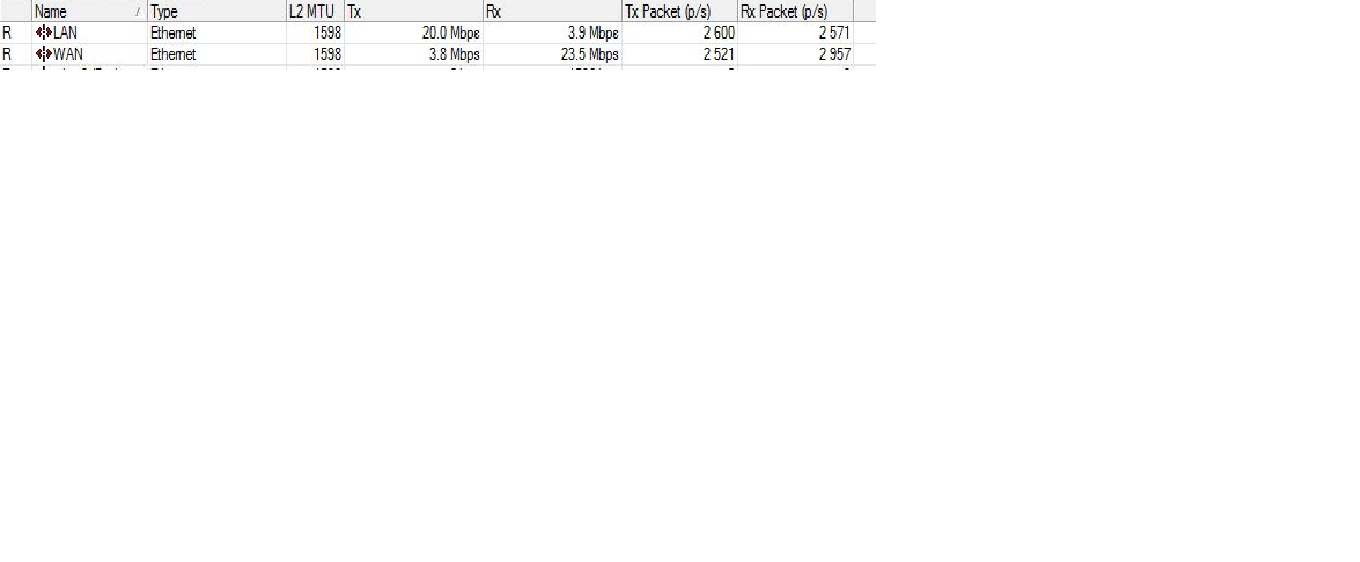
LAN/WAN showing different Bandwidth( Data rate)

hello,

I facing an issue for last two weeks. I am using RB1100 and configured two interfaces. 1 for WAN and another for LAN.Now the issue is that my WAN side showing 24Mbps download and 4Mbps upload and my LAN side showing 20Mbps download and 4 Mbps upload. Upload is the same in both interfaces but the difference in download. what is the issue any body knows.

No web proxy enable and no allow remote DNS requests
WAN and LAN.png

have you some kind of queue configuration? on the other hand i think that this values at the webinterface are not 100% accurate as bandwidth usage is calculate via taking the delta between to countervalue. so the timeframe which was used to calculate WAN might be not the same as the timeframe which was used to calculate LAN. Is the value constantly wrong?

I think the timeframe for upload is calculated right but the issue in download…Hows about that

What i meant was that for one interface the data are from a different “time” as for the other interface. but than it must be also the other way around wrong sometimes. what kind of traffic do you have on the network? belongs the 20M mostly to one tcp connection? how about traffic on the WAN interface which is “garbage” and get drop by the firewall?

I have got 25 Mbps for my customers..and i have made queues for each customers…20Mbps is my use in LAN while 4 to 5 mbps goes to garbage on WAN side…

I have made some rules in firewall… for unwanted traffic our the WAN side..but still the same issue .as shows in the screen shot.

If 5 Mbps garbage-traffic coming in on the WAN interface and get dropped by firewall-rules this is exactly what i would expect as an result. So you get 25M ( WAN-RX ), you filter out 5M, you send out the remaining 20M ( LAN-TX ).

If you really get 5Mbps garbage-traffic which get dropped you should investigate what kind of traffic it is and why it’s coming.

Hello,

I am having this same challenge. My WAN is reading 40mb while i am getting 30mb on my LAN. I don’t have queues except for the dynamic simple queues generated by hotspot.

Any help would be appreciated.

Thanks

Don’t you have opened the dns cache to Internet, do you?

Hello I have remote request enabled, is that what you mean? below is my DNS configuration:

 ip dns print 
                servers: 8.8.8.8,4.2.2.1
        dynamic-servers: 
  allow-remote-requests: yes
    max-udp-packet-size: 4096
             cache-size: 16096KiB
          cache-max-ttl: 1w
             cache-used: 4651KiB

Then drop udp and tcp in input chain port 53 on wan interface.

I do have that already in place but still the problem persists

17   chain=input action=drop protocol=udp in-interface=Internet dst-port=53 

18   chain=input action=drop protocol=tcp in-interface=Internet dst-port=53

What i noticed is that this happen once i enable hotspot.

Are those counters rising? If not you are maybe accepting or fasttracking the connections before those rules.

Thanks for your response, i actually drag the rules to the top and still got no counter increase. Below is my filter rule:

 0   ;;; Echo request - Avoiding Ping Flood
     chain=ICMP action=accept protocol=icmp icmp-options=8:0 limit=1,5 

 1   chain=input action=accept protocol=udp src-address=192.168.50.6 
     dst-address=192.168.50.1 dst-port=1812 

 2   chain=forward action=accept protocol=udp src-address=10.0.0.1 
     dst-address=10.0.0.13 dst-port=1812 

 3   chain=forward action=accept src-address=10.0.0.13 

 4   chain=forward action=accept protocol=udp src-address=10.0.0.1 
     dst-address=10.0.0.13 dst-port=1813 

 5   chain=input action=drop protocol=udp in-interface=Internet dst-port=53 

 6   chain=input action=drop protocol=tcp in-interface=Internet dst-port=53 

 7   chain=input action=accept protocol=tcp src-address=172.16.0.0/12 
     dst-address=public IP src-address-list=support dst-port=80 

 8   ;;; Accept FTP - TCP
     chain=input action=accept protocol=tcp port=21 

 9   chain=input action=accept protocol=udp src-address=127.0.0.1 
     dst-address=127.0.0.1 dst-port=1812 

10   chain=input action=accept protocol=udp src-address=127.0.0.1 
     dst-address=127.0.0.1 dst-port=3799 

11   chain=input action=accept protocol=udp src-address=127.0.0.1 
     dst-address=127.0.0.1 dst-port=1813 

12   chain=input action=accept protocol=udp src-address=192.168.50.6 
     dst-address=192.168.50.1 dst-port=1813 

13   chain=input action=accept protocol=udp src-address=192.168.50.6 
     dst-address=192.168.50.1 dst-port=3799 

14   chain=input action=accept protocol=tcp dst-address=public ip
     dst-port=8291 

15   chain=forward action=accept protocol=tcp dst-port=8291 

16   chain=input action=accept protocol=tcp dst-address=public ip dst-port=2>

17   chain=input action=accept protocol=udp dst-address=public subnet
     dst-port=80 

18   chain=input action=accept protocol=udp src-address=192.168.16.2 
     dst-address=192.168.16.1 dst-port=161 

19   chain=input action=drop protocol=tcp in-interface=Internet dst-port=3128 

20   chain=input action=accept protocol=tcp dst-port=1700 

21   chain=forward action=accept protocol=tcp dst-port=5900 

22   ;;; place hotspot rules here
     chain=unused-hs-chain action=passthrough 

23 X ;;; block facebook on https
     chain=forward action=reject reject-with=tcp-reset protocol=tcp 
     dst-address-list=Facebook 

24   ;;; torrentsites
     chain=forward action=drop dst-address=46.28.48.164 

25   ;;; torrentsites
     chain=forward action=drop src-address=172.16.0.0/12 
     layer7-protocol=torrentsites 

26   ;;; dropDNS
     chain=forward action=drop protocol=udp src-address=172.16.0.0/12 
     layer7-protocol=torrentsites dst-port=53 

27   ;;; keyword_drop
     chain=forward action=drop src-address=172.16.0.0/12 content=torrent 

28   ;;; trackers_drop
     chain=forward action=drop src-address=172.16.0.0/12 content=tracker 

29   ;;; get_peers_drop
     chain=forward action=drop src-address=172.16.0.0/12 content=getpeers 

30   ;;; info_hash_drop
     chain=forward action=drop src-address=172.16.0.0/12 content=info_hash 

31   ;;; p2p_drop
     chain=forward action=drop p2p=all-p2p src-address=172.16.0.0/12 

32   ;;; drop ftp brute forcers
     chain=input action=drop protocol=tcp src-address-list=ftp_blacklist 
     dst-port=21 

33   chain=output action=add-dst-to-address-list protocol=tcp 
     address-list=ftp_blacklist address-list-timeout=3h 
     content=530 Login incorrect 

34   ;;; drop ssh brute forcers
     chain=input action=drop protocol=tcp src-address-list=ssh_blacklist 
     dst-port=22 

35   chain=input action=add-src-to-address-list connection-state=new protocol=tc>
     src-address-list=ssh_stage3 address-list=ssh_blacklist 
     address-list-timeout=1w3d dst-port=22 

36   chain=input action=add-src-to-address-list connection-state=new protocol=tc>
     src-address-list=ssh_stage2 address-list=ssh_stage3 
     address-list-timeout=1m dst-port=22 

37   chain=input action=add-src-to-address-list connection-state=new protocol=tc>
     src-address-list=ssh_stage1 address-list=ssh_stage2 
     address-list-timeout=1m dst-port=22 

38   chain=input action=add-src-to-address-list connection-state=new protocol=tc>
     address-list=ssh_stage1 address-list-timeout=1m dst-port=22 

39   ;;; drop ssh brute downstream
     chain=forward action=drop protocol=tcp src-address-list=ssh_blacklist 
     dst-port=22 

40   ;;; Add Syn Flood IP to the list
     chain=input action=add-src-to-address-list tcp-flags=syn protocol=tcp 
     address-list=Syn_Flooder address-list-timeout=30m connection-limit=30,32 

41   ;;; Drop to syn flood list
     chain=input action=drop src-address-list=Syn_Flooder 

42   ;;; Port Scanner Detect
     chain=input action=add-src-to-address-list protocol=tcp psd=21,3s,3,1 
     address-list=Port_Scanner address-list-timeout=1w 

43   ;;; Drop to port scan list
     chain=input action=drop src-address-list=Port_Scanner 

44   ;;; Jump for icmp input flow
     chain=input action=jump jump-target=ICMP protocol=icmp 

45 X ;;; Block all access to the winbox - except to support list # DO NOT ENABLE>
IS RULE BEFORE ADD YOUR SUBNET IN THE SUPPORT ADDRESS LIST
     chain=input action=drop protocol=tcp src-address-list=!support 
     dst-port=8291 

46   ;;; Jump for icmp forward flow
     chain=forward action=jump jump-target=ICMP protocol=icmp 

47   ;;; Drop to bogon list
     chain=forward action=drop dst-address-list=bogons 

48   ;;; Add Spammers to the list for 3 hours
     chain=forward action=add-src-to-address-list protocol=tcp 
     address-list=spammers address-list-timeout=3h dst-port=25,587 
     connection-limit=30,32 limit=30/1m,0 

49   ;;; Avoid spammers action
     chain=forward action=drop protocol=tcp src-address-list=spammers 
     dst-port=25,587 

50   ;;; Accept DNS - UDP
     chain=input action=accept protocol=udp port=53 

51   ;;; Accept DNS - TCP
     chain=input action=accept protocol=tcp port=53 

52   ;;; Accept to established connections
     chain=input action=accept connection-state=established 

53   ;;; Full access to SUPPORT address list
     chain=input action=accept src-address-list=support1 

54   chain=forward action=accept protocol=tcp dst-port=389 

55   chain=forward action=accept protocol=tcp dst-port=1812 

56   chain=forward action=accept protocol=tcp dst-port=1813 

57   ;;; Drop anything else! # DO NOT ENABLE THIS RULE BEFORE YOU MAKE SURE ABOU>
LL ACCEPT RULES YOU NEED
     chain=input action=drop 

58   ;;; Echo reply
     chain=ICMP action=accept protocol=icmp icmp-options=0:0 

59   ;;; Time Exceeded
     chain=ICMP action=accept protocol=icmp icmp-options=11:0 

60   ;;; Destination unreachable
     chain=ICMP action=accept protocol=icmp icmp-options=3:0-1 

61   ;;; PMTUD
     chain=ICMP action=accept protocol=icmp icmp-options=3:4 

62   ;;; Drop to the other ICMPs
     chain=ICMP action=drop protocol=icmp 

63   ;;; Jump for icmp output
     chain=output action=jump jump-target=ICMP protocol=icmp 

64 X ;;; announce_peers_drop
     chain=forward action=drop src-address=172.16.0.0/12 content=announce_peers

Bump! any suggestion from anyone on what else to check? like i said, everything is fine when/if i don’t have hotspot enabled. My hotspot settings has bandwidth limit set (hence there are dynamic queues existing). I recently started experiencing this disparity.

Thanks

If your hotspot users are bandwidth limited (shaped), maybe some bytes are intentionally discarded and not forwarded to lan interface ..

some progress on this? currently i have the same problem of difference between interfaces

By intentionally you mean i added a rule that does that or the router has a mind of its own? If that is the case, then why should the WAN traffic be more than the LAN since some bytes going through LAN to WAN is being discarded?

sorry, but where is problem investigating it yourself? with sniffer, firewall counters and logging???

  1. add simple pasthrough rule in firewall chain input and forward, that captures all traffic caming in via interface.
  2. reset all counters in interfaces and in firewall
  3. use sniffer and torch
    changing placement of these rules you can find out exactly where and what traffic goes.

my best guess is:
a) some traffic are dropped by firewall
b) some management traffic like winbox connection can add some traffic
c) typical network traffic like broadcasts etc.

Hi, b and c would not be the case since we are talking about LAN being lesser than WAN. As for a, there seem not to be firewall issue as everything seem to normalise once hotspot is disabled. So i think it has to do with hotspot (at least in my own case)

Thanks

Intentionally ..because “you” are shaping :smiley:

Tipical users traffic is more on download direction..
Anyway you have to go deeper and discover what it’s happening ..we are only giving you some hints (remember.. we have not access to your device/config and we know nothing of your network)