have someone used “random” for load balancing? how does it work? i have 5 adsl ,each one is 4M. How to set up in mangle
.i can’t find any example in http://www.mikrotik.com, can someone help me ?THanks.
i guess you should add Mark Connection rule (in fact five of them) first four with 20% probability (more or less – you should play with the numbers) last one with 100%
After that mark packets for each marked connection and NAT every packed on appropriate DSL interface – depending on packet mark
Anyway it’s my IMHO, i’m not sure will it work or not but u could try. Happy testing anyway =)
thank you very much.I have search it for a long time.
i will try it , I am using NTH, someone said “random” is better, but someome said “random” would make ICQ and online game drop off.. I think it’s experiment will let me know. 
THat is what I have done so far, but I am not sure it's what you means . can you give me some advise if there's something incorrect in it ! thanks a lot !
\
nov/30/2008 01:07:46 by RouterOS 3.14
/ip firewall nat
add action=masquerade chain=srcnat comment=random disabled=no out-interface=
pppoe-out0 packet-mark=random-0 src-address=192.168.0.0/24
add action=masquerade chain=srcnat comment="" disabled=no out-interface=
pppoe-out1 packet-mark=random-1 src-address=192.168.0.0/24
add action=masquerade chain=srcnat comment="" disabled=no out-interface=
pppoe-out2 packet-mark=random-2 src-address=192.168.0.0/24
add action=masquerade chain=srcnat comment="" disabled=no out-interface=
pppoe-out3 packet-mark=random-3 src-address=192.168.0.0/24
add action=masquerade chain=srcnat comment="" disabled=no out-interface=
pppoe-out4 packet-mark=random-4 src-address=192.168.0.0/24
/ip firewall mangle
add action=change-ttl chain=prerouting comment="" disabled=no new-ttl=
decrement:1
add action=change-mss chain=forward comment="" disabled=no new-mss=1440
protocol=tcp tcp-flags=syn
add action=change-mss chain=postrouting comment="" disabled=yes new-mss=1440
protocol=tcp tcp-flags=syn
add action=mark-connection chain=prerouting comment="" disabled=no
new-connection-mark=random-0 passthrough=yes random=10 src-address=
192.168.0.0/24
add action=mark-connection chain=prerouting comment="" disabled=no
new-connection-mark=random-1 passthrough=yes random=10 src-address=
192.168.0.0/24
add action=mark-connection chain=prerouting comment="" disabled=no
new-connection-mark=random-2 passthrough=yes random=10 src-address=
192.168.0.0/24
add action=mark-connection chain=prerouting comment="" disabled=no
new-connection-mark=random-3 passthrough=yes random=10 src-address=
192.168.0.0/24
add action=mark-connection chain=prerouting comment="" disabled=no
new-connection-mark=random-4 passthrough=yes random=50 src-address=
192.168.0.0/24
add action=mark-packet chain=prerouting comment="" connection-mark=random-0
disabled=no new-packet-mark=random-0 passthrough=yes src-address=
192.168.0.0/24
add action=mark-routing chain=prerouting comment="" disabled=no
new-routing-mark=0 packet-mark=random-0 passthrough=no src-address=
192.168.0.0/24
add action=mark-packet chain=prerouting comment="" connection-mark=random-1
disabled=no new-packet-mark=random-1 passthrough=yes src-address=
192.168.0.0/24
add action=mark-routing chain=prerouting comment="" disabled=no
new-routing-mark=1 packet-mark=random-1 passthrough=no src-address=
192.168.0.0/24
add action=mark-packet chain=prerouting comment="" connection-mark=random-2
disabled=no new-packet-mark=random-2 passthrough=yes src-address=
192.168.0.0/24
add action=mark-routing chain=prerouting comment="" disabled=no
new-routing-mark=2 packet-mark=random-2 passthrough=no src-address=
192.168.0.0/24
add action=mark-packet chain=prerouting comment="" connection-mark=random-3
disabled=no new-packet-mark=random-3 passthrough=yes src-address=
192.168.0.0/24
add action=mark-routing chain=prerouting comment="" disabled=no
new-routing-mark=3 packet-mark=random-3 passthrough=no src-address=
192.168.0.0/24
add action=mark-packet chain=prerouting comment="" connection-mark=random-4
disabled=no new-packet-mark=random-4 passthrough=yes src-address=
192.168.0.0/24
add action=mark-routing chain=prerouting comment="" disabled=no
new-routing-mark=4 packet-mark=random-4 passthrough=no src-address=
192.168.0.0/24
LAST mangle rule should have random=100 or no random at all, 'cause there will be a chance for some connection to become not marked
I am using the 3.14 MT, and LAST mangle rule’s random can’t be 100. so you means I should change the four rules , random should be 20 if I have 5 ADSL .the fifth rule should no random. is that right? thanks a lot
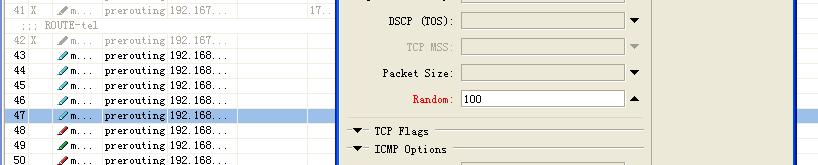
yes 5-th rule should be mandatory 'cause what will u do with connections which bypass las random? $)
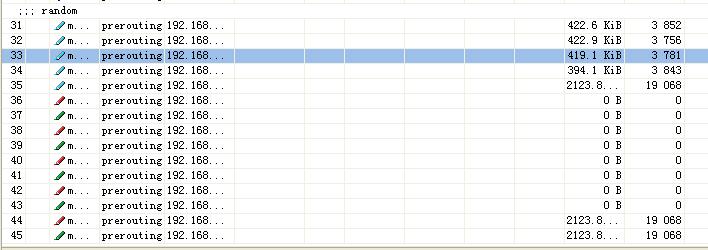
when I did ,5th line carry most in the lines. other 4 lines carry nothings .why this would happen??I want to load blance in five lines ,all of them are 4M ADSL . what’s the difference between marking packet with random and marking connection with random??? What’s the difference in NAT rules using marking packet and marking connection. can someone help me ?
First possible solution:
DISABLE “path through” on Packet Marking rules and MOVE packet marking rules RIGHT AFTER appropriate connection marking rule. SO when your packets get’s marked they stop following mangle chains.
Second possible solution:
Don’t mark connection but do JUMP into another chain, add 5 custom chains i.e. “INet1”, “INet2”… etc. Do packet and connection marking on appropriate chain.
Currently your 5-th line is taking all of the stuff =)
Happy testing =)