Load Balancing with 2 gateways of different bandwidth.

I have 5 ports RB750GL and firmware 2.36.

I have one DSL connection of 2Mb and other is of 4MB.
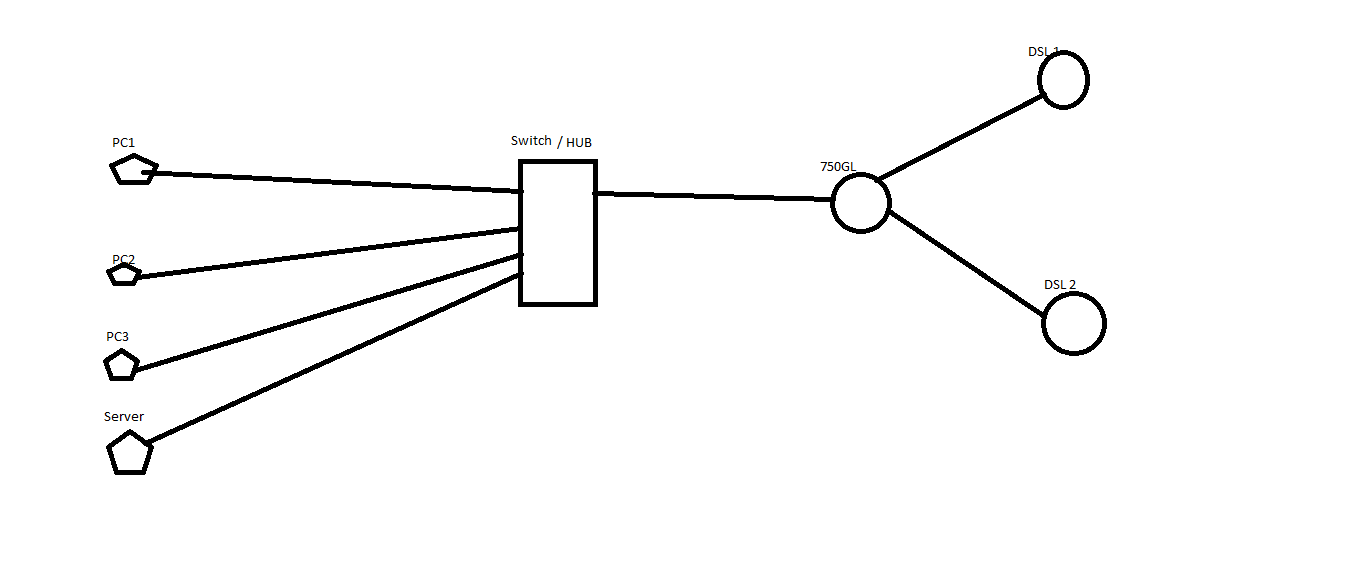
I Want to utilize these connection to the maximum, how to load balance between these connections using 750GL. And would I be able to do networking between the hosts connected on local LAN with a hub? with https and every other kind of traffic?? The image of network layout is shown in the attachment.
Diagram.png
Thnx.

Search “PCC” and “Queue” on the forum, is over-answered question, you find thousands of results.

Thnx for replying. I am following that one http://wiki.mikrotik.com/wiki/Manual:PCC

The problem is the WAN connection are DSL routers with dynamic IPs and DNS servers, now when the route <add dst-address=0.0.0.0/0 gateway=10.111.0.1 routing-mark=to_ISP1 check-gateway=ping

will check the gateway, it will always be up even if the DSL is down [We have lot of break downs here :frowning: :frowning: ], so I think it will break connections and will not shift from one to other if one go down. How can I do a tracking to that dynamic IP, there is no option in the DSL router to my knowledge.


Any help will be appreciated.


If not, then please tell me where to learn about MikroTik products. I have done CCNA, so I know what a firewall is, but don’t know about MANGLE firewall :confused:

This is the solution, also search on wiki:

http://wiki.mikrotik.com/wiki/Advanced_Routing_Failover_without_Scripting

Load balancing with pcc is running fine with these settings …Manual PCC…. But also with these setting only one route is in active state not both. So no load balancing is performed.

But as you know they are DSL connections pppoe based so when the telphone line goes down they don’t work at all as they ping the default gateway, i.e. the ip of DSL modems. The above solution Advance routing failover without scripting is not working.


ANY other… :frowning:

why you put the IP of default gateway?
read again the article on the wiki,
must be used one EXTERNAL IP for each WAN…

My dear the post says:
“Let’s suppose that we have two uplinks: GW1, GW2…” and then says

"
/ip route
add dst-address=Host1 gateway=GW1 scope=10 <<<<<<<<<<Where host1=46.228.47.115=yahoo.com is an external IP, NOT the GW1 or GW2>>
add dst-address=Host2 gateway=GW2 scope=10 <<<<<<<<<<host2=173.194.44.80=google.com>>
"
One thing more these routes are showing reachable, because the gateway is proper i.e. the DSL modem,


but the below routes are showing unreachable, in my understanding because when you put these routes without dst-address field the router adds by itself a dst-address=0.0.0.0/0. Means gateway to every route is either yahoo or google. So these routes become unreachable, and so un-active, or may be because yahoo and google won’t allow you to ping them after every 10 seconds.
"
/ip route
add distance=1 gateway=Host1 routing-mark=ISP1 check-gateway=ping
add distance=2 gateway=Host2 routing-mark=ISP1 check-gateway=ping
"

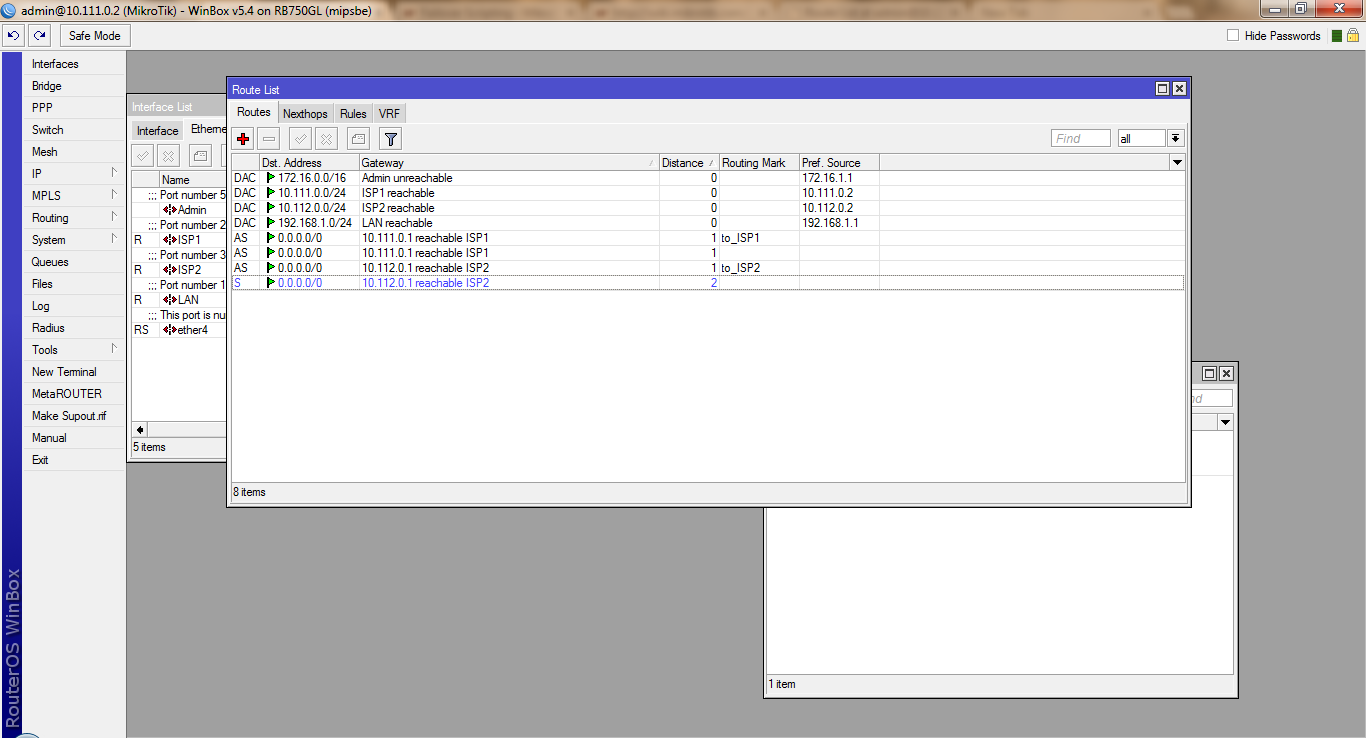
Can anyone tell one more thing please. Why route to ISP2 is not active? …But again this is not loadbalancing, if only one route is active. I followed the page MANUAL PCC.
Routes.png

RB951G-2HnD, BIOS 3.10, RouterOS 6.7

Actually one my client have this type of configuration and work correctly:

/interface bridge
add admin-mac=D4:CA:6D:66:66:66 auto-mac=no l2mtu=1598 name=bri-lan protocol-mode=rstp
add admin-mac=D4:CA:6D:66:66:66 auto-mac=no l2mtu=1598 name=bri-tooway protocol-mode=rstp
/interface wireless
set [ find default-name=wlan1 ] band=2ghz-b/g bridge-mode=disabled comment="NON ATTIVARE" country=italy frequency=2437 l2mtu=2290 mode=ap-bridge radio-name=AP-RB ssid=AP-RB wireless-protocol=802.11
/interface wireless nstreme
set wlan1 comment="NON ATTIVARE"
/interface wireless manual-tx-power-table
set wlan1 comment="NON ATTIVARE"
/ip neighbor discovery
set wlan1 comment="NON ATTIVARE"
/interface wireless security-profiles
set [ find default=yes ] supplicant-identity=MikroTik
/ip pool
add name=pool-dhcp ranges=192.168.0.101-192.168.0.199
/ip dhcp-server
add address-pool=pool-dhcp disabled=no interface=bri-lan name=dhcp-server
/interface bridge port
add bridge=bri-lan interface=ether3
add bridge=bri-lan interface=ether4
add bridge=bri-tooway interface=ether5
add bridge=bri-lan interface=wlan1
add bridge=bri-tooway interface=ether2
/ip address
add address=192.168.0.1/24 interface=bri-lan network=192.168.0.0
/ip dhcp-client
add add-default-route=no dhcp-options=hostname,clientid disabled=no interface=bri-tooway use-peer-dns=no use-peer-ntp=no
add add-default-route=no dhcp-options=hostname,clientid disabled=no interface=ether1 use-peer-dns=no use-peer-ntp=no
/ip dhcp-server network
add address=192.168.0.0/24 dns-server=192.168.0.1,192.168.0.1 gateway=192.168.0.1 netmask=24 ntp-server=193.204.114.232,193.204.114.233
/ip dns
set allow-remote-requests=yes servers=10.6.6.6,8.8.4.4
/ip firewall nat
add action=masquerade chain=srcnat out-interface=ether1
add action=masquerade chain=srcnat out-interface=bri-tooway
/ip firewall service-port
set ftp disabled=yes
set tftp disabled=yes
set irc disabled=yes
set h323 disabled=yes
set pptp disabled=yes
/ip route
add check-gateway=ping comment="Controllo ricorsivo se raggiungo 10.6.6.6 qundi ******* Funziona" distance=1 gateway=10.6.6.6 routing-mark=SRC1
add check-gateway=ping comment="Controllo ricorsivo se raggiungo 8.8.8.8 qundi Tooway Funziona nuovamente" distance=2 gateway=8.8.8.8 routing-mark=SRC1
add check-gateway=ping comment="Controllo ricorsivo se raggiungo 8.8.8.8 qundi Tooway Funziona" distance=1 gateway=8.8.8.8 routing-mark=SRC2
add check-gateway=ping comment="Controllo ricorsivo se raggiungo 10.6.6.6 qundi ******* Funziona nuovamente" distance=2 gateway=10.6.6.6 routing-mark=SRC2
add comment="In maniera predefinica esco da *******" distance=1 gateway=192.168.1.1
add comment="In maniera alternativa esco su Tooway" distance=2 gateway=95.210.8.1
add comment="Impongo che 8.8.8.8 sia raggiungibile solo da Tooway" distance=1 dst-address=8.8.8.8/32 gateway=95.210.8.1 scope=10
add comment="Ping Virtuale per mantenere attivo il calcolo Rotte per Tooway" distance=20 dst-address=8.8.8.8/32 type=blackhole
add comment="Impongo che 10.6.6.6 sia raggiungibile solo da ******" distance=1 dst-address=10.6.6.6/32 gateway=192.168.1.1 scope=10
add comment="Ping Virtuale per mantenere attivo il calcolo Rotte per *******" distance=20 dst-address=10.6.6.6/32 type=blackhole
/ip service
set telnet disabled=yes
set ftp disabled=yes
set ssh disabled=yes
set api disabled=yes
set api-ssl disabled=yes
/system clock
set time-zone-name=Europe/Rome
/system identity
set name=FAILOVER-******
/system leds
set 0 interface=wlan1
/system ntp client
set enabled=yes mode=unicast primary-ntp=193.204.114.232 secondary-ntp=193.204.114.233

Thi is for failover from one WISP connection and one Satellite connection.

For default (and obviously) ONLY ONE ROUTE WITH DST=0.0.0.0/0 WITHOUT ROUTING MARK CAN BE ACTIVE AT THE SAME TIME.

You need routing mark for this purpose, are the mangle chain that choose what WAN are used for “some” IP…

Routing for failover,
Mangle for load balancing.

So how I am going to loadbalance then if only one connection remains active…This page of MANUAL PCC.[/quote] is total waste of time.

Plus when I delete these

add dst-address=0.0.0.0/0 gateway=10.111.0.1 distance=1 check-gateway=ping
add dst-address=0.0.0.0/0 gateway=10.112.0.1 distance=2 check-gateway=ping

Some websties open some don’t.

HOW TO LOADBALNCE? MY QUESTION IS STILL there. :frowning:

  1. BOTH CONNECTION ARE ACTIVE

  2. ONLY ONE CAN BE THE DEFAULT WITHOUT ROUTING MARK

  3. YOU MUST USE MASQUERADE FOR LOAD BALANCING AND ROUTING FOR FAILOVER

UNDERSTAND this 3 points?

When you have understanded that point, you can go further.

Sorry to bother you again. :slight_smile:

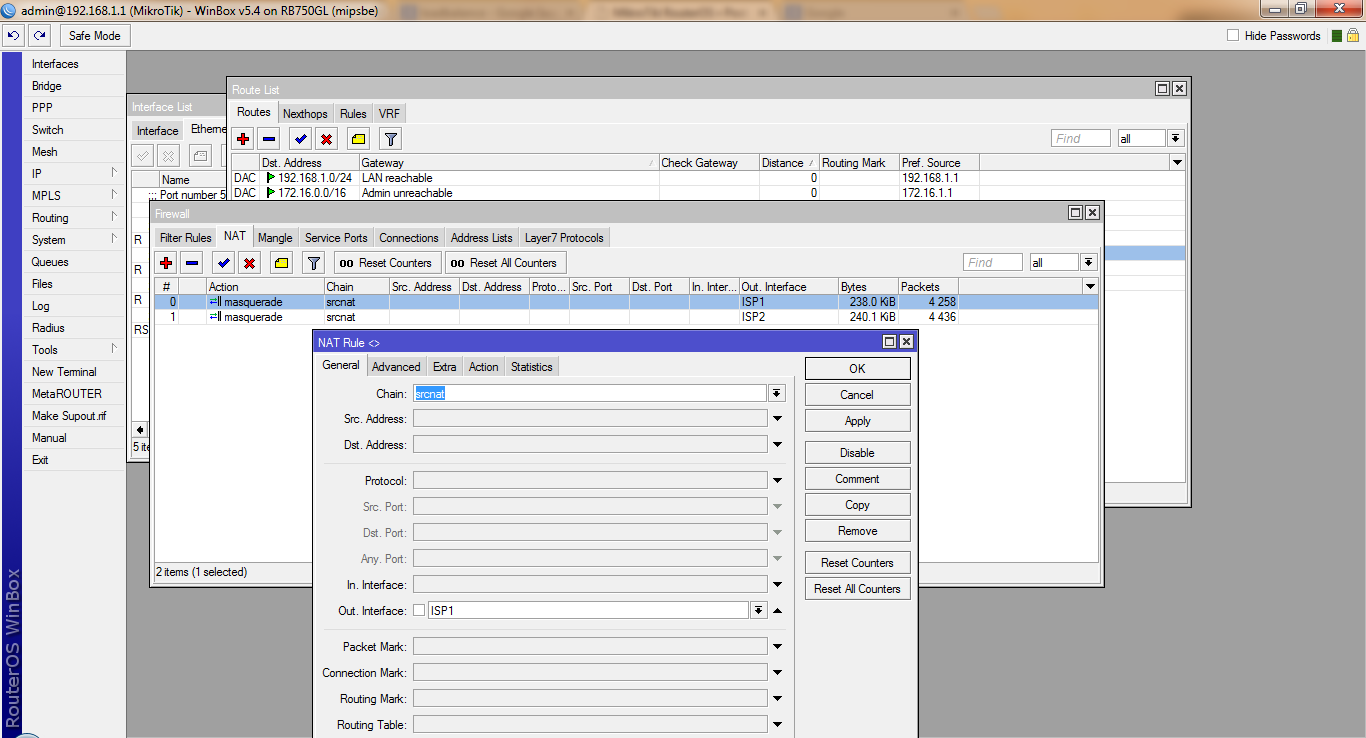
In the image there are NAT Masquerade rules. I am telling you I followed the Maunual PCC page by the inch.
NAT.png

And?

Sorry, this time I not understand the question…

Hi rextended and all.
please i want to find out if it posable for me to do load balancing and fail over with out using MASQUERADE
and if i can please can some one help
Thanks in advance