/log print where topics~"dhcp" && !topics~"dhcp,debug,packet"?

There is no doubt in my mind that I'm just missing something fairly obvious, so I'm already wearing my asbestos underwear, flame on ....

I have a debug logging entry temporarily to capture a possible DHCP client problem (I think on the client, not in RouterOS), and at first I had set it up as:

/system/logging/add topics=dhcp

(I later updated it to topics=dhcp,!packet so that packets wouldn't be logged).

But, while the packets were also going into the log, I wanted to filter /log print output to not show the packets, to avoid seeing the mass of these messages in the output:

2026-05-21 09:49:25 dhcp,debug,packet ciaddr = 192.168.255.13
2026-05-21 09:49:25 dhcp,debug,packet yiaddr = 192.168.255.13
2026-05-21 09:49:25 dhcp,debug,packet siaddr = 192.168.255.5
2026-05-21 09:49:25 dhcp,debug,packet chaddr = 8C:16:45:01:CD:66
2026-05-21 09:49:25 dhcp,debug,packet Subnet-Mask = 255.255.255.192
2026-05-21 09:49:25 dhcp,debug,packet Router = 192.168.255.7
2026-05-21 09:49:25 dhcp,debug,packet Domain-Server = 192.168.255.5
2026-05-21 09:49:25 dhcp,debug,packet Domain-Name = "felines.org"
2026-05-21 09:49:25 dhcp,debug,packet Address-Time = 600
2026-05-21 09:49:25 dhcp,debug,packet Msg-Type = ack
2026-05-21 09:49:25 dhcp,debug,packet Server-Id = 192.168.255.5

I tried:

/log print follow where topics~"dhcp" && !topics~"dhcp,debug,packet"
/log print follow where topics~"dhcp" && !topics~"dhcp.debug.packet"
/log print follow where topics~"dhcp" && !topics~"packet"

But all of these still included the packet debug entries in the log output.

What is the correct /log print where ... syntax to include dhcp except for packet ?

thanks...
/log print where topics~"dhcp" and !(topics~"packet")

Is that documented anywhere (that negation clauses in compound where statements must be parenthesized)? I searched Google for 'routeros where exclamation parentheses' and came up empty).

Well, hopefully people will find it in this thread, in future.

Thanks!

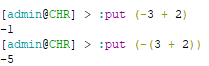
It's a unary operator (logical NOT operator) and those unary operators normally operate on the single operand next to them (not only in RouterOS scripting but in most of the normal programming languages too). For familiarity, you can think about the mathematic unary minus operator -, and will find it is natural that:

image

right? The negation only applies to 3 in -3 + 2. The + operator here is a binary operator requiring two operands on each sides. In many languages, unary operators have precedence over binary operators.

In RouterOS, the ~ operator is also a "binary operator that matches value against POSIX extended regular expression", similar to +. So if you want to say "do not match the regex" you'll have to write !(topics~"packet"), similar to when you want to negate the whole 3 + 2 you need to put that under parentheses -(3 + 2).

The documentation also suggests that you use (topics~"packet")=false to negate the expression as an alternative, and ( ) are required here too:

To negate an expression, you can use "expression=false". To print all interfaces that are not "ethernet", you can use expression negation like this:

/interface/print where (name~"ether")=false

Or to do the opposite, you can use "expression=true":

/interface/print where (name~"ether")=true

Ohmygosh. Thinking back to the stuff I learned in the 1980s, that is so obvious. {My university is going to revoke my degree in mathematics ..... (well, technically, it was "applied mathematics in computer science", but, still :person_facepalming:)}.

Interesting that the docs recommend (match that you don't want)=false, instead of !(match that you don't want).

Thanks!

Note that in /system/logging it is now also possible to specify a regex to match certain messages (yay! I suggested that) but there seems to be no way to invert that selection (messages NOT matching the regex).

Or does anyone know a trick to do that with the current capabilities. It isn't always easy to just invert a regex.

This is something that was already discussed here -> Log rule regex doesn't work for negative lookahead - #9 by TMS1 , too bad that pattern matching does not support regex negative lookahead for placing all topic filter rules into single regex string.