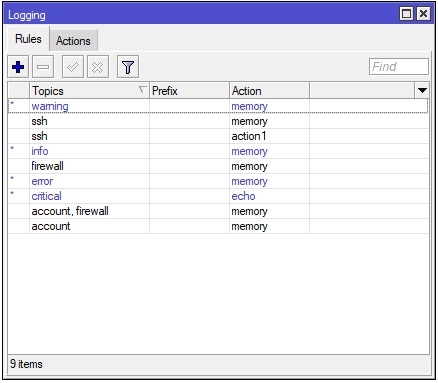
I have FTTH internet and I decided to put CR#P Huawei network terminal ( converter ) in bridge mode, and connected it to RouterBOARD 951 ( great device ). I would like to get logs for failed login attemps.
Every single ONT in ISPs IP range get brute force attack, booth on WEB interface and SSH. Username and password is unbelivebly simple so it is matter of momment when someone will pass.
I personaly log in into about 50 ONTs on ISP network and every single is under attack, it is impossible to only me dont have any login attemp. Logging conf in picture. Thanks
Thanks for info but we all hold our breathes what next?
A. Logging into someone elses’s router is a crime.
B. You should report whole situation to your ISP before reporting it to the public.
C. Did you hardened your router to prevent hacking into?
D. Massive attacks are nothing special.
A. It is not crime if ISP give to you admin pass for every. User pass is disabled and cannot be enabled or password cannot be changed.
B. Yes I reported whole wituation to ISP and provide log with all IPs. They simply dont care.
C. Probably yes.
D. Yea but over 2k login attemps per day…
Simply they dont care…
config.rsc is in attachment. I just deleted L2TP interface which was created by mistake. RB951.rsc (4.49 KB)
A.My router, my castle. Logging into not your own router is a crime. Even if you see open doors, you are not allowed to go into the house.
B. Do not overuse “answer with quote” … see may signature
C If you open port 3389 and NAT it to the internal host … well … you ask for trouble and suggest that more ports are volunerable.
add action=drop chain=forward comment=\
    "defconf: drop all from WAN not DSTNATed" connection-nat-state=!dstnat \
    connection-state=new in-interface-list=WAN
Who wants to do those RDP and HTTP and 2222 or 22222 sessions? Is this from a fixed IP address or range?
You could limit this, or better use a VPN to connect first. Or use port-knocking. https://wiki.mikrotik.com/wiki/Port_Knocking
You want to log all false logon attempts. Is your logging list already providing that info?
You are not logging in to the Mikrotik, only forwarding.
The Mikrotik does not know about success or failure of the logon.
Or can you add this as protection? https://wiki.mikrotik.com/wiki/Bruteforce_login_prevention (chain will be forward only for you)
If I understand you correctly, you suggest me to change rules from input to forward?
Im begginer in Mikrotik devices, and when purchased RB951 I requested from ISP to send engeneer to service my equipment ( changing fiber cable and bridging Huawei cr#p ) because they usually send guys which dont know even how to crimp cables.
I dont know why this is set wrong, guy which set it up maintain allmost all Mikrotik devices in my city. Technically there is 2 guys which work with Mikrotik in whole city. On my question why noone is interested in so great devices and products they replay: Mikrotik is great but complicated to setup and it is time consuming so it is easier to plug tp-link and bye.
Can someone please explain to me in simple words what is diference between forward and input?
It looks like great opportunity for you, learn few basics and you can be new MikroTik master in your city.
input - traffic to router itself, e.g. when you’re connecting to it with WinBox
forward - traffic passing through router, e.g. from devices in LAN to internet
So traffic to forwarded ports, if the destination is another device, goes in forward. But default config already allows all forwarded ports (*), so you don’t need those four rules at all.
(*) It’s exactly that firewall’s default action is accept, and rules are processed from top to bottom, so if none stops the packet, it’s allowed to pass. The last rule:
/ip firewall filter
add action=drop chain=forward comment="defconf: drop all from WAN not DSTNATed" connection-nat-state=!dstnat connection-state=new in-interface-list=WAN
blocks new connections (connection-state=new) from WAN (in-interface-list=WAN) unless they are dstnatted (connection-nat-state=!dstnat), in that case it doesn’t match and there’s nothing else after this, so all dstnatted connections are allowed.
I know what is forward. I use it on other devices but input confused me. Input chain goes only to RB as I unerstand if I want to connect to my RB from WAN etc? How then works with my RDP port and SSHs?
I know Im asking too much but is my conclusion correct?
“dstnatted (connection-nat-state=!dstnat)” - dstnatted means if packet from wan dont have LAN destination ( etc. one of devices ) it will be dropped?
PS My RB is not accessible from wan through winbox or webfig. Which rule prevent this?
EDIT: Watching winbox and blowing my mind. Last rule say: Drop all from WAN not DSTnated - Accept. ---- This means RB will accept every connection even if it dont have destination in LAN?
wtf? I open Winbox, deleted rules as you suggested, go to Firewall > NAT > and rule for forwardig 3389 on 192.168.0.12 ( image ) and from curiosity click on log.
In log I get allmost ton of “dstnat: in:ether1-WAN out:(unknown 0), src-mac 08:19:a6:e0:1b:2a, proto TCP (SYN), 45.82.153.171:53107->MY WAN IP:3389, len 52” does it mean someone trying to login on RDP?
Internet is full of people (and bots) trying to get into everybody’s LAN. So don’t take it personally, just get firewall tight. And, BTW, opening RDP to wide internet is a bad idea. Ideally you would use some kind of VPN to connect to your LAN. Alternatively limit allowed connections to RDP to some known WAN IP addresses (easiest way of doing it is to construct address list in IP firewall address-list and use it in NAT rule as src-address-list=).
EDIT: Watching winbox and blowing my mind. Last rule say: Drop all from WAN not DSTnated - Accept. ---- This means RB will accept every connection even if it dont have destination in LAN?
Almost there: RB will accept and forward connection if there is a dstnat rule for that port. (the rule is “drop” if “!dstnat”, and “!” here means “NOT”)
Those are your DSTNAT rules that will be allowed because they are "dstnat"ed , and as such don’t fullfill “!dstnat” required in the drop rule.
One of the search engines that might contact your IP address is Shodan (https://en.wikipedia.org/wiki/Shodan_(website)) .
That search engine gives all public IP addresses with open (responding) ports.
Hey team,
I am using CRS326-24S+2Q+ and also configuring the log server. But whenever my port is down or up, it shows only this log (device changed by admin).
The exact log-in is not showing port down or up.
I have one ccr 1072 and one switch 326-24g-2s+rm and I have created bonding in both devices but every day my network is down and log are show below.
sfp-sfpplus7-OUT-BGP-CCR2 link down
sfp-sfpplus3-OUT-BGP-CCR link down
hardware offloading deactivated on bridge “bridge1” ports: SW-BGP-Bonding
SW-BGP-Bonding link down
MT support does not frequent this forum that much. It is mostly a USER forum.
Try contacting support directly via support@mikrotik.com.
Make sure to have a COMPLETE description of your network, what setup you made, what you see failing.
And for all involved Mikrotik devices, provide supout.rif.