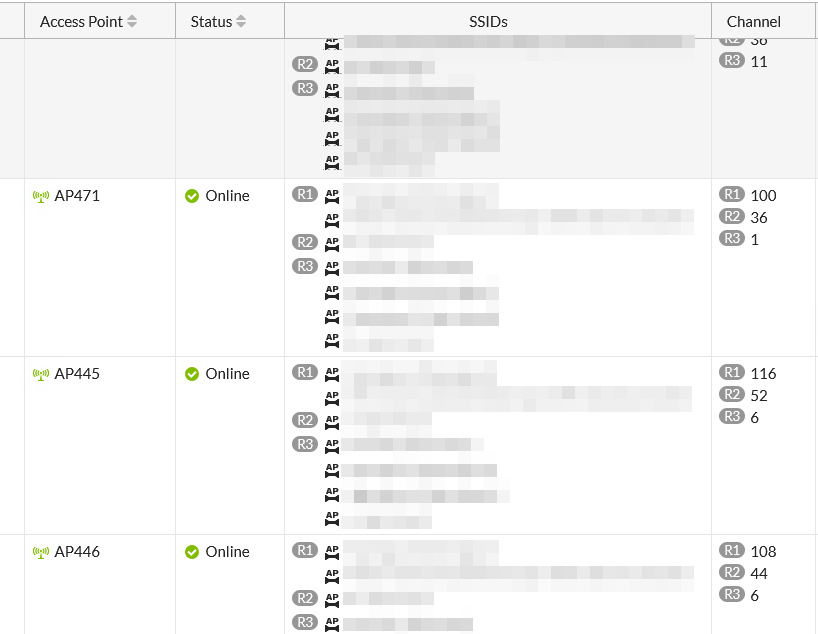
I'm looking for a good how-to guide on how to plan channels in Capsman.
Specifically, I'm relocating 40 APs in an office building and have distributed them across three floors in a "chessboard" pattern. Each AP is on its own channel, configured so that no two adjacent channels are the same.
This worked very well with the Fortinet APs, but they are ancient, don't support Wi-Fi 6, and the controller is to be disposed of by summer.
Now, I have the 40 APs in Capsman, and the algorithm has dynamically assigned the channels, but it's more bad than good.
The existing options for changing this all look terrible:
Create seven separate interfaces with fixed channels for each of my seven SSIDs.
Create countless configurations where there's "SSID 1 - channel 40," "SSID 1 - channel 48," etc., for all five SSIDs...
For me, these are all terrible solutions.
I can't set the channel on the access point itself, as everything is dynamically determined by Capsman.
I'm missing the option in remote Capsman to specify "AP1 - channel 40," "AP2 - channel 44," "AP3 - channel 48," etc. Something like this:
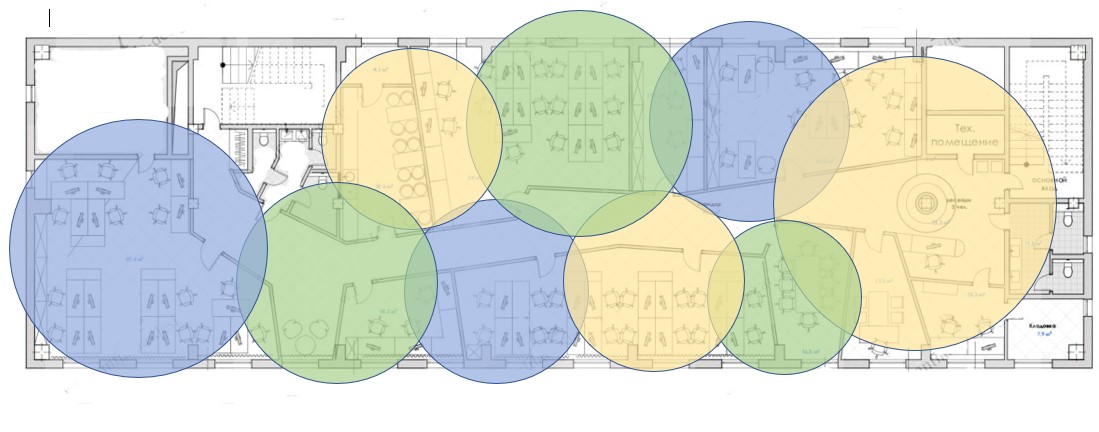
I would start with a site map + cryons to plan channel assigment manualy as one picture says more tan 1000 words. When planned I would implement it in CAPSMAN. Really, it's not a joke.
Beyond my paygrade, but if I were to take this on, I would be accepting of the number of different configurations required and accepting of the limitations of Routeros not to be able to generate them progammatically. Instead, I would choose another environment with good text processing capabilities to generate a Routeros script with the required config. It would be worth keeping as a tool, because by the lok of it, you might not get this right first time ...
How I did it (capsman install in warehouse with 16 APs)
Make configurations based on combination of master config and channel assignment. Both for 2.4GHz and 5GHz. Make the name reflect what is what.
Then apply those configurations using provisioning rules. MAC address or radio or regex are options (I use MAC).
It's a bit of work upfront but afterwards it's rather static (for me it is).
You cannot change the point settings because that is how Capsman was configured.
Change the provisions settings.
Replace the action “create dynamic enabled” with “create enabled.”
After that, you will be able to manually change all CAP settings.
Personally, when planning radio frequencies, I use a floor plan and place points on the plan using three-color circles, so everything is clearly visible.
Static configuration based on such a plan is the best start. No any auto freq etc. settings.
If configuration would work resonably enough, then adjustments could be done.
Once I had such a manualy network working stable but one Monday's morning everething was working slower, not to say bad. It turned out that the problem were conditioners installed during weekend in each room and each one was equipped with WiFi AP for remote control. Think that it's obvious that it wasn't possible to reconfigure band and power they use. All ot them were "shouting" "screaming". When we add moving mobile phones with switched on AP, then it's obious that planning is tough task. In general, we could mostly plan installation places with the best coverage.