@Amm0 wrapped it quite well. RSRP value of -100dB is not great, but it’s a decent starting point. ATL’s antenna gain of +7dBi to +10dBi (in 1800MHz band) will improve speed a bit, but more importantly it’ll stabilize performance … signal strength tends to vary a bit (a few dB up and down) due to changes in surroundings (tree leaves moving, birds flying inside Fresnel zone, interference with reflected signals, etc.).
Upload speed improved a lot because the lack of modem’s Tx power which was not as bad after you improved radio link with base station by huge margin of 17dB. The thing is: base station controls Tx power of phones/modems because it’s good (for receiver’s performance) if signals from all stations are of similar levels when received (power control works for downlink as well). When path loss is not big this means that station can transmit with 1/100 of max power and throughput is great. When path loss increases, station might transmit with 1/10 of power and throughput is equally great. When pathloss increases slightly more, station may have to transmit at full power and throughput is still great. But if path loss further increases, station still transmits at full power but throughput starts to degrade. Station has to transmit with more robust modulation (which requires lower SINR for receiver to properly receive), a more robust FEC scheme is used (adding more redundancy/overhead to correct some errors), MIMO rank is lowered (e.g. from 2x2 to 1x1), etc. And this degradation is rather fast, the difference in signal strengths between full speed and low speed might be only 10-15dB … when I worked for MNO, we (in radio department) set the limit of usable signal coverage at RSRP of -105dBm (yes, connection works at lower signal levels, but certain throughput consumes excessive airtime which hurts other users and overall network performance). We also made sure that Tx and Rx were balanced meaning that drop of performance in both directions happened at roughly same place (many MNOs ramp ul Tx power which mesns it can happen that downlink is acceptable, but uplink breaks).
So my verdict, based on your latest meadurements: ATL should help you get good performance, just make sure to turn antenna towards base station (aim for best signal strength). And try to avoid having any obstacles near line-of-sight … and remember, trees tend to grow
Thanks! Glad to see my clumsy measurement helped this discussion.
OK, ATL. I have 2 concerns regarding it:
It’s modem (R11mL-EG18-EA) is not listed on the cell locking info page. OTOH, there is a section in that same doc with title “for Chateau LTE12, Chateau 5G and LHG LTE18” (the later, IIUC, uses the same modem as the ATL).
Assuming this info is up-to-date and complete, I wonder if with this modem I will be able to lock to the good cell tower (Cell 1) and thus avoid MNO’s load balancing (which may attempt to switch me to another cell). I understand what you @mkx explained (that it doesn’t just “switch” but there are measurements and reports involved) and that when using a pointed antenna it may result in better signal compared to other cells which may prevent switching. However, considering the other 2 cells have comparable RSRP, I wonder if the MNO can tune its systems to forcefully ignore a small difference in signal power and force a switching to a cell with slightly worse signal. The point is: it seems to me the cell locking functionality might be beneficial in my particular case.
It is still not clear how much ATL would improve DL/UL speed. I understand this may be difficult to say but considering the not insignificant investment it seems a factor worth considering and comparing to other possible options.
I would very much appreciate your comments on those.
ATL has decent gain in 1800MHz band (+7dBi) and shitty gain in 900MHz band (around -4dBi). Even if these cells are co-located and maximum antenna gain will apply to both, modem will measure signal from both cells at roughly the same level (calc on numbers from first post … B3: -117dBm+7dBi=-110dBm; B8: -109dBm-4dBi=-113dBm), as calc shows it may actually make B3 cell better. No calc for cell3 as your initial post doesn’t tell which band is it and hence I’ve no idea what kind of antenna gain would apply. If both cells are not co-located (and don’t lie on same line looking from ATL position), then antenna pattern will favour the B3 cell even more.
I’m 99% sure that your MNO has more capacity on B3 than on B8 and would thus push users to B3 (if they are actually doing it) and not the other way around. So I’m pretty sure cell lock (to fix you on B3 cell) won’t be necessary. Further more, if cells are co-located, then they are almost certainly in CA set, so ATL will use them both. Nowdays even non-co-located cells are often in CA set …
Regarding throughput gain when using ATL:
cat12 and up brings a faster modulation scheme in downlink (256QAM vs. 64QAM available in"legacy" devices) which in theory increases throughput by 33% (8 bits per symbol vs. 6 bits per symbol). However radio conditions have to be perfect, which is highly unlikely in your case.
Then: ATL supports 4x4MIMO which in theory doubles the throughput, but radio conditions have to be favourable and base station has to support it (and I may have already mentioned that as of a few years ago I didn’t hear of any MNO implementing 4x4MIMO on frequencies lower than 2.5GHz) … you can try to ask your MNO about it.
with ATL’s higher antenna gain you can hope to improve SINR by a few dB, meaning that you can hope to see CQI around 14. Which increases throughput by around 10-20% compared to CQI 12-13. And this is, IMO, what you can count on.
you can count on better link stability … i.e. it’ll work in poor weather much better than your current router (falling snow or rain attenuate signal and better “base” signal strength provides some margin)
What all of it means for uplink? I’ve no idea, it really depends if your current router was already “power controlled” or not. If it was, then your uplink performance using ATL will be roughly the same. If it was still power limited, then you’ll see higger throughput with ATL, how much depends on how much more power would be needed by current router to reach full speed. But I guess you may see increase by 15-50%.
If both cells you mentioned in first post are co-located and members of CA set, and assuming your current modem doesn’t support CA, then you may see further improvement as you’ll combine throughputs of both cells. But I’d expect only minor improvement from B8 cell due to reasons outlined above.
Some questions and clarifications to help me understand what you are saying:
ATL has decent gain in 1800MHz band (+7dBi) and shitty gain in 900MHz band (around -4dBi).
Where do you get these numbers? I see different one on the graphics of ATL’s brochure. And doesn’t the negative (-4dBi) mean attenuation, not amplification? I hope you can clarify.
Re. cells and locking: When I discussed with my MNO they gave me the geo location of 3 cell towers. Each one is located in a different place, several km away from the others. My location is somewhere near the center of that triangle. I don’t know if (generally) one cell equals one cell tower. From your words I understand (please correct me if I am wrong) that it is possible one cell tower to have more than one cell (co-located). The fact is, with each of the cells currently I see only one band (numbers in the initial post). That’s why my concern is that I don’t end up in a situation when the MNO’s load balancing algorithm switches me to something I am not pointed at.
Re. current router: I mentioned the model in the initial post. It uses a single antenna. I cannot find any detailed specs. When I was having those discussions with MNO’s tech personal, I was told that its antenna gain is 3-5 dBi and they recommended the 4x4 MIMO as the best option in general. I didn’t ask further for details simply because… well, one asks when one knows. At that time I didn’t know much. Thanks to you, I know a little more now. That router also comes with an external attachable antenna - a stick long ~20 cm which one screws directly on the router. I don’t use it though because with it I get slightly worse result (no idea why). Some months ago I bought another external antenna (original Huawei one) which resembles a waffle (about 15 cm long, 3-4 cm wide, 1 cm thick) and has a suction cup (so one can stick it on a window). It has ~2 m cable. I have tried it multiple times (moving it around the room etc) and the result is the same as with the “stick”, i.e. slightly worse than the internal antenna. So, I use only the internal antenna now and it was used during my measurement.
Re. possible speeds: If I am reading you correctly, with the ATL I may see sth like:
DL: 80-93 Mbps (~10-33% on top of current 70 Mbps on roof)
UL: 28-37.5 Mbps (15-50% on top of the 25 Mbps)
Is that correct?
Would you clarify anything considering this additional info?
I would very much like to know what an expert like you thinks. Thanks again!
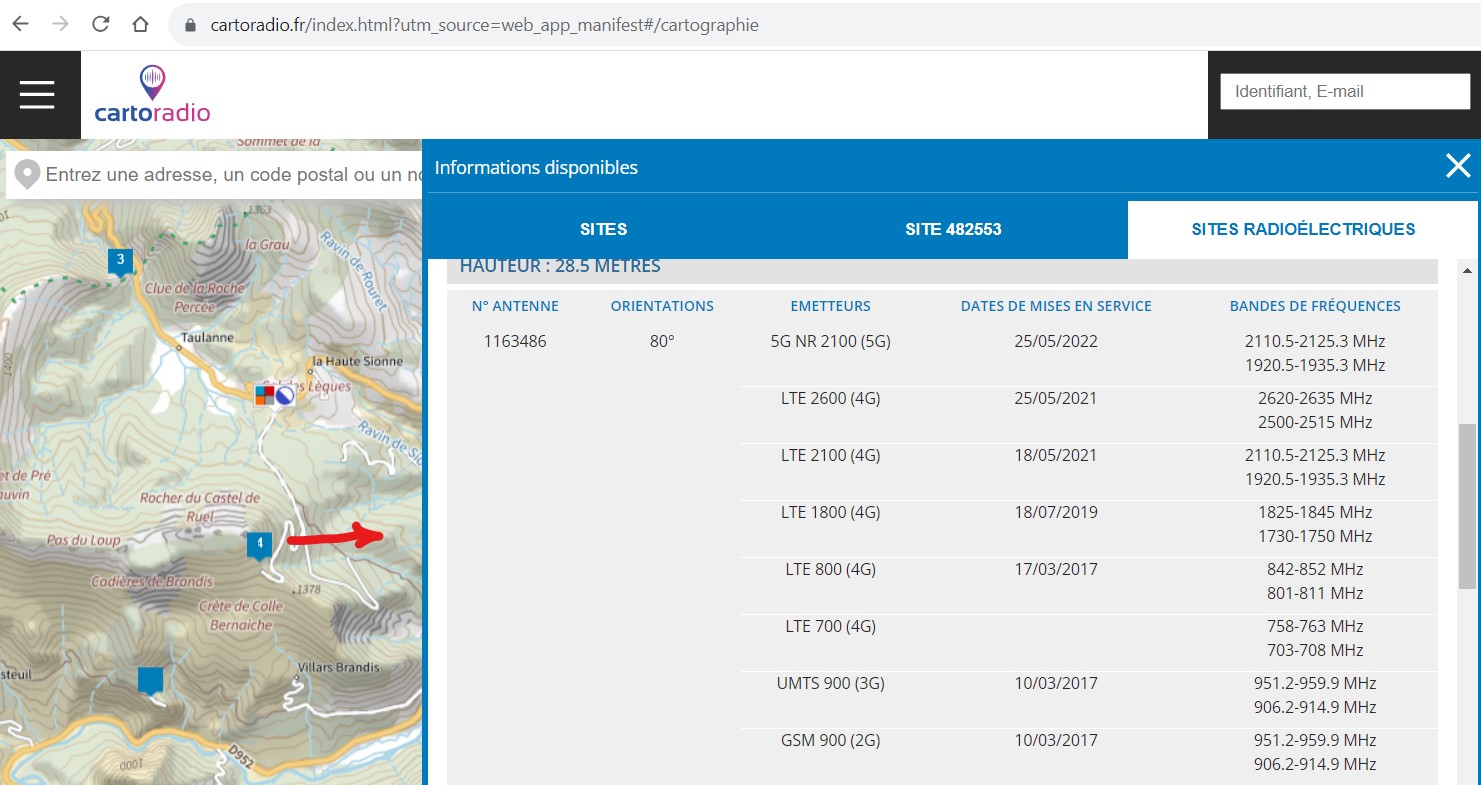
Just my 2 cents: My 2 years of experience in one spot (Alpes de Haute Provence in France). … Don’t give up, get the information and test different setups.
France has a lot of detailed information on their 4G and 5G networks, which is updated regularly. And it does change over time! (Mostly new ranges and larger bandwidths)
Nevertheless having 4G reception in the Alpes is a challenge. And that community was plagued for years with very poor performance in the holiday season, up to worse than a 3G connection.
The ISPs had their stations overcrowded (tourism) , and they gave priority to some recognised smartphones.
Solution in this case was to connect to a more distant tower (with a Mikrotik SXT LTE), that was not crowded or did not get congested.
Those distant towers could not be used with cellphones, and transmitted in higher frequencies.
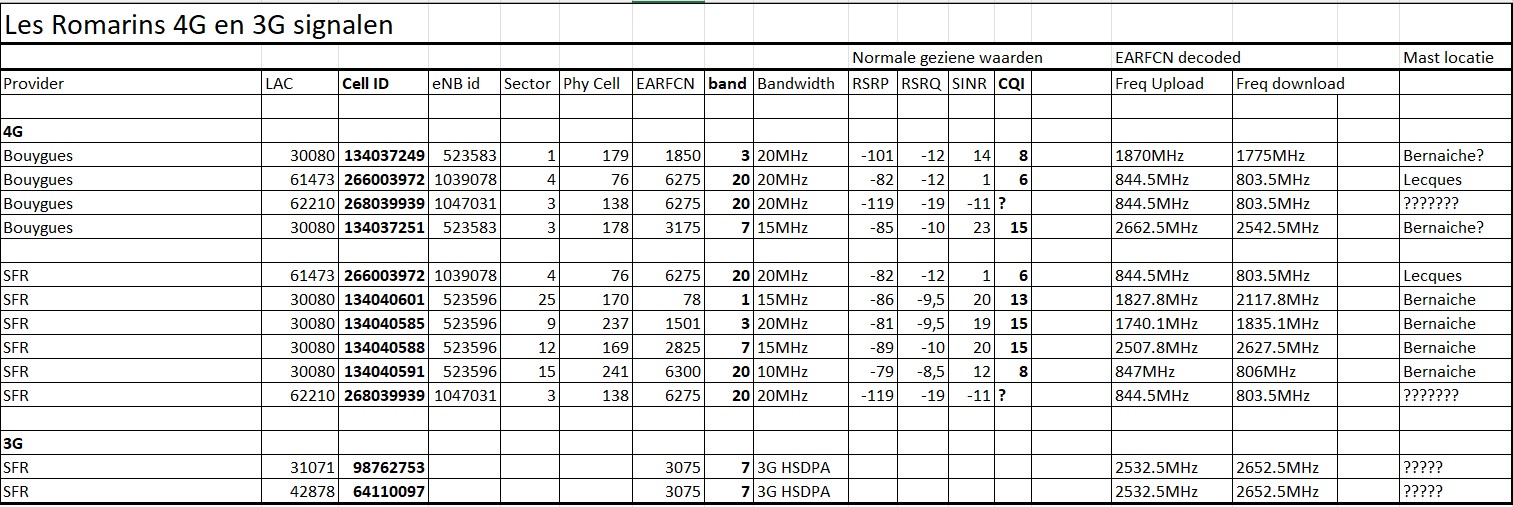
Studying the tables and combining them gave insight in which provider had what connection with what bandwidth, on what tower in what direction.
Cellphones/smartphones are quite often used indoors in the evening, when the most traffic jams occurred.
Their frequency is therefore the lower (800MHz?) range.
The longer access range of the SXT LTE gave quite some cells to chose from.
And the strongest signal was not the best. (e.g. The nearby (4km) overcrowded one).
CQI up to 14 was a good indicator for good reception.
The higher frequencies benefitted from the outdoor setup of the SXT !
Some cells where 10MHz wide, some 15 etc, with different max UL and DL speeds.
The ISP tower steers the tower to be used. (probably based on CQI reported, @MKX can tell)
I did not use cell locking, but using a selective list of bands, was enough to get the tower I wanted.(5.5km)
(Over the years there were times where I had to change the selection, because some cell failed. Using 3 SXT’s with a different band lists, and using load balancing was enough to have continuous internet access. Over time there were 2 more SXT in use, one SXT LTE6, with a SIM card of a different provider. )
ISPs share the towers, and they installed recently one just behind that hill (in the picture). Just a performance drama, luckily my band selection could avoid that strong disturbed signal.
Download is mostly 25 to 50 Mbps on the narrow bands.
The whole thing is now extended with Starlink, performing 180Mbps download.
Txs. (Somebody else did the physical install . @rrdeli).
I just tried to use the better cell connections. CQI 15 is great, CQI 8 is really at the limit of usable or not.
Highest RSRP is not always the best choice. And provider SFR is in backbone trouble quite often.
And even with CQI 15, the number of other users, and the cell backbone connection was important, as seen in the actual data bandwidth over time.
Follow up with DUDE.
Oh, that was creepy !
Your right setup looks almost exactly like the one I had when I still had my vacation home in France in Gard/Ardèche area (SXT LTE6).
Even the look of the walls and tiles from below look amazingly the same !
Ever considered Free Mobile as provider ?
Worked pretty well for me (SXT pointed to mast located in Bolène, about 10 km away).
“Pretty well” to be defined as:
zero data reception on cell phone, very flaky for voice calls and only on well defined spots were reflection of signal provided some reception
about 7-8 Mbps via SXT LTE6 sometimes dropping to 4-5 Mbps
SFR, Orange and Bouygues were disasters in that area.
We sold the place early this year so can’t get any live info anymore.
Walls in crépi ( ) and roofing tiles are typical for that souhtern region.
Certainly we did try FREE. On paper en technically it is the best by far, outperforming SFR, Bouygues and Orange.
However there is more to check. Problem is the volume quota, and the offered subscriptions. Their best channels are in the 700MHz however.
Normal mobile subscription is expensive and is usually limited to 70 GB/month, but even then Free is usefull for its very high throughput.
BOX subscriptions are cheap, localised and 200GB to 500GB/month. They check your physical address, and the “computer said NO” for Orange and Free, because in that region there is ADSL (3 to 10 MBps)
In reality all ADSL lines are sold, and the real throughput is 1 Mbps max, and quite some lines are broken, and will not be repaired.
Bouygues stopped providing the 500GB/month box subscrition, because the area reached its capacity limits.
SFR could be convinced to sell a box subscription, by faking the home address (1 km further, other village) using same cells.
FREE checks the IMEI of the phone, and if not on their certified list, the Free subscription is limited to 1GB/month on 4G, the rest on 3G.
Some people found out they only check IMEI the first days. So after the check one can swap the SIM card for the rest of the month.
Requests to be able to change/fake the IMEI are somewhere around in this forum.
Have given up on FREE subscription.
SFR “Internet Partout” is 100GB/month not localised at 3€/day when used some day. Ideal for the second and third SXT LTE (load balancing in backup mode). Seldom activated now since (unlimited!) Starlink.
The first SXT LTE must fill in the short Starlink interruptions, and that is multiple times a day.
True but I had a 150Gb/month subscription for 19.99 EUR which was more then enough for my needs there.
Never had a problem with getting SXT recognized on their network.
May I kindly remind that I still hope to get some help regarding my particular case and questions?
Forgive me to interrupt the ongoing off-topic discussion.
What’s known is you have +15 to +20 dBm difference outside. I think @bpwl’s post are constructive … you need a lot more data points than “a hotspot on roof once” to be more predictive…
Also, cell networks do change, so possible could be new bands, different config at tower, etc. etc.
If you have a budget, more bands is better. Mikrotik doesn’t have a lot offering but ATL. There ~0% chance the LHG or SXT be better choice. And without more data, I’m not sure anyone can suggest the “right” 3rd party antenna for an LtAP or wAPac.
Those off-topic discussiosn are mostly exemples of the homework OP has to do himself.
No one else can do the tedious work of bringing the whole puzzle together, because there is a lot to be verified and tested.
Test results will vary over day-time and week-weekend days. Can even be weather dependent.
And then the Cell information is needed, and @MKX and @Amm0 where clear enough on how to process all that information.
There is no magic number that will tell what equipment will do and how much improvement it will bring.
As said by all: after the signal strength (RSSI, antenna) the quality of the connection is very important (CQI=15), even more important than the signal strength.
The cell choosen is very important, and cell information is needed to understand what to expect.
OP does not have or give any of this. Whithout that it is all a wild guess, to be improved with trial and error. Many trials and long time follow up.
e.g.: A SXT LTE kit is a good device to do all the measurements, and is a potential permanent solution.
The antenna is outdoors, it’s directional, and RouterOS has enough information on the connection and performance.
Backhaul and cell congestion has to be verified, and changes over time, and ultimatly is important. What is a very good signal, if the cell only delivers <1Mbps in the evening?
Utiker, it sounds like you need MKX to pay you a visit…
That means covering the airline fees and his expenses.
Im sure you have an extra comfy bed and nuthin like home cooken!!
I hear he is partial to Canadian Rye Whiskey!
I am sorry if what I wrote was misunderstood or was considered rude. I didn’t mean to sound ungrateful, condemning anyone or requiring anything inappropriately. By off-topic I meant the sudden inclusion of various extra info (like ISP prices and similar). I understand you guys are experts and play with all these things easily but to me it is all fairly new and it is difficult if the essence is to be found within lots of other info. I just fail to find the answers in it which is probably my fault as I am not an expert.
That said, I understand this is a forum and everyone is free to speak one’s mind. So, apologies again!
@bpwl - How do you use multiple SXT devices? Do you simply switch your client to the next device if one fails or is there some way to automatically choose “the best at the moment”? Is that system better than ATL?
Re. cells’ locations - I already have them from the ISP, as mentioned and they are not on any of the sites mentioned here.
Back to my concern about cell locking: fortunately, I received a reply from support@ which clarifies a part of my confusion and at the same time introduces more confusion. I asked if ATL supports cell locking. The answer I got:
Yes, it works.
Please, on the page you mentioned find the title “for Chateau LTE12, Chateau 5G, LHG LTE18 and ATL LTE18”, this is what you need.
But, please, keep in mind that:
*cellular network can decide to hand over a client device to another tower/cell based on its rules (signal levels, bands, load, etc) and a modem should follow handover commands, by using cell lock You effectively disable (braking) modem handover capability according to a network request. We have observed situations, where the cellular network is refusing connection or connection activation is delayed if the modem is forced to connect to an “incorrect” tower/cell.
Doesn’t that observation contradict the earlier clarifications by @mkx (about how switching actually works) repeating what my ISP explained (that I may end up being pointed to a cell which rejects me because of load balancing)? I am quite confused. I hope someone can shed some light on the matter.
You’re still over thinking this without much data. What are your use cases? What’s your budget to fix this?
You seem singular focused on speed, not stability. Your issue is LTE prefers stability, over speed - that’s just how it works.
e.g. LTE tries very hard to say up – your speed is secondary, entirely determine by a lot of math between tower/device, with many environmental variables… Why predicting speeds or performance is hard.
FWIW… I’m not a fan of band locking unless you have a LOT of data to support that you know more the LTE ecosystem.. Mikrotik is right – band lock could stop working one day & that’s down time until you remove the band lock. Could be years or tomorrow, no one knows and it’s up the carrier’s topology choices. So even if it helped, how much do you want risk your carrier changing something causing downtime? e.g. If your LTE router is remote, and need LTE to get in… then band lock failure might be a bad idea even if it “helped” with speed initially.
You effectively disable (braking) modem handover capability according to a network request.
Don’t expect this … the request to switch to the masked band should not come … with band masking. Maybe it does come when “cell locking” is used, depending on what the modem tells the tower.
Introduction
When a modem is configured for band masking, the modem no longer advertises the specified bands as supported to the towers to which it may connect, preventing these bands from being assigned or used.

Band masking uses
You may need to mask certain cellular bands based on regulatory or legal requirements, or in an effort to tune your network connection. Your network operator can offer specifics when needed.
Only disable the problematic band (easy on Mikrotik)
The Solution
Fortunately, there is a solution to address performance issues and optimize your cellular connectivity. Certain routers, such as those offered by Peplink and Cradlepoint, not only provide signal and band details but also offer frequency band control. With these routers, you can manually disable certain frequency bands, which forces the modem to connect to different bands. Although this process may take some time, especially if your existing device does not provide band details, it can be worth the effort. In some cases, the signal strength on these alternative bands may be weaker than what the modem selects automatically. However, even with a weaker signal, you can generally achieve download speeds of over 30 Mbps or higher.
Assuming Mikrotik, there are just three choices in hardware . And, you’ve already confirmed put a cheap hotspot on roof dramatically improved your situation – so focusing on getting something on the roof should be the priority.
Not be the sales guy here . But since stuff varies by season, time-of-day, weekday/end, even leaves on trees, moisture, etc. etc. … so the sooner you put something on roof, the more data you have to make additional tweaks. If your budget was limited the SXT works better than the hotspot inside. And the ATL has the best chance of getting the highest speeds, at a higher cost.
LTE connection is always in for surprises in some countries.
Last week one ISP had a problem. 8.8.8.8 was not reachable , but 8.8.4.4 was. Half of the internet was reachable on that link with 8.8.4.4 check.
Load balancing swapped to the SXT which uses 8.8.4.4 by the recursive route check, but that SXT link could not reach my home (management point) for 3 days.
Still had another group of SXT with another provider, so I could change the distances in the routing table, to use Starlink temporarely for my out-of-band managemant (which was now in-band)
Management uses hEX for tunnel initiation, and selects the gateway with http://forum.mikrotik.com/t/advanced-routing-failover-without-scripting/136599/1 failover. (recursive route check)
Clients use Draytek + TP-Link RT480R load balancer, but that will be replaced by Powerbox Pro and the complex load balancing (complex because Starlink is now the best, the SXT use LTE-Limiter script to swap between SIM cards, based on fair-use limits and corresponding speed limitations. That script tries to have always connection (enabling the LTE interface even with limited speed, enabling masked bands if no connection … some connection is better than no connection for out-of-band management). Rules are different for user data, seeking the highest speed.
But when the test gateway is OK, and the needed links are not reachable , the scripts failed. If recursive route check fail was detected, then the swap to Startlink would have been automatic.
Cost is important, therefore the SXT LTE kit , which is better than the SXT LHG for low frequencies. (I lost the URL to the antenna diagrams) . ATL was not available at that time and is today beaten by Starlink in cost and performance, in France.
On more story telling: FREE (ISP) uses band B28 (700MHz) as preferred band, but never introduced a handover to that band, as the SXT LTE Kit does not support it. (I expect the same to happen for masked bands.)
You’re still over thinking this without much data. What are your use cases? What’s your budget to fix this?
I have shared all the data I have and tried to measure as discussed. Please let me know what else might be useful and I will try to get it if it is possible.
The use cases are not strictly defined. To name a few: email, software updates, download videos, sometimes watch online TV, upload files. I just need good download and upload speed whenever I use Internet, so I can do whatever I need quickly. I am not planning to host a server, provide live support for anyone or anything like that.
The budget is not unlimited. The ATL is a bit over the top but affordable if the result would justify it (hence all the questions). In any case, looking at the gain diagrams of ATL and comparing them to those of the SXT, it seems to me the former is much stronger and would probably result in higher speeds (and stability). Additionally, it looks more worthwhile as longer term investment. Please correct me if I am wrong.
Assuming Mikrotik, there are just three choices in hardware > > […] Not be the sales guy here >
I am not assuming anything. I was just told by technical people that Mikrotik is better than other brands. The same technical people also warned me that all brands without exception have backdoors. If you can suggest something better (than ATL) for the particular case - I am here to learn about all options. FWIW, I like FOSS (free and open source software) but as it seems, there are no modems/routers with FOSS firmware.
So even if it helped, how much do you want risk your carrier changing something causing downtime?
Is it an actual risk or just a software functionality that can be used or instantly canceled?
Is band masking the same as cell locking? If not - what is the difference and how does all this (cell locking and/or band masking) relate to what @mkx explained about cell switching in #2?
Another thing: Suppose a system like the ATL with 4x4 MIMO. How does that work with cell locking/band masking? IIUC, the cell locking means locking to one band of one cell. Doesn’t that result in 4x4 MIMO becoming 1x1 no-MIMO (i.e. no carrier aggregation)? Or is there a way to lock to one cell but several (e.g. 4) bands to make efficient use of the hardware capabilities?

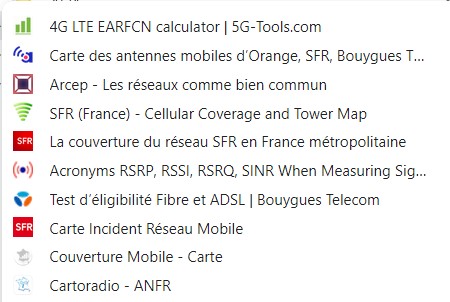
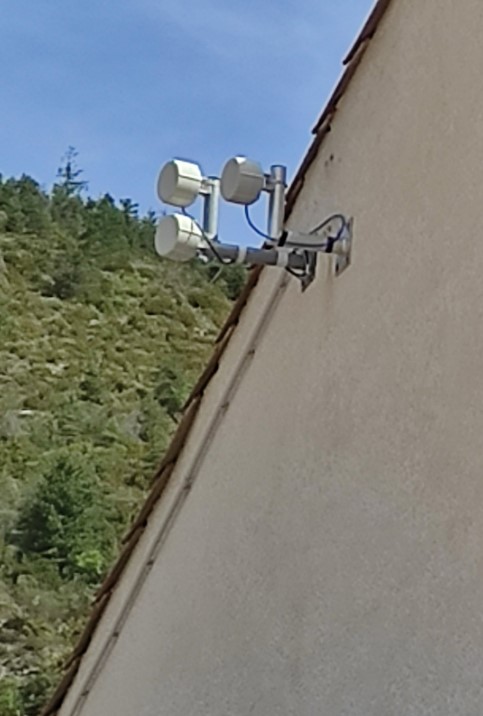
 ! Nice Job
 .
. 
 ) and roofing tiles are typical for that souhtern region.