jcbhnz
February 26, 2022, 1:46pm
1
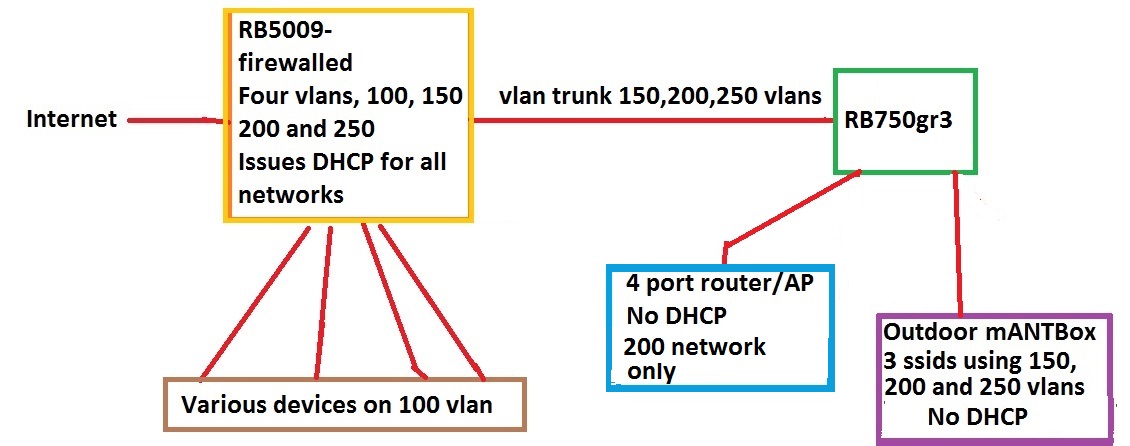
Network is as in pic below all networks work but cannot access RG750gr3
from winbox when config applied.
What have I done wrong?
Config below is (as put together in notepad++ as cannot access router to get actual config)
/interface bridge
add ingress-filtering=yes name=bridge vlan-filtering=yes
/interface vlan
add interface=bridge name=150vlan use-service-tag=yes vlan-id=150
add interface=bridge name=200vlan vlan-id=200
add interface=bridge name=250vlan use-service-tag=yes vlan-id=250
/interface bridge port
add bridge=bridge interface=ether1
add bridge=bridge interface=ether2 pvid=200
add bridge=bridge interface=ether3 pvid=200
add bridge=bridge interface=ether4
add bridge=bridge interface=ether5
/interface bridge vlan
add bridge=bridge tagged=ether1,ether4,ether5 vlan-ids=150,250
add bridge=bridge tagged=ether4,ether1,ether5 untagged=ether2,ether3 vlan-ids=200
/ip address
add address=192.168.150.2/24 interface=150vlan network=192.168.150.0
add address=192.168.200.2/24 interface=200vlan network=192.168.200.0
add address=192.168.250.2/24 interface=250vlan network=192.168.250.0
/ip firewall nat
add action=masquerade chain=srcnat
**have edited pic, previously did not show "4 port router/ap on 200 network only.
Thanks for replies will post all configs later today
need the complete config to determine the issue…
/export file=anynameyouwish… (minus any public IP or public gwy IP).
On the surface, nothing seems untoward about the small bit of the setup shown.
BOTH 5009 and hex.
Already tried winbox discovery via ethernet not port 1 ?
And yes, config pls.
tdw
February 26, 2022, 5:09pm
4
There is no path defined for data between the bridge and the CPU, hence no communication possible.
Also, the 750 does not require multiple interface VLANs and IP addresses unless you really want to access it from all of the VLANs - typically you would have one ‘management’ VLAN. The mixed use of service-tag=yes/no is not common.
jcbhnz
February 27, 2022, 1:36am
5
Was as holvoetn suggested able to connect to RB750 on eth1 exported configs below.
++++++++++++++++++++++++++++++++++++++++++
RB5009 Config export
model = RB5009UG+S+
serial number = EC**********
/interface bridge
add name=bridge vlan-filtering=yes
/interface vlan
add interface=bridge name=100vlan vlan-id=100
add interface=bridge name=150vlan vlan-id=150
add interface=bridge name=200vlan vlan-id=200
add interface=bridge name=250vlan vlan-id=250
/interface list
add comment=defconf name=WAN
add comment=defconf name=LAN
add name=VLAN
/interface wireless security-profiles
set [ find default=yes ] supplicant-identity=MikroTik
/ip pool
add name=150pool ranges=192.168.150.20-192.168.150.54
add name=100pool ranges=192.168.100.20-192.168.100.49
add name=200pool ranges=192.168.200.10-192.168.200.34
add name=250pool ranges=192.168.250.20-192.168.250.29
/ip dhcp-server
add address-pool=100pool interface=100vlan name=100dhcp
add address-pool=200pool interface=200vlan name=200dhcp
add address-pool=150pool interface=150vlan name=150dhcp
add address-pool=250pool interface=250vlan name=250dhcp
/interface bridge port
add bridge=bridge comment=defconf interface=ether2 pvid=100
add bridge=bridge comment=defconf interface=ether3 pvid=100
add bridge=bridge comment=defconf interface=ether4
add bridge=bridge comment=defconf interface=ether5
/ip neighbor discovery-settings
set discover-interface-list=LAN
/interface bridge vlan
add bridge=bridge tagged=bridge untagged=ether3 vlan-ids=100
add bridge=bridge tagged=bridge,ether5,ether4 vlan-ids=150
add bridge=bridge tagged=bridge,ether5,ether4 vlan-ids=200
add bridge=bridge tagged=bridge,ether5,ether4 vlan-ids=250
/interface list member
add comment=defconf interface=ether1 list=WAN
add interface=100vlan list=LAN
add interface=150vlan list=LAN
add interface=200vlan list=LAN
add interface=250vlan list=LAN
/ip address
add address=192.168.100.1/24 interface=100vlan network=192.168.100.0
add address=192.168.200.1/24 interface=200vlan network=192.168.200.0
add address=192.168.150.1/24 interface=150vlan network=192.168.150.0
add address=192.168.250.1/24 interface=250vlan network=192.168.250.0
/ip dhcp-client
add comment=defconf interface=ether1
/ip dhcp-server network
add address=192.168.100.0/24 gateway=192.168.100.1
add address=192.168.150.0/24 gateway=192.168.150.1
add address=192.168.200.0/24 gateway=192.168.200.1
add address=192.168.250.0/24 gateway=192.168.250.1
/ip firewall filter
add action=accept chain=input comment="defconf: accept established,related,untracked" connection-state=
established,related,untracked
add action=drop chain=input comment="defconf: drop invalid" connection-state=invalid
add action=accept chain=input comment="defconf: accept ICMP" protocol=icmp
add action=accept chain=input comment="defconf: accept to local loopback (for CAPsMAN)" dst-address=127.0.0.1
add action=drop chain=input comment="defconf: drop all not coming from LAN" in-interface-list=!LAN
add action=accept chain=forward comment="defconf: accept in ipsec policy" ipsec-policy=in,ipsec
add action=accept chain=forward comment="defconf: accept out ipsec policy" ipsec-policy=out,ipsec
add action=fasttrack-connection chain=forward comment="defconf: fasttrack" connection-state=established,related hw-offload=yes
add action=accept chain=forward comment="defconf: accept established,related, untracked" connection-state=
established,related,untracked
add action=drop chain=forward comment="defconf: drop invalid" connection-state=invalid
/ip firewall nat
add action=masquerade chain=srcnat comment="defconf: masquerade" ipsec-policy=out,none out-interface-list=WAN
/system clock
set time-zone-name=Pacific/Auckland
/system routerboard settings
set cpu-frequency=auto
/tool mac-server
set allowed-interface-list=LAN
[admin@MikroTik] >
END
++++++++++++++++++++++++++++++++++
RB750 config export
model = RB750Gr3
serial number = CC***********
/interface bridge
add ingress-filtering=yes name=bridge vlan-filtering=yes
/interface vlan
add interface=bridge name=150vlan use-service-tag=yes vlan-id=150
add interface=bridge name=200vlan vlan-id=200
add interface=bridge name=250vlan use-service-tag=yes vlan-id=250
/interface wireless security-profiles
set [ find default=yes ] supplicant-identity=MikroTik
/ip hotspot profile
set [ find default=yes ] html-directory=hotspot
/interface bridge port
add bridge=bridge interface=ether1
add bridge=bridge interface=ether2 pvid=200
add bridge=bridge interface=ether3 pvid=200
add bridge=bridge interface=ether4
add bridge=bridge interface=ether5
/interface bridge vlan
add bridge=bridge tagged=ether1,ether4,ether5 vlan-ids=150,250
add bridge=bridge tagged=ether4,ether1,ether5 untagged=ether2,ether3 vlan-ids=200
/ip address
add address=192.168.150.2/24 interface=150vlan network=192.168.150.0
add address=192.168.200.2/24 interface=200vlan network=192.168.200.0
add address=192.168.250.2/24 interface=250vlan network=192.168.250.0
/ip firewall nat
add action=masquerade chain=srcnat
[admin@MikroTik] >
RB5009
(1) Not an error, but Missing ether2 on bridge vlan settings… Not a big deal as the untagging is created dynamically since you have pvid set in bridge ports. Just to be consistent.
I prefer manually inserting so its seen on the config/export.
/interface bridge vlan
add bridge=bridge tagged=bridge untagged=ether2 ,ether3 vlan-ids=100
(2) YOur forward chain rules are too wide open, anything from WAN is allowed to LAN side.
After this rule add
add action=drop chain=forward comment=“defconf: drop invalid” connection-state=invalid
add chain=forward action=drop in-interface-list=WAN
RB750
(3) Missing many firewall rules…
jcbhnz
March 1, 2022, 2:53am
7
Thanks 404Network will (try to) do as you suggested.