Primary Band	B3@20Mhz earfcn: 1300 phy-cellid: 483
CA Band		{empty}
Change some not used LTE band 40>41 or any other change and hit Apply, modem reloads, wait 10sec and perform test again. Now different story, CA is working, speed as expected.
Primary Band	B3@20Mhz earfcn: 1300 phy-cellid: 483
CA Band
                B28@10Mhz earfcn: 9360 phy-cellid: 483
                B7@20Mhz earfcn: 2850 phy-cellid: 483
                B1@20Mhz earfcn: 100 phy-cellid: 483
I’ve tried in different random times of a day. Sometimes speed is ok since multiple CA bands are in use. Tried without band setting, tried one by one different band configurations. More or less after some while (random) CA carriers might or might not be available. But when config is reloaded, then CA is always used and speed is ok. One external antenna is used.
Is this modem, device, operator issue? Just do not tell me this is “normal”.
Model		    		EG18-EA
Revision			EG18EAPAR01A12M4G

Installed Version	 	EG18EAPAR01A12M4G
Latest Version		    	EG18EAPAR01A12M4G

RouterOS v7.5 (stable)

RouterBOARD
Model			RBD53G-5HacD2HnD&EG18-EA
Serial Number		CB280D9A78C6
Firmware Type		ipq4000L
Factory Firmware		7.0.1
Current Firmware		7.5
Upgrade Firmware		7.5


RSSI		-57 dBm (excellent)
RSRP		-89 dBm (good)
SINR		22 dB (excellent)
RSRQ		-9.0 dB (excellent)
External antenna, connected to Main socket, detected correctly by the device.
Scrolled through 7.6rc3 changes and which of those might improve this behaviour? 7.6rc3 not tested, always upgrading stable version.
It is “normal” I also have exactly the same problem with LMT operator for many years. It is operator issue. I have used many diferent LTE devices (Zyxel 5G NR7101, Zyxel LTE7490-M904, Mikrotik LHG LTE, Mikrotik Chateau 5G) they all have problems with CA with this operator. After restarting the LTE modem CA works perfectly, then after some random time tower drops consecutively one after the other CA Bands and no longer connects back. I have tested other Latvian operators BITE and Tele2, they don’t have this problem.
I can’t speak specifically to the quectel modems in the Mikrotik, nor 3GPP specs here. But most modems I’ve used define specific sets of CA pairs/tuples to “look for” – some more than others. But the supported primary bands say little/nothing about what’s possible via CA is the problem…
It be good if Mikrotik published the CA modes support by their modems, but imagine it’s someplace in Quectel’s specs. We use the Telit LM960s modems since, at the time, they were the only ones support all of the CA modes support by AT&T in US – but find the CA specs for both modem and carrier isn’t easy. And all quite complex…but issue is if they don’t align, you may be limiting potential performance…
(And surprised LMT CA modes don’t align - that seems like something Mikrotik would notice But imagine they’re stuck with what Quectel supports.)
I would say this is an Operator Issue/configuration + Quectel modem bug,
LMT is aggressive to turn off CA as fast as possible when there is no high download / UL, Bite and Tele2 CA stays on longer.
This is to free up the frequency and use less eNb resources than other clients can have good performance on mobile network.
the issue is that CA doesn’t recover automatically when there is a demand and for some towers, its is really pronounced, more on towers that LMT has not upgraded to the latest radio HW,
towers with 5G and b28 frequencies suffer from this less, but still its possible that after long LTE uptime session, CA will not connect to all available bands. and will have reduced performance.
ahh I see that you have B28 that means towers is upgraded already. then they need still to fix some configuration on their side.
for iPhone you probably don’t see that but it could be that it deactivates the interface once in a while and that is why you have good speeds all the time. or have other mechanisms.
The solution is simple for your case to write simple scheduler command that does LTE interface disable/enable every night and it should be good.
Another option is to complain LMT and ask their support to put your IMSI on trace/monitoring and try to find out the culprit of this issue.
TL;DR - Mikrotik Chateau LTE18 tries to use 4x4 MIMO even if you have enabled external antennas. And if your signal for internal antennas 3 and 4 is barelly registering then tower will drop those bands.
I did add another pigtail for the Mikrotik LTE18 modem (replacing the internal antenna) and attached another external antenna. In total I had 3 yagi type antennas and it seems that the rate of CA bands disappearing reduced by atleast 70%.
Now I got my hands on Mikrotik ATL LTE18 and it runs very stable with CA bands, because all the antennas are exposed compared to LMT provided mikrotik LTE18 which only exposes 2 external antennas by default unless you disasseble the unit and add your own pigtails. It still managed to loose B1 band at some point during the day, but it seems that it did not affect my speed…
I also had some communication with LMT support and eventually got a response from a tech guy which stated that if you have low SINR/MCS then the band will be dropped from the tower side. He did not state the threshold, tho.
LV operators (and probably not just LV) lately turning off high bands during nights to save electricity. Meantime, if you have lots of active devices: specifically IoT (e.g. cheap Chinese CCTV) which keeps constant connection to some sort of cloud services to push notification to your phone etc, then when bands are turned back at morning, MT “miscommunicate” with tower (at least according to operators) or other way around. And as result MT router stick with what it has during night, and it most likely is only B20 and/or B3
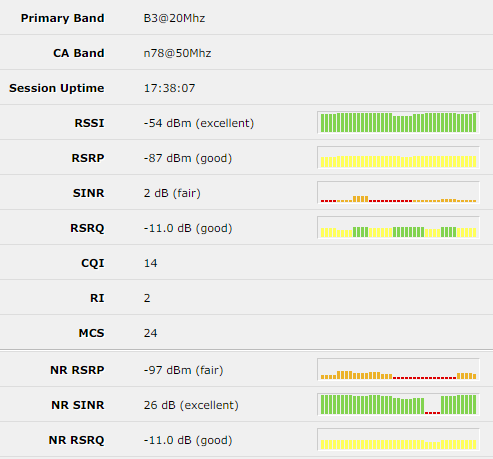
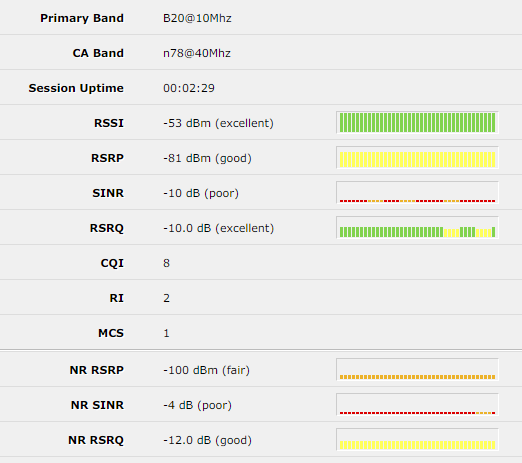
That could be true. I’ve also noticed that during the day I can get 5G NSA n78@50Mhz with good SINR (28 dB) but at night it’s switched to n78@40Mhz with poor SINR (-4 dB).
Day time
Night time
 I also have exactly the same problem with LMT operator for many years. It is operator issue. I have used many diferent LTE devices (Zyxel 5G NR7101, Zyxel LTE7490-M904, Mikrotik LHG LTE, Mikrotik Chateau 5G) they all have problems with CA with this operator. After restarting the LTE modem CA works perfectly, then after some random time tower drops consecutively one after the other CA Bands and no longer connects back. I have tested other Latvian operators BITE and Tele2, they don’t have this problem.
 But imagine they’re stuck with what Quectel supports.)
 then they need still to fix some configuration on their side.