I use mainly Basebox5’s for our sector antennas and I have noticed that if there is about 20 clients connected the speed never goes above 12Mbps in total for all those clients, all within 10km range
Signals is between -40 and -70
Using 5Ghz a/n on NV2 with 5ms TDMA Period Size.
If I kick of 10 of those cpe’s then is goes above the 12Mbps limit.
Anything funny I am doing wrong or any possible solution to get more speed without going to 40Mhz?
Hi,
Client with the lowest signal level quality will always have the biggest degradation potential on throughput of the ap-bridge.
If you have just one client with low modulations/CCQ and he/she starts to download all other clients with good signals (at the same AP) will experience much worse throughput than usual.
I would pick one AP (sector) with 20 or so clients with good signals (let say better than -60dBm) and with just a couple of clients with bad signal levels.
Then I would try to compare throughput of the AP with and without just those clients with bad signal levels.
Take a good look at registration table, modulation rates and CCQ, that information is usually enough to spot “bad clients” even if they have good signal levels (in dBms).
TDMA period size of 2ms is totally correct - it works
Also - what I have found helps throughput is to also do the following:
Set “Hw Retries” on clients and APs to → 3 (edit - do this on APs and also all clients)
Set your “Cell Radius” to about 20 percent larger than your registration table shows for distance
Avoid mixed modes ! If you have b/g then pick G-Only, If you have A/N - then pick N-Only, If you have A/N/AC then pick AC only (edit - do this on APs and also all clients)
I have tweaked and tweaked for years and this gives me the highest throughput for multi and ptp connections.
EDIT - also use the CM2 package or the new wireless-rep package !!! (edit - do this on APs and also all clients)
@ p3rad0x
How sure you are that this is the limit on radio and not somewhere else in your network?
It is very unlikely that you have the same problem on all APs in whole network.
What results do you get with old nstreme protocol?
I have 50+ nv2 AP.
I have tested and tested and tested throughput on M-PTP and PTP (clients, APs & wds links) using btest (both udp and tcp).
Every time a newer Mikrotik firmware/update is release, I also always pre-test prior to updating my production units.
In total - I have about 1,000 microwave links. And I test almost all of them at one time or another - looking/checking/testing what can I do to improve the throughput to my 5 GHz NV2 client connected customers.
Old Nstream gives a bit more, but the latency is pretty high.
The network is routed, if connect lets sy 10 clients with -50 signal then the sector goes 20Mbps + but as more clients gets added all the connected ones gets affected.
nstream is far better/faster than the standard 802.11 protocol
however I prefer NV2 for large networks and long-distant networks.
Most of my 5ghz nv2 clients are 3 to 20 km on APs with 10 to 30 connected clients (using 5 GHz N-only NV2 single polarity “horizontal”) can btest from 30meg to 80 meg back to my data center - with normal customers actively using their networks during the btest.
FYI - my average client registration table for most of my APs shows 150 meg connection - for each client.
Antenna db gain and wlan card rx sensitivity and a clean channel and network redundancy is everything …
What ever the math shows for a wireless link budget at the highest connect rate - cut it in half and overdesign by 2x
North Idaho Tom Jones
Re: Also there is no frequency to switch to 40Mhz
Well - yes and no. To use 40 GHz of frequency channel bandwidth …
On an N (pref N-Only) you need to set Channel Width on AP and clients to 20/40MHz Ce -or- 20/40MHz eC
If everything on the wireless AP is a Mikrotik, then also use the following:
NV2
TX Power default
Data rates default
Advanced - Hw Retries: 3
AP - NV2 - TDMA Period Size 2ms
AP - NV2 - Cell Radius: Furthest shown in registration plus an additional 20 percent
System - Packages - wireless-rep
If your AP supports more than one Ethernet cable - then do the following on your AP:
AP ether1 POE
AP ether2 (non poe) - set spanning tree to prefer this interface (if you loose this port then spanning tree can fall-back to ether1)
Also most important - talk nice to your APs and clients
North Idaho Tom Jones
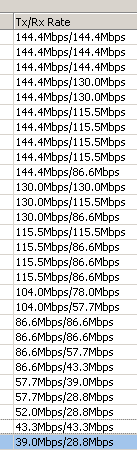
Nothing magical as far as I can see on our own WISP setup. I would suggest checking your spectrum quality. Do you have high noise levels from physically close by radios? Are you using excessive power levels? Is anyone else running excessive power levels close to you within the same radio band? See screenshot below from our radios running legal EiRP levels, 5ghz-only-n, Nv2 on 20M channel, 2mS TDMA period, cell radius 10km and hw-retries set to 15. A few clients are in a bad location and cannot go any faster than around 40-50M data rate. But this is a problem with trees in Fresnel Zone. Also note that Nv2 does not raise data rates until traffic passes. When just idling or with low traffic it is normal to see low data rates.