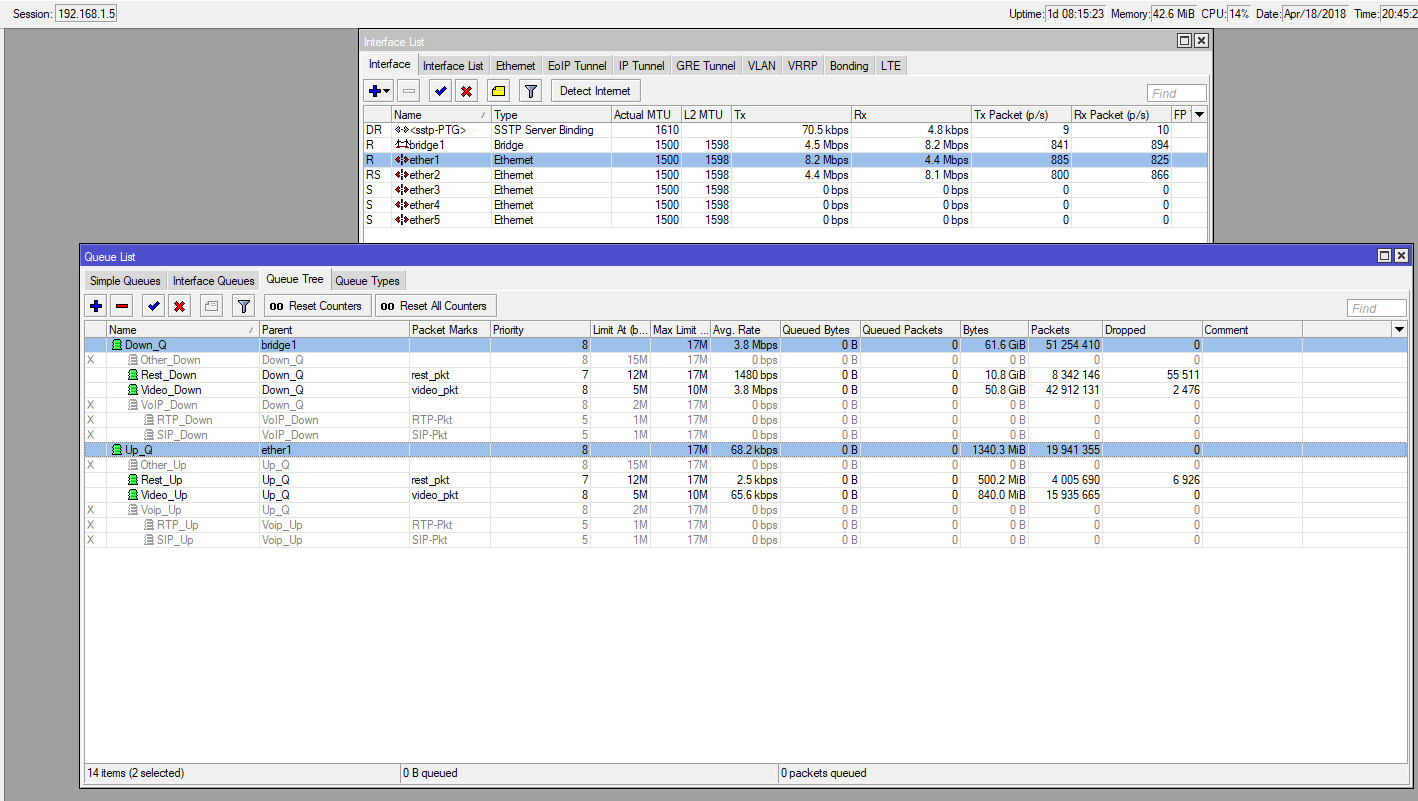
I am a bit confused and not sure if I am missing something here.
I created Mangle rules and then created Queue Tree queues to limit the traffic in order to leave enough free bandwidth available for SIP/RTP so that I can fasttrack this to prevent delays in voice calls.
When I compare the traffic on the ether1 interface, which is the WAN interface, the download / uploads does not seem to match the traffic on the Queue Tree screen, more specifically seems to be upload traffic, see attached client.jpg file.
My Mangle rules are only for TCP, but I torched ether1 interface, and the UDP traffic going through it is minimal and does not make up the differenece, so it looks like I am not catching all tcp traffic with the mangle rules.
Can you assist me in where I am going wrong or what am I missing? Thanking you in advance
# apr/18/2018 20:30:31 by RouterOS 6.41.4

# model = RouterBOARD 750 r2
/ip firewall filter
add action=accept chain=input comment="Allow VPN" dst-port=443 in-interface=ether1 protocol=tcp
add action=fasttrack-connection chain=forward comment="Fasttrack VoIP traffic" connection-state=established,related dst-port=53,5060,5061,10000-20000 protocol=udp
add action=accept chain=forward comment="Allow Established / Related connection through Router" connection-state=established,related
add action=accept chain=forward comment="Allow new connection through Router" connection-state=new src-address-list=LocalLan
add action=accept chain=forward comment="Allow DSTNATed" connection-nat-state=dstnat connection-state=new in-interface=ether1
add action=drop chain=forward comment="Disallow invalid connection through Router" connection-state=invalid
add action=drop chain=forward comment="Default Forward Drop Rule"
add action=accept chain=input comment="Allow Established / Related connection to Router" connection-state=established,related
add action=accept chain=input comment="Allow new connection to Router from LAN" connection-state=new src-address-list=LocalLan
add action=drop chain=input comment="Disallow Invalid connection to Router" connection-state=invalid
add action=drop chain=input comment="Default Input Drop Rule"


# apr/18/2018 20:31:06 by RouterOS 6.41.4

# model = RouterBOARD 750 r2
/ip firewall nat
add action=masquerade chain=srcnat out-interface=ether1
add action=dst-nat chain=dstnat comment="SIP Server" dst-port=5060,5061,10000-20000 in-interface=ether1 protocol=udp to-addresses=192.168.1.2
add action=dst-nat chain=dstnat comment=CCTV dst-port=8000,37777 in-interface=ether1 protocol=tcp to-addresses=192.168.1.150
add action=dst-nat chain=dstnat comment="CCTV Saber" dst-port=88,10000 in-interface=ether1 protocol=tcp to-addresses=192.168.1.6
add action=dst-nat chain=dstnat comment="Alarm 1 & 2" dst-port=37111 in-interface=ether1 protocol=tcp to-addresses=192.168.1.240


# apr/18/2018 20:31:45 by RouterOS 6.41.4

# model = RouterBOARD 750 r2
/ip firewall mangle
add action=mark-connection chain=prerouting connection-state=new new-connection-mark=video_con passthrough=yes protocol=tcp src-address=192.168.1.57
add action=mark-packet chain=forward connection-mark=video_con new-packet-mark=video_pkt passthrough=no protocol=tcp
add action=mark-connection chain=prerouting connection-mark=no-mark connection-state=new new-connection-mark=rest_con passthrough=yes protocol=tcp src-address=192.168.1.0/24
add action=mark-packet chain=forward connection-mark=rest_con new-packet-mark=rest_pkt passthrough=no protocol=tcp


# apr/18/2018 20:32:26 by RouterOS 6.41.4

# model = RouterBOARD 750 r2
/ip firewall raw
add action=drop chain=prerouting dst-port=21,22,80,81,82,8080,8081,8082,8089,8181,8291 in-interface=ether1 protocol=tcp


# apr/18/2018 20:33:20 by RouterOS 6.41.4

# model = RouterBOARD 750 r2
/queue tree
add max-limit=17M name=Up_Q parent=ether1 queue=default
add limit-at=12M max-limit=17M name=Rest_Up packet-mark=rest_pkt parent=Up_Q priority=7 queue=default
add limit-at=5M max-limit=10M name=Video_Up packet-mark=video_pkt parent=Up_Q queue=Video_Qs
add max-limit=17M name=Down_Q parent=bridge1 queue=default
add limit-at=12M max-limit=17M name=Rest_Down packet-mark=rest_pkt parent=Down_Q priority=7 queue=default
add limit-at=5M max-limit=10M name=Video_Down packet-mark=video_pkt parent=Down_Q queue=Video_Qs