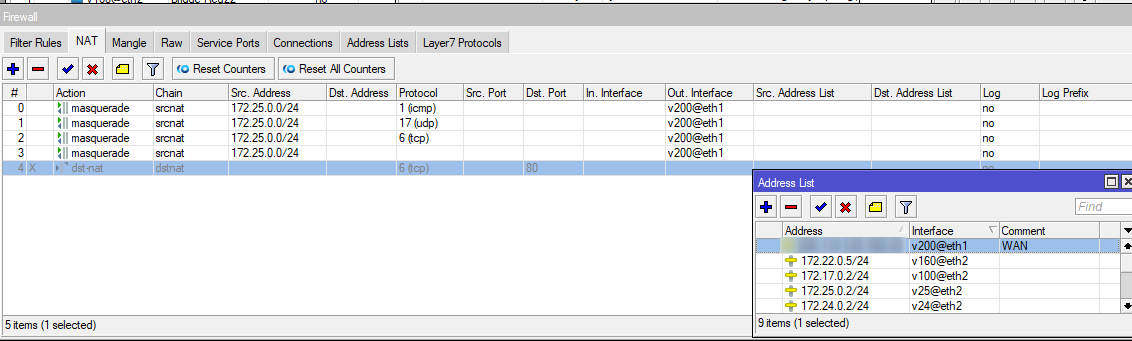
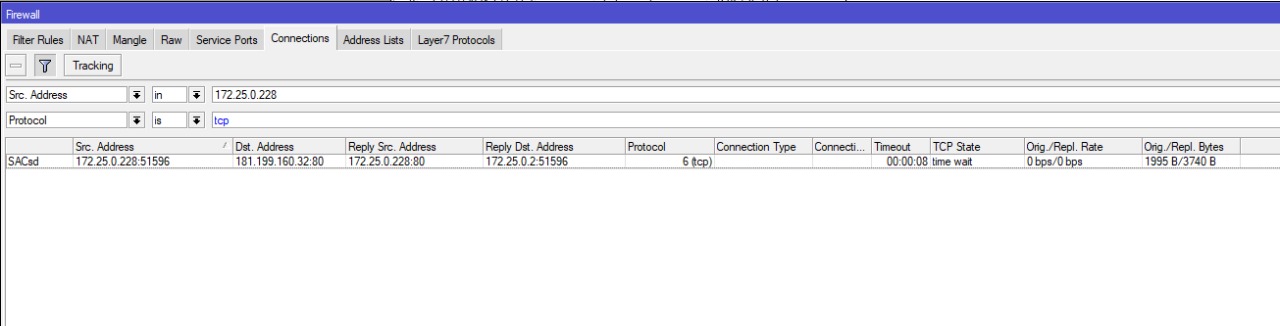
When I try to establish a TCP connection PORT 80, I verify in the Connection Tracking that the Reply Src Address and Reply Dst Adress are the same. Which is wrong because the Reply Scr Address should be the public ip I want to connect to.
When the connection is other than tcp 80 (icmp, upd , tcp port different 80) it works fine .
My config:
[sotof@RVPN2DC] /ip/firewall/nat> print
Flags: X - disabled, I - invalid; D - dynamic
0 chain=srcnat action=masquerade src-address=172.25.0.0/24 out-interface=v200@eth1 log=no log-prefix=""
Are you trying to access HTTP service on public IP from a LAN client? If so, you’ll have to implement hairpin NAT. Which involves both DST-NAT and SRC-NAT (with their respective gotchas), but I don’t know if connection tracking table will show addresses you expect in a single row (both NATs are two separate processes, executed at different packet processing stages).
Also check all the NAT rules, it might be some unexpected rule also doing its action on connection you’re looking at.
It would help if you showed us actual NAT rules … what you did show is a collection of random pieces which you found odd but don’t tell anything without knowing the config.
Also what is the use case.
I mean I have my router for users to have traffic flow, not to play silly games of tracking TCP connections as a hobby. Do you have users??
It is a router that I am starting to configure with few rules. On the Lan I have only one linux server and I can’t update packages (apt get…).
So masquerade does not work anymore as it was with version6? How do I make the LAN computers have access to the Internet now? before it was a simple masquerade rule on the wan interface.
rule number 2 in my capture (tcp) only works if the port is not 80. how can this be?
 Do you have users??