Hello everyone,
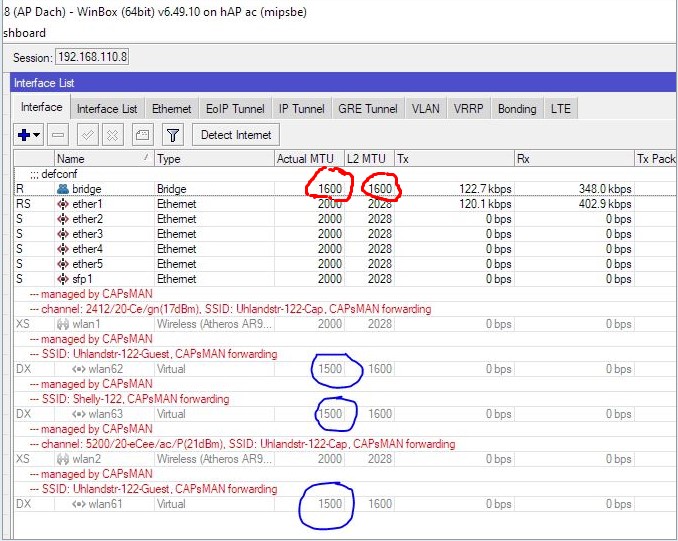
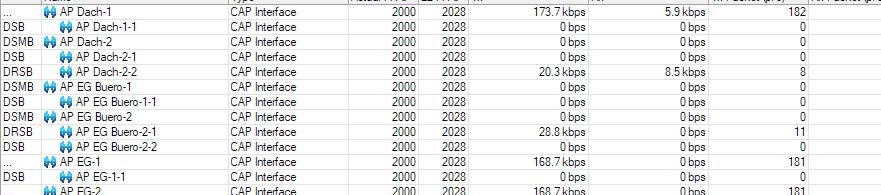
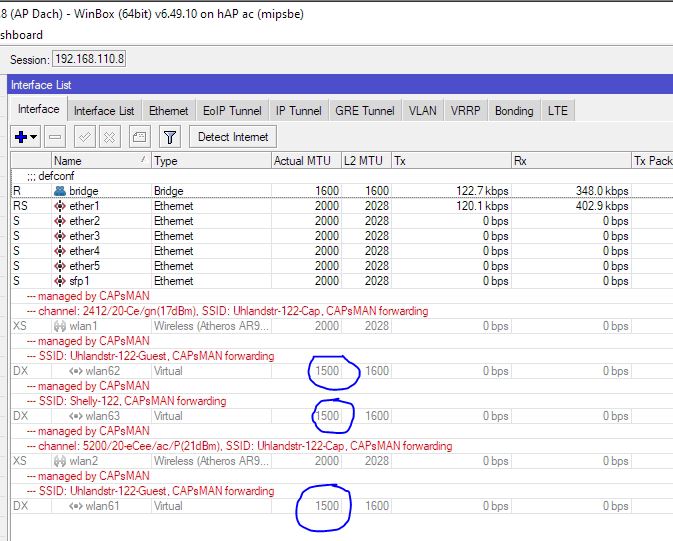
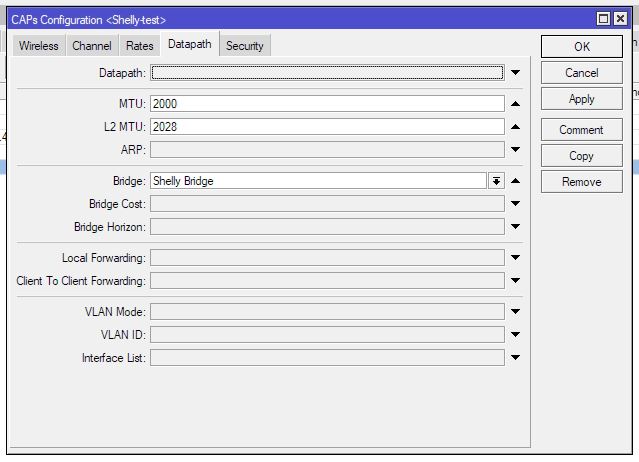
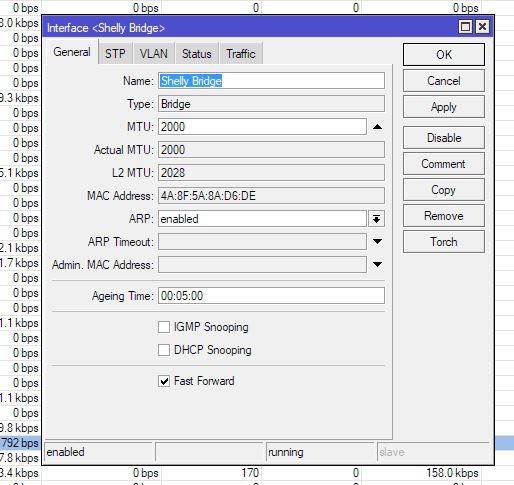
I am trying to change the MTU Size of my WiFi Interfaces but I am struggeling a bit with the Virtual ones created by Capsman. When I look at them from the router running Capsman, this device tells me that the Interfaces are set to a MTU of 2000. If I go to any access - point, there I see that my physical WiFi Interface is set to the MTU of 2000, but the virtual ones (created as Slave Configs from Capsman) there are still listed at 1500. Which device is to believe here? Router OS Version is 6.49.10 on all devices, the Router running Capsman is a RB4011iGS+, the APs are hAP ACs and hAP AC Lites.
What would be the Maximum MTU Mikrotik would allow on a WiFi Interface anyway and what is the difference for virtual interfaces? For now, the hAP AC Lites limit my system to a max MTU of 2028. The normal hAP ACs would allow some 4000ish MTUs, at least on the RJ45 / SFP - ports.
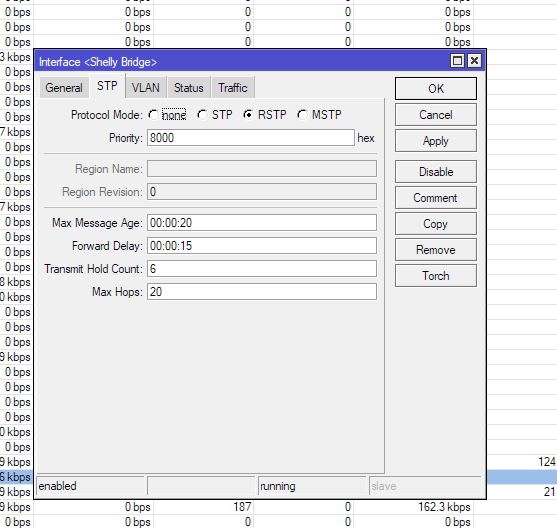
Here are some screenshots to shed more light on that thing:
Thanks a lot
Output on CAP devices contains plenty of hints that it most probably doesn’t show correct values: interface flags (X), colour (shaded and red comments) … to me this means that they really shouldn’t be referred to in any way.
Specially so as you’re using CAPsMAN forwarding which means that MTU value is only valid on ports on the CAPsMAN (CAPsMAN forwarding means that there’s a L2 tunnel between CAP and CAPsMAN, which obviously can perform fragmentation/defragmentation so any MTU value on CAP doesn’t mean anything).
Thanks a lot.
Fragmentation is the root cause I was doing that MTU excercise on that system. How could I look for possible causes of that and make it better?
Where does fragmentation happen? Fragmentation only happens when there’s a router which has to route traffic between interfaces with different MTU sizes. And often that’s the problem when MTU sizes are larger than de-facto standard (which is 1500). It also happens when some WAN link doesn’t support this standard (e.g. pppoe is often limited to 1480 or 1492). And if things are not insanely limited on some routers (some are blocking all ICMP traffic), PMTUD should figure it out (that’s per-connection).
The screenshot doesn’t show all the bridge ports on CAPsMAN device … if not all MTU values match, then this calls for trouble - fragmentation doesn’t happen for bridged/switched traffic, only L3 devices (routers) perform fragmentation. If an L2 device receives frame which is too large for egress port, it can only drop that frame (without any feedback to original sender). Indeed that’s governed by L2MTU sizes, but usually (L3) MTU sizes depend on L2MTU sizes if admin doesn’t set (L3) MTU manually to some sane value.
Thanks for the answer.
My network setup is the following:
I got 3 different WiFi - SSIDs, one “Master” or “Home” WiFi, one for IoT Devices (mostly Shelly Relais and such), and one “Guest” WiFi. “Master” and “Guest” are configured as 2,4 and 5 GHz each, that makes up my Capsman Config.
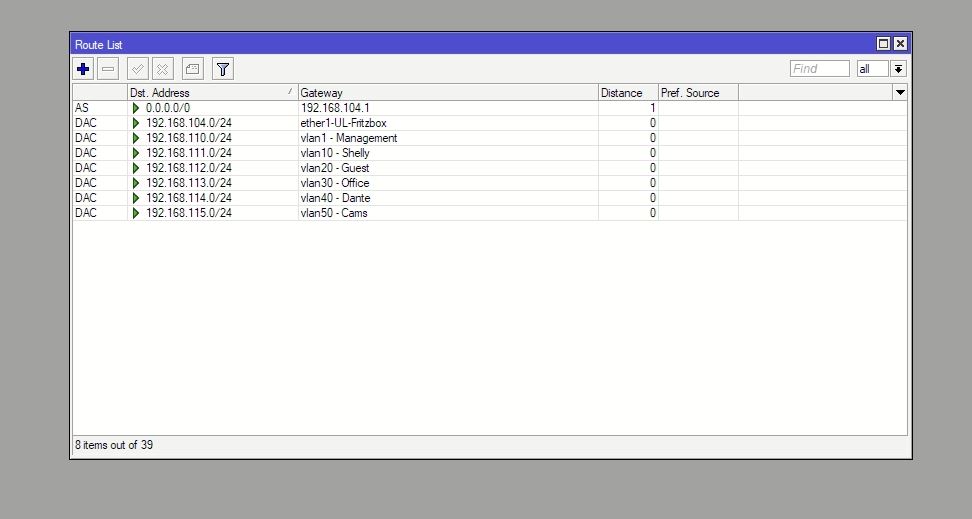
Each SSID is on it’s own Bridge with it’s own IP Range and there are static routes between those 3 IP - Ranges configured, as well as a static route outbound to an external router, a Fritzbox my provider provided.
So, this WiFi question might have turned into a routing question. So far, the setup worked for me, signs of fragmentation occured when I installed some new devices on my IoT WiFi and trying to control them with a HTTP get from a control processor. From any Browser, they work just fine, but from my control system, I get a 400 - bad request error. This is a FW issue with a Shelly device usinf LWIP that does not like Data arriving in multiple packages. So my goal is to somehow encourage my network not to split up messages into multiple packets if that is possible, at least when it goes from my IoT WiFi to my “Master” network, where also wired ports are used. This caused this whole question chain…
In my view increasing MTU in all of your networks just because one broken device would likely appreciate larger packets, is digging own grave (because it’ll affect all of your networks, including those who have nothing, just nothing, to do with the Shelly). What I’d do is to contain the MTU madness into one subnet and communicate with the Shelly thingy directly only using some other device inside same subnet. If you need communication with devices elsewhere, then you might have to install some sort of proxy server (could be any standard proxy server, such as HAproxy or apache, would do … but it might happen that using proxy server won’t solve the “all data in single packet” requirement).
IMO these kind of problems are the ones which drive necessity for dedicated IoT networks … but most of times it’s not enough to contain only suspicious devices, often it’s best to contain also “their master”. And then communicate only with “master” from other networks.
Is there any reason to use CAPsMAN forwarding, instead of local-forwarding?
Just not a familiar with CAPsMAN forwarding myself, but know it uses DTLS tunnels to package traffic…which would lower the MTU. You have 1600 MTU of master, so I’d think that’s right. But since I’m not sure on CAPsMAN’s logic, it could repackage the frames from virtual interfaces in some ways that cause fragmentation. Why I’d worry about using CAPsMAN forwarding.
Capsman forwarding would have made it easier for the routing, in my book. Now, there are just static routes on the Capsman. With local forwarding, wouldn’t I need to setup a static route on every AP?
Well, plain DHCP gets an AP a route…and CAPsMAN can still push config.
My concern is the tunnels are reducing available MTU, now you have 1600 MTU on physical ones, but I’m not sure how tunnels work for Virtual APs… Not a lot of docs on how its tunneling scheme in CAPsMAN works at protocol level, which makes it hard to know what’s going on in your case…and why I asked…
Well, there is an DHCP - Server on the Bridge that is part of that WiFi, but things confuse me a little here:
The DHCP - Server there gives all devices the Gateway 192.168.111.1, which is the Capsman Router. The shelly are configured with static IPs and that Gateway at the moment and are reachable.
On the Bridge, there is not so much configured:
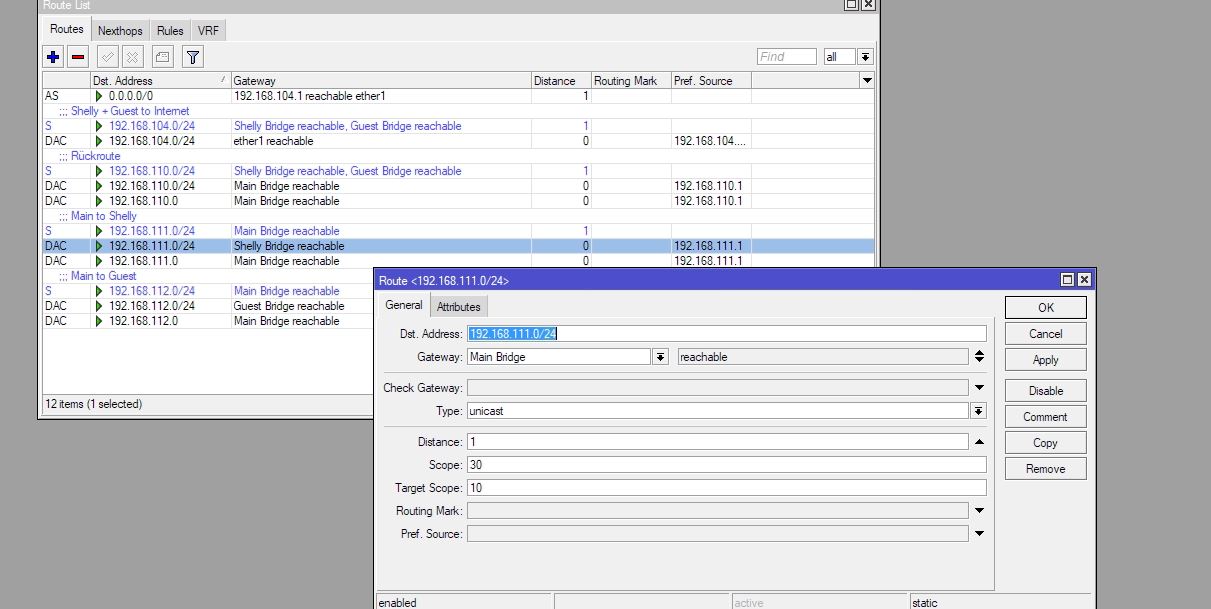
and the Route is simply this:
I am a little lost, where should I adjust things when switching my Shelly WiFi to local forwarding? I tried this, but just changing this made the whole stuff unreachable…
See you
Before switching this to use “local-forwarding”, I’d first try reducing the “main” Wi-Fi MTU to 1500 and see if that fixes you issue. Setting that higher might cause more problems since it’s 1500 elsewhere upstream. And this is easier to test. Are you sure it’s the MTU why the these device aren’t working?
Basically, once you have CAPsMAN forwarding working, unwinding it is likely tricky . But basically requires changing the cAP’s too. e.g. VLAN trunk to the APs, and then use CAPsMAN to set the VLAN ID for various SSID pushed when using local-forwarding. But that’s a different model of operation than you’re setup/used to.
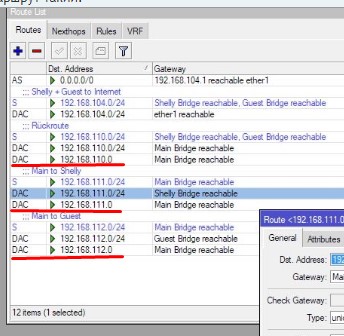
For what reason do you have an additional route created to the network address on the bridge?
If your network is 192.168.111.0/24, then 192.168.111.0 is a network address and cannot be used as a host address.
There are fewer bridge MTUs on the device than MTU interfaces.
The path to the 192.168.110.0/24 network was through the Shelly bridge, now it is through the main bridge.
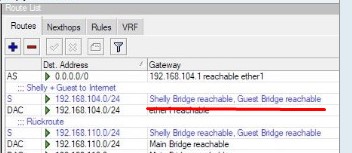
When creating static routes, you specified two gateways for the network. This means that the Router will share the load between these gateways.
In general, there are many inaccuracies and small errors.
Well, the idea behind that was: Route the Shelly - Wifi to my Fritzbox to the internet (for devices to pull FW Updates and such) and route it to the Main WiFi, so my control system could talk to it. Same goes for the guest WiFi. How would I improve on this?
So, sometimes, Projects take a bit longer and need to be postponed, but I still got an Issue here:
I am trying to send a GET Request from a control server to some smart home devices (thermostats to be exact) and doing so I get an “Error 400 - Bad request” reply.
Shelly - TRV_Poll_Status - Error Polling Status: Crestron.SimplSharp.Net.Http.HttpException: HTTP/1.0 400 Bad Request
Server: lwIP/2.1.2 (http://savannah.nongnu.org/projects/lwip)
Content-Type: text/html
at Crestron.SimplSharp.Net.Http.HttpClient.Dispatch(HttpClientRequest aRequest)
at Shelly_Integration.Shelly.TRV_Poll_Status(String Device_IP, String Username, String Password)
at UserModule_SHELLY_TRV_V3.UserModuleClass_SHELLY_TRV_V3.POLL_OnPush_1(Object EventInfo)
at Amib.Threading.Internal.WorkItem.n()
at Amib.Threading.Internal.WorkItem.Execute()
at Amib.Threading.SmartThreadPool.f(WorkItem A_0)
at Amib.Threading.SmartThreadPool.r()
Talking to the manufacturer, this might be due to some “fragmentation” and the lwIP service not liking this, pointing to some “network” issue. That’s why I am here. I can connect with a browser just fine to all those thermostats, but not with my control system. If a TRV sends an URL Out on it’s own, it arrives in the control system and is processed just fine.
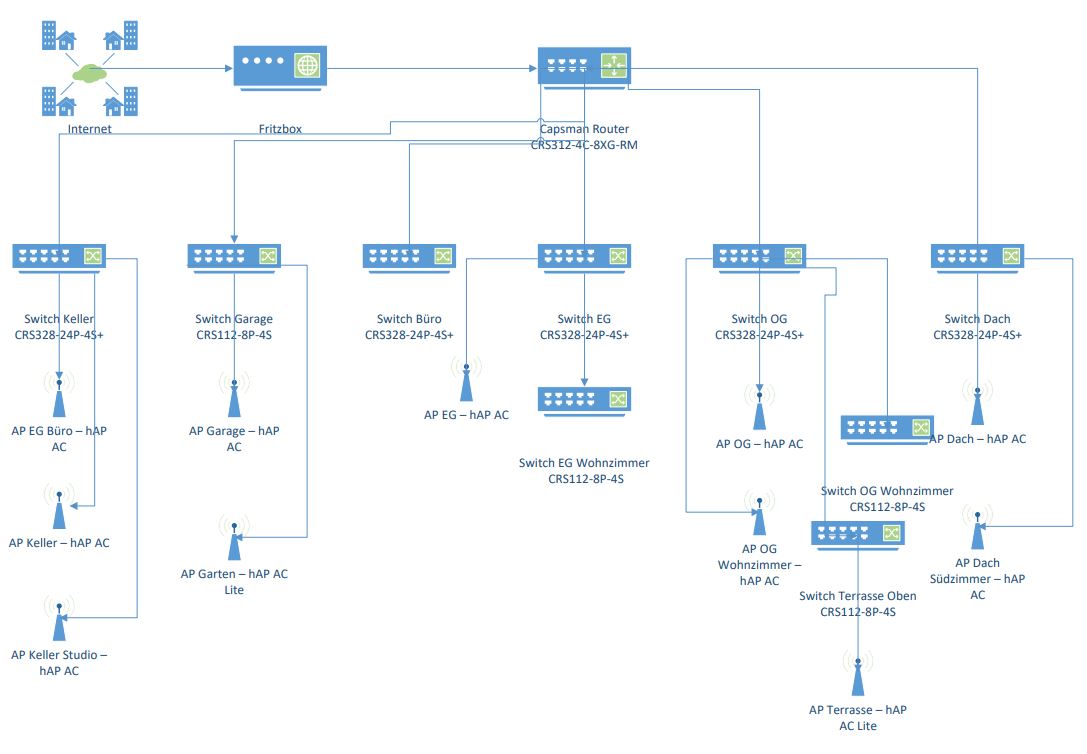
Now, I am looking for a way to improve this. This is my network topology:
The CRS3112-4C-8XGM-RM is acting as a core switch, central router and Capsman - Manager with this config: swicht-keller-2024-01-16.rsc (5.52 KB)
The CRS328-24P-4-S+ are basically my access layer switch, here is one example config: capsmanrouter-2024-01-16.rsc (15.6 KB)
and then, aside from the config they receive by the Capsman, I fiddled a bit on the hap ACs: ap-keller-2024-01-16.rsc (7.56 KB)
The control system is plugged to the core switch and the TRVs are all over the building, connected to the “Shelly” WiFi. So, the path is always: Core → Access - Switch → Access - Point. (The APs on the CRS112s are outside, so a TRV should not try to connect there).
Use /tool/sniffer, and see what’s actually happen with the GET requests. You’d just care about the MTU and packet size.
But if it’s getting an HTTP error back, it means the packets got there & TCP was established – that does not strike me as a “network issue”. If it was not connecting at all…different story.
So, I did some wire-sharking and this is the result:
Measured on a Mirror - Port of the control system and my laptop on the very same switch.
My Laptop is 192.168.110.33 and sends the Status - request with 451 bytes, which this TRV - Device likes.
The Pro3 sends the same GET with 60 Bytes and this is not liked by the TRV, for what reason ever. I guess this rules out any network issues, or am I wrong here
Yeah I’d think so. Your no where the MTU, and even below the lowest TCP MSS.
If it’s unencrypted, Wireshark should you the different headers/data etc between the 2 GET requests. That likely give you some good data for your vendor whose claiming it’s a network problem.
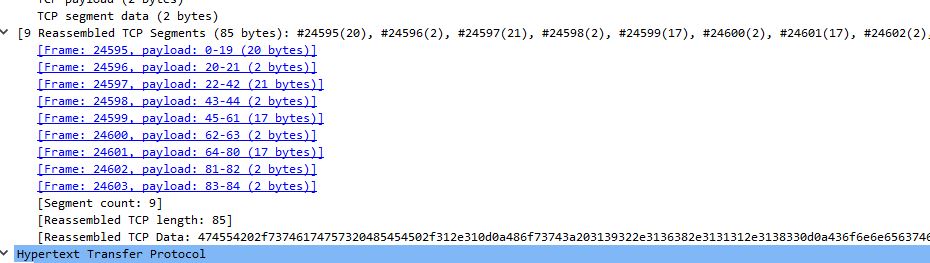
So, I did some more research in Wireshark and apparently, this segmentation is the issue:
A packet producing an Error 400 arrives in a couple of segments, while a working one does not.
Is there a way in the switch config to avoid such a thing or would this be the NIC of my control system?
Ah that makes more sense as to the 400 being related… although 8 fragments seems very odd.
I cannot recall specific of V6 capsman MTU rules, so not 100%**… But have you tried just changing the MTU on the wlan1 and wlan2 to 1500 (instead of 1600) & leaving L2MTU at 1600 (or greater)?
I’m also not sure why your NOT using an MTU of 1500 on the Ethernet ports either… But the way the bridge interface works, it will use the lowest MTU of the ports. So by changing the MTU of wlan1, the bridge’s “actual mtu” will then be 1500 anyway, so the ethernet MTU at 2000 won’t do much.
** Someone more familar may know if the capsman tunnels are constrained by the MTU or L2MTU as the DTLS header are adding something/somewhere. IDK… I’ve only used local-forwarding with CAPSMAN.
Well, the screenshots on top of this thread are outdated. Between the creation of the topic and today, I did a complete reconfig of my system and all the MTUs are back to 1500 as the default setting. Routing looks much cleaner now:
but I still get this segmentation (?) if this is the right term. The running configs were posted by me on monday. Local forwarding is enabled everywhere, but same result… capsmanrouter-2024-01-16.rsc (15.6 KB) swicht-keller-2024-01-16.rsc (5.52 KB) switch-garage-2024-01-16.rsc (2.91 KB) ap-eg-2024-01-16.rsc (2.72 KB) ap-keller-2024-01-16.rsc (7.56 KB)

 . But basically requires changing the cAP’s too. e.g. VLAN trunk to the APs, and then use CAPsMAN to set the VLAN ID for various SSID pushed when using local-forwarding. But that’s a different model of operation than you’re setup/used to.