most of the time IGMP traffic is multicast - so there comes the connection i guess … still, as you wrote, the documentation is poor indeed
Thanks for your work, @colinardo!
I've tried it with with your arm64 docker image and also built an own container with the help of your sources.
In both cases the following error message appears while starting the container on a RB5009UG+S+ (arm64) or on a CHR (x86_64) with v7.10.2:
ip: RTNETLINK answers: Not supported
Any idea about the root cause?
Thank you!
Cannot confirm this, successfully works both on CHR(x86) as well on a RB5009 on current fresh RouterOS Release Version 7.10.2, with the provided container.
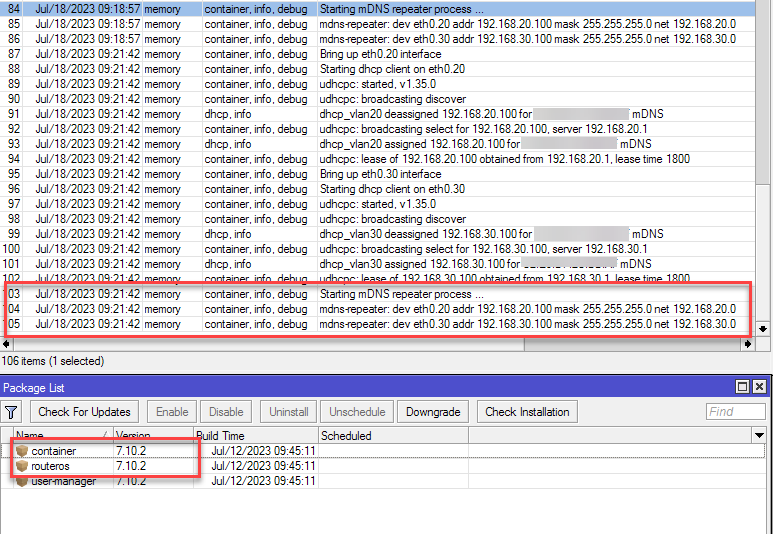
You have to follow the guide precisely!
Regards @colinardo
p.s. If you have any other questions please only post them on administrator.de in the corresponding tutorial. I am not following this post regularly, thanks.
Argh! Didn't follow the guide in detail - my fault! After naming the VLAN interfaces in the proper way and assigning the IPs, the container started successfully.
Additionally I had to activate the Multicast Helper (set to 'full') on the wireless interfaces and disable NAT between both networks.
Now the connection to AirPlay devices is running.
Unfortunately the connection to AirPlay2 devices doesn't work. Can anyone confirm that or does anyone have an idea?
Thank you guys!
I think the airplay protocol enforces a same subnet rule before starting a stream. So I’m guess the mDNS is working, and AirPlay internally is enforcing DRM/anti piracy.
No problem, shit happens  .
.
The mDNS Protocol is responsible only for device announcement in the subnets, it has nothing to do with connections between the devices itself.
If the connection depends on multicast streams (wich is normally the case when media is streamed to multiple devices) which also have a TTL value of 1 they will never leave their own subnet. In this case you have to enable the IGMP Proxy Feature with an upstream to the source subnet where the stream comes from to make them accessible for the other subnet. And don’t forget firewall rules for UDP traffic and multicast address range (224.0.0.0/4). Capture the traffic with the sniffer tool and you will get more information about the connections and their needs.
Wish you good luck. Sorry but I don’t have apple equipment available for testing.
Regards
Thanks again, @colinardo!
mDNS is completely working now here.
All test devices (AirPlay with Samsung TV, Yamaha MusicCast, Bose SoundTouch; AirPrint with HP MFD) are working fine, even without IGMP Proxy and without Multicast Firewall Rules. All these devices are happy without NAT.
Only a newer Bose SoundBar is refusing to work. Seems like a shitty implementation on their side. First of all, traffic needs to be natted because Bose in this series seems not to be aware of using a gateway. And even then, an AirPlay 2 stream doesn’t work. Anyway, I’m ignoring this device right now
Did anyone figure out why an IGMP proxy would work for the chromecast discovery across a vlan boundary?
I’ve been performing some tests in a single-router environment with a Mikrotik Hex S router connected via trunk port to a Unifi AP with two SSID:s where one contains an android device and the other contains a chromecast. Each SSID corresponds to a vlan on the trunk and both these vlans are created as interfaces on the bridge. Vlan-filtering is enabled and only vlan tagged packets are allowed on the trunk port to the AP.
Reading about IGMP-Proxy it seems like the upstream port should be connected towards the root of the multicast tree and it is used to send IGMP membership reports e.g., to indicate interest/join a multicast group. However if the chromecast is on vlan 20 and android phone on vlan 10, both connected via the same switch trunk port in the Hex S router, it seems logical that the IGMP-proxy upstream interface would be vlan 20 if the android phone wants the router to forward the IGMP membership report to the chromecast. Connecting a computer with wireshark sniffing on vlan 20 does not reveal any IGMP membership reports coming from the router, nor is any multicast traffic originating at the chromecast forwarded to vlan 10.
Must multicast traffic be forwarded in both directions for the chromecast discovery to work?
In an attempt to remove problems with the firewall I temporarily allowed any traffic destined to 224.0.0.0/4 in both directions (vlan10 ↔ vlan20) and I also tried the same thing with bridge filtering.
Per earlier suggestions in this thread I also enabled igmp-snooping on the bridge but I did not notice any difference.
I also added a loopback bridge as upstream interface for the igmp-router as DarkNate suggested but did not see any difference in traffic on the two vlans and I struggle to understand why and if a loopback bridge would provide better connectivity than using the vlan interface as the IGMP-router upstream.
However, I’m pretty sure I haven’t grasped entirely how it is supposed to work so would appreciate if anyone had any insights to share apart from just using a mDNS reflector/repeater container to solve it or to put everything in the same network.
I think the Chromecast works(/can work) because it’s using DIAL/SSDP, which uses IGMP. But the IGMP proxy has be setup pretty exactly even in that case… For mDNS itself, I think the conclusion was something in mDNS protocol or bug in IGMP proxy causes it to not work.
MikroTik IGMP Proxy doesn’t support IPv6 it seems, after further PCAPs myself, meaning it isn’t performing MLD Proxying in the process, even though you configure it right.
I suggest you talk to MikroTik official support about it. If they make it work with IPv6, then all these problems disappear overnight.
The other advanced solution is PIM. I personally would never use PIM in a home network, too much complexity.
I guess I don’t understand the extent of what the IGMP Proxy can do for IPv4.
Will the proxy forward more than just the IGMP report and query messages? It seems to me that IGMP is used to join/leave the multicast groups for mDNS and SSDP/DIAL, but once joined will the proxy also forward the other non-IGMP multicast packets that are part of mDNS and SSDP/DIAL?
PIM seems more likely to do the above mentioned tasks but as you said DarkNate, it seems to add a lot of complexity.
Is there anything more that IPv6 MLD would do other than what the IGMP-Proxy already does for IPv4? E.g., something that would make it more suited to allow multicast traffic and mDNS discovery to traverse a subnet/vlan boundary?
I think you should ask for proper documentation from MikroTik.
- Proper documentation for IGMP Proxy (IPv4, what it does, can’t do for inter-VLAN)
- Proper documentation and support for MLD Proxy (IPv6, what it does, can’t do for inter-VLAN)
I was able to get this functioning, however, I cannot get it to work as my default LAN (192.168.1.0) does not have a tag so it does not grab an IP from this subnet. How would I go about doing this without breaking the network?
hi everyone, I read somewhere here that mDns forwarding will be available as part of DNS overhaul change in the future ROS, is that true?
thanks
It is simple.
- Get shell access in the container: /container/shell 0
- Edit /app/run.sh: vi /app/run.sh
- Modify line “exec /bin/mdns-repeater -f $ALLVLANIF” to “exec /bin/mdns-repeater -f eth0 $ALLVLANIF”
- Save and restart container
Thanks for the detailed example.
I know you have already answered the question, but I don’t quite get it: why use a loopback device as the upstream of the IGMP proxy, instead of a regular or VLAN interface?
In fact, I would have thought that using a loopback bridge as the upstream for the IGMP proxy would not work. For example, if I have the following (simplified) topology:
Printer Network <192.168.100.0/24> → (ether1) ROS (ether2) ← Computer Network <192.168.101.0/24>
mDNS announcements from the printer network would reach ether1 at the router and be dropped because ether1 is not marked as upstream (!) if you used a loopback as upstream instead, wouldn’t they?
I stopped using IGMP Proxy. I migrated to PIM, it works and I stopped worrying. You need ROS v7.11.2 in my testing.
Here:
http://forum.mikrotik.com/t/cross-vlan-multicast-pim-config/168921/1
do we have any update from Mirktotik re adding mDNS support officially? I do believe they mentioned somewhere that DNS is getting complete rework done and mDNS will be part of it as well??
I suspect @DarkNate is right here…
I think IGMP Proxy may ignore mDNS’s IP 224.0.0.51/24 since defined as “Local Network Control Block” in RFC-5771
Addresses in the Local Network Control Block are used for protocol
control traffic that is not forwarded off link. Examples of this
type of use include OSPFIGP All Routers (224.0.0.5) [RFC2328].
It’s ironic that PIM is easier, but there be less complex than the ill-defined IGMP Proxy…
IGMP Proxy was never really a “best practices” or an industry-wide accepted method and never standardized to my knowledge, which means, different vendors do it differently, so it’s usually half-baked.
PIM on the other hand is a well-defined standard:
https://www.rfc-editor.org/rfc/rfc7761.html