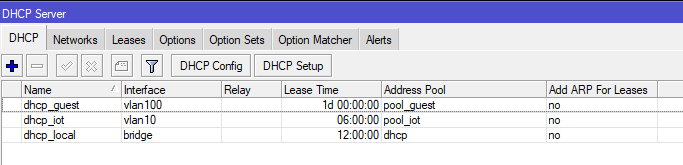
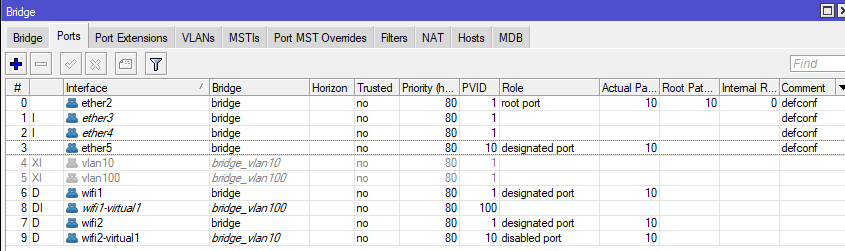
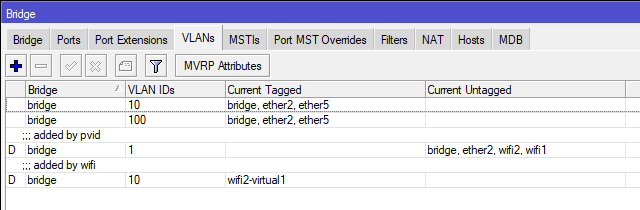
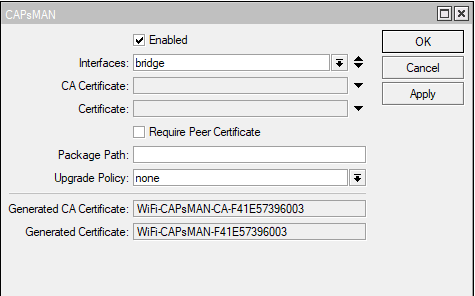
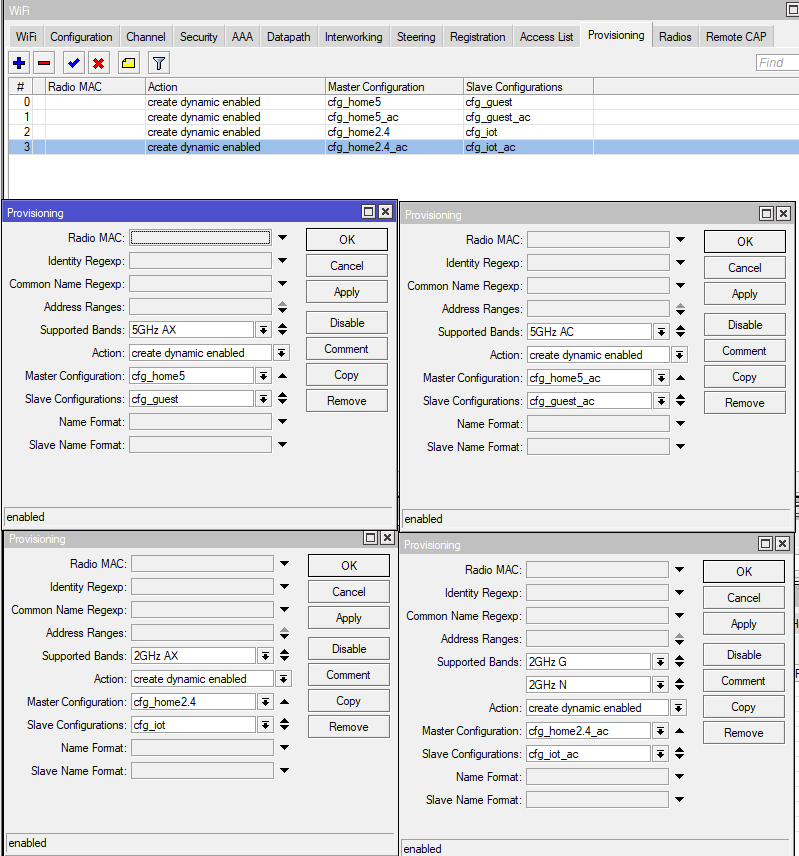
Migrating from old CAPsMAN to new (hap ac2 -> hap ax2)

Hi,
I need to migrate capsman from my old router which was hap ac2 to new one which is hap ax2.
From my understanding it could still work with my current caps (two cap ac’s and one wap ac) as they are arm based, but uninstallation of wireless package and installation of wifi-qcom-ac will be needed. I think configuring caps I can handle and if not then we can discuss it later. For now my main goal is to migrate current settings and preserve as much functionality as I had.

Just a few words about current config before I will paste export.

  • 3 vlans - vlan1 for home, vlan10 for iot, vlan100 for guests
  • 4 wireless networks - home 2,4 and home5 + iot 2,4 and guests5
  • master radios working on different channels per each cap
/caps-man> export      
# 2025-02-17 15:05:11 by RouterOS 7.16.1
# software id = S87N-E2ZU
#
# model = RBD52G-5HacD2HnD
/caps-man channel
add band=2ghz-b/g/n comment=hAP frequency=2412 name=channel1
add band=2ghz-b/g/n comment=cAP_2 frequency=2427 name=channel4
add band=5ghz-n/ac comment=hAP control-channel-width=20mhz frequency=5180 name=channel36 tx-power=40
add band=5ghz-n/ac comment=cAP_2 control-channel-width=20mhz extension-channel=eeCe frequency=5300 name=channel44 \
    tx-power=40
add band=2ghz-b/g/n comment=cAP_1 frequency=2457 name=channel10
add band=5ghz-n/ac comment=cAP_1 control-channel-width=20mhz extension-channel=eeeC frequency=5240 name=channel40 \
    tx-power=40
add band=2ghz-b/g/n comment="wAP AC" frequency=2462 name=channel13
add band=5ghz-n/ac comment="wAP AC" control-channel-width=20mhz extension-channel=Ceee frequency=5500 name=\
    channel48
/caps-man interface
add channel=channel13 channel.band=2ghz-b/g/n .frequency=2462 disabled=no l2mtu=1600 mac-address=\
    48:8F:5A:DE:2E:8A master-interface=none name="wAP AC_home2" radio-mac=48:8F:5A:DE:2E:8A radio-name=\
    488F5ADE2E8A
/caps-man datapath
add bridge=bridge_vlan100 client-to-client-forwarding=no name=dp_guest
add bridge=bridge client-to-client-forwarding=yes name=dp_home
add bridge=bridge_vlan10 client-to-client-forwarding=yes name=dp_iot
/caps-man security
add authentication-types=wpa2-psk encryption=aes-ccm group-key-update=1h name=security_home
add authentication-types=wpa2-psk encryption=aes-ccm group-key-update=1h name=security_iot
add authentication-types=wpa2-psk encryption=aes-ccm group-key-update=1h name=security_guest
/caps-man configuration
add datapath=dp_home mode=ap name=cfg_home_2g rx-chains=0,1,2,3 security=security_home ssid=Home tx-chains=\
    0,1,2,3
add country=poland datapath=dp_home mode=ap name=cfg_home_5g rx-chains=0,1,2,3 security=security_home ssid=Domek \
    tx-chains=0,1,2,3
add datapath=dp_iot name=cfg_iot rx-chains=0,1,2,3 security=security_iot ssid=IoT tx-chains=0,1,2,3
add country=poland datapath=dp_guest mode=ap name=cfg_guest rx-chains=0,1,2,3 security=security_guest ssid=Guests \
    tx-chains=0,1,2,3
/caps-man interface
add channel=channel10 configuration=cfg_home_2g disabled=no l2mtu=1600 mac-address=74:4D:28:12:A3:F8 \
    master-interface=none mtu=1500 name="cAP AC 1_home2" radio-mac=74:4D:28:12:A3:F8 radio-name=744D2812A3F8
add channel=channel40 channel.frequency=5240 configuration=cfg_home_5g configuration.country=poland disabled=no \
    l2mtu=1600 mac-address=74:4D:28:12:A3:F9 master-interface=none name="cAP AC 1_home5" radio-mac=\
    74:4D:28:12:A3:F9 radio-name=744D2812A3F9
add configuration=cfg_iot disabled=no l2mtu=1600 mac-address=76:4D:28:12:A3:F8 master-interface="cAP AC 1_home2" \
    mtu=1500 name="cAP AC 1_iot" radio-mac=00:00:00:00:00:00 radio-name=764D2812A3F8
add channel=channel4 configuration=cfg_home_2g disabled=no l2mtu=1600 mac-address=74:4D:28:46:AC:18 \
    master-interface=none name="cAP AC 2_home2" radio-mac=74:4D:28:46:AC:18 radio-name=744D2846AC18
add channel=channel44 channel.frequency=5300 configuration=cfg_home_5g configuration.country=no_country_set \
    disabled=no l2mtu=1600 mac-address=74:4D:28:46:AC:19 master-interface=none name="cAP AC 2_home5" radio-mac=\
    74:4D:28:46:AC:19 radio-name=744D2846AC19
add channel.band=2ghz-b/g/n configuration=cfg_iot disabled=no l2mtu=1600 mac-address=76:4D:28:46:AC:18 \
    master-interface="cAP AC 2_home2" name="cAP AC 2_iot" radio-mac=00:00:00:00:00:00 radio-name=764D2846AC18
add channel=channel1 channel.band=2ghz-b/g/n .frequency=2412 configuration=cfg_home_2g disabled=no l2mtu=1600 \
    mac-address=74:4D:28:1E:2C:BF master-interface=none name="hAP AC_home2" radio-mac=74:4D:28:1E:2C:BF \
    radio-name=744D281E2CBF
add channel=channel36 channel.band=5ghz-n/ac .frequency=5180 configuration=cfg_home_5g disabled=no l2mtu=1600 \
    mac-address=74:4D:28:1E:2C:C0 master-interface=none name="hAP AC_home5" radio-mac=74:4D:28:1E:2C:C0 \
    radio-name=744D281E2CC0
add channel.band=2ghz-b/g/n configuration=cfg_iot disabled=no l2mtu=1600 mac-address=76:4D:28:1E:2C:BF \
    master-interface="hAP AC_home2" name="hAP AC_iot" radio-mac=00:00:00:00:00:00 radio-name=764D281E2CBF
add channel=channel48 configuration=cfg_home_5g disabled=no l2mtu=1600 mac-address=48:8F:5A:DE:2E:8B \
    master-interface=none name="wAP AC_home5" radio-mac=48:8F:5A:DE:2E:8B radio-name=488F5ADE2E8B
add channel.band=2ghz-b/g/n configuration=cfg_iot disabled=no l2mtu=1600 mac-address=50:8F:5A:DE:2E:8A \
    master-interface="wAP AC_home2" name="wAP AC_iot" radio-mac=00:00:00:00:00:00 radio-name=508F5ADE2E8A
add configuration=cfg_guest disabled=no l2mtu=1600 mac-address=76:4D:28:12:A3:F9 master-interface=\
    "cAP AC 1_home5" name="cAP AC 1_guest" radio-mac=00:00:00:00:00:00 radio-name=764D2812A3F9
add configuration=cfg_guest disabled=no l2mtu=1600 mac-address=76:4D:28:46:AC:19 master-interface=\
    "cAP AC 2_home5" name="cAP AC 2_guest" radio-mac=00:00:00:00:00:00 radio-name=764D2846AC19
add configuration=cfg_guest disabled=no l2mtu=1600 mac-address=76:4D:28:1E:2C:C0 master-interface="hAP AC_home5" \
    name="hAP AC_guest" radio-mac=00:00:00:00:00:00 radio-name=764D281E2CC0
add configuration=cfg_guest disabled=no l2mtu=1600 mac-address=50:8F:5A:DE:2E:8B master-interface="wAP AC_home5" \
    name="wAP AC_guest" radio-mac=00:00:00:00:00:00 radio-name=508F5ADE2E8B
/caps-man manager
set ca-certificate=auto certificate=auto enabled=yes
/caps-man manager interface
set [ find default=yes ] forbid=yes
add disabled=no interface=bridge_vlan10
add disabled=no interface=bridge_vlan100
add disabled=no interface=bridge
/caps-man provisioning
add action=create-dynamic-enabled comment="cAP 1_2.4" master-configuration=cfg_home_2g name-format=identity \
    radio-mac=74:4D:28:12:A3:F8 slave-configurations=cfg_iot
add action=create-dynamic-enabled comment="cAP 1_5" master-configuration=cfg_home_5g name-format=identity \
    radio-mac=74:4D:28:12:A3:F9 slave-configurations=cfg_guest
add action=create-dynamic-enabled comment="hAP 2.4" master-configuration=cfg_home_2g name-format=identity \
    radio-mac=74:4D:28:1E:2C:BF slave-configurations=cfg_iot
add action=create-dynamic-enabled comment="hAP 5" master-configuration=cfg_home_5g name-format=identity \
    radio-mac=74:4D:28:1E:2C:C0 slave-configurations=cfg_guest
add action=create-dynamic-enabled comment="cAP 2_2.4" master-configuration=cfg_home_2g name-format=identity \
    radio-mac=74:4D:28:46:AC:18 slave-configurations=cfg_iot
add action=create-dynamic-enabled comment="cAP 2_5" master-configuration=cfg_home_5g name-format=identity \
    radio-mac=74:4D:28:46:AC:19 slave-configurations=cfg_guest
add action=create-dynamic-enabled comment="wAP AC_2.4" master-configuration=cfg_home_2g name-format=identity \
    radio-mac=48:8F:5A:DE:2E:8A slave-configurations=cfg_iot
add action=create-dynamic-enabled comment="wAP AC_5" master-configuration=cfg_home_5g name-format=identity \
    radio-mac=48:8F:5A:DE:2E:8B slave-configurations=cfg_guest

Any ideas/tips about:

  • how to do it in easiest way
  • optimizing current settings / removing unneeded ones / adding new
    will be much appreciated.

I would really like to advice you to use a single bridge and add VLAN filtering according to this great topic:
http://forum.mikrotik.com/t/using-routeros-to-vlan-your-network/126489/1

And please don’t use VLAN ID 1, that will save you a lot of time and frustration.

If you would like help on that, your complete config would be necessary (make sure to remove serial and any other private info):

/export file=anynameyoulike

Your config is a bit more extended than I expected. Will take some time to adjust. Starting point would be this link:
https://help.mikrotik.com/docs/spaces/ROS/pages/224559120/WiFi#WiFi-CAPsMAN-CAPVLANconfigurationexample:

To be honest my network is configured much higher above my competences, I received a lot of help here and on some network blogs and I knew one day it will become my pain :slight_smile: I will read this article later, once I am back from work, but not sure if I will understand it completely :slight_smile:


If I am not mistaken I only created vlan10 and vlan100 and separated those from "main" traffic. I am calling it VLAN1 but it may as well be just default config.


https://pastebin.com/biHbEqzE
I removed a lot of firewall address lists, scripts, schedulers and DHCP records.


Yep, already noted this link, will proceed with that for some tests.

Looks like I configured new capsman on hap ax2, I added itself as a cap and my wifi is working again, at least on devices connected to this paticular device.

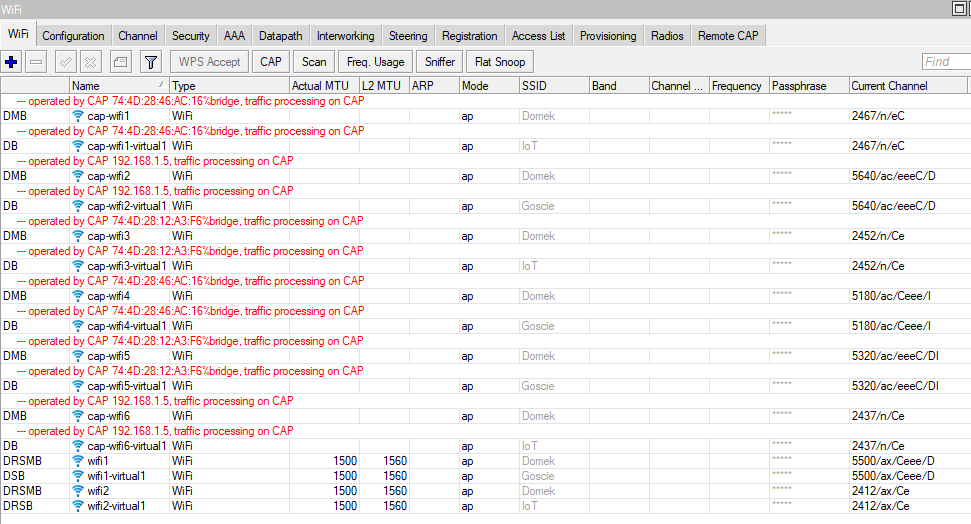
Regarding caps seems I ran into some troubles, I removed wireless package, installed qcom-ac, followed chapter “CAP using “wifi-qcom-ac” package” and I started to see cap wifi’s on capsman but apparently they doesn’t work.

CAPsMAN main device:
1.PNG
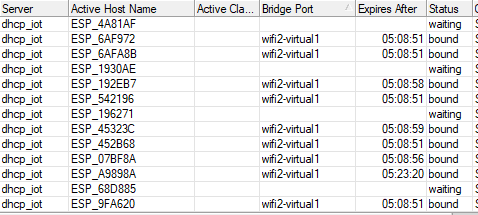
CAP1 and CAP2:
2.PNG
Devices in range on main device connected without problems, those gaps are devices out of range:
3.PNG
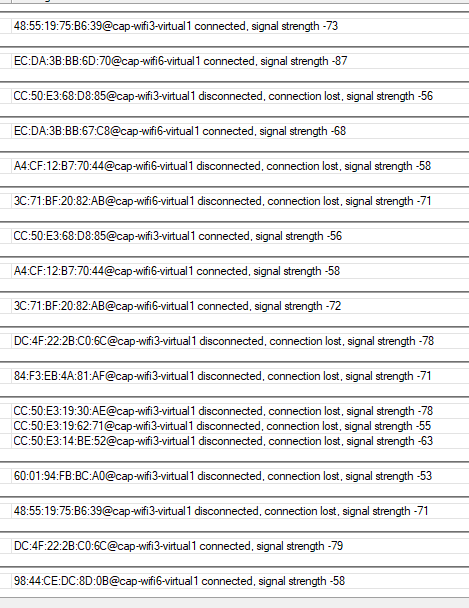
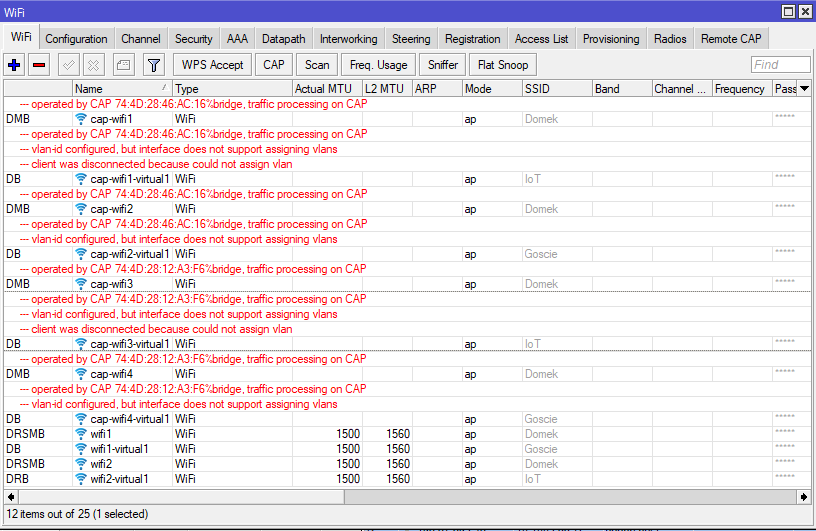
In main device logs I can see all other devices wanted to connect to cap’s wifi interfaces but somehow they can’t:
4.PNG

I think I will try to reset one of the caps to default settings to see if the problem lays on cap or on capsman side.

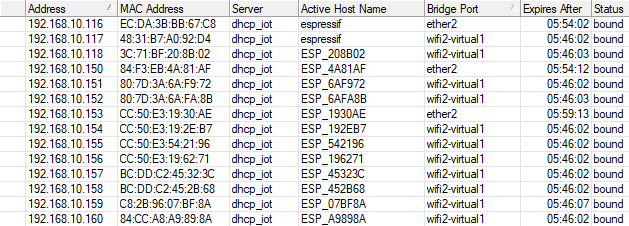
I reseted config of the caps with “CAPS mode” option enabled and now cliients are connecting, but those connected through caps are ending in the bad dhcp pool and displaying bad bridge port.
Not far from the end, just cosmetics I believe :slight_smile:

BAD:
2.PNG
GOOD:
1.PNG
Posting export from main device running capsman:

# 2025-02-18 14:46:33 by RouterOS 7.17.2
# software id = 56DB-EV57
#
# model = C52iG-5HaxD2HaxD
/interface bridge
add admin-mac=74:4D:28:1E:2C:BB auto-mac=no comment=defconf name=bridge \
    port-cost-mode=short
add name=bridge_vlan10 port-cost-mode=short
add name=bridge_vlan100 port-cost-mode=short
/interface ethernet
set [ find default-name=ether1 ] advertise=\
    100M-baseT-half,100M-baseT-full,1G-baseT-half,1G-baseT-full comment=Input \
    l2mtu=1598 mac-address=74:4D:28:1E:2C:BA
set [ find default-name=ether2 ] l2mtu=1598 mac-address=74:4D:28:1E:2C:BB
set [ find default-name=ether3 ] disabled=yes l2mtu=1598 mac-address=\
    74:4D:28:1E:2C:BC
set [ find default-name=ether4 ] disabled=yes l2mtu=1598 mac-address=\
    74:4D:28:1E:2C:BD
set [ find default-name=ether5 ] l2mtu=1598 mac-address=74:4D:28:1E:2C:BE
/interface vlan
add interface=ether1 name=ether1.20 vlan-id=20
add interface=bridge name=vlan10 vlan-id=10
add interface=bridge name=vlan100 vlan-id=100
/interface pppoe-client
add add-default-route=yes disabled=no interface=ether1.20 name=pppoe-out1 \
    use-peer-dns=yes user=012
/interface ethernet switch port
set 0 default-vlan-id=auto
set 1 default-vlan-id=auto
set 2 default-vlan-id=auto
set 3 default-vlan-id=auto
set 4 default-vlan-id=auto
set 5 default-vlan-id=auto
/interface list
add comment=defconf name=WAN
add comment=defconf name=LAN
/interface lte apn
set [ find default=yes ] ip-type=ipv4 use-network-apn=no
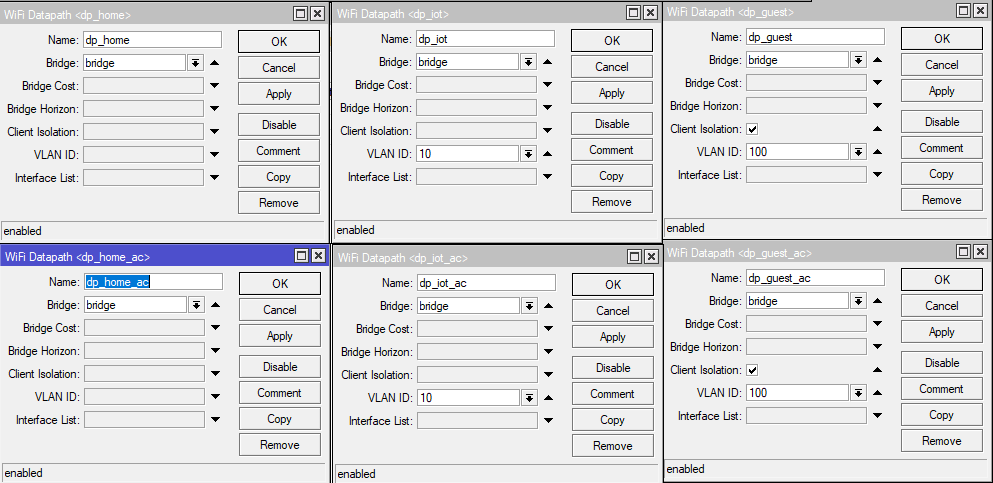
/interface wifi datapath
add bridge=bridge_vlan100 client-isolation=yes disabled=no name=dp_guest
add bridge=bridge disabled=no name=dp_home
add bridge=bridge_vlan10 disabled=no name=dp_iot
add bridge=bridge_vlan100 client-isolation=yes disabled=no name=dp_guest_ac
add bridge=bridge disabled=no name=dp_home_ac
add bridge=bridge_vlan10 disabled=no name=dp_iot_ac
/interface wifi security
add authentication-types=wpa2-psk disabled=no ft=yes ft-over-ds=yes name=\
    sec_guest
add authentication-types=wpa2-psk disabled=no ft=yes ft-over-ds=yes name=\
    sec_iot
add authentication-types=wpa2-psk disabled=no ft=yes ft-over-ds=yes name=\
    sec_home
/interface wifi steering
add disabled=no name=steering neighbor-group=dynamic-Domek-a4d9f796 rrm=yes \
    wnm=yes
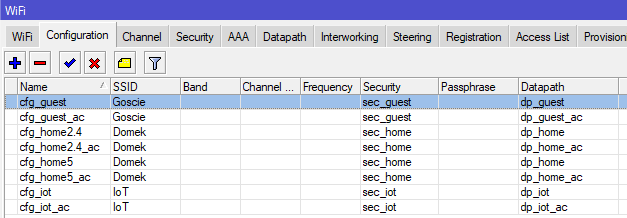
/interface wifi configuration
add datapath=dp_guest disabled=no name=cfg_guest security=sec_guest ssid=\
    Goscie steering=steering
add datapath=dp_home disabled=no name=cfg_home2.4 security=sec_home ssid=\
    Domek steering=steering
add datapath=dp_iot disabled=no name=cfg_iot security=sec_iot ssid=IoT \
    steering=steering
add datapath=dp_home disabled=no name=cfg_home5 security=sec_home ssid=Domek \
    steering=steering
add datapath=dp_iot_ac disabled=no name=cfg_iot_ac security=sec_iot ssid=IoT \
    steering=steering
add datapath=dp_home_ac disabled=no name=cfg_home5_ac security=sec_home ssid=\
    Domek steering=steering
add datapath=dp_home_ac disabled=no name=cfg_home2.4_ac security=sec_home \
    ssid=Domek steering=steering
add datapath=dp_guest_ac disabled=no name=cfg_guest_ac security=sec_guest \
    ssid=Goscie steering=steering
/ip ipsec policy group
add name=ike2-group
add name=ike2-policies
/ip ipsec profile
set [ find default=yes ] dpd-interval=2m dpd-maximum-failures=5
add dpd-interval=2m dpd-maximum-failures=5 name=ike2
/ip ipsec peer
add exchange-mode=ike2 name=ike2 passive=yes profile=ike2 \
    send-initial-contact=no
/ip ipsec proposal
add auth-algorithms=sha256 enc-algorithms=aes-256-cbc,aes-192-cbc name=ike2 \
    pfs-group=modp2048
/ip kid-control
add fri=0s-1d mon=0s-1d name=system-dummy sat=0s-1d sun=0s-1d thu=0s-1d tue=\
    0s-1d tur-fri=0s-1d tur-mon=0s-1d tur-sat=0s-1d tur-sun=0s-1d tur-thu=\
    0s-1d tur-tue=0s-1d tur-wed=0s-1d wed=0s-1d
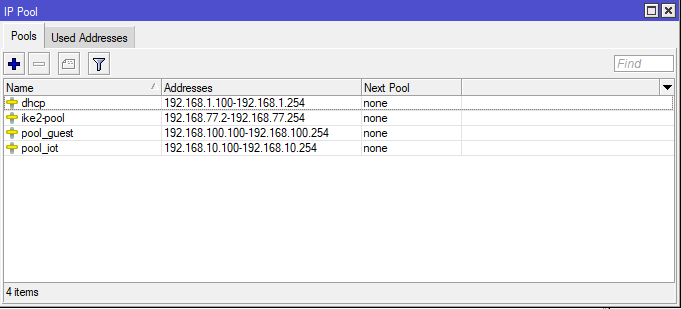
/ip pool
add name=dhcp ranges=192.168.1.100-192.168.1.254
add name=pool_iot ranges=192.168.10.100-192.168.10.254
add name=pool_guest ranges=192.168.100.100-192.168.100.254
add name=ike2-pool ranges=192.168.77.2-192.168.77.254
/ip dhcp-server
add address-pool=dhcp interface=bridge lease-time=12h name=dhcp_local
add address-pool=pool_guest interface=bridge_vlan100 name=dhcp_guest
add address-pool=pool_iot interface=bridge_vlan10 lease-time=6h name=dhcp_iot
/ip ipsec mode-config
add address-pool=ike2-pool address-prefix-length=32 name=ike2-conf
/ip smb users
set [ find default=yes ] disabled=yes
add disabled=yes name=Arek
/queue simple
add max-limit=60M/300M name=Guest target=192.168.100.0/24
/routing bgp template
set default disabled=no output.network=bgp-networks
/routing ospf instance
add disabled=no name=default-v2
/routing ospf area
add disabled=yes instance=default-v2 name=backbone-v2
/system logging action
set 1 disk-file-count=10 disk-file-name=flash/log
set 3 remote=192.168.1.115 src-address=192.168.1.1
/ip smb
set domain=WORKGROUP interfaces=bridge
/interface bridge port
add bridge=bridge comment=defconf ingress-filtering=no interface=ether2 \
    internal-path-cost=10 path-cost=10
add bridge=bridge comment=defconf ingress-filtering=no interface=ether3 \
    internal-path-cost=10 path-cost=10
add bridge=bridge comment=defconf ingress-filtering=no interface=ether4 \
    internal-path-cost=10 path-cost=10
add bridge=bridge_vlan10 comment=defconf ingress-filtering=no interface=\
    ether5 internal-path-cost=10 path-cost=10
add bridge=bridge_vlan10 ingress-filtering=no interface=vlan10 \
    internal-path-cost=10 path-cost=10
add bridge=bridge_vlan100 ingress-filtering=no interface=vlan100 \
    internal-path-cost=10 path-cost=10
/interface bridge settings
set use-ip-firewall=yes
/ip firewall connection tracking
set udp-timeout=10s
/ip neighbor discovery-settings
set discover-interface-list=all
/ip settings
set max-neighbor-entries=8192
/ipv6 settings
set disable-ipv6=yes max-neighbor-entries=8192
/interface detect-internet
set detect-interface-list=all
/interface l2tp-server server
set use-ipsec=required
/interface list member
add comment=defconf interface=bridge list=LAN
add interface=pppoe-out1 list=WAN
add disabled=yes interface=ether1 list=WAN
/interface ovpn-server server
add auth=sha1,md5 mac-address=FE:2A:FB:0A:77:BE name=ovpn-server1
/interface sstp-server server
set default-profile=default-encryption
/interface wifi cap
set caps-man-addresses=192.168.1.1 certificate=request discovery-interfaces=\
    bridge enabled=yes slaves-static=yes
/interface wifi capsman
set enabled=yes interfaces=bridge package-path="" require-peer-certificate=no \
    upgrade-policy=none
/interface wifi provisioning
add action=create-dynamic-enabled disabled=no master-configuration=cfg_home5 \
    slave-configurations=cfg_guest supported-bands=5ghz-ax
add action=create-dynamic-enabled disabled=no master-configuration=\
    cfg_home5_ac slave-configurations=cfg_guest_ac supported-bands=5ghz-ac
add action=create-dynamic-enabled disabled=no master-configuration=\
    cfg_home2.4 slave-configurations=cfg_iot supported-bands=2ghz-ax
add action=create-dynamic-enabled disabled=no master-configuration=\
    cfg_home2.4_ac slave-configurations=cfg_iot_ac supported-bands=\
    2ghz-g,2ghz-n
/ip address
add address=192.168.1.1/24 comment=defconf interface=bridge network=\
    192.168.1.0
add address=192.168.10.1/24 interface=bridge_vlan10 network=192.168.10.0
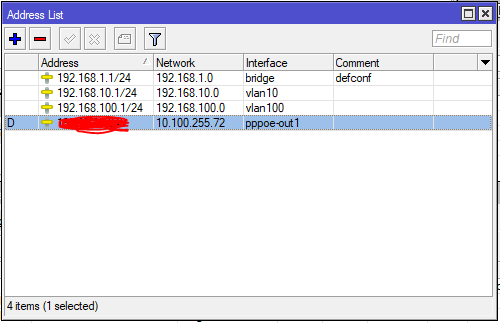
add address=192.168.100.1/24 interface=bridge_vlan100 network=192.168.100.0
/ip arp
add address=192.168.1.240 interface=bridge mac-address=08:ED:ED:6C:AE:1A
/ip cloud
set ddns-enabled=yes
/ip dhcp-client
add comment=defconf interface=ether1
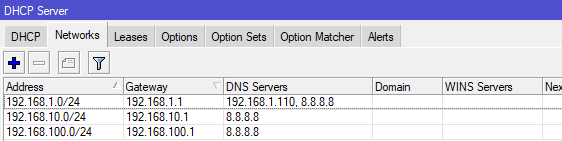
/ip dhcp-server network
add address=192.168.1.0/24 comment="Home + Pi-hole" dns-server=\
    192.168.1.110,8.8.8.8 gateway=192.168.1.1
add address=192.168.10.0/24 comment=IoT dns-server=8.8.8.8 gateway=\
    192.168.10.1
add address=192.168.100.0/24 comment=Guests dns-server=8.8.8.8 gateway=\
    192.168.100.1
/ip dns
set allow-remote-requests=yes servers=192.168.1.110,8.8.8.8
/ip dns static
add address=192.168.1.1 name=router.lan type=A
/ip firewall address-list
add address=192.168.1.140 list=domek_blocked_from_LAN
add address=192.168.1.141 list=domek_blocked_from_LAN
add address=192.168.1.141 list=domek_blocked_to_LAN
add address=192.168.1.140 list=domek_blocked_to_LAN
add address=192.168.1.200 list=domek_blocked_from_LAN
add address=192.168.1.200 list=domek_blocked_to_LAN
add address=39.98.204.251 disabled=yes list="port scanners"
add address=192.168.1.120 list=iot_adm
add address=192.168.1.130 list=iot_adm
add address=192.168.1.132 list=iot_adm
add address=192.168.1.115 list=iot_adm
/ip firewall filter
add action=drop chain=forward comment="domek blocked to LAN" disabled=yes \
    dst-address=192.168.1.0/24 src-address-list=domek_blocked_to_LAN
add action=drop chain=forward comment="domek blocked from LAN" disabled=yes \
    dst-address-list=domek_blocked_from_LAN src-address=192.168.1.0/24
add action=accept chain=input comment="0:0 and limit for 5pac/s" \
    icmp-options=0:0-255 limit=5,5:packet protocol=icmp
add action=accept chain=input comment="3:3 and limit for 5pac/s" \
    icmp-options=3:3 limit=5,5:packet protocol=icmp
add action=accept chain=input comment="3:4 and limit for 5pac/s" \
    icmp-options=3:4 limit=5,5:packet protocol=icmp
add action=accept chain=input comment="8:0 and limit for 5pac/s" \
    icmp-options=8:0-255 limit=5,5:packet protocol=icmp
add action=accept chain=input comment="11:0 and limit for 5pac/s" \
    icmp-options=11:0-255 limit=5,5:packet protocol=icmp
add action=drop chain=input comment="Drop everything else" protocol=icmp
add action=add-src-to-address-list address-list="port scanners" \
    address-list-timeout=none-static chain=input comment=\
    "Port scanners to list " log=yes protocol=tcp psd=21,3s,3,1
add action=add-src-to-address-list address-list="port scanners" \
    address-list-timeout=none-static chain=input comment=\
    "NMAP FIN Stealth scan" log=yes protocol=tcp tcp-flags=\
    fin,!syn,!rst,!psh,!ack,!urg
add action=add-src-to-address-list address-list="port scanners" \
    address-list-timeout=none-static chain=input comment="SYN/FIN scan" log=\
    yes protocol=tcp tcp-flags=fin,syn
add action=add-src-to-address-list address-list="port scanners" \
    address-list-timeout=none-static chain=input comment="SYN/RST scan" log=\
    yes protocol=tcp tcp-flags=syn,rst
add action=add-src-to-address-list address-list="port scanners" \
    address-list-timeout=none-static chain=input comment="FIN/PSH/URG scan" \
    log=yes protocol=tcp tcp-flags=fin,psh,urg,!syn,!rst,!ack
add action=add-src-to-address-list address-list="port scanners" \
    address-list-timeout=none-static chain=input comment="ALL/ALL scan" log=\
    yes protocol=tcp tcp-flags=fin,syn,rst,psh,ack,urg
add action=add-src-to-address-list address-list="port scanners" \
    address-list-timeout=none-static chain=input comment="NMAP NULL scan" \
    log=yes protocol=tcp tcp-flags=!fin,!syn,!rst,!psh,!ack,!urg
add action=drop chain=input comment="dropping port scanners" log=yes \
    src-address-list="port scanners"
add action=accept chain=input comment=\
    "defconf: accept established,related,untracked" connection-state=\
    established,related,untracked
add action=accept chain=input comment="allow IPsec NAT" dst-port=4500 \
    protocol=udp
add action=accept chain=input comment="allow IKE" dst-port=500 protocol=udp
add action=accept chain=input protocol=ipsec-esp
add action=drop chain=input comment="defconf: drop invalid" connection-state=\
    invalid
add action=drop chain=input comment="defconf: drop all not coming from LAN" \
    in-interface-list=WAN
add action=accept chain=forward comment="defconf: accept in ipsec policy" \
    ipsec-policy=in,ipsec
add action=accept chain=forward comment="defconf: accept out ipsec policy" \
    ipsec-policy=out,ipsec
add action=accept chain=forward comment=\
    "guests: accept established,related, untracked" connection-state=\
    established,related,untracked out-interface=bridge_vlan100
add action=fasttrack-connection chain=forward comment="defconf: fasttrack" \
    connection-state=established,related hw-offload=yes src-address=\
    !192.168.100.0/24
add action=accept chain=forward comment=\
    "defconf: accept established,related, untracked" connection-state=\
    established,related,untracked
add action=drop chain=forward comment="defconf: drop invalid" \
    connection-state=invalid
add action=drop chain=forward comment=\
    "defconf:  drop all from WAN not DSTNATed" connection-nat-state=!dstnat \
    connection-state=new in-interface-list=WAN
add action=accept chain=forward dst-address=192.168.10.10 src-address-list=\
    iot_adm
add action=accept chain=forward dst-address-list=iot_adm src-address=\
    192.168.10.10
add action=drop chain=forward disabled=yes dst-address=192.168.10.0/24 \
    src-address=192.168.1.0/24
add action=drop chain=forward dst-address=192.168.100.0/24 src-address=\
    192.168.1.0/24
add action=drop chain=forward disabled=yes dst-address=192.168.1.0/24 \
    src-address=192.168.10.0/24
add action=drop chain=forward dst-address=192.168.100.0/24 src-address=\
    192.168.10.0/24
add action=drop chain=forward dst-address=192.168.1.0/24 src-address=\
    192.168.100.0/24
add action=drop chain=forward dst-address=192.168.10.0/24 src-address=\
    192.168.100.0/24
/ip firewall nat
add action=masquerade chain=srcnat comment="defconf: masquerade" \
    ipsec-policy=out,none out-interface-list=WAN
/ip hotspot profile
set [ find default=yes ] html-directory=flash/hotspot
/ip ipsec identity
add auth-method=digital-signature certificate=VPN_Server2 generate-policy=\
    port-strict match-by=certificate mode-config=ike2-conf peer=ike2 \
    policy-template-group=ike2-policies remote-certificate=VPN_Client2
add auth-method=digital-signature certificate=VPN_Server2 generate-policy=\
    port-strict match-by=certificate mode-config=ike2-conf peer=ike2 \
    policy-template-group=ike2-policies remote-certificate=VPN_Dell
/ip ipsec policy
add dst-address=192.168.77.0/24 group=ike2-policies proposal=ike2 \
    src-address=0.0.0.0/0 template=yes
/ip service
set telnet disabled=yes
set ftp address=192.168.1.0/24 disabled=yes
set www address=192.168.1.0/24
set ssh disabled=yes
set api disabled=yes
set winbox address=192.168.1.0/24
set api-ssl disabled=yes
/ip smb shares
set [ find default=yes ] directory=/flash/pub
/ip upnp interfaces
add disabled=yes interface=bridge type=internal
add disabled=yes interface=pppoe-out1 type=external
/routing bfd configuration
add disabled=no
/snmp
set trap-target=192.168.1.120
/system clock
set time-zone-name=Europe/Dublin
/system identity
set name="hAP AX^2"
/system logging
set 0 topics=info,!firewall
add action=remote topics=error
add action=remote topics=critical
add action=remote topics=warning
add action=remote topics=info
add disabled=yes topics=debug,!packet
add topics=ipsec,!packet
/system note
set show-at-login=no
/system ntp client
set enabled=yes
/system ntp client servers
add address=10.5.0.5
/tool graphing interface
add allow-address=192.168.1.0/24 interface=ether1
add allow-address=192.168.1.0/24 interface=ether2
add allow-address=192.168.1.0/24 interface=ether5
/tool graphing queue
add allow-address=192.168.1.120/32
/tool graphing resource
add allow-address=192.168.1.0/24
/tool mac-server
set allowed-interface-list=LAN
/tool mac-server mac-winbox
set allowed-interface-list=LAN
/tool traffic-monitor

Nooo, not a million of bridges. You need to go with VLANs. Using a million of bridges might have been working with old CAPsMAN when capsman forwarding enabled. With new capsman there is no capsman forwarding and the only way of keeping traffic of separate SSIDs separate on wired part of network is by using VLANs.

I am playing with it back and forth since couple of hours and cant get it working :frowning:

Did you follow MT instructions ?
Just copy them so you understand what’s been done why.
Then adjust.

https://help.mikrotik.com/docs/spaces/ROS/pages/224559120/WiFi#WiFi-CAPsMAN-CAPVLANconfigurationexample:

And THE VLAN bible around here:
http://forum.mikrotik.com/t/using-routeros-to-vlan-your-network/126489/1

Yep, every time I do them line by line (adjusted to my config) I am ending up with red warnings in wifi tab saying something like vlans managing is not working and no devices are connecting to caps.

Anyway I tried one more trick and I left my capsman in the state it was earlier, but went back to play with caps and when I did those vlan steps from manual I ended up with devices properly jumping into their dhcp pools. It may not look pretty but at least it is working as expected now, I am not getting any more dynamic entries.

Bridge port column not showing actual cap is not a big problem, I can trace that by searching for specific mac address in wifi registration tab.
1.PNG

Ok, so sadly not everything is working as expected and problem is not just cosmetic.

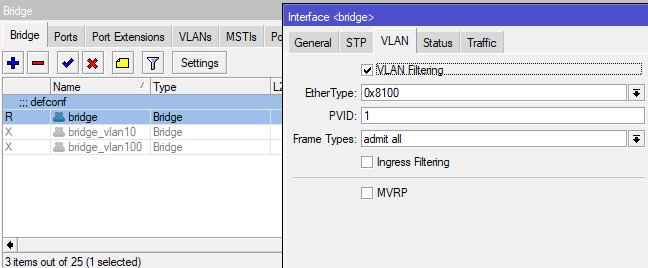
I followed them like 20 times with adjustments to my situation and always ending up with whole network not working. Either I got red warnings about vlan on cap wifi interfaces, or I am getting disconnected from main router and cant login back or in winbox everything is peachy but devices are unable to connect.

Seeking for some kind soul who can help me to adjust it to my needs.

Situation from before migration:
hap ac2 was running old capsman and had 3 bridges:

  • default one for everything except:
    – iot things which were connecting to bridge_10
    – guest things which were connecting to bridge_100

Config was moved from hap ac2 to hap ax2 to have things like ppppoe and firewall rules set up.

Current situation:

  • caps are connecting to capsman
  • devices can connect to guest (goscie) and iot wifi through caps
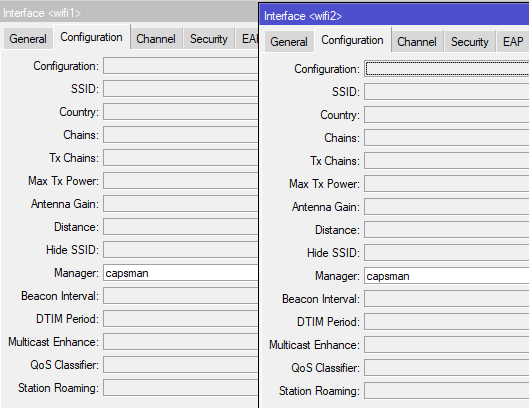
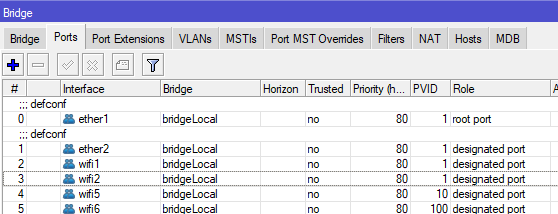
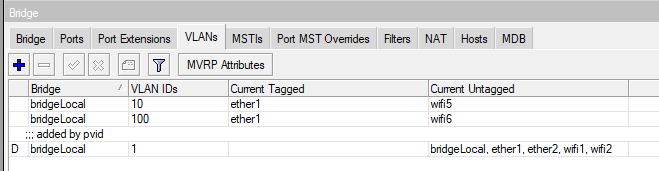
  • devices cannot connect to home (domek) wifi, this is most likely caused by trying to set vlan5 on caps, but not being able to reflect it on capsman device, whatever I try I am getting disconnected from main device once I touch the default bridge and I need to reset it and restore settings from backup
  • getting random iot connection drops, not sure why

capsman device config:

# 2025-02-19 14:51:09 by RouterOS 7.17.2
# software id = 56DB-EV57
#
# model = C52iG-5HaxD2HaxD
/interface bridge
add admin-mac=74:4D:28:1E:2C:BB auto-mac=no comment=defconf name=bridge \
    port-cost-mode=short
add name=bridge_vlan10 port-cost-mode=short
add name=bridge_vlan100 port-cost-mode=short
/interface ethernet
set [ find default-name=ether1 ] advertise=\
    100M-baseT-half,100M-baseT-full,1G-baseT-half,1G-baseT-full comment=Input \
    l2mtu=1598 mac-address=74:4D:28:1E:2C:BA
set [ find default-name=ether2 ] l2mtu=1598 mac-address=74:4D:28:1E:2C:BB
set [ find default-name=ether3 ] disabled=yes l2mtu=1598 mac-address=\
    74:4D:28:1E:2C:BC
set [ find default-name=ether4 ] disabled=yes l2mtu=1598 mac-address=\
    74:4D:28:1E:2C:BD
set [ find default-name=ether5 ] l2mtu=1598 mac-address=74:4D:28:1E:2C:BE
/interface vlan
add interface=ether1 name=ether1.20 vlan-id=20
add interface=bridge name=vlan10 vlan-id=10
/interface pppoe-client
add add-default-route=yes disabled=no interface=ether1.20 name=pppoe-out1 \
    use-peer-dns=yes user=01266
/interface ethernet switch port
set 0 default-vlan-id=auto
set 1 default-vlan-id=auto
set 2 default-vlan-id=auto
set 3 default-vlan-id=auto
set 4 default-vlan-id=auto
set 5 default-vlan-id=auto
/interface list
add comment=defconf name=WAN
add comment=defconf name=LAN
/interface lte apn
set [ find default=yes ] ip-type=ipv4 use-network-apn=no
/interface wifi datapath
add bridge=bridge_vlan100 client-isolation=yes disabled=no name=dp_guest
add bridge=bridge disabled=no name=dp_home
add bridge=bridge_vlan10 disabled=no name=dp_iot
add bridge=bridge_vlan100 client-isolation=yes disabled=no name=dp_guest_ac
add bridge=bridge disabled=no name=dp_home_ac
add bridge=bridge_vlan10 disabled=no name=dp_iot_ac
/interface wifi security
add authentication-types=wpa2-psk disabled=no ft=yes ft-over-ds=yes name=\
    sec_guest
add authentication-types=wpa2-psk disabled=no ft=yes ft-over-ds=yes name=\
    sec_iot
add authentication-types=wpa2-psk,wpa3-psk disabled=no ft=yes ft-over-ds=yes \
    name=sec_home
/interface wifi steering
add disabled=no name=steering neighbor-group=dynamic-Domek-a4d9f796 rrm=yes \
    wnm=yes
/interface wifi configuration
add datapath=dp_guest datapath.bridge=bridge_vlan100 disabled=no name=\
    cfg_guest security=sec_guest ssid=Goscie steering=steering
add datapath=dp_home disabled=no name=cfg_home2.4 security=sec_home ssid=\
    Domek steering=steering
add datapath=dp_iot datapath.bridge=bridge_vlan10 disabled=no name=cfg_iot \
    security=sec_iot ssid=IoT steering=steering
add datapath=dp_home disabled=no name=cfg_home5 security=sec_home ssid=Domek \
    steering=steering
add datapath=dp_iot_ac datapath.bridge=bridge_vlan10 disabled=no name=\
    cfg_iot_ac security=sec_iot ssid=IoT steering=steering
add datapath=dp_home_ac disabled=no name=cfg_home5_ac security=sec_home ssid=\
    Domek steering=steering
add datapath=dp_home_ac disabled=no name=cfg_home2.4_ac security=sec_home \
    ssid=Domek steering=steering
add datapath=dp_guest_ac datapath.bridge=bridge_vlan100 disabled=no name=\
    cfg_guest_ac security=sec_guest ssid=Goscie steering=steering
/ip hotspot profile
set [ find default=yes ] html-directory=flash/hotspot
/ip ipsec policy group
add name=ike2-group
add name=ike2-policies
/ip ipsec profile
set [ find default=yes ] dpd-interval=2m dpd-maximum-failures=5
add dpd-interval=2m dpd-maximum-failures=5 enc-algorithm=aes-256,aes-128 \
    hash-algorithm=sha256 name=ike2
/ip ipsec peer
add exchange-mode=ike2 name=ike2 passive=yes profile=ike2 \
    send-initial-contact=no
/ip ipsec proposal
add auth-algorithms=sha256,sha1 enc-algorithms=aes-256-cbc name=ike2_proposal \
    pfs-group=none
/ip kid-control
add fri=0s-1d mon=0s-1d name=system-dummy sat=0s-1d sun=0s-1d thu=0s-1d tue=\
    0s-1d tur-fri=0s-1d tur-mon=0s-1d tur-sat=0s-1d tur-sun=0s-1d tur-thu=\
    0s-1d tur-tue=0s-1d tur-wed=0s-1d wed=0s-1d
/ip pool
add name=dhcp ranges=192.168.1.100-192.168.1.254
add name=pool_iot ranges=192.168.10.100-192.168.10.254
add name=pool_guest ranges=192.168.100.100-192.168.100.254
add name=ike2-pool ranges=192.168.77.2-192.168.77.254
/ip dhcp-server
add address-pool=dhcp interface=bridge lease-time=12h name=dhcp_local
add address-pool=pool_guest interface=bridge_vlan100 lease-script="if (\$lease\
    Bound = \"1\") do={\r\
    \nglobal telegramMessage \"\$\"lease-hostname\" (\$leaseActMAC) otrzymal a\
    dres \$leaseActIP z DHCP_guest\"\r\
    \n/system script run SendToTelegram\r\
    \n}" lease-time=1d name=dhcp_guest
add address-pool=pool_iot interface=bridge_vlan10 lease-time=6h name=dhcp_iot
/ip ipsec mode-config
add address-pool=ike2-pool address-prefix-length=32 name=ike2-conf
/ip smb users
set [ find default=yes ] disabled=yes
add disabled=yes name=Arek
/queue simple
add max-limit=60M/300M name=Guest target=192.168.100.0/24
/routing bgp template
set default disabled=no output.network=bgp-networks
/routing ospf instance
add disabled=no name=default-v2
/routing ospf area
add disabled=yes instance=default-v2 name=backbone-v2
/system logging action
set 1 disk-file-count=10 disk-file-name=flash/log
set 3 remote=192.168.1.115 src-address=192.168.1.1
/ip smb
set domain=WORKGROUP interfaces=bridge
/interface vlan
add interface=*D name=vlan100 vlan-id=100
/interface bridge port
add bridge=bridge comment=defconf ingress-filtering=no interface=ether2 \
    internal-path-cost=10 path-cost=10
add bridge=bridge comment=defconf ingress-filtering=no interface=ether3 \
    internal-path-cost=10 path-cost=10
add bridge=bridge comment=defconf ingress-filtering=no interface=ether4 \
    internal-path-cost=10 path-cost=10
add bridge=bridge_vlan10 comment=defconf ingress-filtering=no interface=\
    ether5 internal-path-cost=10 path-cost=10
add bridge=bridge comment=defconf ingress-filtering=no interface=*1 \
    internal-path-cost=10 path-cost=10
add bridge=bridge comment=defconf ingress-filtering=no interface=*2 \
    internal-path-cost=10 path-cost=10
add bridge=bridge_vlan10 ingress-filtering=no interface=*A \
    internal-path-cost=10 path-cost=10
add bridge=bridge_vlan10 ingress-filtering=no interface=vlan10 \
    internal-path-cost=10 path-cost=10
add bridge=bridge_vlan100 ingress-filtering=no interface=*D \
    internal-path-cost=10 path-cost=10
add bridge=bridge_vlan100 ingress-filtering=no interface=vlan100 \
    internal-path-cost=10 path-cost=10
/interface bridge settings
set use-ip-firewall=yes
/ip firewall connection tracking
set udp-timeout=10s
/ip neighbor discovery-settings
set discover-interface-list=all
/ip settings
set max-neighbor-entries=8192
/ipv6 settings
set disable-ipv6=yes max-neighbor-entries=8192
/interface detect-internet
set detect-interface-list=all
/interface l2tp-server server
set use-ipsec=required
/interface list member
add comment=defconf interface=bridge list=LAN
add interface=pppoe-out1 list=WAN
add disabled=yes interface=ether1 list=WAN
/interface ovpn-server server
add auth=sha1,md5 mac-address=FE:2A:FB:0A:77:BE name=ovpn-server1
/interface sstp-server server
set default-profile=default-encryption
/interface wifi cap
set caps-man-addresses=192.168.1.1 certificate=request discovery-interfaces=\
    bridge enabled=yes slaves-static=yes
/interface wifi capsman
set enabled=yes package-path="" require-peer-certificate=no upgrade-policy=\
    none
/interface wifi provisioning
add action=create-dynamic-enabled disabled=no master-configuration=cfg_home5 \
    slave-configurations=cfg_guest supported-bands=5ghz-ax
add action=create-dynamic-enabled disabled=no master-configuration=\
    cfg_home5_ac slave-configurations=cfg_guest_ac supported-bands=5ghz-ac
add action=create-dynamic-enabled disabled=no master-configuration=\
    cfg_home2.4 slave-configurations=cfg_iot supported-bands=2ghz-ax
add action=create-dynamic-enabled disabled=no master-configuration=\
    cfg_home2.4_ac slave-configurations=cfg_iot_ac supported-bands=\
    2ghz-g,2ghz-n
/ip address
add address=192.168.1.1/24 comment=defconf interface=bridge network=\
    192.168.1.0
add address=192.168.10.1/24 interface=bridge_vlan10 network=192.168.10.0
add address=192.168.100.1/24 interface=bridge_vlan100 network=192.168.100.0
/ip arp
add address=192.168.1.240 interface=bridge mac-address=08:ED:ED:6C:AE:1A
/ip cloud
set ddns-enabled=yes
/ip dhcp-client
add comment=defconf interface=ether1
/ip dhcp-server network
add address=192.168.1.0/24 comment="Home + Pi-hole" dns-server=\
    192.168.1.110,8.8.8.8 gateway=192.168.1.1
add address=192.168.10.0/24 comment=IoT dns-server=8.8.8.8 gateway=\
    192.168.10.1
add address=192.168.100.0/24 comment=Guests dns-server=8.8.8.8 gateway=\
    192.168.100.1
/ip dns
set allow-remote-requests=yes servers=192.168.1.110,8.8.8.8
/ip dns static
add address=192.168.1.1 name=router.lan type=A
/ip firewall address-list
add address=192.168.1.140 list=domek_blocked_from_LAN
add address=192.168.1.141 list=domek_blocked_from_LAN
add address=192.168.1.141 list=domek_blocked_to_LAN
add address=192.168.1.140 list=domek_blocked_to_LAN
add address=192.168.1.200 list=domek_blocked_from_LAN
add address=192.168.1.200 list=domek_blocked_to_LAN
add address=39.98.204.251 disabled=yes list="port scanners"
add address=81.22.45.171 disabled=yes list="port scanners"
add address=104.152.52.18 disabled=yes list="port scanners"
add address=113.96.223.207 disabled=yes list="port scanners"
add address=64.32.11.69 disabled=yes list="port scanners"
add address=23.248.219.63 disabled=yes list="port scanners"
add address=192.168.1.120 list=iot_adm
add address=192.168.1.130 list=iot_adm
add address=192.168.1.132 list=iot_adm
add address=192.168.1.115 list=iot_adm
add address=192.168.1.200/30 list=iot_adm
/ip firewall filter
add action=drop chain=forward comment="domek blocked to LAN" disabled=yes \
    dst-address=192.168.1.0/24 src-address-list=domek_blocked_to_LAN
add action=drop chain=forward comment="domek blocked from LAN" disabled=yes \
    dst-address-list=domek_blocked_from_LAN src-address=192.168.1.0/24
add action=accept chain=input comment="0:0 and limit for 5pac/s" \
    icmp-options=0:0-255 limit=5,5:packet protocol=icmp
add action=accept chain=input comment="3:3 and limit for 5pac/s" \
    icmp-options=3:3 limit=5,5:packet protocol=icmp
add action=accept chain=input comment="3:4 and limit for 5pac/s" \
    icmp-options=3:4 limit=5,5:packet protocol=icmp
add action=accept chain=input comment="8:0 and limit for 5pac/s" \
    icmp-options=8:0-255 limit=5,5:packet protocol=icmp
add action=accept chain=input comment="11:0 and limit for 5pac/s" \
    icmp-options=11:0-255 limit=5,5:packet protocol=icmp
add action=drop chain=input comment="Drop everything else" protocol=icmp
add action=add-src-to-address-list address-list="port scanners" \
    address-list-timeout=none-static chain=input comment=\
    "Port scanners to list " log=yes protocol=tcp psd=21,3s,3,1
add action=add-src-to-address-list address-list="port scanners" \
    address-list-timeout=none-static chain=input comment=\
    "NMAP FIN Stealth scan" log=yes protocol=tcp tcp-flags=\
    fin,!syn,!rst,!psh,!ack,!urg
add action=add-src-to-address-list address-list="port scanners" \
    address-list-timeout=none-static chain=input comment="SYN/FIN scan" log=\
    yes protocol=tcp tcp-flags=fin,syn
add action=add-src-to-address-list address-list="port scanners" \
    address-list-timeout=none-static chain=input comment="SYN/RST scan" log=\
    yes protocol=tcp tcp-flags=syn,rst
add action=add-src-to-address-list address-list="port scanners" \
    address-list-timeout=none-static chain=input comment="FIN/PSH/URG scan" \
    log=yes protocol=tcp tcp-flags=fin,psh,urg,!syn,!rst,!ack
add action=add-src-to-address-list address-list="port scanners" \
    address-list-timeout=none-static chain=input comment="ALL/ALL scan" log=\
    yes protocol=tcp tcp-flags=fin,syn,rst,psh,ack,urg
add action=add-src-to-address-list address-list="port scanners" \
    address-list-timeout=none-static chain=input comment="NMAP NULL scan" \
    log=yes protocol=tcp tcp-flags=!fin,!syn,!rst,!psh,!ack,!urg
add action=drop chain=input comment="dropping port scanners" log=yes \
    src-address-list="port scanners"
add action=accept chain=input comment=\
    "defconf: accept established,related,untracked" connection-state=\
    established,related,untracked
add action=accept chain=input comment="allow IPsec NAT" dst-port=4500 \
    protocol=udp
add action=accept chain=input comment="allow IKE" dst-port=500 protocol=udp
add action=accept chain=input protocol=ipsec-esp
add action=drop chain=input comment="defconf: drop invalid" connection-state=\
    invalid
add action=drop chain=input comment="defconf: drop all not coming from LAN" \
    in-interface-list=WAN
add action=accept chain=forward comment="defconf: accept in ipsec policy" \
    ipsec-policy=in,ipsec
add action=accept chain=forward comment="defconf: accept out ipsec policy" \
    ipsec-policy=out,ipsec
add action=accept chain=forward comment=\
    "guests: accept established,related, untracked" connection-state=\
    established,related,untracked out-interface=bridge_vlan100
add action=fasttrack-connection chain=forward comment="defconf: fasttrack" \
    connection-state=established,related hw-offload=yes src-address=\
    !192.168.100.0/24
add action=accept chain=forward comment=\
    "defconf: accept established,related, untracked" connection-state=\
    established,related,untracked
add action=drop chain=forward comment="defconf: drop invalid" \
    connection-state=invalid
add action=drop chain=forward comment=\
    "defconf:  drop all from WAN not DSTNATed" connection-nat-state=!dstnat \
    connection-state=new in-interface-list=WAN
add action=accept chain=forward dst-address=192.168.10.10 src-address-list=\
    iot_adm
add action=accept chain=forward dst-address-list=iot_adm src-address=\
    192.168.10.10
add action=drop chain=forward disabled=yes dst-address=192.168.10.0/24 \
    src-address=192.168.1.0/24
add action=drop chain=forward dst-address=192.168.100.0/24 src-address=\
    192.168.1.0/24
add action=drop chain=forward disabled=yes dst-address=192.168.1.0/24 \
    src-address=192.168.10.0/24
add action=drop chain=forward dst-address=192.168.100.0/24 src-address=\
    192.168.10.0/24
add action=drop chain=forward dst-address=192.168.1.0/24 src-address=\
    192.168.100.0/24
add action=drop chain=forward dst-address=192.168.10.0/24 src-address=\
    192.168.100.0/24
/ip firewall nat
add action=masquerade chain=srcnat comment="defconf: masquerade" \
    ipsec-policy=out,none out-interface-list=WAN
/ip ipsec identity
add auth-method=digital-signature certificate=hAPAX2 generate-policy=\
    port-strict match-by=certificate mode-config=ike2-conf peer=ike2 \
    policy-template-group=ike2-group remote-certificate=S22
/ip ipsec policy
add dst-address=192.168.77.0/24 group=ike2-group proposal=ike2_proposal \
    src-address=0.0.0.0/0 template=yes
/ip service
set telnet disabled=yes
set ftp address=192.168.1.0/24 disabled=yes
set www address=192.168.1.0/24
set ssh disabled=yes
set api disabled=yes
set winbox address=192.168.1.0/24
set api-ssl disabled=yes
/ip smb shares
set [ find default=yes ] directory=/flash/pub
/ip upnp interfaces
add disabled=yes interface=bridge type=internal
add disabled=yes interface=pppoe-out1 type=external
/routing bfd configuration
add disabled=no
/snmp
set trap-target=192.168.1.120
/system clock
set time-zone-name=Europe/Warsaw
/system identity
set name="hAP AX^2"
/system logging
set 0 topics=info,!firewall
add action=remote topics=error
add action=remote topics=critical
add action=remote topics=warning
add action=remote topics=info
add disabled=yes topics=debug,!packet
add topics=ipsec,!packet
/system note
set show-at-login=no
/system ntp client
set enabled=yes
/system ntp client servers
add address=pl.pool.ntp.org

cap device config:

# 2025-02-19 14:34:25 by RouterOS 7.17.2
# software id = YXT8-GNKV
#
# model = RBcAPGi-5acD2nD
/interface bridge
add admin-mac=74:4D:28:12:A3:F6 auto-mac=no comment=defconf name=bridgeLocal \
    vlan-filtering=yes
/interface wifi datapath
add bridge=bridgeLocal comment=defconf disabled=no name=capdp
/interface wifi
# managed by CAPsMAN 74:4D:28:1E:2C:BB%bridgeLocal, traffic processing on CAP
# mode: AP, SSID: Domek, channel: 2412/n/Ce
set [ find default-name=wifi1 ] configuration.manager=capsman datapath=capdp \
    disabled=no
# managed by CAPsMAN 74:4D:28:1E:2C:BB%bridgeLocal, traffic processing on CAP
# mode: AP, SSID: Domek, channel: 5500/ac/Ceee/D
set [ find default-name=wifi2 ] configuration.manager=capsman datapath=capdp \
    disabled=no
# managed by CAPsMAN 74:4D:28:1E:2C:BB%bridgeLocal, traffic processing on CAP
# mode: AP, SSID: IoT
add disabled=no mac-address=76:4D:28:12:A3:F8 master-interface=wifi1 name=\
    wifi5
# managed by CAPsMAN 74:4D:28:1E:2C:BB%bridgeLocal, traffic processing on CAP
# mode: AP, SSID: Goscie
add disabled=no mac-address=76:4D:28:12:A3:F9 master-interface=wifi2 name=\
    wifi6
/ip hotspot profile
set [ find default=yes ] html-directory=hotspot
/interface bridge port
add bridge=bridgeLocal comment=defconf interface=ether1
add bridge=bridgeLocal comment=defconf interface=ether2
add bridge=bridgeLocal interface=wifi1 pvid=5
add bridge=bridgeLocal interface=wifi2 pvid=5
add bridge=bridgeLocal interface=wifi5 pvid=10
add bridge=bridgeLocal interface=wifi6 pvid=100
/interface bridge vlan
add bridge=bridgeLocal tagged=ether1 untagged=wifi5 vlan-ids=10
add bridge=bridgeLocal tagged=ether1 untagged=wifi6 vlan-ids=100
add bridge=bridgeLocal tagged=ether1 untagged=wifi1,wifi2 vlan-ids=5
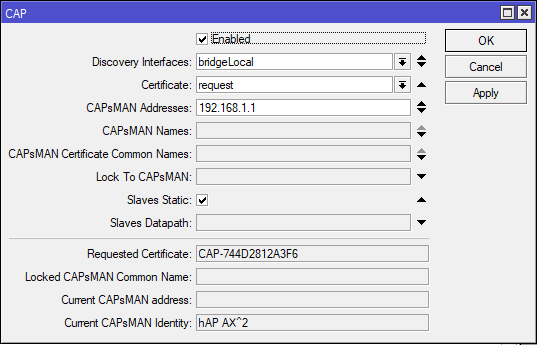
/interface wifi cap
set caps-man-addresses=192.168.1.1 certificate=request discovery-interfaces=\
    bridgeLocal enabled=yes slaves-static=yes
/ip dhcp-client
add comment=defconf interface=bridgeLocal
/system clock
set time-zone-name=Europe/Warsaw
/system identity
set name="cAP AC 1"
/system note
set show-at-login=no

Step by step, iot=10, guests=100, leaving home traffic untouched.


/interface bridge
add name=br vlan-filtering=yes

1.PNG

/interface vlan
add interface=br name=MAIN vlan-id=10
add interface=br name=GUEST vlan-id=20

2.PNG

/interface wifi datapath
add bridge=br name=MAIN vlan-id=10
add bridge=br name=GUEST vlan-id=20

3.PNG

/interface wifi security
add authentication-types=wpa2-psk,wpa3-psk ft=yes ft-over-ds=yes name=Security_MAIN passphrase=HaveAg00dDay
add authentication-types=wpa2-psk,wpa3-psk ft=yes ft-over-ds=yes name=Security_GUEST passphrase=HaveAg00dDay

4.PNG

/interface wifi configuration
add datapath=MAIN name=MAIN security=Security_MAIN ssid=MAIN_Network
add datapath=GUEST name=GUEST security=Security_GUEST ssid=GUEST_Network

4a.PNG

/ip pool
add name=dhcp_pool0 ranges=192.168.1.2-192.168.1.254
add name=dhcp_pool1 ranges=192.168.10.2-192.168.10.254
add name=dhcp_pool2 ranges=192.168.20.2-192.168.20.254

5.PNG

/ip dhcp-server
add address-pool=dhcp_pool0 disabled=yes interface=br name=dhcp1
add address-pool=dhcp_pool1 interface=MAIN name=dhcp2
add address-pool=dhcp_pool2 interface=GUEST name=dhcp3

6.PNG

/interface bridge port
add bridge=br interface=ether5 
add bridge=br interface=ether4 
add bridge=br interface=ether3 
add bridge=br interface=ether2

7.PNG

/interface bridge vlan
add bridge=br tagged=br,ether5,ether4,ether3,ether2 vlan-ids=20
add bridge=br tagged=br,ether5,ether4,ether3,ether2 vlan-ids=10

v.PNG

/interface wifi capsman
set enabled=yes interfaces=br

8.PNG

/interface wifi provisioning
add action=create-dynamic-enabled master-configuration=MAIN slave-configurations=GUEST supported-bands=5ghz-ax
add action=create-dynamic-enabled master-configuration=MAIN slave-configurations=GUEST supported-bands=2ghz-ax

9.PNG

/ip address
add address=192.168.1.1/24 interface=br network=192.168.1.0
add address=192.168.10.1/24 interface=MAIN network=192.168.10.0
add address=192.168.20.1/24 interface=GUEST network=192.168.20.0

10.PNG

/ip dhcp-server network
add address=192.168.1.0/24 gateway=192.168.1.1
add address=192.168.10.0/24 gateway=192.168.10.1
add address=192.168.20.0/24 gateway=192.168.20.1

11.PNG
And this is the result of that changes:
output.PNG
Cap configured with instructions as well:

/interface bridge
add name=bridgeLocal vlan-filtering=yes

a.PNG

/interface wifi
set [ find default-name=wifi1 ] configuration.manager=capsman disabled=no
set [ find default-name=wifi2 ] configuration.manager=capsman disabled=no

b.PNG

/interface bridge port
add bridge=bridgeLocal comment=defconf interface=ether1
add bridge=bridgeLocal comment=defconf interface=ether2
add bridge=bridgeLocal comment=defconf interface=ether3
add bridge=bridgeLocal comment=defconf interface=ether4
add bridge=bridgeLocal comment=defconf interface=ether5
add bridge=bridgeLocal interface=wifi1 pvid=10
add bridge=bridgeLocal interface=wifi21 pvid=20
add bridge=bridgeLocal interface=wifi2 pvid=10
add bridge=bridgeLocal interface=wifi22 pvid=20

c.PNG

/interface bridge vlan
add bridge=bridgeLocal tagged=ether1 untagged=wifi1,wifi2 vlan-ids=10
add bridge=bridgeLocal tagged=ether1 untagged=wifi21,wifi22 vlan-ids=20

d.PNG

/interface wifi cap
set discovery-interfaces=bridgeLocal enabled=yes slaves-static=yes

e.PNG