Hi Feklar,
Following is the ip route on our mikrotik router.
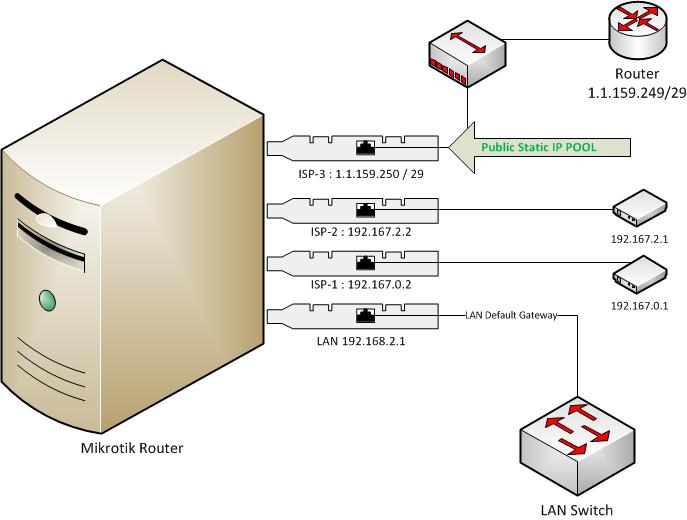
Basically, we got this installed as we were told that this will load-balance all our 3 Internet connections (2 x DSL and 1 x Dedicated Lease Line of 2MB)
Please let me know if you want to see an output of any other command. I will be grateful if you could just type the 3 or 2 commands I have to type to open the ports in this scenario.
1st Rule : I want to use the IP 1.1.159.250 to get to my server on port 3389, servers private ip is 192.168.2.250
2nd Ruel : I want to use the IP 1.1.159.250 to get to mikrotik on 8291 via winbox, mikrotik IP is 192.168.2.2
[admin@mikrotikos] > /ip route print detail
Flags: X - disabled, A - active, D - dynamic,
C - connect, S - static, r - rip, b - bgp, o - ospf, m - mme,
B - blackhole, U - unreachable, P - prohibit
 0 A S  dst-address=0.0.0.0/0
        gateway=1.1.159.249,192.167.2.1,192.167.2.1,192.167.0.1,192.167.0.1,
                192.167.0.1,192.167.0.1,192.167.0.1
        interface=ISP1,ISP3,ISP3,ISP2,ISP2,ISP2,
                  ISP2,ISP2
        check-gateway=ping
        gateway-state=reachable,reachable,reachable,reachable,reachable,
                      reachable,reachable,reachable
        distance=1 scope=255 target-scope=10

 1 ADC  dst-address=1.1.159.248/29 pref-src=1.1.159.250 interface=ISP1
        distance=0 scope=10

 2 ADC  dst-address=192.167.0.0/24 pref-src=192.167.0.2 interface=ISP2
        distance=0 scope=10

 3 ADC  dst-address=192.167.2.0/24 pref-src=192.167.2.2 interface=ISP3
        distance=0 scope=10

 4 ADC  dst-address=192.168.2.0/24 pref-src=192.168.2.1 interface=lan
        distance=0 scope=10
[admin@mikrotikos] >
Will be grateful !
Kind Regards