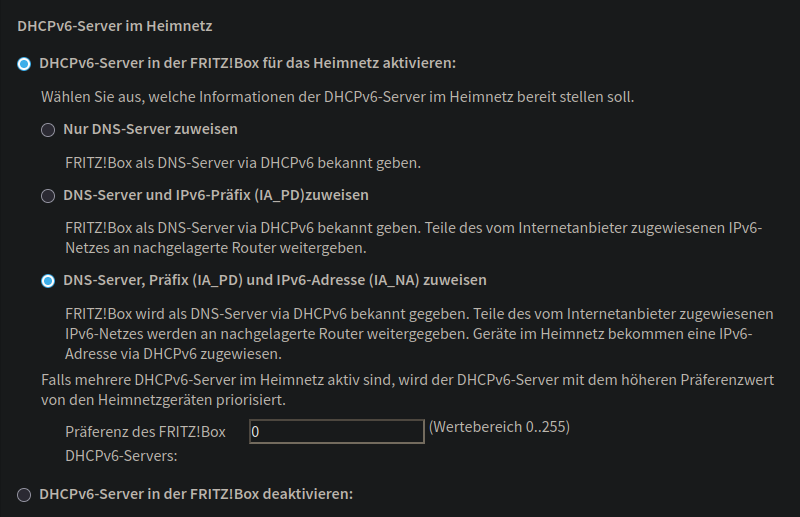
I would need to setup some kind of mechanism for the dynamic ipv6, DS-lite, I have from my ISP. There are various Fritz!Box options regarding DHCPv6 server or SLAAC, but I am unsure what to use, and my fiddling around did not help at all.
I do not know how to debug this, anyone has an idea? Also ChatGPT seems to be very hallucinating regarding this topic…
You should investigate if DHCPv6 server on Fritz is actually capable of passing out prefixes. I'd guess that typical end-user CPE (which Fritz essentially is) might not be capable of doing it. (you may set "request=prefix,address" to see if your MT can get at least IPv6 address from Fritz).
If you want to support multiple subnets (VLANs if you wish), then Fritz would need to support handing out shorter prefixes (e.g. /60 ... to support 16 /64 subnets). Which it might not (it's a non-trivial thing to do on ROS as well).
Additionally: don't set "add-default-route=yes" on MT's DHCPv6 client. It's a cludge and might not work properly in certain cases. DHCPv6 protocol doesn't actually support setting gateway address, the MT's cliedge instead takes DHCPv6 server address and sets it as default gateway. Which may not be correct. IPv6 instead offers mechanizm Routing Advertisements (RAs), which carry gateway information and should be used.
It might be easier to put Fritz into "transparent mode" (if you need Fritz for some particular reason, e.g. to act as xDSL modem or POTS gateway or ...) and configure MT to do the communication towards ISP directly. This way you'd avoid one layer of NAT for IPv4 and get possibility of doing IPv6 in an easy way.
When I had access to VDSL connection only, I had to replace ISP modem/router with DrayTek Vigor 167 to be a VDSL terminal in “bridge mode” and not more than that, then Mikrotik did the rest. But I don’t know what is the uplink connection @philthyfoe do you have?