Hello guys,
I have Hap AC - RB962UiGS-5HacT2HnT
I upgrade firmware from 6.4.39 to 6.42.3 and I can see traffic is dropping to 8/9 MB. Before that I reaches stable 50-55MB which does not drop.
Any ideas
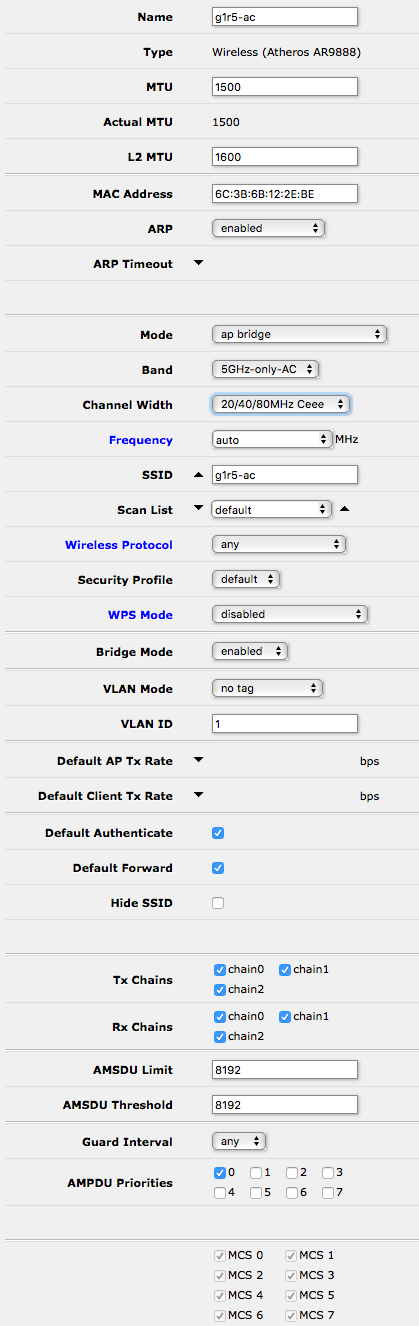
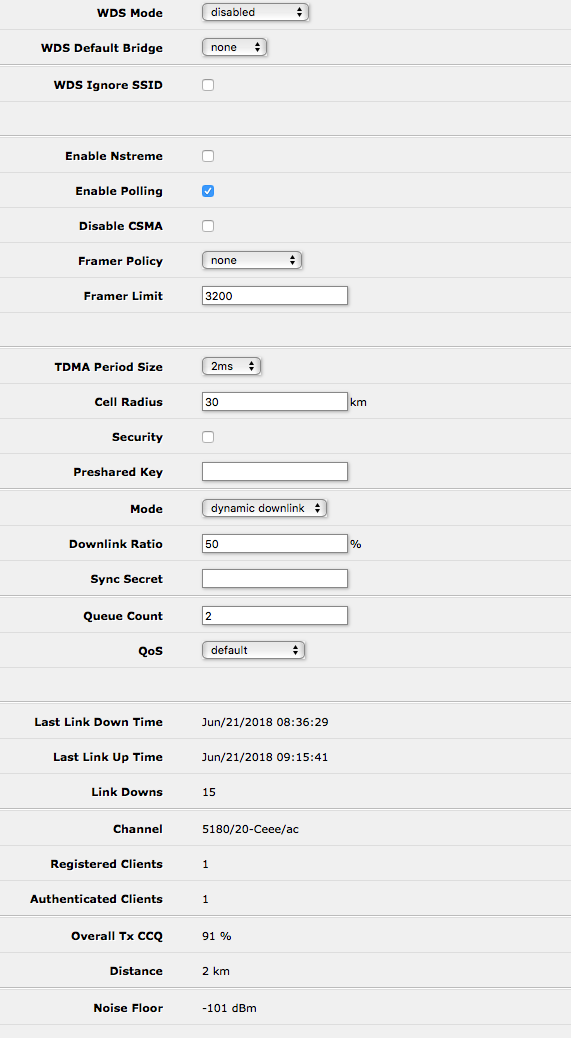
Hello guys,
I have Hap AC - RB962UiGS-5HacT2HnT
I upgrade firmware from 6.4.39 to 6.42.3 and I can see traffic is dropping to 8/9 MB. Before that I reaches stable 50-55MB which does not drop.
Any ideas
Hello Everyone,
I wanted to post some input on this issue. I just received my cAP AC unit a couple days ago and unfortunately haven’t had much time to play with it. However, I noticed right off the bat, the same performance issues as most of you are mentioning in this post. I too hover around 30-35mbit on throughput.
I was just able to do some digging and noticed that using the PoE Injector provided with the unit, that ether1 only connects at 100mbit.
Using a 3rd party PoE Injector connects at the full 1Gbps.
Changing out the PoE Injector gave me some difference, from about 30-35mbit with my phone sitting right next to it, to about 65-75mbit. Still not that great, but better…
Now however, if I keep the PoE Injector in place to power the unit, and run my bandwidth through ether2. BIG difference.
In continuing my tests my phone for some reason kept connecting at 20MHz channel width, which makes no sense, but even with this, I was able to hit much higher speeds, of 80mbit+.
At one point I was able to test and hit my full pipe of 200mbit+.
I just wanted to share my findings with this, it may point to something else going on with ether1 and / or the included PoE Injector.
Hi Guys
Just had to post this.
Our clients are buying this CAP AC like crazy. They love it. One client reported to have 48 connections and everyone still achieving speeds of 95mbps plus of which some even got 169mbps on a 200mbps down and 200mbps up fiber line.
Love this device a lot.
Thank you Mikrotik for bring us such an awesome ceiling AP.
The only thing people still worry about is it’s range compared to other ceiling mounts, reported they don’t get the same range as a TP-Link EAP 225 or Ubiquiti AC Lite and an Engenius EAP300.
I am trialling some CAPAC’s in classrooms where there are 30+ iPads at a time. Anecdotally there is an improvement in reliability and stability where the WAPAC and HAPAC struggled and needed rebooting on a regular basis because they stopped passing Wifi packets over the bridge to ethernet for some reason, or even just crashing and rebooting via watchdog! I think the older MIPS devices are underpowered CPU wise - the radios are fine - just not enough grunt to run them in a busy environment.
Overall I’d say choose the CAPAC every time unless you need the weatherproofing or an SFP.
I have bought cap ac recently. And see a very poor performance.
I have an unmanaged gigabit switch, cap ac as access point and hap ac lite as router. A PC is connected by cable to switch and is running iperf3 server. If i connect another PC to switch and run iperf test - i see speeds around 950-970 mbits. If i run bandwidth test between cap ac and hap ac - i see speed around 97 mbit (hap ac lite has 100-mbit ports). But if i run iperf on wifi client (thinkpad, macbook pro, smartphones), i can see speeds only around 50Mbits.
The config is pretty default. What am i doing wrong and why do i have such slow wifi speed?
# sep/16/2018 12:25:17 by RouterOS 6.44beta6
# software id = X2MS-XFA5
#
# model = RouterBOARD cAP Gi-5acD2nD
# serial number = 81CE08B705EA
/interface bridge
add admin-mac=CC:2D:E0:ED:10:98 auto-mac=no comment=defconf name=bridge
/interface ethernet
set [ find default-name=ether1 ] name=ether1-WAN
set [ find default-name=ether2 ] name=ether2-LAN
/interface wireless security-profiles
set [ find default=yes ] supplicant-identity=MikroTik
add authentication-types=wpa-psk,wpa2-psk eap-methods="" \
    management-protection=allowed mode=dynamic-keys name=AP \
    supplicant-identity="" wpa-pre-shared-key=password wpa2-pre-shared-key=\
    password
/interface wireless
set [ find default-name=wlan1 ] band=2ghz-b/g/n channel-width=20/40mhz-Ce \
    disabled=no distance=indoors frequency=auto mode=ap-bridge name=wlan1-2G \
    security-profile=AP ssid=MikroTik-2G wireless-protocol=802.11
set [ find default-name=wlan2 ] band=5ghz-a/n/ac channel-width=\
    20/40/80mhz-Ceee disabled=no distance=indoors frequency=auto mode=\
    ap-bridge name=wlan2-5G security-profile=AP ssid=MikroTik-5G \
    wireless-protocol=802.11
add disabled=no keepalive-frames=disabled mac-address=CE:2D:E0:ED:10:9A \
    master-interface=wlan1-2G multicast-buffering=disabled name=wlan3-2G-Virt \
    security-profile=AP ssid=MikroTik-2GHz wds-cost-range=0 wds-default-cost=\
    0 wps-mode=disabled
add disabled=no keepalive-frames=disabled mac-address=CE:2D:E0:ED:10:9B \
    master-interface=wlan2-5G multicast-buffering=disabled name=wlan4-5G-Virt \
    security-profile=AP ssid=MikroTik-5GHz wds-cost-range=0 wds-default-cost=\
    0 wps-mode=disabled
/interface bridge port
add bridge=bridge comment=defconf interface=ether1-WAN
add bridge=bridge comment=defconf interface=ether2-LAN
add bridge=bridge comment=defconf interface=wlan1-2G
add bridge=bridge comment=defconf interface=wlan2-5G
add bridge=bridge interface=wlan4-5G-Virt trusted=yes
add bridge=bridge interface=wlan3-2G-Virt trusted=yes
/ip dhcp-client
add comment=defconf dhcp-options=hostname,clientid disabled=no interface=\
    bridge
/system clock
set time-zone-name=Europe/Kiev
/system identity
set name=CAP
/system routerboard settings
set silent-boot=no
/system routerboard mode-button
set enabled=yes on-event=dark-mode
/system script
add comment=defconf dont-require-permissions=no name=dark-mode owner=*sys \
    policy=ftp,reboot,read,write,policy,test,password,sniff,sensitive,romon \
    source="\r\
    \n   :if ([system leds settings get all-leds-off] = \"never\") do={\r\
    \n     /system leds settings set all-leds-off=immediate \r\
    \n   } else={\r\
    \n     /system leds settings set all-leds-off=never \r\
    \n   }\r\
    \n "
/interface wireless set adaptive-noise-immunity=ap-and-client-mode wlan2
/interface wireless set adaptive-noise-immunity=ap-and-client-mode wlan1
The only disappointing thing about this device is the amount of storage memory. There is only 16MB Storage for user!