Hello everyone,
Can anybody already had a problem with cAP ax that is connected to management switch?
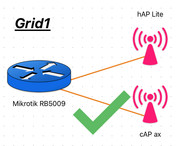
Until now I was using CAPsMAN to control my two cAPs (hAP Lite works as AP and cAP ax) which was connected directly to my router and everything worked perfectly. (Grid1)
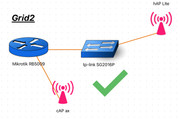
I just bought new management tp-link switch and when connect hAP Lite to switch and leave cAP ax connected to RB5009 everything works (Grid2)
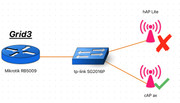
But the problem become when I connect both of them to tp-link switch (Grid3), then hAP Lite becomes unavailable by management IP and also no wireless network provisioned on it. cAP ax works.
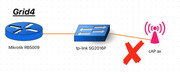
I also tried to connect only cAP ax to tp-link switch then it doesn’t work, not accessible by management ip and no provisioned wireless networks. (Grid4)
So, my conclusion is the on “Grid3” example cAP ax is going to be discovered through hAP Lite by L2 if I’m right and something is happening because hAP Lite is unaccessible?
hAP Lite is controlled by a CAPsMAN and hAP ax is controlled by CAPsMAN v2.
Do I need to configure something more on cAP ax or maybe there is compatibility issue? CAPsMAN v1 devices works well with non Mikrotik switches between as I heard but what about CAPsMAN v2 devices?
Export of some configurations
### cAP ax ###

/interface vlan
add interface=mybridge name=VLAN_10 vlan-id=10
/interface wifi datapath
add bridge=mybridge disabled=no name=capdp
/interface wifi
set [ find default-name=wifi1 ] configuration.manager=capsman datapath=capdp \
    disabled=no
set [ find default-name=wifi2 ] configuration.manager=capsman datapath=capdp \
    disabled=no
/interface wifi cap
set caps-man-addresses=10.100.10.1 discovery-interfaces=mybridge enabled=yes \
    lock-to-caps-man=no slaves-datapath=capdp
/ip address
add address=10.100.10.3/24 interface=VLAN_10 network=10.100.10.0
/ip route
add disabled=no dst-address=0.0.0.0/0 gateway=10.100.10.1 routing-table=main \
    suppress-hw-offload=no


### hAP Lite ###

/interface vlan
add interface=mybridge name=VLAN_10 vlan-id=10
/interface wireless security-profiles
set [ find default=yes ] supplicant-identity=MikroTik
/interface wireless cap
set bridge=mybridge caps-man-addresses=10.100.10.1 discovery-interfaces=\
    mybridge enabled=yes interfaces=wlan1
/ip address
add address=10.100.10.2/24 interface=VLAN_10 network=10.100.10.0
/ip route
add disabled=no dst-address=0.0.0.0/0 gateway=10.100.10.1 routing-table=main \
    suppress-hw-offload=no


### RB5009 ###

/interface wifi capsman
set enabled=yes interfaces=bridge1 package-path="" require-peer-certificate=\
    no upgrade-policy=none
/ip firewall filter
add action=accept chain=input comment="Accept CAPsMAN From VLAN_10" dst-port=5246 in-interface=VLAN_10-Management protocol=udp
add action=accept chain=input comment="Accept CAPsMAN From VLAN_10" dst-port=5247 in-interface=VLAN_10-Management protocol=udp


### tp-link SG2016P ###

interface port-channel 1
  switchport general allowed vlan 1,10,20,30,40,50,192 tagged

interface gigabitEthernet 1/0/2
  description "cap ax"
  switchport general allowed vlan 10,20,30,40,50,192 tagged

interface gigabitEthernet 1/0/12
  description "hap Lite"
  switchport general allowed vlan 1,10,20,30,40,50,192 tagged

interface gigabitEthernet 1/0/15
  description "TRUNK"
  switchport general allowed vlan 1 tagged

  channel-group 1 mode active
  lacp port-priority 1

interface gigabitEthernet 1/0/16
  description "TRUNK"
  switchport general allowed vlan 1 tagged

  channel-group 1 mode active
  lacp port-priority 1
Thank you