Mikrotik CCR2004-1G-12S+2X’s rom is too small, only 128M, but it has 4G RAM, so it has set ramdisk=1G, but the openwrt image in the container cannot run. After running, it is stopped immediately. What’s the reason?
Do you have logging enabled? What does that say?
logging=yes
/system/device-mode/update container=yes
/disk add type=tmpfs tmpfs-max-size=1000M slot=RAM
/container/config/set registry-url=https://registry-1.docker.io tmpdir=RAM
/interface/veth/add name=veth1 address=172.17.0.2/16 gateway=172.17.0.1
/interface/bridge/add name=dockers
/ip/address/add address=172.17.0.1/16 interface=dockers
/interface/bridge/port add bridge=dockers interface=veth1
/ip/firewall/nat/add chain=srcnat action=masquerade src-address=172.17.0.0/16
/container/envs/add env_list=linux_envs key=PASSWD value=“letmein”
/container/mounts/add name=linux_data src=RAM/docker/linux_data dst=/data
add remote-image=unifreq/openwrt-aarch64:latest interface=veth1 envlist=linux_envs root-dir=RAM/docker/linux_root mounts=linux_data hostname=openwrt
about logging file
getting layer sha256:a78819ced238e05f3cc7811c2f5c370be2125586cdf224ac204293083f7bc4da
layer sha256:a78819ced238e05f3cc7811c2f5c370be2125586cdf224ac204293083f7bc4da downloaded
import successful, container 2f370818-f547-404b-89b5-e65c453199b7
You can use armvirt target -
docker import https://downloads.openwrt.org/snapshots/targets/armvirt/64/openwrt-armvirt-64-default-rootfs.tar.gz openwrt-arm64
docker save openwrt-arm64 > openwrt_arm64.tar
Still not, as before
docker import https://downloads.openwrt.org/snapshots/targets/armvirt/64/openwrt-armvirt-64-default-rootfs.tar.gz openwrt-arm64
docker save openwrt-arm64 > openwrt_arm64.tar
I set “CMD” to
cmd="/bin/sh -c \"while ((true)); do sleep 1; done\""
then connect to the console (
/container; shell 0
or whatever # the container is) and poke around. For some containers, I figure out that there’s a permissions problem, or some app is missing a library, or it can’t find a file it’s looking for.
I’ve tried it on the same exact setup and I, too, can’t keep the container running. I’ll have to test on another machine without a RAM disk and on 7.6.
Thanks, I managed to repeat this issue. This was broken somewhere from stable 7.6 to rc, release.
You can use 7.6 for now, as bare Openwrt uses only 8.8MB on arm64 systems
/ # cat /etc/banner
  _______                     ________        __
 |       |.-----.-----.-----.|  |  |  |.----.|  |_
 |   -   ||  _  |  -__|     ||  |  |  ||   _||   _|
 |_______||   __|_____|__|__||________||__|  |____|
          |__| W I R E L E S S   F R E E D O M
 -----------------------------------------------------
 OpenWrt SNAPSHOT, r21603-fb15cb4ce9
 -----------------------------------------------------
So what exactly is broken? Use of the RAM disk for container storage?
In this case, cause is not related to tmpfs
Nice.
Downgraded my router to 7.6, then got the container working. Snapshot versions don’t have a GUI, so this is what I ended up preparing for the router.
docker import https://downloads.openwrt.org/releases/22.03.2/targets/armvirt/64/openwrt-22.03.2-armvirt-64-default-rootfs.tar.gz openwrt-arm64
docker save openwrt-arm64 > openwrt_arm64.tar
And with that, we have a GUI:
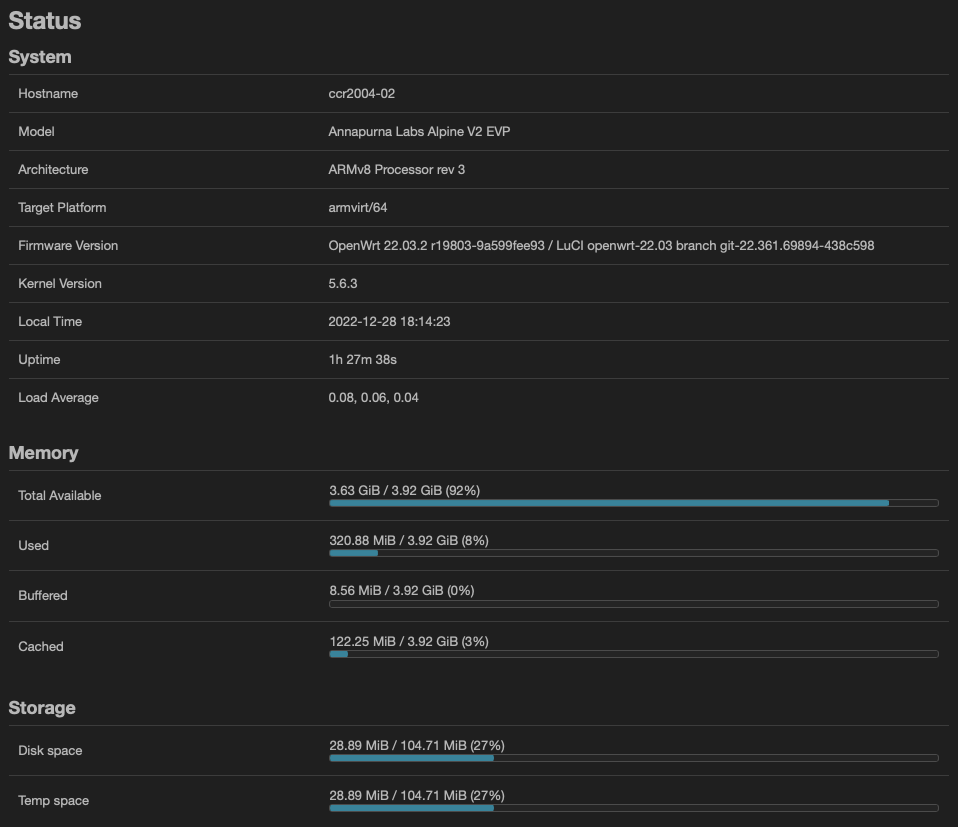
Downgraded from 7.7 to 7.6?
Yeah. I had upgraded to 7.7 to try the RAM disk. Switched back to 7.6 and just used the NAND.
Hello
Is it possible for you to fully explain the installation method? I did the settings according to the official Mikrotik videos on YouTube and followed your instructions on both 7.9 and 7.6 but still got the error that it wouldn’t run.
Please give complete instructions to install openwrt container. Thanks!
On PC:
docker import https://downloads.openwrt.org/releases/24.10.1/targets/armsr/armv8/openwrt-24.10.1-armsr-armv8-rootfs.tar.gz openwrt-24.10.1-arm64 --platform linux/arm64/v8
docker save openwrt-24.10.1-arm64 -o openwrt_24.10.1_arm64.tar
On Mikrotik:
/interface/bridge add name=Bridge-Docker port-cost-mode=short
/ip/address add address=192.168.254.1/24 interface=Bridge-Docker network=192.168.254.0
/interface/veth add address=192.168.254.23/24 gateway=192.168.254.1 name=OpenWRT
/interface/bridge/port add bridge=Bridge-Docker interface=OpenWRT
/container/add file=/usb1/openwrt_24.10.1_arm64.tar interface=OpenWRT cmd="/sbin/init" root-dir=/usb1/docker/openwrt start-on-boot=yes

/container start [find interface=OpenWRT]
and initial setting OpenWRT from console
Change name eth0
network.lan.device='eth0'to actual!
In ROS >= 7.20 name interface in container = name veth in ROS
/container sh №
# set network address
uci delete network.globals
uci delete network.lan.ip6assign
uci set network.lan.device='eth0'
uci set network.lan.ipaddr='192.168.254.23'
uci set network.lan.netmask='255.255.255.0'
uci set network.lan.gateway='192.168.254.1'
uci commit network
# disable non-working services
/etc/init.d/sysntpd disable
/etc/init.d/firewall disable
/etc/init.d/odhcpd disable
# set dns server
echo "nameserver 8.8.8.8">/etc/resolv.conf
/etc/init.d/network restart
# check internet
ping google.com -c 2

# install iptables, wireguard
opkg update && opkg install iptables-zz-legacy wireguard-tools luci-proto-wireguard
# install other useful utilities
opkg update && opkg install mc nano curl git
Final: open in browser web panel OpenWRT 192.168.254.23
thank you so much, is that possible to set valn on openwrt (eth0.20 and set interface dhcp) and on mikrotik get ip (dchp client)?
I played with openwrt, create and delete container. it was ok, but for testing i used internal memory for storage. So finally i decided put usb drive and setup it properly. Day before i did upgrade to routeros to latest 7.20.6 and now container not starting, once i click start it write “open: No such file or directory” (see images attached)

FYI, i’m using exact command from the post above (change file path and root-dir accordingly).
I did downgrade to 7.19.6 and now openwrt container can run. So issue related 7.20. Didnt try 7.21