MikroTik Shared API Console ( https://github.com/Archi23-GIT/MikroTik-Console )
Current version: 1.6.1 (recorded in VERSION).
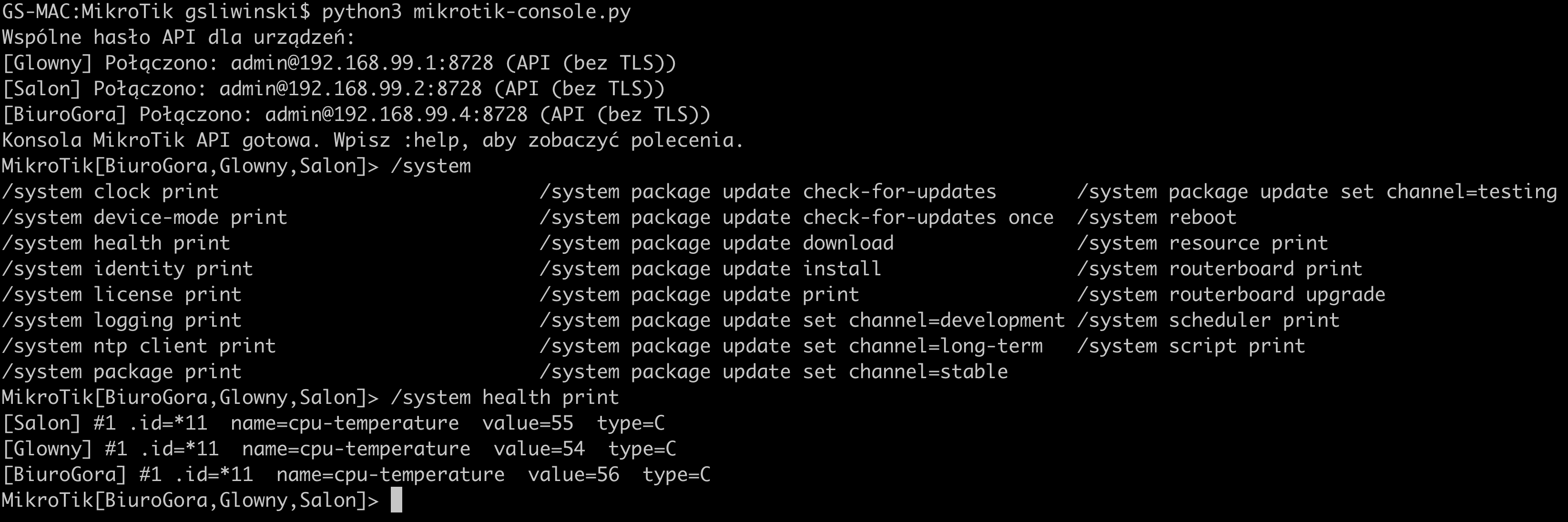
The console connects to multiple routers through the native RouterOS API. It keeps a separate API connection to each router, runs commands concurrently, and displays replies as records labeled with the device name.
Each MikroTik must have a configured, reachable IPv4 or IPv6 address. The RouterOS API uses TCP/IP, so this application cannot manage devices without an IP address.
Project information
- Implementation language: Python; Windows interface enumeration also invokes PowerShell.
- Documentation languages: English and Polish. Application messages: English and Polish.
- License: GNU GPL v3, as provided in LICENSE.
- Dependencies: standard library for the core; optional Windows Tab completion uses
pyreadline3. Install withpy -m pip install -r requirements.txton Windows. - Automated checks: GitHub Actions runs unit tests on Linux, Windows, and macOS with Python 3.12 and 3.14. This is a configured test matrix, not proof of live router/network compatibility.
- Contributions: CONTRIBUTING.md. Security reports: SECURITY.md.
- Community expectations: Code of Conduct.
Python and operating system requirements
The minimum Python version inferred from the code is 3.9: the console uses asyncio.to_thread(), introduced in 3.9. For a new installation, use Python 3.12 or newer from a supported release. The current automated tests have been run on CPython 3.12.14 on macOS; this is not a claim that every Python version or operating system has been tested.
The scripts use the Python standard library; no pip install step is required on macOS or Linux with a complete Python installation. Keep mikrotik-console.py, mikrotik-config-builder.py, and mikrotik_language.py in the same directory. The console also needs devices.json, created manually or by the builder. Run commands from that directory in an interactive terminal.
| System | Python installation | Current application limitations |
|---|---|---|
| macOS, Intel or Apple Silicon | Python 3.12+ or Homebrew; run with python3 |
Main development/test platform. Tab completion uses the optional readline module, backed by GNU readline or libedit; the console also runs without it. |
| Windows 11 | Python 3.12+ ; run with py -3 |
Explicit IPv4/IPv6 prefix scanning uses portable Python APIs, but is not tested here on Windows. The console runs without readline; Tab completion is unavailable in that case. Native Windows API connections have not been tested here. Automatic MNDP discovery is not validated on Windows. |
| Linux, including Ubuntu 26.04 LTS | Distribution Python 3.12+; Ubuntu 26.04 supplies Python 3.14 through python3 |
Tab completion requires readline; it is optional for running the console. Prefix scanning uses portable APIs but has not been tested here on Linux. The IPv4 broadcast stage of automatic MNDP discovery uses macOS-specific ifconfig parsing and is not portable to Linux as currently implemented; the IPv6 multicast stage is separate. |
macOS
Install a supported Python 3.12+ build, or use Homebrew if it is already installed:
brew install python
python3 --version
python3 -c "import asyncio, ssl, readline; print('Python modules OK')"
python3 mikrotik-config-builder.py --ipv6 --lang en
python3 mikrotik-console.py --lang en
Do not assume that the Python supplied by Apple or developer tools meets the requirements: check the interpreter actually selected by python3.
Windows 11
Install Python using the official Windows downloads. With the Python install manager, install a runtime and verify it in PowerShell:
py install 3.14
py -3 --version
py -3 mikrotik-config-builder.py --network 192.168.99.0/24 --lang en
py install applies to the new Python install manager. If you use a traditional installer, select a Python 3.12+ release and verify it with py -3 --version instead.
Since version 1.5.3, readline is optional. Stock Windows Python can start the console without installing additional packages; Tab completion is unavailable without readline. To enable it or fix ModuleNotFoundError: No module named 'readline' in older versions, follow the Windows installation instructions below.
py -3 .\mikrotik-console.py --lang en
Do not treat WSL as equivalent to native Windows for local-link MNDP discovery; its network setup must be checked separately.
Windows IPv6 discovery
Since 1.6.0, if MNDP returns no addresses on Windows, the builder checks API endpoints in local IPv4 subnets, within --max-hosts. After login, it reads /ipv6/address/print and /ip/neighbor/print, then verifies the IPv6 endpoints through API before saving them. IPv4 bootstrap addresses are not saved in IPv6 mode. This requires API read permissions and reachable IPv6 API endpoints. Large local subnets exceeding the remaining limit are skipped with a message. A local IPv6 address on the PC does not prove that MNDP packets are being received.
Since 1.5.5, automatic discovery reads IPv4 broadcast interfaces using PowerShell and uses numeric IPv6 scope IDs on Windows (for example fe80::1%12). This has been tested with simulated interface data, not on a Windows network. If discovery returns no addresses, check IPv6 on the active adapter, local network connectivity, MNDP on the routers, and Windows Firewall permissions for Python to receive UDP/5678 on the trusted local network. Close WinBox and retry if it is using the discovery port. You can bypass MNDP using --ipv6 --network with a small reachable prefix. A missing discovery reply does not establish that the router API is unavailable.
Installing Windows Tab completion
Windows does not include the Unix readline module. Install the Windows replacement pyreadline3, which provides a readline compatibility module. In PowerShell, use the same Python launcher for installation and execution:
py -m pip install --upgrade pyreadline3
py -c "import readline; print(readline.__file__)"
py .\mikrotik-console.py --lang en
If pip is missing, run py -m ensurepip --upgrade and retry installation. If you select a specific interpreter, use that selection in every command, for example py -3.14 -m pip install --upgrade pyreadline3 and py -3.14 .\mikrotik-console.py. In a virtual environment, use its python -m pip and python commands instead. Restart the console after installation.
Without the module, the console displays this installation hint and runs without Tab completion. Do not install the old pyreadline package. The replacement has not been tested here on Windows 11; the check above verifies that your interpreter can import it.
Ubuntu 26.04 LTS
Install the distribution's Python without replacing the system interpreter:
sudo apt update
sudo apt install python3
python3 --version
python3 -c "import asyncio, ssl, readline; print('Python modules OK')"
python3 mikrotik-config-builder.py --network 192.168.99.0/24 --lang en
python3 mikrotik-console.py --lang en
pip, python3-dev, and a virtual environment are not required to run this version. Installing net-tools alone does not fix automatic MNDP's IPv4 stage: the code also expects macOS output formatting. Use an explicit reachable prefix for predictable scanning on Linux until that discovery stage is ported.
Across all systems, the computer must be able to reach the routers' API TCP port (8728 or 8729). Automatic discovery additionally needs local-link UDP/5678 traffic and IPv6 enabled. No administrator/root privileges are required by the application itself; installing system packages may require them.
Sources: Python asyncio documentation, readline availability, Ubuntu 26.04 python3 package.
Example screen

Router configuration
By default, the application uses unencrypted API connections on TCP port 8728. Enable the api service on each router and restrict access to the computer running the application, for example:
/ip service set api disabled=no address=192.168.88.10/32
Also restrict access with firewall rules. Use a RouterOS account with the api permission and only the other permissions required by your commands. Unencrypted API connections transmit passwords and commands in plain text, so use them only on a trusted local network or through a VPN. RouterOS uses port 8728 for API and 8729 for API-SSL by default (MikroTik documentation).
Passwords
Shared settings in devices.json belong in defaults; entries in devices usually contain only a router name and address. Each device entry can override the shared settings. Set the password mode in defaults:
"password_mode": "shared"prompts once for a shared password for devices without their own setting."password_mode": "individual"prompts separately for each such device."password_mode": "individual"in a device entry requires a separate password for that device, even when the default mode isshared.
Passwords are requested at startup and are not saved to the configuration file. See devices.example.json.
Message language
Both scripts automatically choose the language of messages, prompts, errors, and help. Polish is used when the detected system language is Polish. English is used for other languages and when detection fails.
On macOS, detection reads the first language in AppleLanguages. On Windows, it reads the user's interface language. On Linux, it checks LC_ALL, LANGUAGE, LC_MESSAGES, and LANG, in that order. Keep the shared module mikrotik_language.py alongside both scripts. RouterOS replies and error messages originating from the operating system are displayed as received.
Use --lang pl or --lang en to override detection in either program. The option also sets the language of --help. Without --lang, detection remains automatic.
python3 mikrotik-config-builder.py --ipv6 --lang en
python3 mikrotik-console.py --lang pl
Automatic device discovery
mikrotik-config-builder.py scans a subnet on the API port, logs in to responding routers, and reads their names from /system identity. Discovery requires an accessible API and valid shared credentials. The password is requested in the terminal and is not saved.
python3 mikrotik-config-builder.py --network 10.0.138.0/24
By default, the builder uses unencrypted API on port 8728 and saves the result to devices.json. If the file exists, it asks before overwriting it. You can choose another subnet, port, username, or output file, for example --network 10.0.137.0/24 --output new-network.json. For API-SSL, use --ssl --port 8729; certificates are verified by default. --insecure disables verification.
With --ipv6 and no --network, the builder sends MNDP requests on UDP/5678 using IPv4 broadcasts (limited and directed broadcasts on each local interface) and IPv6 multicast. It waits 35 seconds to cover the default 30-second RouterOS announcement interval. It extracts IPv6 addresses from announcements and uses IPv4 addresses as temporary connections to read /ip/neighbor/print. It then tries the IPv6 addresses of neighbors visible to those routers, including devices whose announcements were not received directly by the computer. Temporary IPv4 addresses are excluded from devices.json; this mode saves IPv6 addresses.
Discovery uses MNDP and RouterOS neighbor tables. It does not use the general macOS neighbor table, which can include unrelated devices and system interfaces. No subnet is required in automatic IPv6 mode. After discovery, the builder attempts API login. IPv4 failures are summarized by count without listing each address. IPv6 failures are reported individually.
Link-local addresses (fe80::) work only on the link where they were discovered. The builder includes the computer's interface identifier in host, for example fe80::2ec8:1bff:fe05:2a4e%en0; the console uses it for IPv6 connections. Discovery covers the computer's local links and does not cross routers into other VLANs or subnets. Neighbor-table addresses are accepted only from MikroTik neighbor records returned by the routers.
python3 mikrotik-config-builder.py --ipv6
You can also scan a small, reachable IPv6 prefix explicitly:
python3 mikrotik-config-builder.py --ipv6 --network fd12:3456:789a::/120 --max-hosts 256
The scanner respects --max-hosts (default: 4096). A typical /64 is too large to scan. The router's API service, /ip service access rules, and IPv6 firewall must allow connections from the scanning computer.
A preparation message appears immediately, followed by a notice about waiting for MNDP announcements.
Device names come from RouterOS Identity. For each identity, the builder saves only one working address: the first in IP address order. Other addresses with the same identity are skipped without adding an IP suffix to the name, so the console connects to that device once. Routers sharing an identity are treated as one device; give separate routers distinct identities.
Starting the console
Copy the example configuration if you want to configure devices manually:
cp devices.example.json devices.json
devices.example.json contains 28 example devices, S01R1–S14R2, at 10.0.138.1–10.0.138.28, with shared settings in defaults. Adjust their names and addresses for your network, or generate devices.json with the builder, then run:
python3 mikrotik-console.py
Command-line options
mikrotik-console.py
python3 mikrotik-console.py [--config JSON_FILE] [--lang pl|en]
| Option | Default | Description |
|---|---|---|
-h, --help |
— | Show help and exit. |
--lang pl, --lang en |
Automatic detection | Force Polish or English messages and help. |
-c JSON_FILE, --config JSON_FILE |
devices.json |
Device configuration file. |
--password-prompt |
Disabled | Hidden compatibility option; passwords are always requested interactively according to password_mode. |
devices.json fields
The configuration contains shared settings in defaults and a devices array. Device fields can override the corresponding defaults.
| Field | Default | Description |
|---|---|---|
defaults |
{} |
Shared device settings; individual entries can override each field. |
devices |
Required | Nonempty array of devices. |
name |
Required | Device name used in the console; must be unique. |
host |
Required | Reachable IPv4 or IPv6 address of the router. |
username |
admin |
API username. |
port |
8728 without TLS, 8729 with TLS |
API TCP port; an explicit value overrides the port selected by ssl. |
ssl |
false |
true enables API-SSL; false uses unencrypted API. |
verify_ssl |
true |
Verify the API-SSL certificate. Applies when ssl is enabled. |
password_mode |
shared |
shared requests one shared password; individual requests a password for each device. A device entry can override defaults. |
Older configurations may put password_mode at the top level of the JSON object. New configurations should put it in defaults.
mikrotik-config-builder.py
python3 mikrotik-config-builder.py [OPTIONS]
| Option | Default | Description |
|---|---|---|
-h, --help |
— | Show help and exit. |
--lang pl, --lang en |
Automatic detection | Force Polish or English messages and help. |
--network CIDR |
10.0.138.0/24 without --ipv6; none for automatic IPv6 discovery |
Prefix to scan. With --ipv6, omitting this option enables active MNDP discovery. |
--ipv6 |
Disabled | Use IPv6. Without --network, send MNDP requests over IPv4 broadcast and IPv6 multicast, then supplement discovery from accessible routers' /ip/neighbor tables. With --network, scan that prefix. |
--username NAME |
admin |
Shared API username used for login and saved in defaults. The password is requested in the terminal. |
--port PORT |
8728 |
API TCP port. With --ssl, specify the API-SSL port, usually 8729. |
--ssl |
Disabled | Use API-SSL instead of unencrypted API. |
--insecure |
Disabled | Disable certificate verification; requires --ssl. |
--timeout SECONDS |
1.5 |
Timeout for each connection or API reply. |
--workers NUMBER |
48 |
Maximum number of concurrent connection attempts. |
--max-hosts NUMBER |
4096 |
Maximum number of addresses to check. |
--output FILE |
devices.json |
Output JSON configuration path. |
--force |
Disabled | Overwrite the output file without prompting. Otherwise, ask for confirmation in the terminal. |
Example: scan another IPv4 subnet with API-SSL and save a separate configuration:
python3 mikrotik-config-builder.py --network 192.168.88.0/24 --ssl --port 8729 --output routers.json
Using the console
- Enter a RouterOS command to send it concurrently to selected devices, for example
/system identity print. - Paths may use spaces or slashes:
/system package update check-for-updatesand/system/package/update/check-for-updatesare both supported. - Tab completion includes RouterOS package commands for checking updates, downloading, selecting a channel, and installing.
downloaddisplays combined progress instead of every download fragment.installdownloads and installs an update, then reboots the router. Before installing, select a router using:only nameto avoid rebooting all selected devices at once. :listshows devices and their connection states.:only home-router,office-routerselects target devices.:allselects all connected devices.:reconnectcloses old sessions and attempts to reconnect to all configured routers. Retry unavailable devices with another:reconnect.- Tab completion includes
/system reboot,/system routerboard upgrade, and/system/reset-configuration. Resetting erases the router's configuration and may disconnect it; select a single device using:only namefirst. - Tab completes common paths under IP, SYSTEM, and TOOLS, console commands, and device names.
/system routerboard upgradeupdates RouterBOOT. After rebooting, use:reconnectto connect again without restarting the application./tool romon printand/tool romon set enabled=yesshow the RoMON state and enable RoMON on the selected device.:helpshows help;:quitcloses connections and exits.
The console forwards API commands without restricting them to a fixed list of RouterOS actions. Commands available in the router's version and packages can be used if the API supports them. Enter a CLI path with spaces or an API path with / separators. After print, you can use an API query, for example /ip/address/print ?address=192.168.99.1/24. Common CLI conditions after where are converted to API queries. Each record displays its attributes on one line, wrapping to fit the terminal width.
The API is not a text terminal: it does not relay ANSI progress bars or interactive prompts. Tab completion uses example commands built into the program and does not retrieve dynamic suggestions from the router.
Only final statuses of /system package update check-for-updates are colored: “System is already up to date” is green; other final statuses are red. The intermediate “finding out latest version...” status and other command replies use the terminal's default color. Colors are disabled when output is redirected or NO_COLOR is set.
Technical implementation
Components and execution flow
| Component | Responsibility |
|---|---|
mikrotik-config-builder.py |
Discover candidate addresses, verify API credentials, read RouterOS identities, and generate devices.json. |
mikrotik-console.py |
Load configuration, maintain per-device TCP sessions, translate commands, and display replies. |
mikrotik_language.py |
Detect the OS language and apply the --lang pl/en override before building CLI help. |
The builder is a separate preparation step. The console reads the saved configuration; it does not run discovery automatically. Both programs use asyncio for network operations. Terminal input in the console runs through asyncio.to_thread(input, ...) so it does not block the event loop. MNDP collection and interface enumeration in the builder are synchronous and finish before API scanning begins.
RouterOS API transport
The scripts implement RouterOS API framing directly, without an external API client. A request is a sentence of UTF-8 words. Each word has a variable-length byte-count prefix (one to five bytes); a zero-length word ends the sentence. Login uses /login with =name= and =password= attributes. This implementation does not include the legacy challenge-response login mechanism.
Reply types include !re (record), !done (completion), !trap (command error), and !fatal (fatal error). Attributes are decoded from =key=value words. The console consumes the completion after a trap to keep the stream aligned; it combines duplicate trap messages for display. TCP connects directly to the configured IPv4/IPv6 endpoint. TLS uses Python's ssl module; certificate verification is enabled unless explicitly disabled.
Discovery and validation
- With an explicit
--network, the builder enumerates usable hosts in that CIDR. It checks the host count against--max-hostsbefore enumeration. A scoped/128, such asfe80::4aa9:8aff:feb7:5699%12/128, checks one IPv6 endpoint without MNDP. - Automatic
--ipv6first listens for MNDP and sends refresh requests on UDP/5678. IPv6 discovery joinsff02::1on local interfaces, waits 35 seconds, and repeats refresh requests. IPv4 discovery sends limited and directed broadcasts on each enumerated IPv4 interface. - MNDP packets are parsed as a four-byte header followed by big-endian type/length/value fields. The parser requires a MAC-address field and extracts IPv4/IPv6 address fields. It is not a general ARP/NDP cache scan.
- If Windows receives no MNDP candidate addresses, the builder uses local IPv4 prefixes obtained through PowerShell as API bootstrap candidates. Oversized prefixes are skipped. This fallback is not triggered merely because some MNDP candidates later fail API checks.
- Each candidate is verified by TCP connection, API login, and
/system/identity/print. In automatic mode,/ip/neighbor/printcan add IPv6 candidates. For IPv4 bootstrap connections with a known local interface,/ipv6/address/printalso supplies the router's own enabled, valid IPv6 addresses. These candidates undergo their own API checks before they can be saved.
Link-local IPv6 candidates retain the computer's local interface scope: a name such as %en7 on macOS or a numeric index such as %12 on Windows. A RouterOS interface name cannot substitute for the computer's scope. Scoped addresses in devices.json are specific to that computer; moving the file may require updating scopes.
The builder tracks attempted addresses across discovery rounds. Its semaphore limits concurrent checks to --workers (default 48). --timeout (default 1.5 seconds) applies separately to connection and reply stages, rather than to the whole scan. --max-hosts (default 4096) caps attempted addresses, including bootstrap and subsequent IPv6 candidates; reaching it can stop further expansion.
Configuration output and duplicate handling
Only successful API results are eligible for output. Automatic IPv6 mode excludes temporary IPv4 bootstrap addresses. Results are sorted by address and scope; the first successful address for each exact, case-sensitive RouterOS identity is retained. Identity is the deduplication key, not MAC address or hardware serial number: two distinct routers with the same identity are treated as one.
The builder writes JSON to a sibling .tmp file and replaces the destination after writing. This avoids replacing the destination with a partially written JSON document, but is not a power-loss durability guarantee. If no eligible devices are found, the existing configuration is preserved. Passwords are kept in process memory and are not written to JSON. IPv4 failures are summarized; IPv6 failures retain per-address details.
Console concurrency and command handling
The console connects to configured devices concurrently and maintains one reader, writer, and asyncio.Lock per device. Commands run across selected devices with asyncio.gather; the per-device lock prevents replies from different commands being mixed on one connection. Replies enter an asyncio.Queue and a separate printer task displays them as they arrive. There is no cross-router transaction or rollback: one router can succeed while another fails.
Connection and login each have a 12-second timeout. During command execution, each reply sentence has a 120-second timeout; this is not a 120-second total command limit. :reconnect explicitly closes old sessions and retries all configured devices. Reconnection is user-triggered, not an automatic retry loop.
The parser uses shlex for quoting, converts CLI paths/actions into API words, preserves explicit API query words, and supports selected CLI where conditions. It does not emulate the full interactive RouterOS shell or arbitrary RouterOS scripting syntax. Tab completion comes from a static list plus configured device names. readline supplies line editing on supported systems; Windows can use pyreadline3. Without that module, ordinary command input remains available.
Verification and known limits
Run the local regression suite without routers:
python3 -m unittest test_config_builder test_language test_console_portability
On Windows, use py -m unittest with the same module names. Tests cover configuration output, identity deduplication, language selection, missing readline, Windows interface data, and simulated IPv4-to-IPv6 discovery. Mock-based tests do not establish live Windows/Linux network compatibility. MNDP delivery depends on local-link connectivity and filtering; a reachable IPv6 API endpoint can still be absent from discovery. Linux's IPv4 MNDP interface enumeration still needs porting from macOS ifconfig output.