hello all, newbie here, i can follow instructions pretty well but defiantly not that experienced in IT, i would like some help with the following, i have one hap ac router working fine, i think, but my modem is in the basement where i have three cat 5 cables that need a switch, but only one cat 5 that can be connected to the modem, that goes upstairs to my router, i ordered another hap ac that i want to install next to the modem in the basement, then from that head upstairs to the office to the other router. so from doing research i can bridge them. i don’t want the basement to act like a switch i would like two routers doing the same thing, also we are an ios family. 6 to 8 devices running usually. would it be beneficial to have ios on its own wifi? thank you again
Configure one hAP ac as router (place this one in the basement, connected to the modem), the other as accesspoint. Multiple routers is for multiple reasons not advisable.
In this YouTube video from MikroTik you can see step by step how to configure it:
https://www.youtube.com/watch?v=qB1FSvxddi0
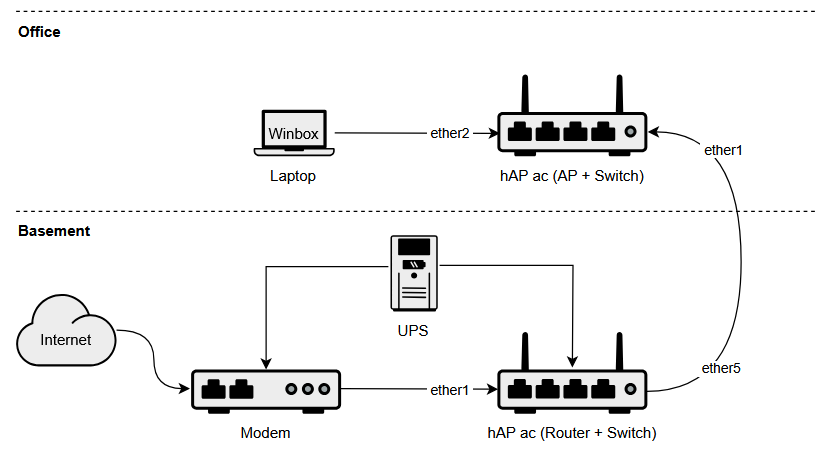
Provide a network diagrams of what you think the final setup will loook like.
So the router in the basement is working fine. Do I need to reconfigure anything on that? And the video just says how to reconfigure the second one. It doesn’t say how to connect the second one. So my question is do I go straight from first router to second router via Ethernet, then to switch? Or do I hook second router from switch coming from first router, then only have the Ethernet cable and not use second router as a switch. Ideally I would like to use the built in POE so I can mount the router minus power cable. Right now I am having trouble finding and connecting to second router. Can someone give me step by step instructions please? Thank you
The options are clear.
One Cable from modem to MT Device in basement.
One Cable from MT Device in basement to MT device upstairs.
Which one acts as switch and which one acts as a router should is all very optional.
I personally would put the router with two considerations
a. UPS backup (as well as modem)
b. coolish location ( doesnt overheat )
Post both configs for review
/export file=anynameyouwish ( minus router serial number, any public WANIP information, keys )
Two link the two devices, a management vlan is important and the switch gets its IP address from this VLAN.
You can keep the configuration of the first router (basement) intact and change the configuration of the second router (office) only to achieve the desired result. The second device should be repurposed and act as a Wireless Access Point. In this example the AP will receive IP configuration from your router in the basement automatically.
I would use the default configuration as a starting point.
First Ethernet is always configured as a WAN port (protected by a firewall, enabled DHCP client, and disabled MAC connection/discovery). Other Ethernet ports and wireless interfaces are added to the local LAN bridge with 192.168.88.1/24 address set and configured DHCP server. In the case of dual-band routers, one wireless is configured as a 5 GHz access point and the other as a 2.4 GHz access point.
So the first step is resetting the router to the default configuration.
Hold reset button until the LED light starts flashing, and release the button to reset RouterOS configuration to default.
Start Winbox on your laptop and connect using a cable to any port of the router except the 1-st one. Then switch to “Neighbors” list in Winbox where you should see the router. Connect to the router by MAC address.
From the list of discovered routers, you can click on the IP or MAC address column to connect to that router. If you click on IP address then IP will be used to connect, but if you click on MAC Address then the MAC address will be used to connect to the router.
Once connected, do the following:
- Disable DHCP server on the bridge interface (IP / DHCP Server / DHCP).
- Disable static IP address on the bridge interface (IP / Addresses).
- Create DHCP client for the bridge interface (IP / DHCP Client).
- Add ether1 interface to the list of bridge ports (Bridge / Ports).
- Disable WAN interface list membership for ether1 (Interfaces / Interface List).
Connect port 1 of the office router to port 5 of the basement router, reconnect the laptop, restart Winbox and you’ll see both routers in the Neighbors list. You can also unplug the power adapter from the router in the office, and it will be powered by the router in the basement via PoE.