Hi fellow MikroTik users,
Today I’m having strange issue, one of our RB Mac detected as 00:00:00:00:00:00 in ARP print list.
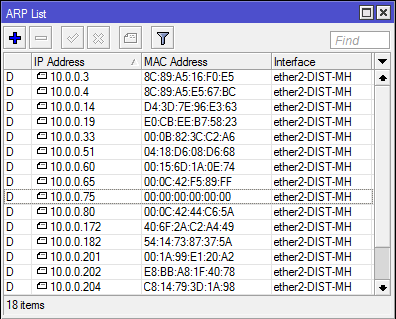
Has anyone faced similar problem with mine?
I tried to plug into different ports, but still getting the same issue.
Hi fellow MikroTik users,
Today I’m having strange issue, one of our RB Mac detected as 00:00:00:00:00:00 in ARP print list.
Has anyone faced similar problem with mine?
I tried to plug into different ports, but still getting the same issue.
What's new in 6.32.4 (2016-Feb-09 09:17):

*) arp - show incomplete ARP entries;
it is feature not an issue.
But I couldn’t ping 10.0.0.75 and/or any other devices with mac 00:00:00:00:00:00 
AFAIK - incomplete ARP entry is created when the request for ARP for IP address comes up empty. That is, in the Ethernet someone broadcasts for ARP for an IP address and nobody is responding.
So, the fact that you cannot ping actually is the reason why incomplete ARP entry is in the table not the cause.
Hi Janisk,
Thanks for replying, how can I reproduce this issue?
Because we didn’t change anything recently.
Could this be device malfunctioning?
Nope - this isn’t a malfunction. Here’s how to reproduce the results. (not an issue):
from some host whose traffic goes through the router, but is not in the same network as 10.0.0.X - ping any IP address that you know is not in use.
You will see the address appear in the ARP table with all-zero MAC address.
Any time any packet comes into the router with a destination address that is not in the ARP table, the router must send an ARP request to learn the MAC address of that host. Usually, the host is really there and so it replies to the ARP, and the MAC changes from all-zeros to being the actual MAC of the host.
So - if you see all-zero MAC addresses, that means there are packets going through the router with destination addresses that don’t correspond to a real host. What could be some causes of this?
Network scans
Someone mis-types an address.
The missing host WAS online, and was talking to some other host, and then disconnected, but the remote host is still trying to reach the disconnected host. (are you still there? Hello? If you’re there, I can’t hear you… hello???)
Network scans
Yes, I typed network scans twice. Try looking at the ARP table on an interface with a public IP range attached to it, and you’ll see tons of these.
This is bug happily existing in 6.35.2 as well
What’s new in 6.35 (2016-Apr-14 12:55):
*) arp - apply Linux Kernel patch to stop RouterOS from randomly exhibiting misplaced ARPs;
Read the post above, this is not a bug. It’s standard Linux behavior.
Hi ZeroByte,
Thank you for your explanation.
I will investigate that particular device then, because maybe someone is looking into that IP address, and the device is not responding.
And I thank you to all who has responded to this thread 
Whenever someone requests an IP address for a new server or something here at my office, since the IP list has errors in it (don’t get me started), I ALWAYS do a ping and then check the ARP table in the router for an incomplete entry before I will consider it CLEAR. (Hosts may drop all incoming packets, but they can’t drop ARP requests, so I consider that the most reliable scan of all)
I wouldn’t concern myself with them - our public-IP border router has… (checking) 21 such entries right now.
I’d be more concerned if there WEREN’T any… if your public IP network isn’t getting scanned, then it’s down. 
Read whats new:
What’s new in 6.35 (2016-Apr-14 12:55):
*) arp - apply Linux Kernel patch to stop RouterOS from randomly exhibiting misplaced ARPs
I have issue with this too - not valid LAN IP address with mac 00:00:00… - it is only one PC on my network and nobody search and pinging for this ghost address. This is not corrected with version 6.35, 6.35.1 and 6.35.2
Apparently this issue was that the Mikrotik would ARP on the wrong interface for addresses…
I bet if you run a sniffer on all interfaces, filtered to that IP address, you’ll see some packet entering the router with that destination IP.
I have this issue to in 6.35.2
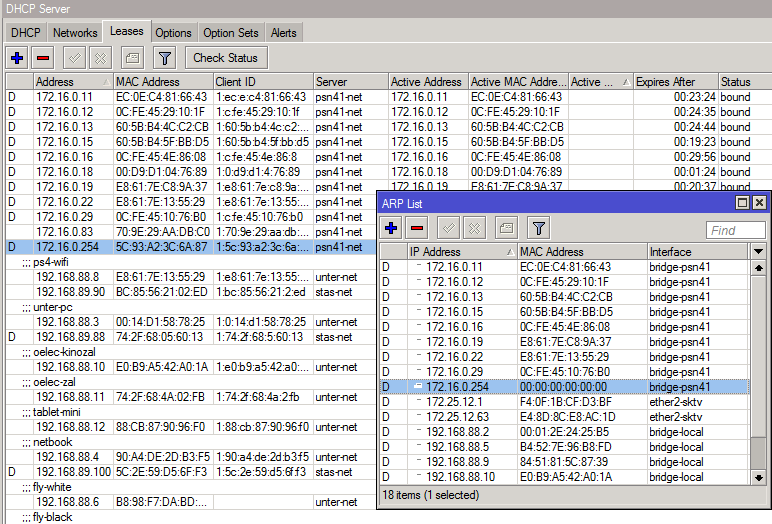
What’s the issue? Looks like it’s on the right interface. Just because there’s a DHCP lease assigned doesn’t mean the machine is still active and responding to arp.
Ok! May its not a problem. But on 6.35.2 I have big issue! All remote clients cant get IP - I got errors in log about DHCP lease offered! Cant fix it! Just update server to RC version!
You must have a configuration error somewhere.