Routerboard updated with success. MikroTik reboot.
I have a look on logs and I see many traffic in very short time. Is it normal?
I will observe it.
Hope will works longer than last time.
If will crash, I will use /system logging add topics=lte,!packet in Terminal and will back to you.
I have a look on logs and I see many traffic in very short time. Is it normal?
We can’t tell for sure until we see the logs.
If will crash, I will use /system logging add topics=lte,!packet in Terminal and will back to you.
Run the command above and reboot, if those topics are not already present. We need them in place to capture the message exchanges between router and modem BEFORE the timeouts occur.
UPDATE:
From last almost 12 hours MikroTik is running without freezing.
My smart TV was wake up me during night 2 times (hope some missing signal from Alexa app “found” way out to TV)- after second time I moved LAN from my TV.
I will keep you updated, today I am working from home so I will be able to react fast if signal will be lost again.
Update:
Now again MikroTik freez. This time it was look like system wants to connect again, first time with success and after few secunds it freeze again.
I have download logs - in file.
Remarks/Question: I am wondering, is it possible that MikroTik have problem when it have few BTS in front of it? I have BTS aprox 2km far from home, but there is on that site 2 BTS…
Is it possible to assign one BTS to avoid situation that in time to time signal from second BTS is stronger and MikroTik wants to move connection from one to another BTS? myconfa.rsc (2.66 KB)
Now again MikroTik freez. This time it was look like system wants to connect again, first time with success and after few secunds it freeze again.
I have download logs - in file.
You don’t need to run the command again, just one time. You’ll see that multiple entries of logging topic lte,!packet were added:
/system logging
add topics=lte,!packet
add topics=lte,!packet
add
add topics=lte,!packet
Delete the others and just leave one.
Yes. Once you export it to a file:
/log print file=mylog.txt
you need to open it with a text editor and manually edit. Then upload the sanitized file here.
Okay, I understand I will need to use CTRL+R in the notebook to replace sensitive data.
Maybe it’s a stupid question, but what exactly is ‘sensitive’?
For me, for example, the websites that I open are not sensitive. I understand that ‘id:342e…XXX’ should be hidden/deleted.
What else should I delete, or what data should I leave in the file?
I test /log print file=mylog.txt and I face a problem… file can capture only 1000 lines- that is only 29 seconds for system work.
What can I do to capture more than 1000 lines, or can I remove from system some atributes which system capture in log file?
Maybe it’s a stupid question, but what exactly is ‘sensitive’?
It is said that the only “stupid” question is the question that one didn’t ask, so your question is alright.
Sensitive data usually are those that may be used to personally identify like unique serial numbers or IMEI. Passwords should be kept private. For other data, sensitivity will be subject to each individual’s preferential treatment.
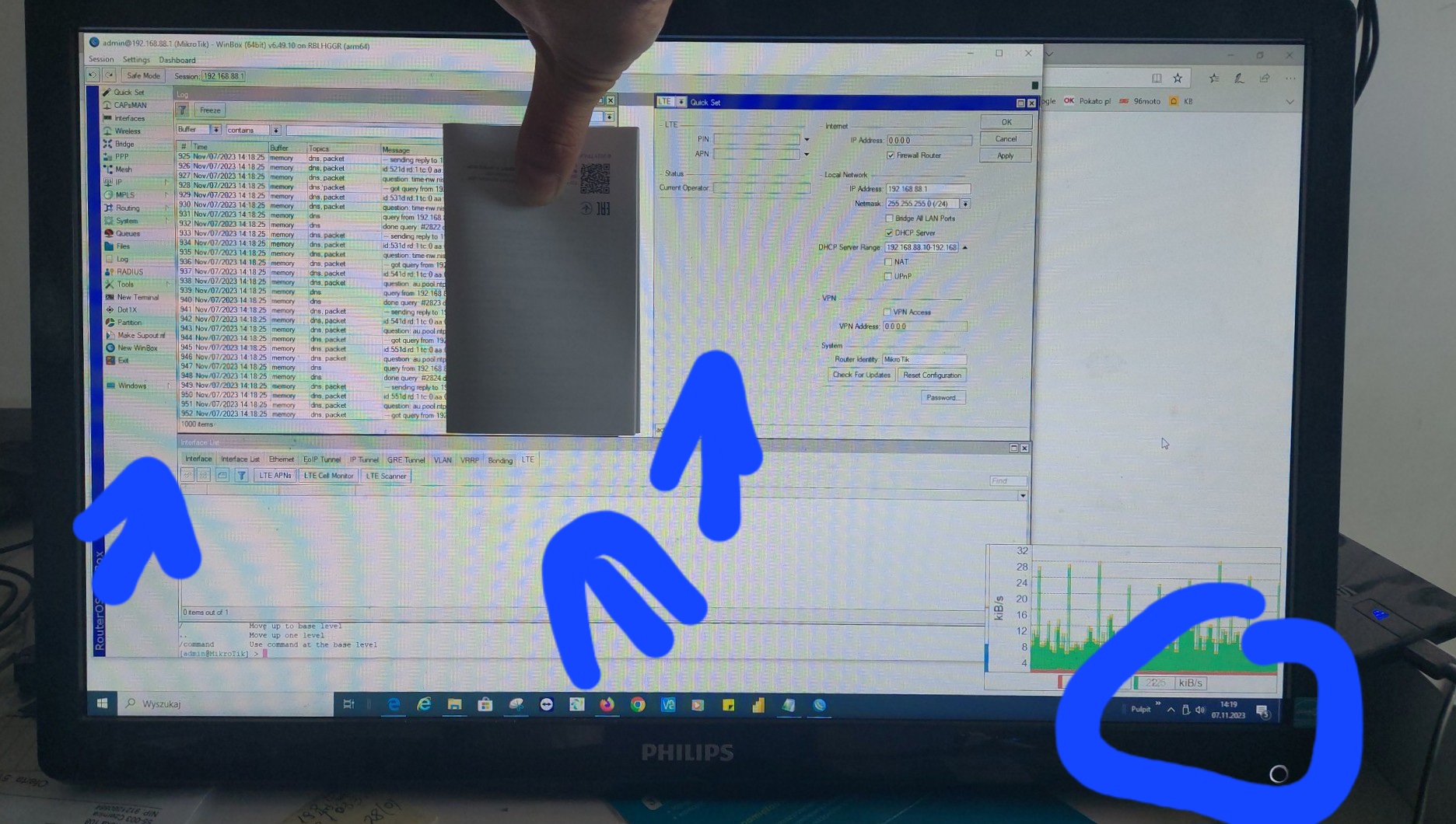
Now I reboot it and MikroTik do not connect via LTR to internet. I have look on logs and there was some trafić. Picture attached.
I have aleo put log file from last freeze with HIDE sensitive data. mylog2.txt (59.6 KB)
I have aleo put log file from last freeze with HIDE sensitive data.
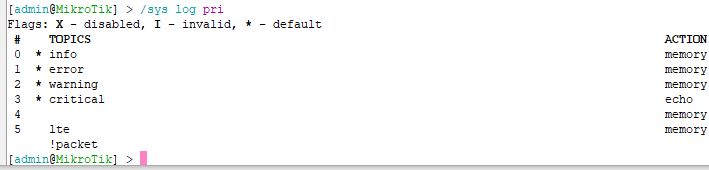
You need to clean up the system logging topics. You added a blank topic that catches ALL log messages that’s why the important messages from LTE got overwritten.
Give the output of:
/sys log pri
And I will give the command to cleanup the logging
Update to version 7 has been completed successfully.
I hope it will be helpful.
What about the output from /sys log pri? Should I adjust something?
P.S. I don’t know why, but I am thinking about my feelings about BTS.
Is it possible that the modem starts creasy up when it receives signals from 2 or 3 BTS?
Is it feasible to lock the connection to a single BTS for LTE (to prevent switching between BTS)?
UPDATE!!
Some time ago, I faced a temporary connection loss. MikroTik reset the connection in approximately one minute, and I was back online without needing to manually reboot. My reaction was quite fast, so I have logs that I can share with you. mylog.txt (351 KB)
Update to version 7 has been completed successfully.
I hope it will be helpful.
What about the output from /sys log pri? Should I adjust something?
That’s one upgrade advice too many, but didn’t even address your question regarding logging that spams lots of info that it overloads the buffer memory and overwrites troubleshooting info that is very much needed for what we are doing atm. There’s a reason why I’m taking the conservative approach of not just upgrading everything because that is just blindly hoping the problem goes away with the latest, without diving into the nitty gritty details of what causes the problem at hand. Maybe next you’ll end up receiving advice to upgrade your hardware.
Now we will never know what caused the connectivity loss under v6. So let’s just blindly hope it fixes your problem under v7, because the latest is always the greatest right, or is it?
You need to remove the blank topic that catches ALL log messages:
/sys log rem 4
Let’s try to see if your issue of sudden connectivity loss is fixed before exploring other avenues like cell locking. It is not given a GUI element in the webui, nor formally supported in the ROS command menu structure for a reason.
You’re right. But it’s hard to guarantee that I’ll be as quick as possible to catch the time of the signal loss. Tomorrow, I’ll also be working from home, so I’ll be able to be in the right place at the right time to spot any unusual workflow of device.
I am keeping you in loop.
UPDATE:
A few minutes ago, I experienced a one-minute signal outage. As soon as I noticed, I downloaded the logs, which I have attached. Do you see anything mysterious in the logs? log 7 11 23 23 33.txt (50.8 KB)
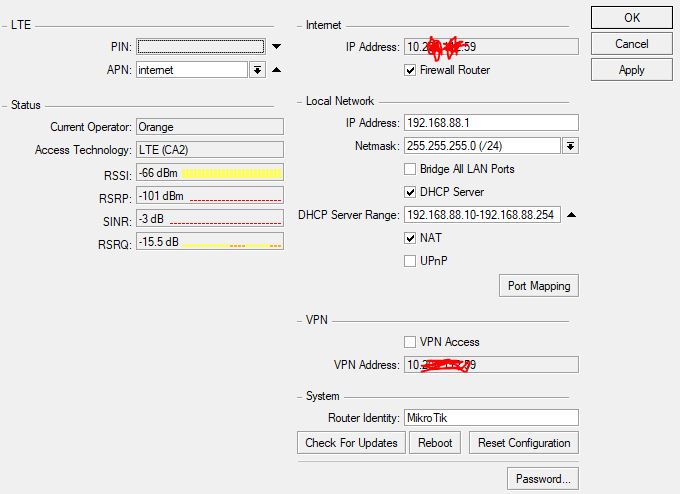
I have also put screen from main screen. What do you think about signal quality?
UPDATE:
A few minutes ago, I experienced a one-minute signal outage. As soon as I noticed, I downloaded the logs, which I have attached. Do you see anything mysterious in the logs?
Given the logs and signal stats, I would say that the intermittent connectivity loss is brought about by the modem changing stations to get better signal as indicated by the change in cell ID.
Is this the best signal statistics you get in your area? If you observe much better stats in the past, then please take note of the cell ID and bands, you’ll get these from
/int lte mon lte1 onc
This may be premature to say, but would now be a much better condition than before where the modem changes cell ID but connectivity never comes back? Of course when the modem does this there is brief interruption of the internet service, but it is quickly restored now unlike before where it stays disconnected.
I’d move around the LtAP’s direction to see if improves the RSRP. -101dBm is usable, but not good. Keep in mind it’s negative, so -100, -99, -98 are all BETTER signal in RSRP. The -3 SINR is also particularly bad.
The little graph next to them kind shows the poor signal. But it RSRP and then SINR be the ones to see if they can be improved.
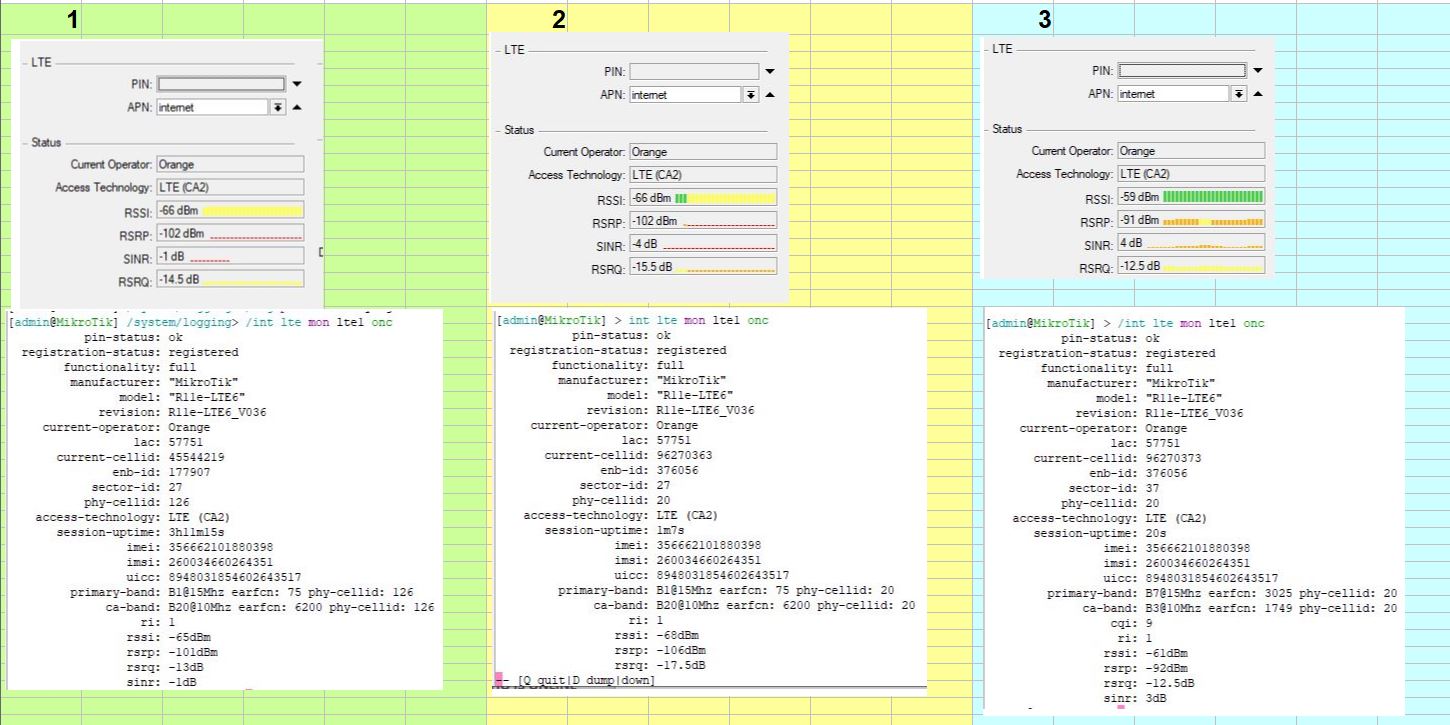
I conducted tests in three different directions of the antenna (BTS).
Every time I moved the antenna, I had to reboot the device to ensure that the BTS was correctly connected.
The results are in the attachment. From what I can see, BTS nr 3 have the strongest signal.
Am I right?
P.S. During the night, the antenna was set in the first direction. I did not observe any signal loss during 14 hours of continuous work. Now I have set the antenna to direction number 3.