Welcome to mikrotik LHG
something similar happened in my case
http://forum.mikrotik.com/t/lte-operator-problem/147057/1
Although the sad thing about his case is that it is with a newer product…
Welcome to mikrotik LHG
something similar happened in my case
http://forum.mikrotik.com/t/lte-operator-problem/147057/1
Although the sad thing about his case is that it is with a newer product…
Sometimes it also happens to me that instead of the name of the mobile operator the MCC + MNC appears instead, as in the photo below:
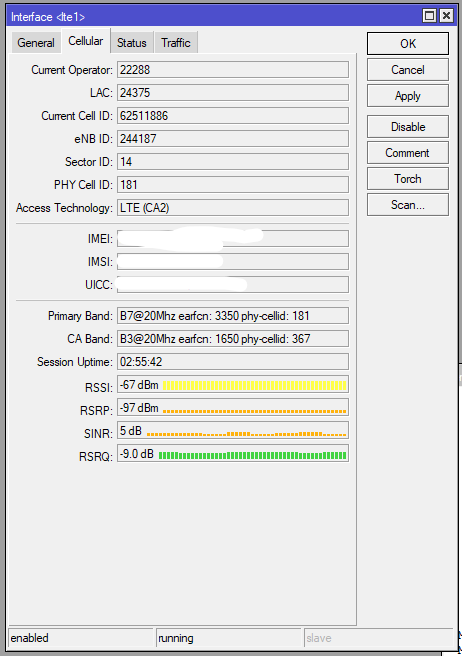
I also updated to the latest firmware for the LTE module (v27), but it didn’t help to fix the cell lock/band lock problem for the primary.
Now at this point I am waiting for the pieces that must arrive and then I will put the module cat 16 quectel with which I should not have more of these oddities (since with the chateau with the same simcard and bts and related cells the problem does not exist).
Update (21-03-2021):
I hope to receive the lte module (Quectel EM160R-GL) in the course of next week, so that I can get started with the modification.
Hello all!
Just started to use LHGG and I have same issue. Cell lock does not work. I tried to lock primary to B3, but it still shows B20, which is strange, it seems to be connected, but the traffic shows no movement. When cell lock is disabled, B3 and B20 enabled, it will connect primary to B20 + CA B3 at the same nearest cell. But then something strange will happen, LHGG starts to jump across serveral cells, even to those ones which are more far away but at the same direction where the LHGG is pointed to.
So, in my case the only thing which worked is, to stay only on band 3 only and never enable B20. I have observed the connection now for 48h and it is stable.
I will keep to find proper direction, maybe to lower the LHGG a bit too on my mast and then enable second band, but if that will not improve my connection and it will keep to jump between several cells I prolly reroll to another product, maybe to Yagi MIMO.
Regards
Daniel
Hi again,
Observed this issue now a long time. Had to lower the antenna by 1m, works like a charm. At least on one single band - only band 3 is enabled.
I have tried the cell lock again, together with band 20 enabled.
/interface lte at-chat lte1 input=“AT*Cell=2,3,6400,377”
All ok, primary is 20, ca is 3, works fine.
When I try to lock band 3 as a primary, it does not work.
/interface lte at-chat lte1 input=“AT*Cell=2,3,1574,377”
It does not lock primary to band 3, and still shows band 20 as a primary. Ca does not come up and no traffic at all.
Does anyone have the same issue or maybe I do something wrong?
My R11e-LTE6 loses data transfer but not the LTE link very similar to your device. Did you replace the LTE module? And did that solve your problem?
Hi, after I made the change I didn’t have that problem anymore.
@uiblogit
so, is it still necessary to update the firmware on the em160 modem and mikrotik to version 7 unstable?
If you already have the “A07” firmware version in your em160r-gl it is not necessary and you can proceed with the actual modification, while if the “A05” firmware version or lower is present on the lte module, I recommend upgrading. As for routeros only the versions 7.× have the drivers and files necessary to recognize and manage the lte module without problems. I got along well with 7.1b3.
Hi, thanks for letting me know and also many thanks for the information provided with the link. I just ordered the parts as suggested by you.
If you already have the “A07” firmware …
good to know, I ordered the modem and other parts from your blog links, which is very accurate.
thanks
Hi all!
First of all, the Firmware 028, fixed my problem with Cell Lock, but not entirely. Yes, the connection does not freeze anymore, instead CA band starts to reconnect all the times, this again will bring the speeds down. Therefore, the only conclusion is the LTE policy of my ISP (Tele2), why the Cell Lock does not work properly. Cell Lock works fine only if just one band is enabled.
Since another ISP mounted new Cells at my area, then I have decided to switch to new ISP (Elisa).
Now I get promised speeds all day long with Bands 3 and 20. Speeds are restricted to 50/20Mbit in my package, and I get those speeds as promised by ISP.
Cell Lock or Frequency Lock work fine with this ISP. Only CA channel does not come up when locks are used.
In overall, now I am satisfied with my LHGG. 
Sorry but we not have any diagnostic tools, AT Commands book etc. from MikroTik and we cannot watch the SiB messages to know about what Tower and your UE speak eachother to know why they not add 2CA :(. You can only say… each ISP have own policy and can not give any CA to anyone, can give CA to some IMEI devices, can give CA only when you use proper APN etc
but if with this device CA not work but others devices works then you can write about that to support@mikrotik.com or http://help.mikrotik.com - this is only proper way then.
@uiblogit Does the EM12-G mod work with pass-thru apn?