Until today our IPS Supported us with 100/100mpbs Down/Up and the speed was ok.
We have changed this week the speed and upgrade it to 300/150mpbs (Down/Up)
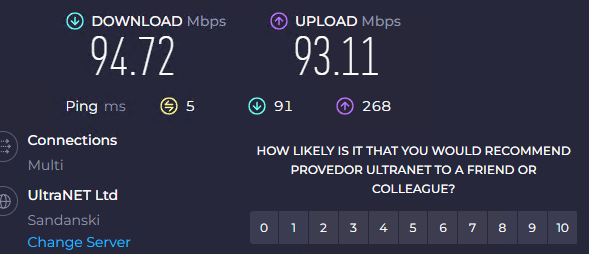
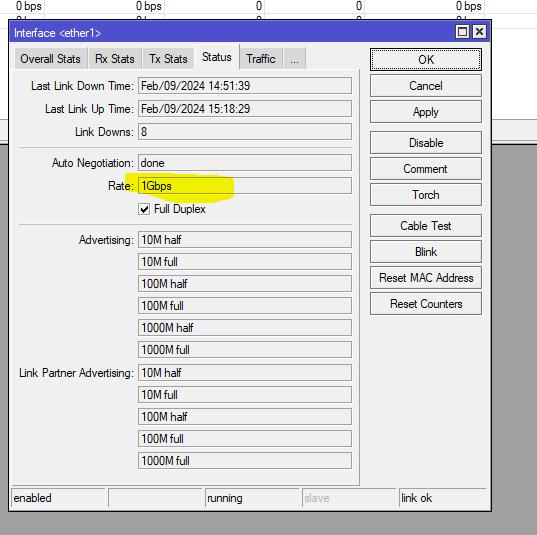
We have configured the Eth1 as WAN and all the necessary routes/firewall settings and we can not reach the speed of 300/150 on the wan port, but approx. 100/100.
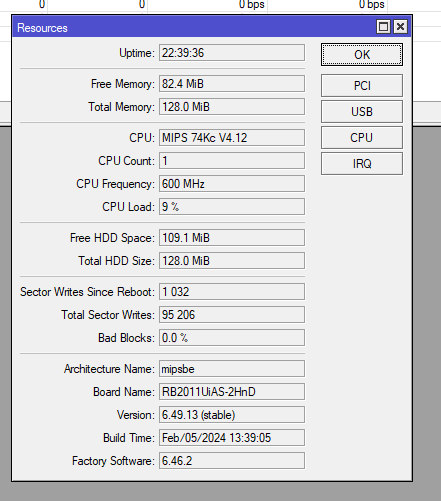
The router has the MikroTik RouterOS 6.49.13 and firmware.
We have made a reset config and tried from scratch having the same results.
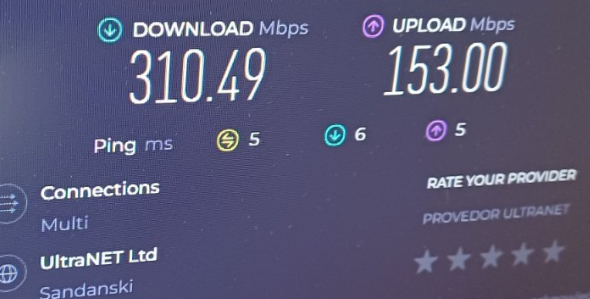
If we connect a TP-LINK ARCHER AX53 /AX3000 we get 310/153.
TP-LINK ARCHER AX53 is a WiFi6 device, but the RB2011 is a 2GHz only older generation model. They will have very different results, as 2GHz can’t be much faster
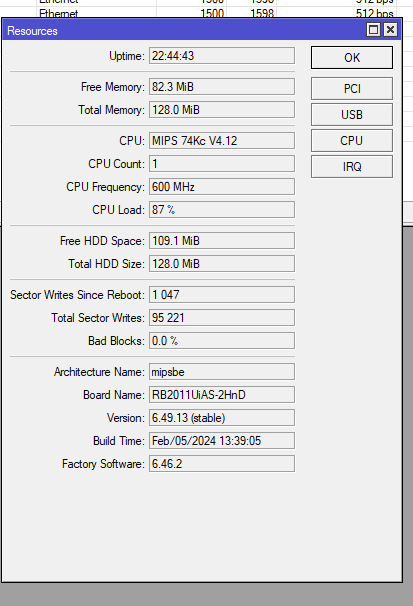
RB2011 is pretty old device, and according to the Mikrotik website it’s capable of only 244 Mbps routing when you have about 25 firewall rules. As stated above, what is CPU load when doing speedtest ?
87% is a lot, that’s probably your bottleneck. If you don’t need wireless on your router then look at RB5009. It’s more expensive but you will be safe for a long time.
It’s good and affordable replacement but it would be a good choice to invest in something more powerful. Internet speeds are increasing and while L009 is a good replacement, OP here have 300/150 internet connection and L009 can route at 323.6 Mbps so no much room for faster internet.
One should look at budget and current requirements and future requirements.
As most here would state, 350 down and 50 up is pretty decent but most connections are gravitating to 1gig up and down, for future planning purposes anyway.
In general when it comes to load and equipment and computers, one should plan on 50% capacity not 100% capacity, aka you want room for growth and as devices get closer to 100% they slow down and things can fail or not work properly.
Hence the comment about throughput on the L1009 was very appropriate and on point.
You would not even be able to reach full throughput of your new internet signal with a normal slate of firewall rules and hence the L1009 should not even be considered in the mix. Fascinating that the unbiased MT advice was to flog a dead horse. '=)
It boggles my mind why they would even put a 2.5gig port on this device, assuming maybe to connect to a switch as it would be wasted on a WAn connection. I honestly fail to see the market for this device. It is trying to be a 2000 replacement but cut too many corners to be considered vs other models.
( has only 512 RAM, better than the old 256 or 128 of older routers but most new models have 1gig).
(also is older arm32 technology which may be fine for switches but not in keeping with the rest of their newer routers using arm64)
(only has 2 core cpu)
At the same price point give or take $20, I would seriously consider the hap ax3.
arm 64, newer chip, 1gig ram, 4 core cpu etc etc.
also has a 1x 2.5 gig port to attach to a switch for example.
disable wifi if not needed
throughput up to 1.1 gig with firewall rules ( so future growth )
No doubt, if you have an extra $100 then by all means the RB5009 is another step up, that has all the AX3 has (less wifi), and:
you gain a few more ports
you gain a more powerful & faster processor and a bit more storage on board
on top of the 1x 2.5gb port you also gain an SFP+ port ( so both capable of an increased WAN connection up to 2.5 and 10+ gigs to a managed switch for example)
most of all you get throughput with firewall rules up to 3gigs ( so the 2.5 port can be utilized for wan ).
This device is truly pound for pound the best value for a wired router you will find anywhere.
The ax3 is in the same category for wifi home router.