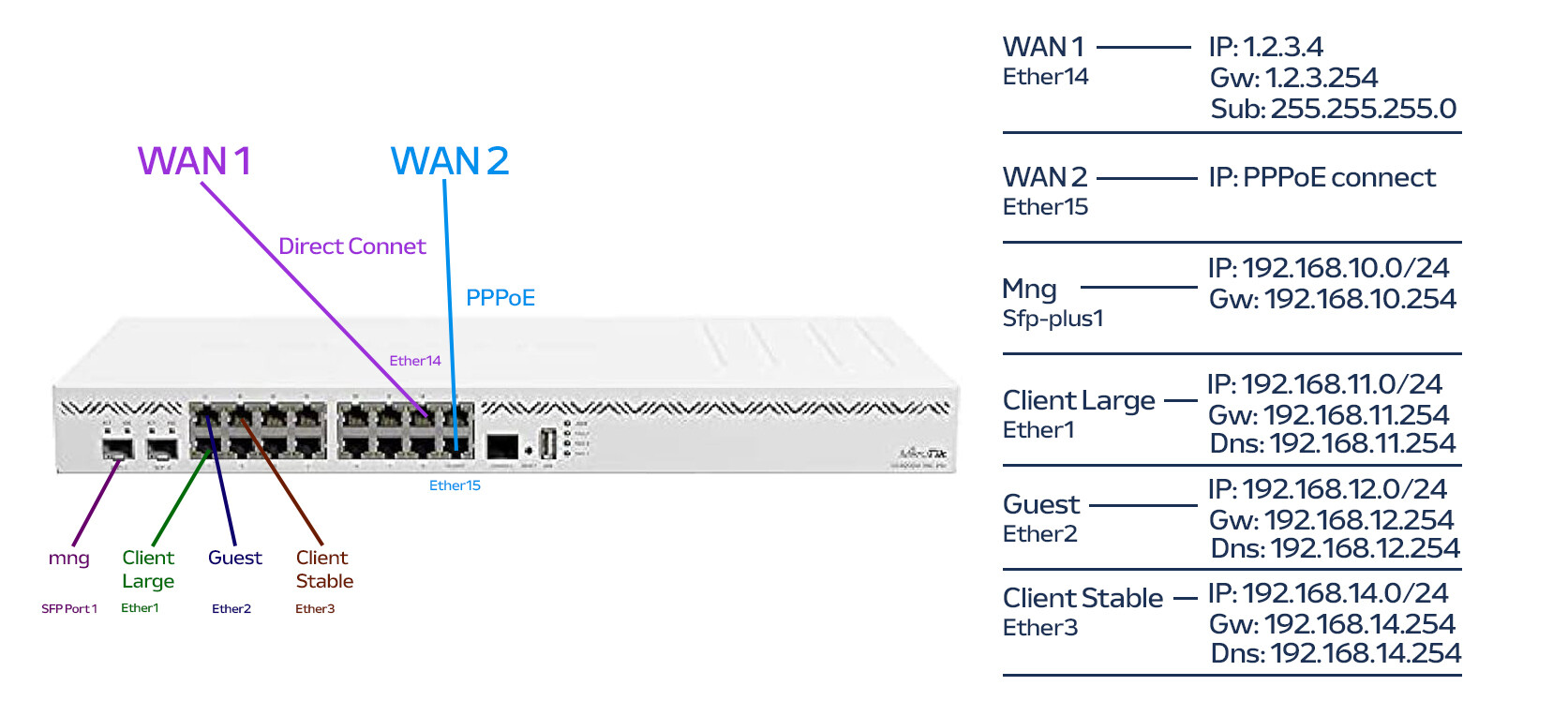
I have a Mikrotik CCR2004-16G-2S+ router. As you can see in the image, I’ve set up a configuration, but I am encountering issues. I want to redesign the setup from scratch (for the user side).
The issue I’m facing is: when I configure the settings for users in the Guest and Large networks to access the internet via WAN2, the communication between users in the Large and Stable networks is disrupted. Additionally, users in the Stable network cannot communicate with the router, although they can still access the internet.
The structure I want to implement is as follows:
Devices in the Mng and Stable networks should access the internet through WAN1. If WAN1 goes down, it should automatically switch to WAN2.
Computers in the Guest and Large networks should access the internet through WAN2. If WAN2 goes down, it should automatically switch to WAN1.
Users in the Stable and Large networks should be able to communicate with each other. Users in the Guest network should only be able to access the internet and not reach the Stable or Large networks.
The IP addresses will be the addresses given in the image.
Is there someone who can help me set up the configuration I mentioned above? Thank you in advance.
The most important thing is to detail your requirements accurately.
a. identify all devices/users ( internal, external and admin )
b. identify all the traffic they should be able to accomplish.
Detail the WAN requirements…
Single WAN, with failover to a secondary WAN.
Both WANS shared by all users… ( what happens when one wan fails )
One WAN only for some users and the other only for the rest ( what happens when either wan fails )
I wrote you a really good answer using Mangle and then realised that answer was sooooooo Ros v6.
Routing Rules are likely going to dig you out of this one, I haven’t read up enough on them yet myself but that’s where I’d start tinkering if you have the capability to have this on the bench,
Hello, I hope you can help me with the configuration. I tried to prepare an answer according to the article you wrote. I am doing VLAN management with a Unifi Switch. I want to make a setting as I wrote in the Router section. There will be no special restrictions on the router. Nor will there be any special speed limitations.
a. Identify all devices/users (internal, external, and admin) Network Information
Management Network (MNG) – Network devices and other IP-enabled devices are connected here.
Router IP: 192.168.10.254/24
DHCP: On
DHCP Pool: 192.168.10.10 - 192.168.10.200
Gateway: 192.168.10.254
DNS: 8.8.8.8, 1.1.1.1
Client Large Network - Use WAN2 Internet
Router IP: 192.168.11.254/24
DHCP: On
DHCP Pool: 192.168.11.10 - 192.168.11.200
Gateway: 192.168.11.254
DNS: 192.168.11.254, 8.8.8.8
Guest Network - Use WAN2 Internet
Router IP: 192.168.12.254/24
DHCP: On
DHCP Pool: 192.168.12.10 - 192.168.12.200
Gateway: 192.168.12.254
DNS: 8.8.8.8, 1.1.1.1
Client Stable Network - Use WAN1 Internet
Router IP: 192.168.14.254/24
DHCP: On
DHCP Pool: 192.168.14.10 - 192.168.14.200
Gateway: 192.168.14.254
DNS: 192.168.14.254, 1.1.1.1
b. identify all the traffic they should be able to accomplish.
There are no restrictions.
*** Detail the WAN requirements:**
Devices in the MNG and Stable networks should access the internet through WAN1. If WAN1 goes down, it should automatically switch to WAN2.
Computers in the Guest and Large networks should access the internet through WAN2. If WAN2 goes down, it should automatically switch to WAN1.
Users in the Stable and Large networks should be able to communicate with each other. Users in the Guest network should only be able to access the internet and should not have access to the Stable or Large networks.
*** Single WAN, with failover to a secondary WAN.**
If WAN1 goes down, it should automatically switch to WAN2. If WAN2 goes down, it should automatically switch to WAN1.
*** Both WANS shared by all users..... ( what happens when one wan fails ).**
If one WAN fails, users should be automatically switched to the other.
*** One WAN only for some users and the other only for the rest ( what happens when either wan fails )**
If both WANs are down, nothing will happen.
1. Any port forwarding required?
Yes, from WAN1 to Client Large Network
Example: Port 2222 forwarded to IP 192.168.11.200 Port 2222.
Example: Port 3333 forwarded to IP 192.168.11.200 Port 3333.
2. Any VPN required (e.g., WireGuard)?
No, we don’t use VPN.
3. Is WAN1 a public IP, and if so, is it dynamic or static?
WAN1 has a static IP and is manually configured.
IP: 1.2.3.4
Gateway: 1.2.3.254
DNS: 8.8.8.8, 1.1.1.1
Speed: 100/100 Mbps
4. Is WAN2 a public IP, and if so, is it dynamic or static?
WAN2 has a static IP and uses a PPPoE connection.
IP: 2.3.4.5
Gateway: Uncertain
Speed: 300/100 Mbps
If people in the large and stable groupings have complete access to each other, what is the purpose then of different subnets?
If there were only certain devices accessible across the subnets or a small group of folks within each that have access to each other, then yes they should be separate and create address lists to identify the exceptions and use firewall rules to allow the cross traffic.
A. How many clients are involved in port forwarding?
Reason I ask is that if the number is manageable and known, it may be more secure for them to VPN into the server, vice openeing ports on the router.
B. regardless of answer in A, wireguard is simple to setup and will allow you as an admin, to access the router from home, hotel, anywhere via laptop, ipad/smartphone for configuration issues or to access any of the subnets.
Food for thought.
++++++++++++++++++++++++++
In terms of the config, this is a basic number of vlans attached to a single bridge.
Firewall rules to allow needed traffic.
Since WAN1 will be primary, port forwarded traffic may not require any mangling.
We should be able to use routing rules for users going out WAN2, and thus again no mangling required.
IP routes / tables will be required to ensure users go out specific WANs, and failover is handled as required.
+++++++++++++++++++++++++++++++++
Suggest you give it a try and then come back when your stuck.