Mikrotik pcc not working with isp uplink vlan

pcc is not working with isp uplink vlan

i have no idea,please help me out

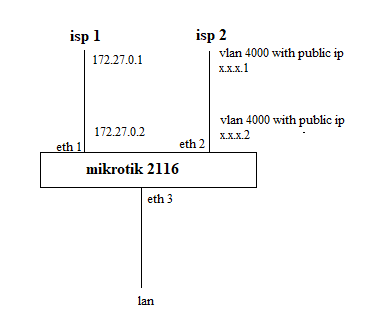
this is the configuration and diagram

/ip address
add address=172.27.0.2/29 network=172.27.0.0 broadcast=172.27.0.7 interface=eth1
add address=x.x.x.2/30 network=x.x.x.0 broadcast=x.x.x.3 interface=vlan4000
add address=192.168.1.1/24 network=192.168.1.0 broadcast=192.168.1.255 interface=eth3

/ip route
add dst-address=0.0.0.0/0 gateway=172.27.0.1 distance=1 check-gateway=ping
add dst-address=0.0.0.0/0 gateway=x.x.x.1 distance=2 check-gateway=ping
add dst-address=0.0.0.0/0 gateway=172.27.0.1 routing-mark=wan1 check-gateway=ping
add dst-address=0.0.0.0/0 gateway=x.x.x.1 routing-mark=wan2 check-gateway=ping


/ip firewall nat
add chain=srcnat out-interface=eth1 action=masquerade
add chain=srcnat out-interface=vlan4000 action=masquerade


/ip firewall mangle
add chain=prerouting action=mark-connection new-connection-mark=wan1-conn passthrough=yes 
    connection-state=new connection-mark=no-mark in-interface=eth1
add chain=prerouting action=mark-connection new-connection-mark=wan2-conn passthrough=yes 
    connection-state=new connection-mark=no-mark in-interface=vlan4000
add chain=output action=mark-routing new-routing-mark=wan1 passthrough=yes 
    connection-mark=wan1-conn
add chain=output action=mark-routing new-routing-mark=wan2 passthrough=yes 
    connection-mark=wan2-conn 

add chain=prerouting action=mark-connection new-connection-mark=wan1-conn passthrough=yes 
    connection-state=new dst-address-type=!local connection-mark=no-mark 
    in-interface=eth3 per-connection-classifier=src-address:2/0 
add chain=prerouting action=mark-connection new-connection-mark=wan2-conn passthrough=yes 
    connection-state=new dst-address-type=!local connection-mark=no-mark 
    in-interface=eth3 per-connection-classifier=src-address:2/1

add chain=prerouting action=mark-routing new-routing-mark=wan1 passthrough=yes 
    connection-mark=wan1-conn in-interface=eth3 

add chain=prerouting action=mark-routing new-routing-mark=wan2 passthrough=yes 
    connection-mark=wan2-conn in-interface=eth3

i notice that traffic stuck in wan1 according to default route distance 1 main table.

it’s working normally in other infra but wan interface is not vlan interface.

what was i wrong and need to learn other theory ?

is the diagram OK? There are two VLAN4000. Shouldn't it be two different VLANs?
What is x.x.x.2 assigned to? Should it be VLAN4001 for example?

@micro-banana
Which Ros version are you running?
The routing-mark in /ip route has been replaced by routing-table in v 7.x.

Also, you posted a partial configuration, there is no way to know if any of the tens of other settings you did NOT post may affect the way the router works (or fails to).

More or less, generally speaking, if you actually knew where the issue is and thus post only the relevant parts of the configuration, you would have already solved it, otherwise the advice is to post the FULL configuration, amonymizing/editing the sensitive parts, see:
Forum rules - #5 by gigabyte091
and Rule #12 here:
The twelve Rules of Mikrotik Club

The diagram is a good start. Explaining more on the traffic flows is helpful and your goals.
If you have one LAN, what is the goal. Load Balancing (using both ISPs at the same time), or primary and failover?
Do you have services that need to communicate with the router itself ( like any VPN ) and if so, provide description of the requirements.
Are there any users on the LAN that require different traffic flows?
Are there any devices on the LAN that external users need to reach.

Plus as noted before the config is key ( and current version being used).
/export file=anynameyouwish ( minus router serial number, any public WANIP information, keys, dhcp lease lists )

thanks for your comment it shouldn’t be two different vlans.

isp give me that

#vlanid 4000

#subnet x.x.x.0

#pe x.x.x.1

#ce x.x.x.2

#broadcast x.x.x.3

so cidr was /30

that’s why i use x.x.x.2 in my vlan int

thanks for your advice,

i’m so dumb because of i’m creating the config with read account so i’m trying to get admin prevililege acc and i’ll test it again and i’ll come back with config as you mentions if it was failed. is it relative with user acc creating the mangle rule ?

thanks for your compliment,

my goal is load balancing using pcc.

yes there is hundred of pppoe user and some devices on lan that external users need to reach.

THose details or requirements should be detailed in order to process the config, especially any outside access………. Forward ports? Servers? Anything to the router itself (VPNs etc. )
No, the mangle "new-routing-mark=" remained the same, but while in v6 your route would be something like yours:

add dst-address=0.0.0.0/0 gateway=172.27.0.1 routing-mark=wan1 check-gateway=ping

in v7 this would be changed to:

add dst-address=0.0.0.0/0 gateway=172.27.0.1 routing-table=wan1 check-gateway=ping

and the routing table needs to be explictly created besides and before.