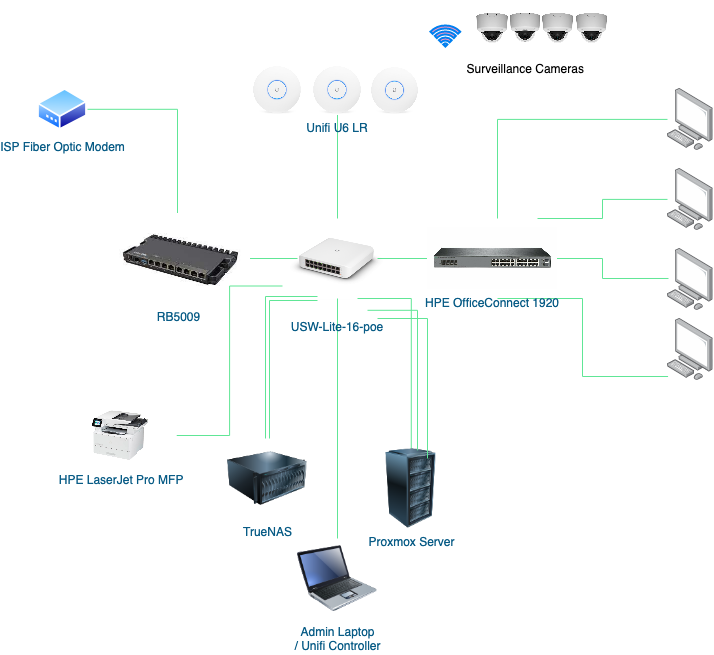
Hi there, I have a similar setup and I am new to both Mirkotik and Ubiquiti devices. 
The goals are to
- Setup a guest network with Wifi internet access only. That is, no access to other devices/ networks
- Setup Wifi and wired network for those computers connected to HPE OfficeConnect 1920 switch with access to Internet, the LaserJet Pro, Samba sharing at TrueNAS and some selected VMs/ Containers at the Proxmox Server only
- Setup a Wifi network for the surveillance cameras. NVR application runs at the TrueNAS server. This network should not have internet access.
- Setup an Admin network to maintain these devices: RB5009, USW-Lite-16-poe, Unifi U6 LR AP, HP OfficeConnect 1920 switch, TrueNAS, Proxmox Server, Surveillance cameras & HP LaserJet Pro
I’ve been playing with the Unifi new and old UIs back and forth. So far so good and here are some ref links
- Unifi Complete Network Setup https://youtu.be/7m4d1K9Npw4
- VLANs on Unifi https://youtu.be/CSsB8T-HCp0
For Mikrotik, I am reading about mikrotik vlan setup and the configuration files here.
- http://forum.mikrotik.com/t/vlans-on-rb750gr3-im-stuck/154656/1
- http://forum.mikrotik.com/t/using-routeros-to-vlan-your-network/126489/1
Watching YouTube videos
- Bridge VLAN Filtering in MikroTik: https://www.youtube.com/watch?v=JcinExkyHZA
- Configure VLAN on built-in switch chip in MikroTik: https://www.youtube.com/watch?v=rvQ6o4RfnoU
Do Bridge VLAN filtering or VLAN at mikrotik build-in switch chip? Still very confusing. As shown in the diagram below, I use RB5009’s port 1 to connect to ISP modem and port 2 as the trunk port for collecting the USW-Lite-16-poe switch. This should be what they call router on a stick.
mkx suggests bridge vlan is not necessary for router on a stick → http://forum.mikrotik.com/t/vlans-on-rb750gr3-im-stuck/154656/1
But, a bridge with all ports as the members is created out of the box as the default config of RB5009. I think i miss something and need to study again…