MikroTik RouterOS 7.25 XFRM IPsec tunnel to UniFi UDM Pro Max: Phase 2 up, but no traffic

Spent a good part of the day fighting with a route-based IPsec tunnel between a MikroTik CCR2116 and a UniFi UDM Pro Max.

Eventually got it working, so I figured I'd share what I found in case someone else runs into the same problem. There's still not a whole lot of documentation on XFRM in RouterOS, especially when dealing with third-party devices.

The setup

  • MikroTik CCR2116 running RouterOS 7.25 stable

  • UniFi UDM Pro Max

  • IKEv2 with PSK

  • Phase 1: AES-256-CBC, SHA256, DH14

  • Phase 2: AES-256-CBC, SHA256, no PFS

  • Route-based IPsec using XFRM

  • Traffic selectors: 0.0.0.0/0 <=> 0.0.0.0/0

  • Static route pointing to the remote LAN through the XFRM interface

What was happening

The tunnel came up without much trouble. Phase 1 established, Phase 2 established, XFRM interface running, static route active.

So far, so good.

Except absolutely nothing was going through it.

Every ping returned host unreachable. Looking at the interface statistics, I noticed TX drops on the XFRM interface. Even more interesting, the IPsec out-no-states counter was increasing by exactly one for every failed ping.

The outbound ESP SA was installed, but it wasn't actually processing any traffic.

On the other hand, the inbound SA was receiving packets, yet the XFRM interface showed zero RX packets.

At that point, I started going through pretty much everything I could think of; Routes, NAT, firewall rules, IPsec proposals, traffic selectors, policy groups, installed SAs. Nothing immediately stood out.

What made it particularly annoying was that everything looked established. If you just checked the active peers and installed SAs, you'd think the tunnel was fine.

What finally got it working

I came across a MikroTik forum discussion showing a working route-based XFRM configuration and noticed something different in how the IPsec identity was configured.

Mine had:

generate-policy=no

So I changed mine to:

/ip ipsec identity
set [find where peer="REMOTE-PEER"] \
    generate-policy=port-strict \
    policy-template-group=REMOTE-XFRM

The policy group was already associated with the XFRM interface:

/ip ipsec policy group
add name=REMOTE-XFRM interface=xfrm-remote

And I already had a static policy using the broad traffic selectors:

/ip ipsec policy
add peer=REMOTE-PEER \
    tunnel=yes \
    group=REMOTE-XFRM \
    src-address=0.0.0.0/0 \
    dst-address=0.0.0.0/0 \
    action=encrypt \
    level=require \
    proposal=REMOTE-ESP

I didn't add another policy with template=yes.

After making that change, the IKEv2 tunnel renegotiated. Interestingly, this time the MikroTik was the initiator instead of the responder.

And suddenly, traffic started moving.

Well, not quite immediately. The first thing I noticed was that pings stopped returning local host unreachable errors and started timing out instead.

That was actually progress.

The outbound ESP counters were finally increasing, and after sending four test pings, the out-no-states counter hadn't increased at all.

Then I started seeing inbound ESP traffic being processed, RX and TX counters increasing on XFRM, and no new TX drops.

Eventually, actual LAN-to-LAN connectivity was working.

Tested the following:

  • ICMP: successful, 0% packet loss

  • TCP 445 (SMB): successful

  • TCP 389 (LDAP): successful

So what was the actual problem?

That's the part I'm still not 100% sure about.

Changing generate-policy=no to generate-policy=port-strict and assigning the correct policy template group is what finally got things moving.

But the tunnel also renegotiated at the same time, with the MikroTik becoming the initiator. So I can't say with absolute certainty whether the policy generation setting was the entire problem or whether the new negotiation also played a role.

What I can say is that before the change, I had an established CHILD_SA, an active XFRM interface, and a static IPsec policy, but no usable outbound ESP traffic.

After the change, the counters started behaving normally and LAN-to-LAN connectivity worked.

If you're troubleshooting something similar, these commands were particularly helpful:

/ip ipsec installed-sa print detail
/ip ipsec statistics print
/interface print stats

Pay attention to out-no-states, XFRM TX drops, and whether your outbound ESP SA actually gets the S flag indicating it has seen traffic.

Also, just because Phase 2 says established doesn't mean your traffic is actually being encrypted and forwarded.

Anyway, has anyone else run into this on RouterOS 7.25, particularly with UniFi or another third-party IPsec implementation?

I'm especially curious whether generate-policy=port-strict is actually expected to be necessary for this type of setup or whether there's something else going on with XFRM and policy matching.

Would be interested in hearing from anyone who's had more experience with RouterOS XFRM.

Note: I used AI to help clean up the formatting and sanitize sensitive configuration details. The troubleshooting and findings are my own.

Hi, welcome to the forum and thanks for sharing your findings!

Your counters look like the SA never got tied to the XFRM interface while the MikroTik was the responder. out-no-states going up means a policy matched but there was no SA with the right id to send it through. Seeing 0 RX on XFRM even though ESP was coming in fits the same story.

With port-strict and policy-template-group the negotiation gets linked to the group, and through that to the interface.

Since you changed two things at once, here's how I'd narrow it down:

  1. Go back to generate-policy=no, kill the connection and let the MikroTik initiate.
  2. Keep port-strict and let the UDM initiate.

If step 1 works, the problem lies with the MikroTik as responder, and I'd report it to support@mikrotik.com with a supout, since XFRM is brand new in 7.25 and IPsec policy/SA handling was reworked in the same release. If step 2 works instead, port-strict with the policy group is the real fix regardless of which side initiates, which also answers your question about whether it's needed.

Thanks, Larsa. I went ahead and tested your first suggestion, and things got a little more interesting.

I changed generate-policy back to no, keeping policy-template-group=XFRM. The MikroTik automatically renegotiated as initiator, and LAN-to-LAN traffic continued working.

I confirmed connectivity from our DC to the remote network using ICMP (0% packet loss) and TCP 389 (LDAP). The out-no-states counter stayed at 214 before and after the tests, and the policy still showed active-interface=xfrm-XX.

However, I'm not convinced this was a completely clean test. Although the IKE SPI changed, the previous XFRM/SA association may have survived the renegotiation. So I can't rule out retained state from when port-strict was enabled.

I tried taking the XFRM peer down to test from a cleaner state using:

/ip ipsec peer disable [find where name="XFRM-PEER"]

Instead of returning normally, the command hung for a while and eventually returned:

action timed out - try again, if error continues contact MikroTik support and send a supout file (13)

RouterOS also generated an automatic supout.rif.

The XFRM SAs were removed, but the other two regular IPsec tunnels also renegotiated during the same failure sequence. Looking at the supout, both had new SAs established at exactly 16:01:45, shortly before the automatic report was generated at 16:02:02.

My conclusion is that the IPsec service likely experienced an interruption or internal reset during the teardown, and the other tunnels renegotiated when the service recovered. I haven't confirmed an actual process restart, but the simultaneous renegotiations suggest something affected the IPsec subsystem beyond just the XFRM peer.

I was able to re-enable the XFRM tunnel afterward, and all three tunnels are operational again.

One other thing I noticed after restoring the connection: our XFRM tunnel currently has two established IKEv2 sessions, one with MikroTik as initiator and another as responder. The policy reports ph2-count=2, so both CHILD_SAs appear to be associated with the same XFRM policy.

Looking at the installed SAs, only one ESP pair handled the controlled traffic test. The other remained idle. XFRM TX drops also stayed unchanged at 180 during testing, so there doesn't appear to be an ongoing forwarding issue.

For now, I've restored the working configuration with generate-policy=port-strict.

So the first test suggests generate-policy=no can work when MikroTik initiates, but I wouldn't consider that conclusive until we rule out retained XFRM state.

I haven't tested the UniFi-initiated scenario yet because I need to coordinate with the administrator on that side. We're on opposite sides of the world, so finding a suitable maintenance window takes a bit of planning.

I'm starting to wonder whether the original issue might involve how RouterOS handles XFRM associations when IKEv2 sessions are renegotiated or when both sides initiate independently.

Note: I used AI to help clean up the formatting and sanitize sensitive configuration details. The troubleshooting and findings are my own.

Okay, that's a useful info. Step 1 working fits the idea that the problem is on the responder side, and the two parallel IKE sessions make me think the original issue was both sides initiating at once, with the CHILD_SA where the MikroTik responds never getting bound to the XFRM interface.

You can actually test that without involving the UniFi admin, as long as the UDM is set to re-initiate on its own. Set passive=yes on the MikroTik peer so it can only respond, keep generate-policy=no, and clear the state with /ip ipsec active-peers kill-connections followed by /ip ipsec installed-sa flush instead of disabling the peer. Heads up though, both commands hit every peer and SA, so your other two tunnels will drop as well. Probably one for a maintenance window.

If traffic fails again with out-no-states climbing, you've reproduced the responder problem cleanly. If it works, the parallel sessions were most likely the cause, and just making sure only one side initiates should do it.

The peer disable timeout that triggered an automatic supout and made the other tunnels renegotiate looks like a bug on its own, so I'd send that supout to support@mikrotik.com either way.

Hello @T0tex, I was trying to achieve the save as you were and I did end up in the same situation. If you decide to open support ticket, can you please let us know?

Thank you very much!

@pdostal Thanks for chiming in! I'd open a ticket with support@mikrotik.com either way. Include your config, a very brief description of the problem and your topology plus a supout (and maybe a link to this thread). The more people who report it, the better the chance they'll bump it up the list.

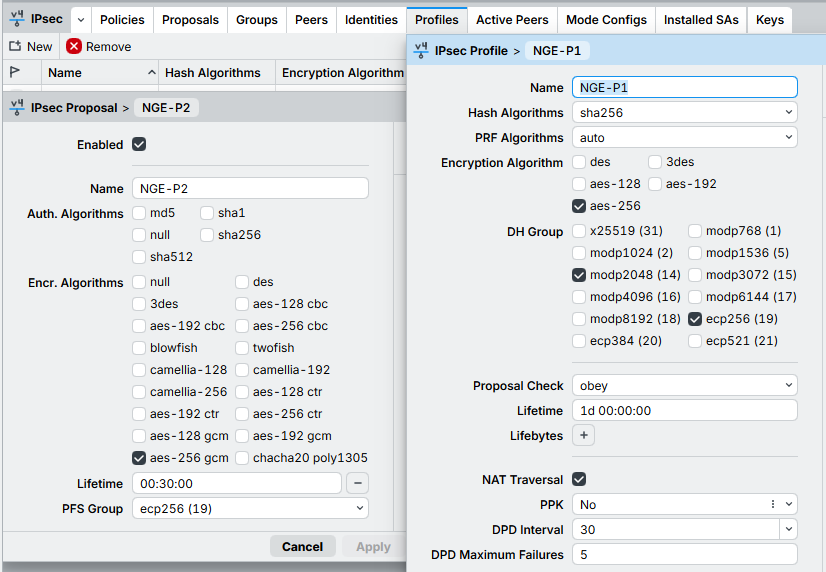
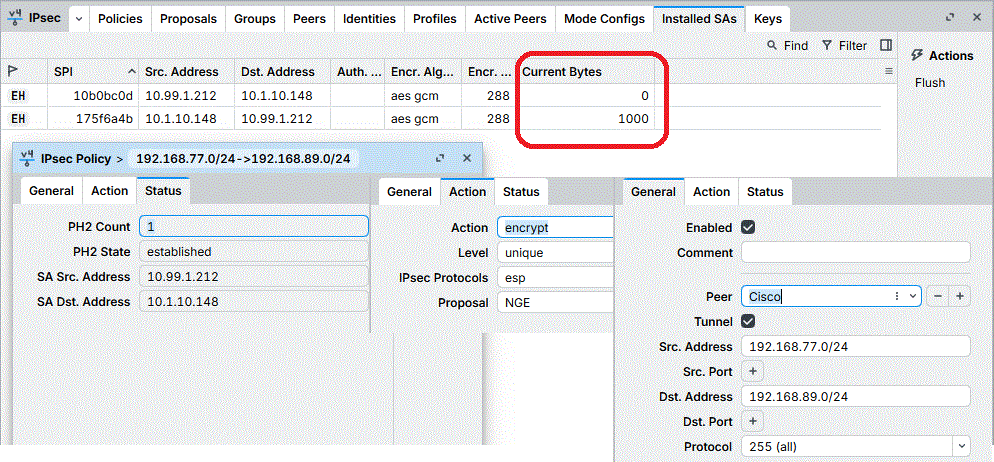
I am have the same issue connecting a Cisco router in a lab setup. Only traffic comes TO the Mikrotik (SA byte count increased) but no traffic is send FROM the Mikrotik into the tunnel. (byte count 0)

Cisco Setup:

crypto ikev2 proposal AES256SHA2
encryption aes-cbc-256
integrity sha256
group 19 14
crypto ikev2 proposal NGE
encryption aes-gcm-256
prf sha256
group 19
no crypto ikev2 proposal default
!
crypto ikev2 policy IKE2POL
match fvrf any
proposal NGE
proposal AES256SHA2
no crypto ikev2 policy default
!
crypto ikev2 profile Mikrotik
match fvrf any
match identity remote address 10.99.1.212 255.255.255.255
identity local address 10.1.10.148
authentication remote pre-share key c1sc0!
authentication local pre-share key c1sc0!
dpd 30 5 on-demand
!
crypto ipsec transform-set NGETRANS esp-gcm 256
mode tunnel
!
crypto ipsec profile MIKROTIK
set transform-set NGETRANS
set pfs group19
set ikev2-profile Mikrotik
!
interface Tunnel1
description IKEv2 Tunnel Mikrotik
ip address 192.168.24.250 255.255.255.254
tunnel source Vlan99
tunnel mode ipsec ipv4
tunnel destination 10.99.1.212
tunnel protection ipsec profile MIKROTIK
no tunnel protection ipsec initiate
!

Actual WinBox 4.5 did not know xfrm Interfaces so interface and group have to be set via CLI.

/interface xfrm add name=ipsec1 mtu=1400
/ip ipsec policy group add interface=ipsec1 name=xfrm-group
/ip ipsec policy add src-address=192.168.77.0/24 dst-address=192.168.89.0/24 group=xfrm-group level=unique peer=Cisco proposal=NGE tunnel=yes action=encrypt

Usually route based VPNs would expect src-address=0.0.0.0/0 dst-address=0.0.0.0/0but that surprisingly routes everything into the tunnel and hence blocks local LAN traffic to the Internet. :slightly_frowning_face:

Cisco requires IP adressing in the tunnel so /31s are used here for point-to-point but the Interface status goes to "Invalid" in WinBox?? Even changing it to a /24 mask did not change this. :frowning:

Hi @lmanthey, Welcome to the forum!

First, which version are you on? The new 7.25.1 (from 2026-11-02) fixes the XFRM interfaces that were staying down until a reboot, so I'd upgrade and test that to begin with. If it still doesn't work, try generate-policy=port-strict and policy-template-group=xfrm-group on the identity (that's what got it working for T0tex).

Also check the tunnel address with /ip address print in the CLI to see if it shows as invalid there too, or if it's just WinBox. Let's leave the rest until you've tested 7.25.1. Let us know how it goes!

Hi Larsa!

Thanks a lot for your feedback. I am on the latest and greatest 7.25.1. The **/ip address print**output did not show an "Invalid" tag so i guess its only WinBox. Afaik Mikrotik supports /31 p2p subnet masks. (RFC 3021)

I read another web article about xfrm setup which mentioned the bug too and i realized that i have made a config mistake in my group-policy setup. I am going to fix this and will give a feedback.

The article's pretty good overall, but the reboot part is outdated now that the fix landed in 7.25.1. Looking forward to hearing how it goes anyways!

One additional point i forgot to mention is the fact that if i change all into a classical IKEv2 policy based setup with the same settings and crypto algorithms it comes instantly to work without any issues. :wink:

Did some intensive testing today but still no joy and same behaviour so far. :fearful:

I do not use any firewall setting to be safe from blocking traffic. This is my actual config:

/interface xfrm
add mtu=1400 name=xfrm-cisco
/ip address
add address=192.168.77.1/25 comment=LAN interface=bridge network=192.168.77.0
add address=192.168.24.251/31 comment="Tunnel Cisco" interface=xfrm-cisco
/ip ipsec peer
add address=10.1.10.148/32 comment=Cisco exchange-mode=ike2 name=cisco profile=NGE-P1
/ip ipsec policy group
add interface=xfrm-cisco name=Cisco
/ip ipsec identity
add comment="Cisco Ident" generate-policy=port-strict my-id=address:10.99.1.150 peer=cisco
policy-template-group=Cisco
/ip ipsec policy
set 0 disabled=yes
add comment="Cisco Tunnel" dst-address=192.168.89.0/24 peer=cisco proposal=NGE-P2 src-address=
192.168.77.0/24 tunnel=yes
/ip route
add comment="Cisco LAN" disabled=no distance=1 dst-address=192.168.89.0/24 gateway=192.168.24.250
routing-table=main

3 major things which do not look good...

  • xfrm Tunnel IP interface is also in invalid state in the CLI

  • [admin@MikroTik] > ip address/print
    Flags: I - INVALID; D - DYNAMIC
    Columns: ADDRESS, NETWORK, INTERFACE, VRF
    
    ADDRESS            NETWORK         INTERFACE    VRF
    ;;; LAN
    0    192.168.77.1/25    192.168.77.0    bridge  main
    ;;; Tunnel Cisco
    2 I  192.168.24.251/31  192.168.24.250  xfrm-cisco   main
    3  D 10.99.1.150/24     10.99.1.0       ether1       main
    
  • I guess thats why the IP route is in USI state too. It does'nt make any difference if i use only the IP for next hop, the interface name or both and thats maybe the reason for the traffic one way only.

[admin@MikroTik] > ip route/print
Flags: D - DYNAMIC; I - INACTIVE, A - ACTIVE; c - CONNECT, s - STATIC, d - DHCP
Columns: DST-ADDRESS, GATEWAY, ROUTING-TABLE, DISTANCE
= DST-ADDRESS GATEWAY ROUTING-TABLE DISTANCE
DAd 0.0.0.0/0 10.99.1.254 main 1
DAc 10.99.1.0/24 ether1 main 0
DAc 192.168.77.0/25 bridge main 0
DAc 192.168.77.254/32 lo main 0
;;; Cisco LAN
0 Is 192.168.89.0/24 192.168.24.250%xfrm-cisco main 1

  • Most interesting is the policy! I can not set it to source and destination 0.0.0.0/0 otherwise all local traffic is blocked. I can not even open an SSH or Telnet session and must use Mac Telnet to access the router. If i set it to source and destination to local LAN net addresses like in policy mode all is fine but then i have 2 repeating messages in the log

no template matches selector (group: Cisco) 0.0.0.0/0 <=> 0.0.0.0/0
no policy found/generated for cisco 10.99.1.150-10.1.10.148 8a1e24feef0efc6c:ed872af900dae0ee

The result is that it remains still a one way connection which can be seen in den SA traffic bytes

The Cisco site is telling the same in terms of traffic counts...

Cisco#sh int tun 1
Tunnel1 is up, line protocol is up
Hardware is Tunnel
Description: IKEv2 Tunnel Mikrotik
Internet address is 192.168.24.250/31
5 minute output rate 1000 bits/sec, 1 packets/sec
0 packets input, 0 bytes, 0 no buffer
Received 0 broadcasts (0 IP multicasts)
0 input errors, 0 CRC, 0 frame, 0 overrun, 0 ignored, 0 abort
844 packets output, 117360 bytes, 0 underruns
0 output errors, 0 collisions, 0 interface resets

From my perspective its not IPsec, cause both sites are established without any issues.

[admin@MicroTik] > ip ipsec/active-peers/print
Columns: ID, STATE, UPTIME, PH2-TOTAL, REMOTE-ADDRESS
= ID           STATE        UPTIME  PH2-TOTAL  REMOTE-ADDRESS
;;; Cisco Ident
0 10.1.10.148  established  10m51s          1  10.1.10.148

Cisco# sh crypto ike sa det
Tunnel-id Local                 Remote                fvrf/ivrf            Status
1         10.1.10.148/4500      10.99.1.150/4500      none/none            READY
Encr: AES-CBC, keysize: 256, PRF: SHA256, Hash: SHA256, DH Grp:19, Auth sign: PSK, Auth verify: PSK
Life/Active Time: 86400/53 sec
CE id: 2061, Session-id: 34
Status Description: Negotiation done
Local spi: C5C813D8E6C87094       Remote spi: DF8D3845226F3F44
Local id: 10.1.10.148
Remote id: 10.99.1.150
Local req msg id:  3              Remote req msg id:  3
Local next msg id: 3              Remote next msg id: 3
Local req queued:  3              Remote req queued:  3
Local window:      5              Remote window:      1
DPD configured for 30 seconds, retry 5
IETF Std Fragmentation  enabled.
Dynamic Route Update: disabled
IETF Std Fragmentation MTU in use: 1372 bytes.
Extended Authentication not configured.
NAT-T is not detected
Cisco Trust Security SGT is disabled
Initiator of SA : No

To make sure there is no config error on the Cisco site i took an OPNsense, Debian server (with Strongswan) as well as another Cisco with an identical IP setup of the Mikrotik to doublecheck and all 3 systems work just fine.
The thrilling question is where is the point here? :thinking:

Your main issue is probably that your policy is missing group=Cisco, so it ends up in the default group and never gets tied to xfrm-cisco.

That explains all three things you're seeing. A 0/0 policy outside the XFRM group is just a normal policy that grabs all traffic, which is why you got locked out. No SA gets bound to the interface, so it most likely stays down, the address shows as invalid and the route goes inactive. And the log complains because a Cisco VTI only works with 0/0 and there's no template in the Cisco group to match it. It's also why the policy based setup works right away, since that's basically what you're running now.

Try this:

/ip ipsec policy
remove [find comment="Cisco Tunnel"]
add group=Cisco peer=cisco proposal=NGE-P2 src-address=0.0.0.0/0 dst-address=0.0.0.0/0 tunnel=yes comment="Cisco Tunnel"

And use safe mode or over MAC Telnet in case it locks you out again.

If the "no template matches" message still shows up after that, add this too and check with /ip ipsec policy print that none of the policies are flagged I (invalid):

/ip ipsec policy
add group=Cisco template=yes src-address=0.0.0.0/0 dst-address=0.0.0.0/0 proposal=NGE-P2

If the interface still won't come up after that, I'd open a support ticket. Either way, let us know if it works or not!

Hi Larsa,

Thanks again for your feedback! Much appreciated. I will do your recommended changes asap and will give a feedback.

In case its of any help i have done a Strongswan setup on a Debian server with the same Cisco IP settings exept that the local LAN is an .90.0/24 network.

IP Interface settings:

=> Setup VTI interfaces

ip addr add 192.168.90.1/32 dev lo
ip link add ipsec0 type xfrm dev eth0 if_id 33
ip link set ipsec0 up
ip link set ipsec0 mtu 1400
ip addr add 192.168.24.250/31 dev ipsec0

=> Setup static routes
ip route add 192.168.77.0/24 via 192.168.24.251 dev ipsec0

=> Strongswan config

connections {
     mikrotik {
     version = 2
     dpd_delay = 30
     local_addrs = 10.1.10.146
     remote_addrs = 10.99.1.150
     proposals = aes256-sha512-sha256-ecp256-modp2048
     local {
         auth = psk
         }
     remote {
         auth = psk
         }
     children {
         net-net {
         local_ts = 0.0.0.0/0
         remote_ts = 0.0.0.0/0
         if_id_out = 33
         if_id_in = 33
         esp_proposals = aes256gcm16-prfsha256-ecp256
        # start_action = trap
       }
     }
  }
}

secrets {
   ike-remote {
      secret = "test123!"
      id-mikrotik = 10.99.1.150
    }
}

Connection status

root@debian:/# swanctl -T
09[NET] received packet: from 10.99.1.150[4500] to 10.1.10.146[4500] (248 bytes)
09[ENC] parsed IKE_SA_INIT request 0 [ SA KE No N(NATD_S_IP) N(NATD_D_IP) N(FRAG_SUP) ]
09[IKE] 10.99.1.150 is initiating an IKE_SA
09[CFG] selected proposal: IKE:AES_CBC_256/HMAC_SHA2_256_128/PRF_HMAC_SHA2_256/ECP_256
09[ENC] generating IKE_SA_INIT response 0 [ SA KE No N(NATD_S_IP) N(NATD_D_IP) N(FRAG_SUP) N(CHDLESS_SUP) N(MULT_AUTH) ]
09[NET] sending packet: from 10.1.10.146[4500] to 10.99.1.150[4500] (264 bytes)
15[NET] received packet: from 10.99.1.150[4500] to 10.1.10.146[4500] (416 bytes)
15[ENC] parsed IKE_AUTH request 1 [ IDi AUTH N(INIT_CONTACT) SA TSi TSr ]
15[CFG] looking for peer configs matching 10.1.10.146[%any]...10.99.1.150[10.99.1.150]
15[CFG] selected peer config 'mikrotik'
15[IKE] authentication of '10.99.1.150' with pre-shared key successful
15[CFG] no IDr configured, default to IP address 10.1.10.146
15[IKE] authentication of '10.1.10.146' (myself) with pre-shared key
15[IKE] IKE_SA mikrotik[4] established between 10.1.10.146[10.1.10.146]...10.99.1.150[10.99.1.150]
15[IKE] scheduling rekeying in 13829s
15[IKE] maximum IKE_SA lifetime 15269s
15[CFG] selected proposal: ESP:AES_GCM_16_256/NO_EXT_SEQ
15[IKE] CHILD_SA net-net{4} established with SPIs cb9b9fcb_i b10e95bf_o and TS 0.0.0.0/0 === 0.0.0.0/0
15[ENC] generating IKE_AUTH response 1 [ IDr AUTH SA TSi TSr ]
15[NET] sending packet: from 10.1.10.146[4500] to 10.99.1.150[4500] (208 bytes)

root@debian:/# swanctl -l
mikrotik: #3, ESTABLISHED, IKEv2, 08f8715dcab307b8_i 2441d70e0870e66a_r*
local  '10.1.10.146' @ 10.1.10.146[4500]
remote '10.99.1.150' @ 10.99.1.150[4500]
AES_CBC-256/HMAC_SHA2_256_128/PRF_HMAC_SHA2_256/ECP_256
established 659s ago, rekeying in 13370s
net-net: #3, reqid 1, INSTALLED, TUNNEL, ESP:AES_GCM_16-256/ECP_256
installed 639s ago, rekeying in 2689s, expires in 3321s
in  c0efebb5 (-|0x00000021),      0 bytes,     0 packets
out 35dfecf9 (-|0x00000021),    840 bytes,    10 packets,   512s ago <===
local  0.0.0.0/0
remote 0.0.0.0/0

The behaviour is more or less the same...

  • xfrm tunnel IP interface is in "I" invalid state
  • IP route to target network is in USI (Unreachable, Invalid) state
  • If i set the policy to 0.0.0.0/0 on source and destination the local LAN is fully blocked even when i disable the policy.
  • Traffic is again one way if you check the bytes in the swanctl -l command

The Strongswan test was actually done also without your above recommended changes.

I will fix that on the Microtik as recommended and will test both scenarios and let you know....

I could'nt resist and make your recommended changes and what should i say... Its working! At least with the Strongswan setup. :+1:

I only needed to renew the policy by CLI.

[admin@MikroTik] /ip/ipsec/policy> print
Flags: T - TEMPLATE; X - DISABLED, A - ACTIVE; * - DEFAULT
Columns: PEER, TUNNEL, SRC-ADDRESS, DST-ADDRESS, PROTOCOL, ACTION, LEVEL, GROUP, ACTIVE-INTERFACE,
PH2-COUNT
= PEER TUNNEL SRC-ADDRESS DST-ADDRESS PROTOCOL ACTION LEVEL GROUP ACTIVE-INTERFACE P
0 TX* ::/0 ::/0 all default
;;; Cisco Tunnel
1 A cisco yes 0.0.0.0/0 0.0.0.0/0 all encrypt require Cisco xfrm-cisco 1

One thing i could'nt understand here is that i first used WinBox to enter the policy

add group=Cisco peer=cisco proposal=NGE-P2 src-address=0.0.0.0/0 dst-address=0.0.0.0/0 tunnel=yes comment="Cisco Tunnel"

and not the CLI. There is still a lot of xfrm related stuff missing in WinBox 4.5 but all the above policy parameters are included in WinBox. But surprinsingly the settings under WinBox end up in a tunnel interface and routing being in Invalid and Unrechable state as well as the local LAN blocking.

Entering all via CLI brings things instantly to work. No more blocking and no Invalid interfaces and routes. Where is the difference here?? Bug in WinBox?

OK, next step is the Cisco router... :wink: I am pretty confident it will work as well and keep you posted! Thanks for pushing me into the right direction...

Nice, glad you got it working!

I don't think it's WinBox though, more likely the CLI remove killed the old SA so the new one got tied to the interface. That would also explain why the LAN stayed blocked even with the policy disabled. If you wanna rule out WinBox, add the policy there again and compare /ip ipsec policy export verbose and /ip ipsec policy group print with the CLI version.

Good luck with the Cisco, and let us know how it goes!

Hi Larsa,

Finally i can report that its working on the Cisco front under IOS and IOS-XE as well even in combination with the ZBF (Zone Based Firewall)!! :+1:

In regards of the WinBox policy setting its reproducable and makes no difference if you use ::/0 or 0.0.0.0/0 for src and dst. You need to remove the policy and set it again via CLI which works without any issues. Your suspicion about the reason describes exactly the behaviour. I will check this with your recommended commands and give a feedback.

If its of interest for the community here are the running configs for Cisco IOS and Mikrotik:

Mikrotik:

/interface xfrm
add mtu=1400 name=xfrm-cisco

/ip address
add address=192.168.77.1/25 comment=LAN interface=vlan-bridge network=192.168.77.0
add address=192.168.24.251/31 comment="Tunnel Cisco" interface=xfrm-cisco network=192.168.24.250

/ip ipsec profile
set [ find default=yes ] dpd-interval=30s dpd-maximum-failures=5 enc-algorithm=aes-256 hash-algorithm=sha256
add dh-group=ecp256,modp2048 dpd-interval=30s dpd-maximum-failures=5 enc-algorithm=aes-256 hash-algorithm=
sha256 name=NGE-P1

/ip ipsec peer
add address=10.1.10.145/32 comment=Cisco exchange-mode=ike2 name=cisco profile=NGE-P1

/ip ipsec proposal
set [ find default=yes ] auth-algorithms=sha512,sha256 enc-algorithms=aes-256-cbc pfs-group=modp2048
add auth-algorithms="" enc-algorithms=aes-256-gcm name=NGE-P2 pfs-group=ecp256

/ip ipsec policy group
add interface=xfrm-cisco name=Cisco

/ip ipsec identity
add comment="Cisco Ident" generate-policy=port-strict my-id=address:10.99.1.150 peer=cisco 
policy-template-group=Cisco secret=test123!

/ip ipsec policy
set 0 disabled=yes
add comment="Cisco Tunnel" dst-address=0.0.0.0/0 group=Cisco peer=cisco proposal=NGE-P2 src-address=0.0.0.0/0 
tunnel=yes

/ip route
add comment="Cisco LAN" disabled=no distance=1 dst-address=192.168.89.0/24 gateway=192.168.24.250 
routing-table=main scope=30 target-scope=10

Cisco IOS:

no crypto ikev2 policy default
no crypto ikev2 proposal default
crypto ikev2 fragmentation mtu 1400
!
crypto ikev2 proposal AES256SHA2
encryption aes-cbc-256
integrity sha256
group 19 14
!
crypto ikev2 proposal NGE
encryption aes-gcm-256
prf sha256
group 19
!
crypto ikev2 policy IKE2POL
match fvrf any
proposal NGE
proposal AES256SHA2
!
crypto ikev2 profile Mikrotik
match fvrf any
match identity remote address 10.99.1.150 255.255.255.255
identity local address 10.1.10.145
authentication remote pre-share key test123!
authentication local pre-share key test123!
dpd 30 5 on-demand
!
crypto ipsec transform-set NGETRANS esp-gcm 256
mode tunnel
!
crypto ipsec profile MIKROTIK
set transform-set NGETRANS
set pfs group19
set ikev2-profile Mikrotik
!
interface Tunnel1
description IKEv2 Tunnel Mikrotik
ip address 192.168.24.250 255.255.255.254
tunnel source Vlan99
tunnel mode ipsec ipv4
tunnel destination 10.99.1.150
tunnel protection ipsec profile MIKROTIK
no tunnel protection ipsec initiate
!
ip route 192.168.77.0 255.255.255.0 192.168.24.251
!
interface Vlan1
description Local LAN
ip address 192.168.89.1 255.255.255.0
!
interface Vlan99
description WAN/Internet Port
ip dhcp client broadcast-flag clear
ip address dhcp
(Mac reservation on DHCP server to WAN IP: 10.1.10.145)

Here is the requested output. Due to the fact that all works fine now, i guess it looks like as expected?! :wink:

[admin@MikroTik] > /ip ipsec policy export verbose
# 2026-11-09 15:51:56 by RouterOS 7.25.1
# software id = V9FH-1A2B
# serial number = xyz
/ip ipsec policy group
set [ find default=yes ] name=default
add interface=xfrm-cisco name=Cisco
/ip ipsec policy
set 0 disabled=yes dst-address=::/0 group=default proposal=default protocol=all src-address=::/0 template=yes
add action=encrypt comment="Cisco Tunnel" disabled=no dst-address=0.0.0.0/0 dst-port=any group=Cisco ipsec-protocols=esp level=\
    require peer=cisco proposal=NGE-P2 protocol=all sa-dst-address=10.1.10.145 sa-src-address=10.99.1.150 src-address=0.0.0.0/0 \
    src-port=any tunnel=yes
	
[admin@MikroTik] > /ip ipsec policy group print
Flags: * - DEFAULT
Columns: NAME, INTERFACE
#   NAME     INTERFACE 
0 * default            
1   Cisco    xfrm-cisco

I have one additional question...
I tested all with the classical Mikrotik RouterOS Default configuration and therefore with the firewall Default (defconf) setting in place.
Due to the fact that the Mikrotik is here the IPsec initiator and the Cisco the responder there is no need to tweak this firewall setting. (Open IPsec ports on WAN) So far so good...
The firewall default config uses the interface lists "LAN" and "WAN" and the question remains in which list should the xfrm Interface should be put in?
Surprisingly the tunnel connection works fine regardless if the xfrm Interface is in LAN or WAN or just in NO list. :wink:

Yep, that looks exactly as it should. Great that the Cisco works too and thanks for sharing the configs!

About the lists: the tunnel itself doesn't care, since IKE/ESP runs over your WAN port and MikroTik initiates the connection. The list only decides what the firewall does with traffic coming out of the tunnel. With defconf, forwarding is only blocked for new connections from WAN, so LAN or no list both work. The difference is the input chain, where only LAN is allowed to reach the router itself (WinBox, SSH, etc).

So I'd put it in LAN if you trust the other side or in its own list (like VPN) with its own rules if you want more control. I'd stay away from WAN, since new connections from the Cisco side may get dropped and the masquerade rule might start NATing your tunnel traffic.