Recently, i contacted Mikrotik support and they are so rigid and always ask me to contact the Mikrotik consultant to get my answers. I mean its fine as every company has their own way of doing things but i'm about to upgrade my networking infrastructure and the datasheet/specification page does not list what features the switch supports so i had to reach them. As the Mikrotik staff did not answer to me, my last hope was to ask the fellow users here who might have some knowledge.
So, i'm planning to buy CRS518-16XS-2XQ-RM and CRS520-4XS-16XQ-RM and the recently announced CRS812 DDQ. My question is, do these switches supports RDMA/RoCE feature?
The 8x50G ports on the CRS812-DQ switch, can be splitted into 10/25GbE? If yes, then a single 50G port on the CRS8 DDQ can split into 2x25G as well as 10G ports? For 10G, does it split into 5x10G from a single 50G port?
I thought RDMA/RocE has existed for a decent time in the industry? If you are saying this for Mikrotik, then yeah. I'm not sure why Mikrotik does not mention that their switch supports RDMA/RocE like other brands. Doesn't it make difficult to understand from the customer's perspective?
Damn. So, a breakout to even 2x25G isn't supported on the CRS812-DQ switch on the 8x50G ports?
Mikrotik has supported RoCE for quite a while now and reports around it are positive. They even have a detailed how to about setting it up. You have to pay attention to exactly which switches support it though.
As for breakout: 100GbE has four and 50GbE has two 25Gbps lanes so splitting into 4/2 25GbE is possible. (I don't know if it's supported currently, but if not, Mikrotik is quite quick to add/fix these.)
25GbE lanes can usually run at 10GbE speeds, but here care must be taken: usually lanes are grouped to run on the same clock so setting speeds may not work individually, but only for entire groups. (However they are organized in the given switch chip.) This also means that splitting to 2x10GbE is the most you can expect. Even though the bandwidth would be available, the chip doesn't magically sprout additional lanes.
These ports have have one (SFP28), two (DSFP28) or four (QSFP28) lanes capable of transferring 25Gbps of useful data. Lanes often run in groups (usually of 8) that are clocked together and can terminate in 2x4 lanes (QFSP28), 4x2, 8x1 etc., but they can only be all clocked for 25Gbps or 10Gbps together. Again, different switches have different restrictions around this.
And don't forget: at these speeds reclocking (clock recovery) logic is integrated into the SFP modules, so while some 25GbE modules can be convinced to run at 10GbE speeds, they usually do so with terrible bit error rates.
CRS812 is RoCE-ready (note that the "R" in "RoCE" stands for "RDMA") from a hardware standpoint, but full software support is planned for either RouterOS v7.21 or v7.22.
The CRS8xx series features a new switch chip generation that takes an enhanced approach to Priority Flow Control (PFC, used in RoCE), making RoCE support better than ever. However, it requires additional software support, which our developers are currently working on.
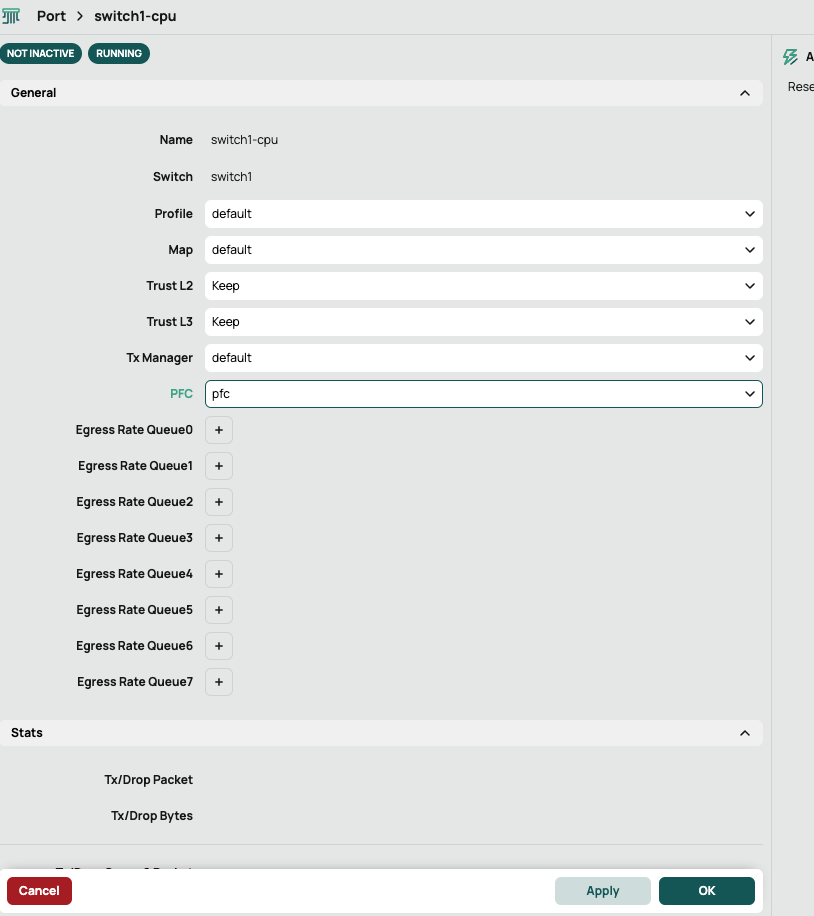
Yesterday, i updated my Mikrotik CRS312 series switch but not sure how do i enable the RoCE. I’m stuck on the last second step and whenever i try to set egress in any of the ports or the switch to pfc=pfc-tc3, the changes never save and gets stuck in last fourth step.