Hey guys,
So...first of all, don't be to harsh on me as this is my first mikrotik experience ever.
Have known about mikrotik for some years now, but haven't paid attention to it until now.
Right...so...here some history about my issue...
Up until now i had a Fortigate 60B i had in place as a gateway/firewall/security device, basically a one stop shop for routing and security.
I don't know how many of you have had any chance in working with fortigate appliances but they are great (until the nvram goes haywire and you have to pay to get the nvram replaced outside of warranty way to much then it's worth).
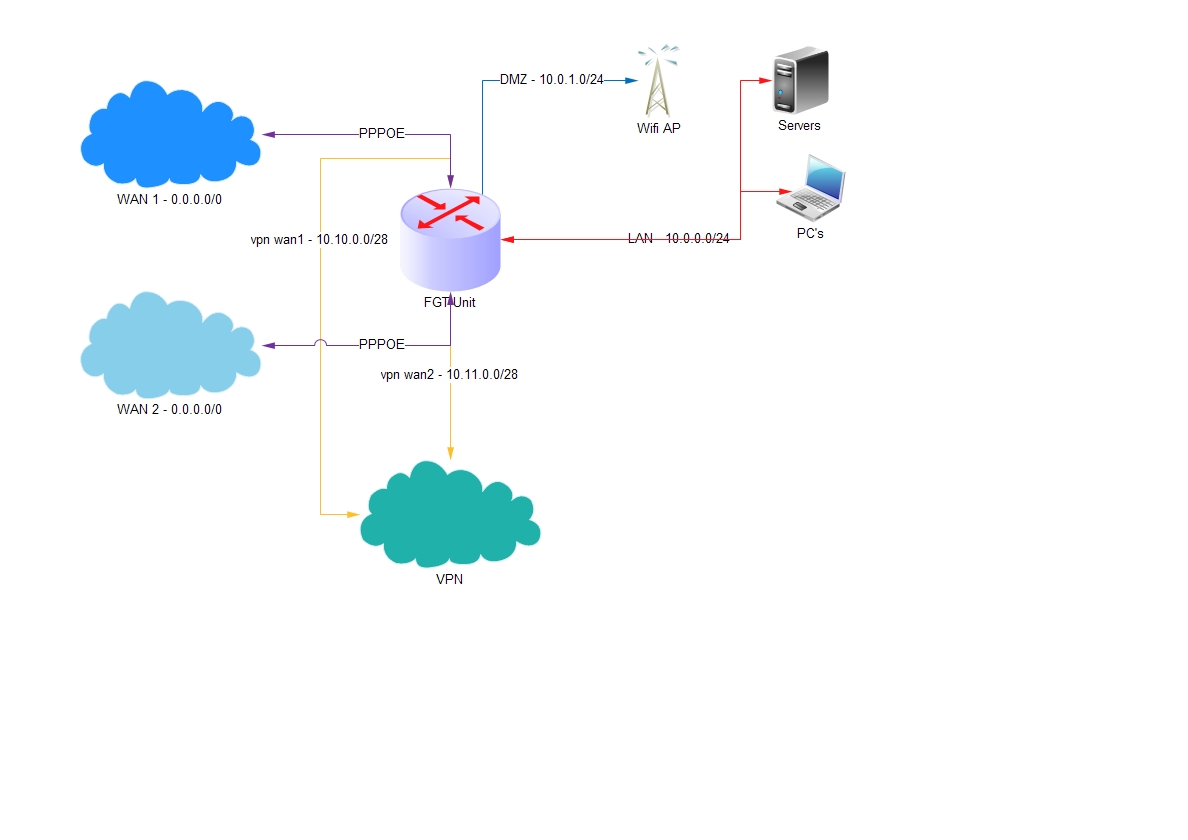
So, on my FGT Unit, i have 2 wan ports a dmz port and 8 lan 100mbit ports. The lan ports are all in the same root vlan.
At this point, thanks to someone who recommended me mikrotik routers in order to change the fgt unit, i've got my hands on a RB951Ui-2HnD for testing purposes only.
In order to get it to be a viable as a replacement, i need it to set it up to act as the fgt unit did, meaning:
I need to set it up as following:
- dual pppoe connections on the same physical port?
- the FGT unit had ip pool for every DNAT i had set up (via firewall policies) according to my needs at the time.
Firewall policy example:
==================================================
{firewall policy}
config firewall policy
set srcintf "wan2"
set dstintf "internal"
set srcaddr "ANY"
set dstaddr "wan2_storage"
set action accept
set schedule "always"
set service "ANY"
set logtraffic enable
set nat enable
set ippool enable
set poolname "wan2-storage"
next
{details of ip pool specified in the policy}
config firewall ippool
edit "wan2-storage"
set endip 10.0.5.255
set startip 10.0.4.0
next
end
{details of vip group specified in the policy}
config firewall vipgrp
edit "wan2_storage"
set interface "wan2"
set member "wan2storage_https"
next
end
{details of virtual ip specified in the vip group}
config firewall vip
edit "wan2storage_https"
set extintf "wan2"
set portforward enable
set mappedip 10.0.0.2
set extport 443
set mappedport 65001
next
end
Meaning, for every connection coming to "wan2-storage" port 44004 the traffic is port forwarded to 10.0.0.2 port 65001.
The server at 10.0.0.2 wouldn't see the 10.0.0.254 (fgt internal ip) in this situation, but it would "see" the connection coming from one of the ip's from the 10.0.4.0/23 subnet. Unable to set FGT to forward the public ip to the servers behind it, this was the "solution" i had set myself with. If mikrotik can forward the public ip address to the servers behind it, that'll be great!
-
port forwarding: in conjunction with the above requirement (if you want to call it that way), one other thing is p.forwarding. I've read that many people somehow complain about this as not being to straight forward.
-
VIP Groups of port forwardings for firewall policies simplification possible?
-
RADIUS Authentication for specific services: VPN groups, Public Wifi Groups?
-
Speaking of Wifi...is it possible to set up a 5Ghz wifi wisp network?
-
DHCP Pools for DMZ, LAN, VPNs (l2tp and ipsec) with ip reservations based on MAC addressing?
-
syslog for specific lan address?
-
SNMP to nagios posible?
-
mikrotik external "ping" services, just to check if the device is connected to wan?
-
if question 1 is posible, setting up ddns on specific virtual ports (i'm assuming that something like a virtual port would be used) for both wan connection posible?
-
vpn setup l2tp with one of the dhcp ip pools from question 7 and auth from question 5 posible?
-
conf management - backup/restore from this BR to a new device maybe other than the same series posible?
I've read the wiki for the things i was interested about, but i'm not really sure that i can set it up...
So...
The main question is: anyone out there willing to help me out in setting the RB according to the above information? willingless to learn is no problem.
I just need a few pointers on what and how to get started with this.
I repeat. This device is a testing device to get me started to see if can handle "the power" as a friend of mine once said 
so...any help would be greatly appreciated.