Hi, I have problem and I didn’t found any solution.
I have Mikrotik RB951G-2HnD after ISP’s router. Mikrotik is connected to switch TP-Link TL-SG108PE. All devices are connected to this switch. I have Windows 11 and standard 1Gbit network card + 5e cabels. No problem at all.
Some time ago I found my PC Link speed is not 1000 Mbps but 100 Mbps. I tried everything. Restarting PC, restarting router/switch/cable modem, changing network settings etc. Sometimes it helps, sometimes not. So I decided to test router and switch. When PC is connected to switch, problem occures. When PC is connected directly to router, all works fine.
I tried other switch, tried other type (TP-Link TL-SG108). Problem still persist.
So, is there any incompatibility between Mikrotik and TP-Link? Why this happens? What is the problem?
I’m not advanced user of Mikrotik even I have it many years. It is set up anw works LAN + WIFI. But this one drives me crazy. Any tips?
Everything works fine for 1Gbit. As I said. Every part of my network supports 1 GBit. Yes, it should be CAT 6, but 5e works fine.
I’m looking for info, why speed drops only when router and switch are connected and PC connects to switch. And again, it is not ALWAYS, but sometimes it drops to 100 mbit and sometimes not. Why? Is there any command in Mikrotik or in TP-Link to “slow down”?
I’m on the same cable. Connected to router - no problem. Connected to switch - problem occures. So no, cable seems to be ok
So, please back to my questions
Is there any way how to check in my Mikrotik what speed is on ports? Can I determine is speed is limited from router or in/out switch?
Winbox - interfaces - select interface.
There you see which speed is being used.
On TP-Link you can also see what is being used.
The fact you say it changes from time to time, does not point into a problem of the ports on those devices or you would KNOW that speed is being changed. Someone has to do it then.
So most likely cable…
For the last time: I’ve seen it happen that THE SAME cable between DIFFERENT ports can cause a DIFFERENT result.
Change cable to cat6 and problem went away.
When you detect such a problem, spare yourself future troubles and throw that cable away !
It’s not entirely clear which link is 100Mbps … is it a) link between PC and switch … or is it b) link between switch and router?
If it’s a), then it’s between PC and switch to negotiate link speed, router has nothing to do with it. If it’s between switch and router, then proceed with checking various things.
One suggestion: try to use another ethernet cable, preferrably different vendor/make. RJ45 female and male plugs are made to certain tollerances and if both are on edge (but opposite ends) the connection might not be made properly … even though both plugs are according to specs (but only just).
Remove connection between TP-Link switch and your Mikrotik router. Now connect your PC to your TP-LINK switch. What speed is advertised? Try different ports as well.
Years ago auto negotiate was a problem when 100 megabits was new, we ended up hard coding PC NICs to 100 to avoid the problem.
Not sure if your TP link switch has that option, the router does, check out the status tab under interfaces.
By the way expect about 200-400Mbps via your ISP connection as that is what the router is likely to provide, assuming you have it acting as a router.
If its just a switch with no DHCP responsiblities, then it should give you gig speed between devices and up to 1gig to/fro the ISP device whatever that is capable of in terms of routing.
So basically now you have to provide more informaiton.
a. what is the MT device being used for??
b. /export file=anynameyouwish (minus router serial number, any public wanIP information, keys etc.)
Hello, I have a similar problem.
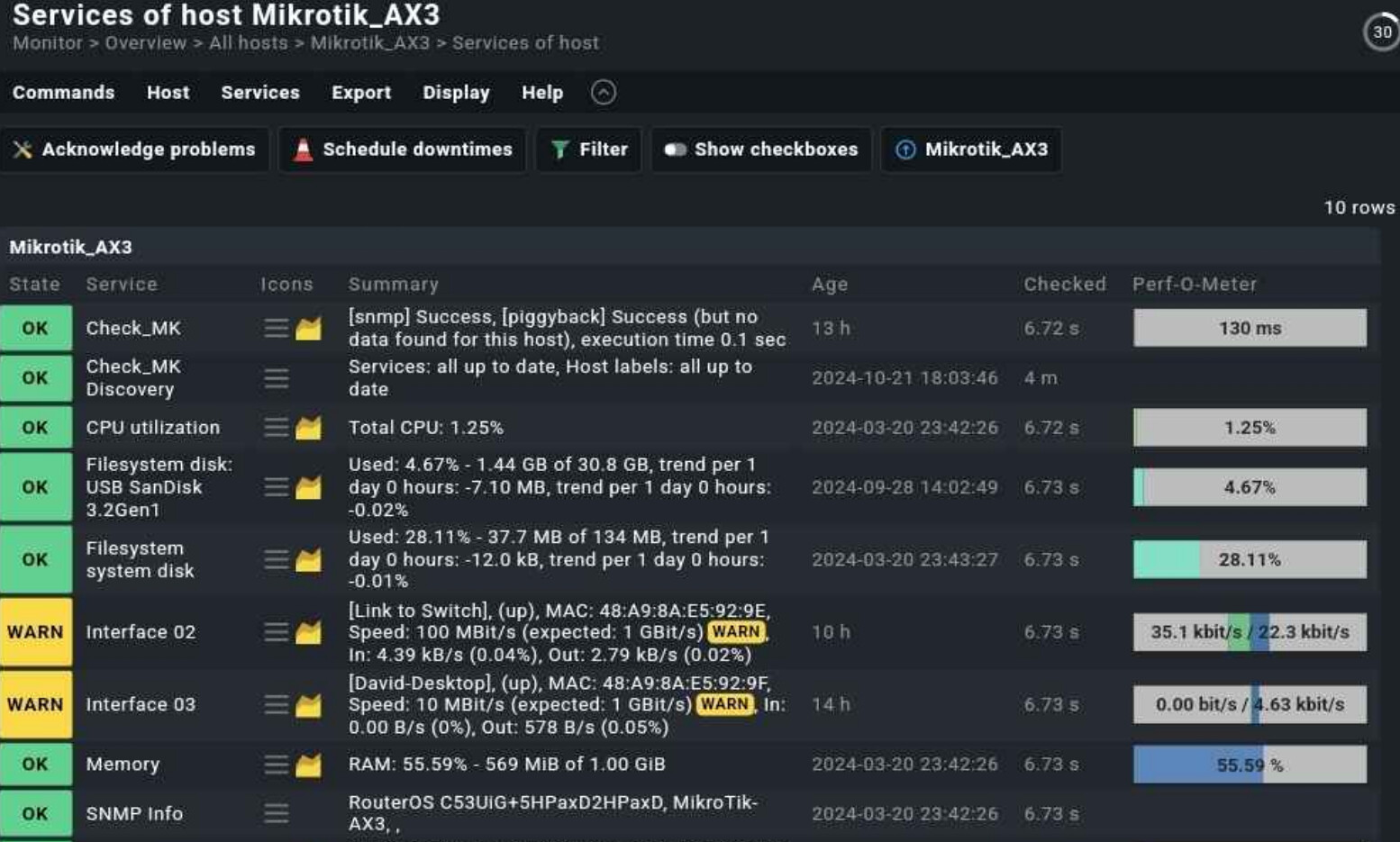
I have a Mikrotik hAP AX^3 - which is mainly being used as an AP for WiFi, but there is one PC connected to it.
Ethernet Port 1 (Interface 02) - leads to a managed Mikrotik switch - 1 Gbps (CAT6 cable) - this is the uplink to the rest of my network (then the switch is connected to RB5009 - my main router - using SFP+)
Ethernet Port 2 (Interface 03) - Has a Desktop PC connected - also 1 Gbps (CAT6 cable)
at times, usually after I have been using the Desktop PC with Windows and it has been shut down the Eth1 drops to 100 Mbit. and Eth2 drops just to 10Mbps
(on the other hand, when i shut down the same Desktop PC using Linux instead, the Eth2 link goes down completely.)
The only solution is to eiter Reboot the AX3 remotely (while this does not help always) or pull and reconnect the Network cable in Eth1 so the uplink goes back to 1Gbps
in the screenshot there is a screenshot from Check_MK monitoring, which shows such situation, when the uplink port drops to 100Mbps and the Pc to 10Mbps.
I have not found any solution yet, besides pulling and reconnecting the Eth1 cable.