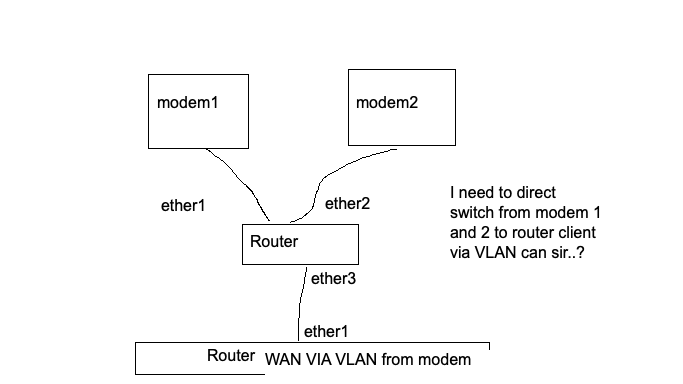
Mode switch from DHCP server modem

hello sir, how to set router mode switch to get ip dhcp from modem 1 and modem 2 to client via VLAN

I am currently implementing the bridge method using the ether1 interface and VLAN10 on ether3, and the ether2 interface and VLAN100 on ether3.

Can I make it into switch mode on my router, so that the CPU load doesn't take up too much of the bridge's resources?

thank’s

It is not clear (to me) what you are trying to do.
Let's call the router in the middle of your scheme "failover/balancing router" and the one in the bottom "client router".

Modem1 - ether port is on VLAN10?
failover/balancing router - ether1 port is on VLAN10?
Modem2 - ether port is on VLAN100?
failover/balancing router - ether2 port is on VLAN100?
failover/balancing router - ether3 port is on both VLAN10 and VLAN100?

But how exactly is the bridge on the failover/balancing router with ports ether1, 2 and 3 in it configured?

Post your configuration of the failover/balancing router, instructions here:
Forum rules - #5 by gigabyte091

I want to do it like this sir,
For VLAN101 it works with radio management, but for VLAN 100 it doesn't work

Port Fungsi
ether4 Modem1 (untagged)
ether5 Modem2 (untagged)
ether2 to Radio Link → Router client
ether3 LAN lokal
VLAN 100 WAN from Modem1 to router client
VLAN 101 WAN from Modem2 to router client
ether2 juga use management radio no VLAN

this is my config sir

/interface ethernet switch vlan
remove [find]

/interface ethernet switch port
set ether2 vlan-mode=secure vlan-header=leave-as-is default-vlan-id=1
set ether4 vlan-mode=secure vlan-header=always-strip default-vlan-id=100
set ether5 vlan-mode=secure vlan-header=always-strip default-vlan-id=101
set switch1-cpu vlan-mode=secure
/interface ethernet switch vlan
add switch=switch1 vlan-id=1 ports=ether2,switch1-cpu
add switch=switch1 vlan-id=100 ports=ether4,ether2
add switch=switch1 vlan-id=101 ports=ether5,ether2

[admin@Router_SMPG_LANGGAM] > /interface ethernet switch port print
Flags: I - invalid 
 #   NAME             SWITCH             VLAN-MODE VLAN-HEADER    DEFAULT-VLAN-ID
 0   ether1           switch1            disabled  leave-as-is               auto
 1   ether2           switch1            secure    leave-as-is                  1
 2   ether3           switch1            disabled  leave-as-is               auto
 3   ether4           switch1            secure    always-strip               100
 4   ether5           switch1            secure    always-strip               101
 5   switch1-cpu      switch1            disabled  leave-as-is               auto
[admin@Router_SMPG_LANGGAM] > /interface ethernet switch vlan print
Flags: X - disabled, I - invalid 
 #   SWITCH                                         VLAN-ID PORTS                                       
 0   switch1                                            101 ether5                                      
                                                            ether2                                      
 1   switch1                                              1 ether2                                      
                                                            switch1-cpu                                 
 2   switch1                                            100 ether4                                      
                                                            ether2                                      
[admin@Router_SMPG_LANGGAM] > /ip dhcp-client print
Flags: X - disabled, I - invalid, D - dynamic 
 #   INTERFACE                           USE-PEER-DNS ADD-DEFAULT-ROUTE STATUS        ADDRESS           
 0 XI ether4                              no           yes              
[admin@Router_SMPG_LANGGAM] > /ip address print
Flags: X - disabled, I - invalid, D - dynamic 
 #   ADDRESS            NETWORK         INTERFACE                                                       
 0   192.168.3.1/24     192.168.3.0     ether3                                                          
 1   192.168.8.1/24     192.168.8.0     ether2                                                          
[admin@Router_SMPG_LANGGAM] > 

No. it isn't. :woozy_face:

That is the part of the configuration that you believe relevant, while what you need to post is your FULL configuration. (FULL as COMPLETE, without removing anything from the output of a /export, only changing anonymizing possibly sensitive data). This way we will also know the exact model of the router and the RoS version you are running, that may be relevant.

Anyway, you have a basic possible issue, see Rules #1 and #2 of the club:
The twelve Rules of Mikrotik Club

Also, you posted a scheme of an only wired network, not using ether4 or ether5, and now you have these other ports and the mentioning of radios (I presume wi-fi links), please update the scheme to reflect your actual situation.

Consider how the more info you fail to provide or provide vaguely or incorrectly the more time will be needed to (hopefully) find a solution to your issue, compare with "I'm ill, doctor. Help!":
https://jdebp.uk/FGA/problem-report-standard-litany.html