However, using the Mikrotik hAP ac lite and latest updates, after USB connection, the modem does not show up on the System Port list so it doesn’t look good from here. The APN is set properly to ‘broadband’ for AT&T and pinging external 8.8.8.8 is possible, but LTE ‘functionality’ is minimum and terminal commands showed failure due to ‘Modem unsupported!’.
Just putting this out there for reference and wondering if anyone has gotten the 815S to connect properly with recent AT&T firmwares. Another note of interest is that the newer Netgear M1 (MR1100) also does not show up in the port list and has little connectivity, but the M1 does have an ethernet port so it is not solely dependent on USB for wired connection.
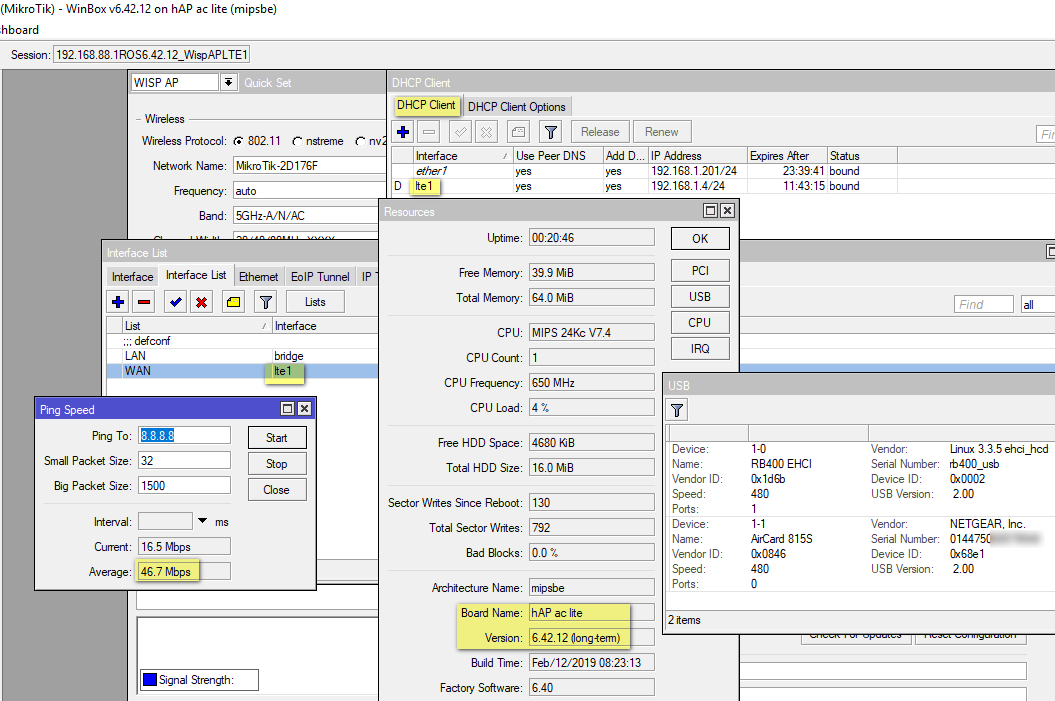
Just want to report that this newbie got the Aircard 815S to connect by downgrading from ROS 6.44 to ROS long term stable 6.42.12. After the downgrade, simply use Quick Set to apply WISP AP, plug in Aircard 815S, interface lte1 is recognized and the DHCP Client for the lte1 interface seemed to be automatically populated. Under the Interface List, change the WAN from eth1 to lte1 and the 815S should connect properly and it seems to have good internet, ping is good, ping speed is good.
Whether the problems I have had was due to ROS 6.44 or just newbie error (more likely), I don’t know, but the setup above is now working. The LTE interface functionality is still ‘Minimum’ but the connection seems to be stable with good speed.