Hello,
I have a network with 20 APs in a harbour. This network is giving servicce to a 3 laptops around all the harbour. We need to know with less delay possible, where are connected these laptops.
We are using Dude to monitor all APs and we know the laptops MAC address. We need some signal to know where these laptops are connected. A place whith the name of the AP connected, or a line in the label of the AP looking “HERE” or the MAC in the label.
We are trying to make improvements in the coverage, and we need to enter to each APs to see registration table..
It’s possible to print the complete registration tables with few seconds delay to monitor this?
thanks,
If the network is flat you could call an external to run a layer 2 trace every few seconds for the interesting mac addresses.
Yes, all is the same subnet.
Do you know any easy-to-use app for windows? My customer will be the final user of the app.
It’s not possible with Dude?
thanks,
I am using Cisco APs, What APs are you using?
The OID for associated mac addresses in Cisco is 1.3.6.1.4.1.9.9.272.1.1.1.8.1.2.1
How would a tracking mac address probe work? It would be down on 14 of the 15 devices? or it would be up on 14 of 15 devices. The trouble being each device would need it’s own probe to determine if the mac address is “up”.
Thinking about how it might work, user x is connected, they roam then they lose connection then some time later they connect again.
It would be easy with an external using arpping to notify when/if they are not online. You attach 3 probes to one device and it will log every 30 seconds what AP they are connected to. Then it would be easy to map out when/why they they lose connection. You would have 3 batch files that are all similar but using different mac addresses and log files.
If you want help with the syntax of the batch jobs and the probes it sound like fun.
Lebowski
Edit due to trouble with the function; There is a logic flaw (inside the dude) with the value “negative 1”, it doesn’t resolve to false. Negative 1 resolves to true inside an if statement so the function always returns 1 even when the array_find returns -1. So add 1 to your array_find then test not equal 0. The fix function is updated so be careful to use settings after this edit.
Here is the problem, a layer 2 trace or mac address trace doesn’t actually exist. In Cisco it does but it is mostly built on their proprietary CDP neighbor protocol (I should have thought harder about this before posting).
But fear not you can do this in the Dude. You will have to build a function and a probe for each device you want to track. So first snmpwalk an access point that has a known mac address. After it is done search for the mac address. Take the OID that has the mac address you are interested and put it into a function that returns 1 when that mac address is associated.
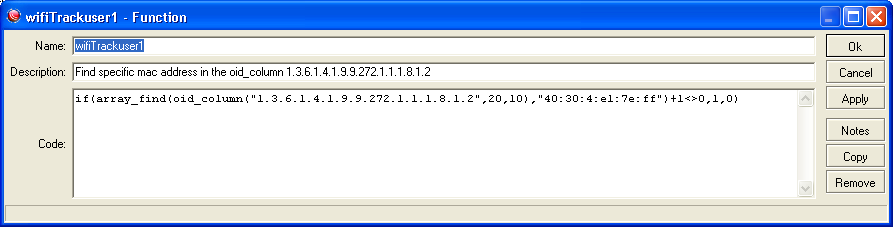
if(array_find(oid_column(“1.3.6.1.4.1.9.9.272.1.1.1.8.1.2”,20,10),“40:30:4:e1:7e:ff”)+1<>0,1,0)
Then build a probe that calls the wifiTrackuser1 function and returns “” when it is working and “” when it is in error, this way the probe never shows down but it will graph a 1 when wifiTrackuser1 is up.
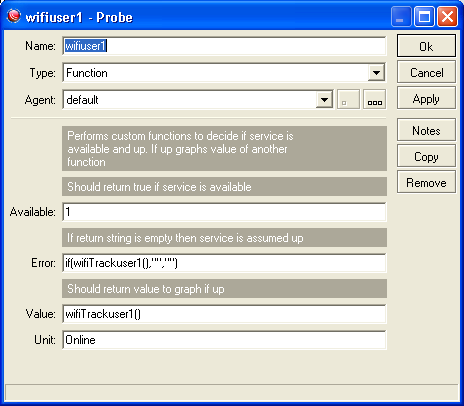
You could extend this to write a log file with the device.name and time that the mac address is connected that way you could easily find the last device the user was connected to but it would take another function that calls an external.
Edit it is infuriating to find this bug again 
Maybe use negative logic to determine where the user is.
if(wifiTrackuser1(),“0”,“”)
Then if the user is connected the probe would be down and the name of the probe would be on the device label. The device would change color as well. While they are connected there would be no graphing just use the lack of any graph to represent connected. Name the probes with user names and then it is their name on the device label when they are connected.
LOL! I will try the last one. Thanks!!!