Dear Colleagues,
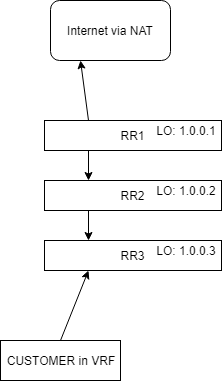
in my Lab i have 3 Routers running OSPF with MPLS, for a customer i created a VRF and enabled VPN4 via BGP.
From the Customer Site, if they do a traceroute, there are no responding two hops, even when Propagate TTL is set to no.
Expectation: fully invisible MPLS network
Can somebody help me here please?
Configs:
RR1
/interface bridge
add fast-forward=no name=lo
/routing ospf instance
set [ find default=yes ] mpls-te-area=backbone mpls-te-router-id=lo \
    redistribute-connected=as-type-1 router-id=1.0.0.1
/ip address
add address=1.0.0.1 interface=lo network=1.0.0.1
add address=10.1.2.1/30 interface=ether2 network=10.1.2.0
/ip firewall mangle
add action=mark-routing chain=prerouting dst-address=10.132.105.53 \
    new-routing-mark=VRF-KUNDE passthrough=yes
/ip firewall nat
add action=src-nat chain=srcnat routing-mark=VRF-KUNDE to-addresses=\
    10.132.105.53
/ip route
add distance=1 gateway=10.132.104.1@main routing-mark=VRF-KUNDE
/ip route vrf
add export-route-targets=1.1.1.1:10 import-route-targets=1.1.1.1:10 \
    route-distinguisher=1.1.1.1:10 routing-mark=VRF-KUNDE
/mpls
set propagate-ttl=no
/mpls ldp
set distribute-for-default-route=yes enabled=yes lsr-id=1.0.0.1 \
    transport-address=1.0.0.1
/mpls ldp interface
add interface=ether2 transport-address=1.0.0.1
/routing bgp instance vrf
add redistribute-connected=yes redistribute-ospf=yes redistribute-other-bgp=yes
    redistribute-rip=yes redistribute-static=yes routing-mark=VRF-KUNDE
/routing bgp peer
add address-families=vpnv4 name=peer1 remote-address=1.0.0.3 remote-as=65530 \
    route-reflect=yes ttl=default update-source=lo
/routing ospf network
add area=backbone network=10.1.2.0/30
/system identity
set name=MPLS-RR-01
RR2
/interface bridge
add fast-forward=no name=lo
/routing ospf instance
set [ find default=yes ] mpls-te-area=backbone mpls-te-router-id=lo \
    redistribute-connected=as-type-1 router-id=1.0.0.2
/ip address
add address=1.0.0.2 interface=lo network=1.0.0.2
add address=10.1.2.2/30 interface=ether1 network=10.1.2.0
add address=10.2.3.1/30 interface=ether2 network=10.2.3.0
/mpls
set propagate-ttl=no
/mpls ldp
set enabled=yes lsr-id=1.0.0.2 transport-address=1.0.0.2
/mpls ldp interface
add interface=ether1 transport-address=1.0.0.2
add interface=ether2
/routing ospf network
add area=backbone network=10.1.2.0/30
add area=backbone network=10.2.3.0/30
/system identity
set name=MPLS-RR-02
RR3
/interface bridge
add fast-forward=no name=lo
/routing ospf instance
set [ find default=yes ] mpls-te-area=backbone mpls-te-router-id=lo \
    redistribute-connected=as-type-1 router-id=1.0.0.3
/ip address
add address=1.0.0.3 interface=lo network=1.0.0.3
add address=10.2.3.2/30 interface=ether1 network=10.2.3.0
add address=192.168.128.1/30 interface=ether10 network=192.168.128.0
/ip route vrf
add export-route-targets=1.1.1.1:10 import-route-targets=1.1.1.1:10 interfaces=\
    ether10 route-distinguisher=1.1.1.1:10 routing-mark=VRF-KUNDE
/mpls
set propagate-ttl=no
/mpls ldp
set enabled=yes lsr-id=1.0.0.3 transport-address=1.0.0.3
/mpls ldp interface
add interface=ether1
/routing bgp instance vrf
add redistribute-connected=yes redistribute-ospf=yes redistribute-other-bgp=yes \
    redistribute-rip=yes redistribute-static=yes routing-mark=VRF-KUNDE
/routing bgp peer
add address-families=vpnv4 multihop=yes name=1.0.0.1 remote-address=1.0.0.1 \
    remote-as=65530 route-reflect=yes ttl=default update-source=lo
/routing ospf network
add area=backbone network=10.2.3.0/30
/system identity
set name=MPLS-RR-03
Customer Router
/ip address
add address=192.168.128.2/30 interface=ether2 network=192.168.128.0
/ip route
add distance=1 gateway=192.168.128.1
Traceroute from Customer
[admin@MPLS-KUNDE] > tool traceroute 1.1.1.1
 # ADDRESS                          LOSS SENT    LAST     AVG    BEST   WORST
 1                                  100%    3 timeout
 2                                  100%    3 timeout
 3 10.132.104.1                       0%    3   1.5ms     1.7     1.5     1.9
 4 10.132.101.230                   33..    3 timeout     0.9     0.9     0.9
 ... some more hops ...
Traceroute from Customer EXPECTATION
[admin@MPLS-KUNDE] > tool traceroute 1.1.1.1
 # ADDRESS                          LOSS SENT    LAST     AVG    BEST   WORST
 1 10.132.104.1                       0%    3   1.5ms     1.7     1.5     1.9
 2 10.132.101.230                   33..    3 timeout     0.9     0.9     0.9
 ... some more hops ...