Greetings. I’ve got a fully OSPF routed network. Over 65 “Core” sites. On top of this, I’ve applied MPLS to facilitate in L2VPN services.
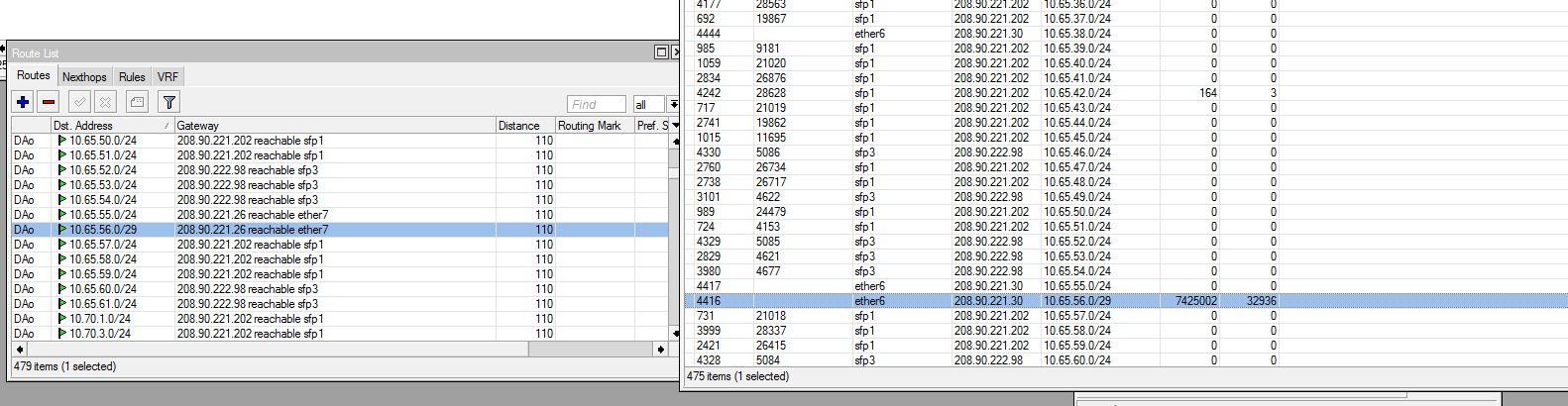
Since we started running MPLS (~6.6ROS) I’ve had this problem where the MPLS forwarding table will come out of sync with the OSPF driven local routing table. Causing traffic to be routed incorrectly.
When this happens, A reboot of the router will fix the problem. However I can also build a local binding label, Apply it, Then remove it (Forcing the forwarding table to reload) and the issue is then resolved. This is a lot quicker then rebooting the entire router.
I’ve submitted the issue to Mikrotik in the past, But their response has always been “Please upgrade to $LATESTROS and let us know if the problem continues”. It always does. And I can never get the problem to occur on a particular router while it’s running the latest ROS build.
This also has occurred on both CCR’s and RB2011’s. Of all mixes of ROS from 6.6 Up. However I don’t have any coresites running 6.37.2 yet. But I suspect it’ll have the same problem as well.
Below are screenshots of the problem.Has anyone seen this, Or know of a fix?
And then after a reload of the forwarding table by temporarily applying a local binding.
All looks ok, except the MPLS MTU seems high - maybe it does not like that? The max size a MPLS packet can become with RouterOS is equivalent to 3 added labels worth, so I set MPLS MTU to 1526 as I can’t see how an MPLS packet can ever get larger than 1526.
One remaining thought is that MPLS/LDP will get it’s information from OSPF - well actually, more accurately from the FIB (basically a cached calculated copy of what is in “IP Routes”) - is that been proven to be bomb proof? Do you see any OSPF glitches in the log? Looking at the adjacency stats for the neighbours, does any one neighbour have a much higher number of state changes than another?
I’d argue that an MPLS MTU problem would manifest itself in packet loss of larger packets. The This allows us to transport jumbo-ish frames for customer L2VPN’s with less fragmentation. I’d run it at 9600 if the underlying transport gear supported it.
While nothing with Mikrotik is bomb proof. I can say that before MPLS this never happened. Sure there are state changes. But nothing more then others. And in ever case of a state change. The routing table is correct. It’s only the MPLS forwarding table that gets out of sync. I suspect this is some kind of bug building the labels off the routing table. Where it fails to update or something like that. As this does seem to happen more often after a link state change. Either way, It should rebuild correctly without me having to go force a rebuild on it.
I experienced this issue before personally; in my case it was caused by one router having a loopback address with the wrong subnet mask due to a typo (/30 instead of /32), so that the subnet mask for that router included loopback addresses that belonged to other routers on the MPLS network. After fixing the issue, the forwarding table did not update on a different router, and that router had to be rebooted to correct the issue. So it is possible for a typo/misconfiguration on any one router to break the forwarding table update process on a completely different router.
We experience the same issue. One of our routers always has a broken forwarding table after restarting, unless we disable LDP prior to shutdown and then re-enable it again afterwards.
We distribute some of our subnets via BGP and OSPF and assumed it was that routes would briefly ‘flap’ as BGP routes were replaced by OSPF. This however can’t be it as:
The routers can’t connect to the BGP route reflectors without OSPF
We have a non BGP speaking core router (We run a distributed core) which behaved like this today.
In today’s case the core router was restarted, everything correctly failed over to it’s redundant partner but connectivity thereafter went down as OSPF switched traffic back to the restarted router, which then had invalid labels. Disabling LDP for a number of seconds fixed the issue.
Guess I’m going to have to try running a script at start-up to disable LDP, sleep 2 minutes and re-enable it again…
I’ll have to roll 6.38.x out and see if it makes any difference.
I can definitely say it has something to do with route instability. It appears that it exacerbates the problem.
One particular site use to have this issue almost daily during the rainy season. The site had an AF24 with a 5Ghz backup. We had short timers on OSPF, So it would failover quickly and no one ever noticed it. Since we’re out of rainy season, And the AF24 doesn’t fade. It hasn’t once had an issue. I suspect this will change as we re-enter rainy season.
We made the following change approximately 2 weeks ago and no longer have to disable LDP after restarting a specifically problematic router, which would otherwise never be accessible unless we connected via mac telnet, disabled LDP, waited a couple of seconds and re-enabled it:
/mpls
set dynamic-label-range=53248-57343
/mpls ldp
set enabled=yes lsr-id=10.17.245.3 transport-address=10.17.245.3
/mpls ldp interface
add hello-interval=1s hold-time=10s interface=XXX
We essentially:
Matched LDP hello and hold timers to our OSPF settings
Gave each router it’s own LDP range (started at 4096-<base+4095>)
This problem primarily occurred when routers were restarted or experienced connectivity problems. I have no formal training on this, so perhaps it’s normal to ensure adjacent routers do not have overlapping label assignment ranges? This first caused an issue when we started making everything properly redundant, especially with equal cost links between routers…
Fantastic! I’ll have to try this. You did this on every router participating in LDP/MPLS? Did you also extend this to CPE equipment running LDP? Perhaps for a customer you’re providing Metro-E to?
I’ve never heard a need to hard-set a label range. But it answers a lot of questions, At least for my primary issue. I could theorize that the router has a local label for a destination and has then received the same label with a different destination. Or something like that. Where it fails to properly insert into the forwarding table due to duplicate info.
MPLS labels should only be relevant to the router receiving the label, so overlapping destination labels shouldn’t be a problem in a router’s forwarding table. The table may say:
To send to x.x.x.x/y add label 20 and send out A
To send to w.w.w.w/z add label 20 and send out B
Your screen shots from your first post however accurately demonstrate an incorrect destination interface having been associated for a route. The receiving router may even have a matching forwarding table entry for the received label and may subsequently forward it off incorrectly as a second or more hops.
We don’t generally run MPLS all the way to the CPE (we rely on carriers to handle the last mile and simply ‘plumb’ at data centres and have our CPE at the far end of a carrier’s link). We subsequently only had to do this on about 40 infrastructure routers.
I’ve unfortunately never been able to reproduce the problem in a lab and timers wouldn’t explain a particular router never being available after a restart, whereas it is now.
PS: I’ll need to read the RFC, or other information, to understand if labels are constantly re-advertised or only changes are announced. I assume LDP making use of UDP or TCP may shed some light on this as well…
I am also getting same issue, once one ospf path goes down then mpls forwarding table does not update by another igp path .
MPLS forwarding table is work after ldp restart manually.
Does anyone know the solution of this issue?
Replacing MikroTik route reflectors with VyOS (FRR)
VyOS uses FRR and can now also do MPLS, it reflects defaults and I submitted patches to get route filter feature parity in VyOS (set distance, set preferred source, match on local preference, set route map when BGP programs routes in to FIB). It provides support for peer groups, so that calculations aren’t repeatedly done for each peer individually. Result is much improved convergence (a factor of 20 when running CHR with the same resources) and no more cascading routing failures where peers would depeer when our black hole routes are withdrawn (averages about 20K /32 prefixes).
We have clustered redundant route reflectors in each data centre that each router in that DC connect to, the route reflectors then peer with each other to adjust local preference to attain the following preference: