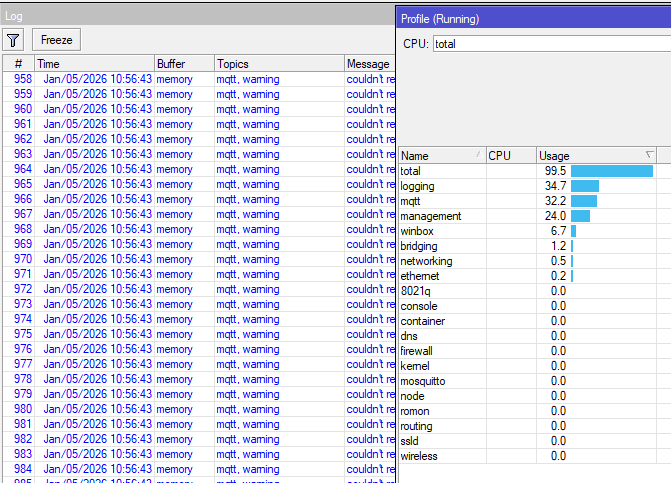
observing frequently (= a couple of times per day), but not periodically or reproducable starting a flood of (blue colored) messages in the log = hundreads and thousand of same log Messages per second - seams to be unstoppable:
System: RB3011 with 7.18.23 and 7.21rc3 and 7.21rc4 (same with all versions)
MT-Script: sending metrics every minute via mqtt to my broker (consumed by influxDB/grafana) with connect/disconnect to the broker in any run = I don't keep the session open during the minute
Runs hours w/o any problem and suddenly it starts = not reproducable or periodically
Profile "total": If it is running normal: "mqtt" is 0% (=disapears), during sending ~ 1,5% CPU usage
Profile "total": If the flood starts "mqtt" is constantly +/- 30% CPU usage. Plus logging the CPU is almost 100%
Reboot of the RB3011 always helps - until it starts again. I don't know any other option to stop it or heal it by now.
Questions:
Any idea what could be the root cause and how to heal it w/o rebooting? Why it runs hours and suddenly... fuzzy is not easy to investigate...
Script: Is it possible to check the CPU usage of "mqtt" frequently by a script to react somehow? Happy for any script snippet...
Script: Is it possible to kill the mqtt-process via script and restart it? Would be self-healing at least the symptomes.
Appreciate any idea for my questions. In best case to avoid the root cause.
I've always used auto-connect=yes on the broker. I'd imagine manually re-connecting uses more resources but IDK.
Now it should not leak resources when connecting+disconnecting, which the error message suggests is happening... You may want to grab a supout.rif when it's in bad state (as well as one when it's working) and open a ticket with MikroTik.
After 7 days without any issue anymore I take it as solved now
3 things seems to me as crucial as solution of the root cause
auto-connect=true (and never us connect/disconnect for MQTT again) --> Thank you @Amm0 as I think this was the main root cause
keep-alive longer than my scheduled script frequency. running a script every 60s and do not care about the default keep-alive=60 is a kind of stupid - or missing knowledge. or both.
Just raising my hand with the same issue -- only happened once so far, on 7.23.2 I believe, and the broker config was already using auto-connect=true. Couldn't fix the issue without rebooting. Will keep an eye out.
It's worth collecting a supout.rif at the time of the issue. You can also enable a bit more logging on topics=mqtt,!packet,!raw to memory (perhaps also increasing memory-lines /system/logging/action/set memory memory-lines=10000), so if it does happen again, you/MikroTik have a bit more detail on ponder. @denissMT/friends are pretty good at getting to bottom of these things, but have a supout.rif (which will include memory logs).
The other thing to look at is keep-alive= (and corresponding one in broker). Docs imply to keep them aligned, but I suppose if both are 60s (default in RouterOS and mosquito)... but my wild-ass-guess is it possible there is some race where 59.999 vs 60.001 so keepalive<>timeout "get crossed"... although I have not studied the actual interactions nor specs on how this works in MQTT.