We are experiencing MRTG issues on the NMS applications LibreNMS and Cacti on MikroTik devices that have a large amount of routing, actually this is a classic problem that has been reported for a long time. From the ticket we got a reply 'In /snmp/community you can try to set denied-oids, to exclude all the large data tables, like routing tables, from even trying to fetch from routeros.' but to be honest I have tried that command on version 6.49.x and on version 7.24.x that command does not exist. Is there anyone who can help explain what it means and how to execute that instruction?
Support probably worded it a bit unclearly, but the idea is to just exclude the routing table OIDs (IP-FORWARD-MIB) in LibreNMS/Cacti, not on the router.
EDIT:
Turns out support was just answering from the future (  ) since "denied-oids" seems to arrive in 7.26 beta, which in jaclaz’s MikroTikish dictionary means roughly “early alpha i.e. bring a helmet”.
Meanwhile the 7.24 manual calls the current stable “no longer actively maintained” (!!!). Regarding denied-oids in the upcoming 7.26, see the last bullet under Check and troubleshoot:
/snmp/community/set [find name=public] denied-oids=1.3.6.1.2.1.4.24
So for now, just exclude the OIDs in LibreNMS/Cacti and wait for 7.26 to grow up at least a couple of patch versions
Is there any documentation / tutorial link on how to do it in LibreNMS and what OIDs should be excluded? I have disabled almost all modules in the settings of that device but the result is still the same.
But in my opinion MikroTik should acknowledge that there is indeed an SNMP problem in their product and optimization needs to be done.
Because this does not happen or is not as severe in v6 and this problem does not happen in other vendors' products.
This case only occurs when the routing reaches a certain number.
The problem is clearly visible when we perform a simple regular snmpwalkbulk query.
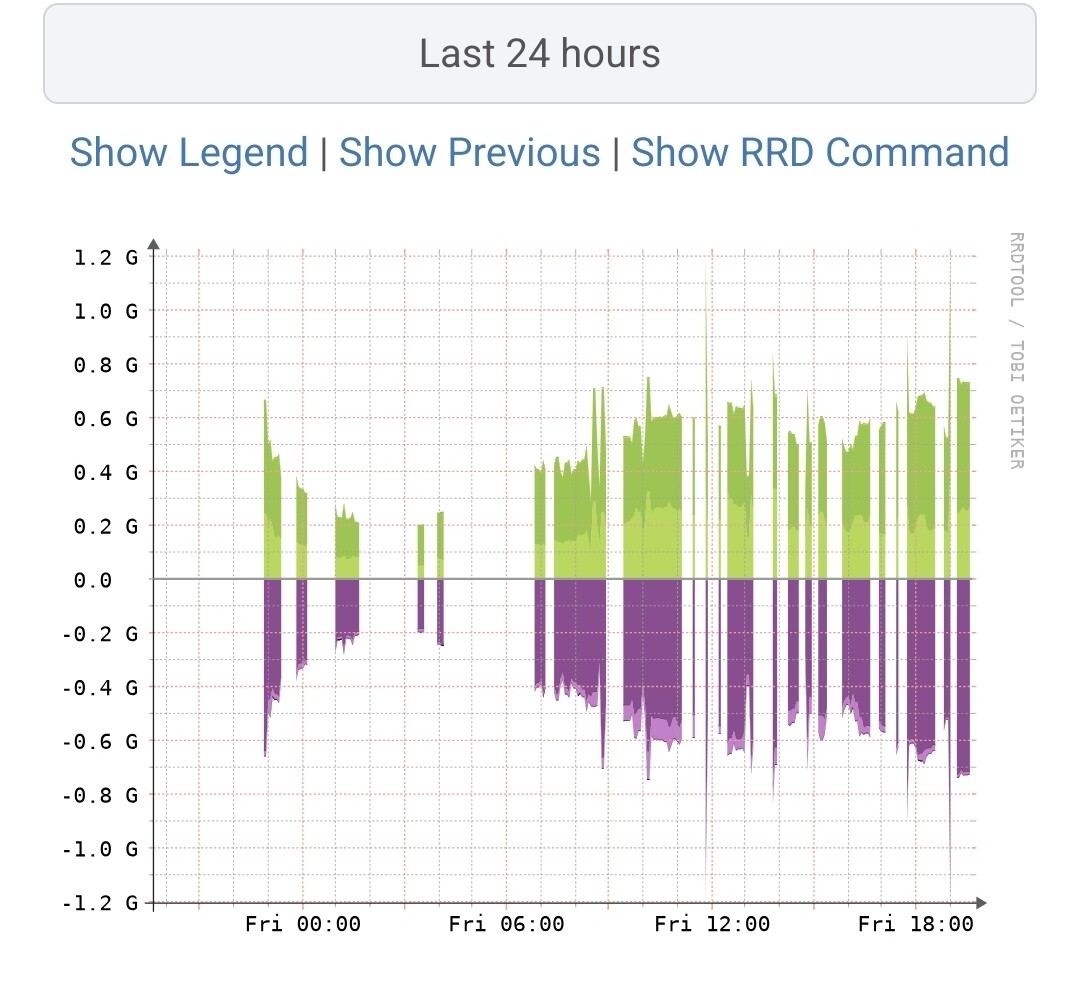
Have you looked at the polling info in LibreNMS? How long does it take to completely poll one of the routers in question?
@buset1974 No production NMS should ever do a full top-down walk of a router, regardless of vendor. With a large routing table that means walking many thousands of route entries every poll, and the router might need way too long to answer. Your snmpbulkwalk test proves exactly that.
In LibreNMS the route discovery module is actually off by default, so check that it is still off for this device under Device > Settings > Modules (the Discovery column, not just Poller!), or set it for all RouterOS devices with lnms config:set os.routeros.discovery_modules.route false. If bulk requests still time out, try lowering Max Repeaters in the device SNMP settings. In Cacti, make sure no data query or graph template on that device touches IP-FORWARD-MIB (1.3.6.1.2.1.4.24).
A few general tips:
- Only poll what you actually graph, e.g. ifXTable (1.3.6.1.2.1.31.1.1, 64-bit counters) and the MIKROTIK-MIB health values. Monitor routing through BGP peer state and prefix counts instead of the table itself.
- Never hammer the same router from several NMS, it just multiplies the load for nothing, so pick one. If you really need both, give each its own community restricted to its address and make sure to stagger the poll intervals so their polls never overlap.
- Or better yet, drop Cacti as an SNMP poller altogether and use the data LibreNMS is already collecting. LibreNMS keeps port data in <rrd_dir>/<hostname>/port-id<port_id>.rrd (INOCTETS, OUTOCTETS and so on), and Cacti can graph those files straight off. Point a data source at the file and leave the data input method empty.
- Troubleshooting tip: turn on /system/logging/add topics=snmp,debug on the router to see exactly which OIDs get asked for and by whom.
We have disabled the module -> polling in LibreNMS and left only the port and transceiver modules, but the result is still the same.
In my opinion, MikroTik must acknowledge that this is a problem/bug and not simply blame the user and the NMS application.
And it needs to be checked and concrete optimization and solutions need to be provided for this case.
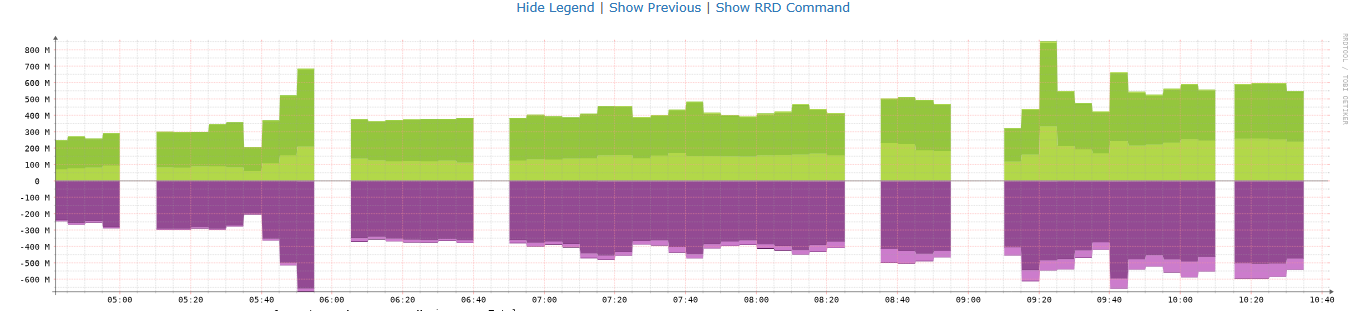
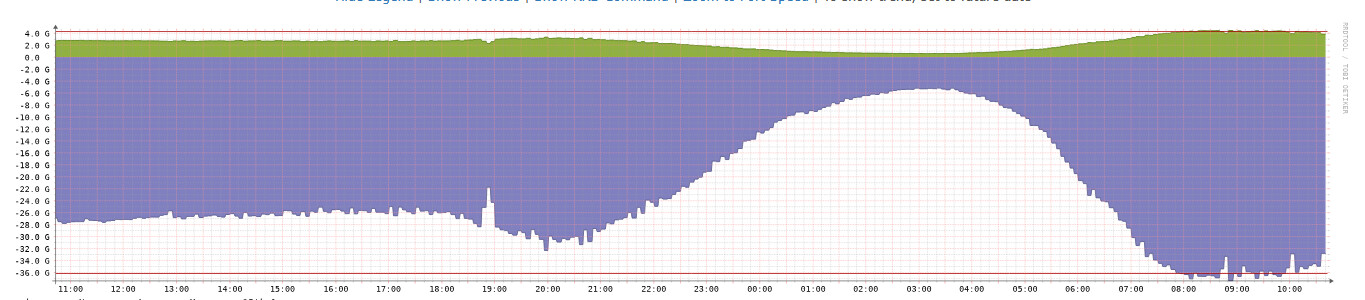
A few things are worth checking before the root cause can be established.
The route module in LibreNMS is discovery only and never runs as part of the 5 minute poll. With the stock cron, discovery runs every 6 hours, so on its own it's unlikely to explain gaps all day long. Have you verified the change actually took effect? lnms device:poll <router> -v on the LibreNMS server shows which modules run and how long each one takes. That also answers pants6000's question: if a poll takes longer than 300 s, you'll get gaps like those.
About the Cisco comparison: before walking anything, LibreNMS should do a single GET on inetCidrRouteNumber.0 / ipCidrRouteNumber.0 and skip the routing table entirely if it's larger than routes_max_number (1000 by default). So your NCS55 most likely never walks its full tables. That safety net only works if your MikroTik actually reports those counters correctly, so run this against the MikroTik from the LibreNMS server: snmpget -v2c -c <community> <mikrotik-ip> IP-FORWARD-MIB::inetCidrRouteNumber.0 IP-FORWARD-MIB::ipCidrRouteNumber.0. If either returns 0 or nothing, LibreNMS walks the whole table, and a Cisco would be walking its full table too. Also keep an eye on the SNMP timeout and retries in LibreNMS (1 s and 5 retries by default), since slow replies plus retries add up quickly.
A few more questions: how many interfaces does the router have (PPPoE, VLANs?), which ROS version and hardware is it, and is Cacti still polling it (simultaneously)? Have you tried enabling snmp,debug logging to see exactly who asks for what when a gap shows up?
If you still think it's ROS after all that, open a support ticket and attach a supout.rif taken while the problem is happening, the relevant ROS log entries, an /export and your LibreNMS settings for the device (enabled modules, SNMP timeout/retries/max repeaters, poll interval).


How many routes are we talk about?
I'm happy to help, but not if I have to spoonfeed this and keep guessing. If you want me to stay in this thread, please be a lot clearer and actually answer the questions from my last comment. Otherwise I'll leave it here.
So again: which Mikrotik model and exact ROS version is the affected router running, how many routes (as ID1 asked) and interfaces does it have, what's the CPU load, how long does a LibreNMS poll take, and is Cacti still polling it?
And when you test something, always spell out exactly how you ran it: the full command, from which host, against which router, and under what conditions, i.e. the load on the router and whether LibreNMS, Cacti or anything else was polling it at the same time. Also grab the complete log lines as text from the CLI, e.g. /log print where topics~"snmp", covering the exact time you ran the command that hung, so the two can be matched up.
Your screenshots are a start, but answering the rest of the questions might help pin down the actual problem.
Hello,
The problematic router is a CCR1072 with RouterOS 7.24.4
with a total of 3 active interfaces. total VLANs 7 from 2 interfaces
Yes, Cacti is still polling it, we also do double polling (LibreNMS and Cacti) to the CISCO NCS55
I’ve asked for this several times but still missing: timeout settings, route count, routes_max_number, how exactly you ran the walk, the router load at the time, what else was polling it, matching log lines, LibreNMS poll time, the result of the snmpget on the route counters and whether Cacti touches IP-FORWARD-MIB, etc...
My suggestion is to open a ticket with MikroTik support. Good luck!
This issue is now solved starting from version 7.25.1, with the ability to add an OID filter on /snmp/community as follows:/snmp/community/set [find name=public] denied-oids=1.3.6.1.2.1.4.24.4, 1.3.6.1.2.1.4.24.3