Trying to migrate this setup from ROS 6 to 7:
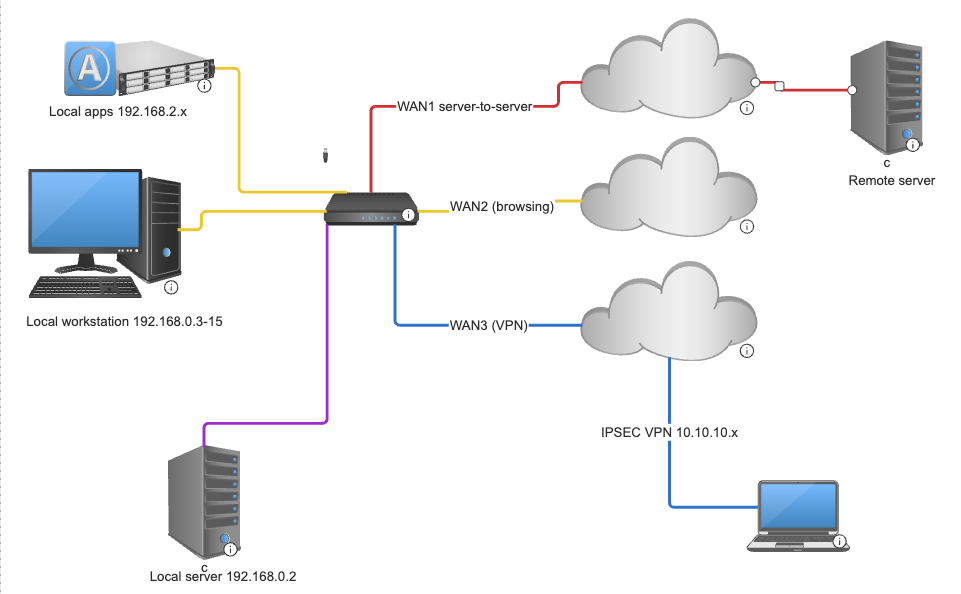
IPSEC access is to access 192.168.0.2 only; WAN1 is exclusively used by 192.168.0.2, regular browsing traffic uses WAN2 while VPN users connect via WAN3.
Here is the router configuration (note WAN1 and WAN3 are disabled, otherwise I cannot make IPSEC work)
# 2026-11-05 18:00:28 by RouterOS 7.25.1
# system id = 5+MNKYajEhD
#
/interface list
add name=LAN
add name=WAN
/ip firewall connection tracking
set loose-tcp-tracking=no
/ip dhcp-server network
add address=192.168.0.0/24 dns-server=192.168.0.1 gateway=192.168.0.1 \
    netmask=24
/ip ipsec profile
set [ find default=yes ] dh-group=\
    ecp256,ecp384,ecp521,modp8192,modp6144,modp4096,modp3072,modp2048 \
    enc-algorithm=aes-256,aes-128 hash-algorithm=sha256
add dh-group=\
    ecp256,ecp384,ecp521,modp8192,modp6144,modp4096,modp3072,modp2048 \
    enc-algorithm=aes-256,aes-128 hash-algorithm=sha256 name=ike2
/ip ipsec peer
add exchange-mode=ike2 name=ike2 passive=yes profile=ike2
/ip ipsec proposal
set [ find default=yes ] auth-algorithms=sha256,sha1 enc-algorithms="aes-256-c\
    bc,aes-256-ctr,aes-256-gcm,aes-192-cbc,aes-128-cbc,aes-128-ctr,aes-128-gcm\
    " pfs-group=none
add auth-algorithms=sha512,sha256 enc-algorithms="chacha20poly1305,aes-256-cbc\
    ,aes-256-ctr,aes-256-gcm,aes-128-cbc,aes-128-ctr,aes-128-gcm" name=\
    ikev2proposal pfs-group=none
/ip pool
add name=pool1 ranges=192.168.0.4/30
add name=vpnpool ranges=10.10.10.0/26
/ip ipsec mode-config
add address-pool=vpnpool address-prefix-length=32 name=ikev2modeconfig \
    split-dns=192.168.0.1 split-include=192.168.0.0/24 system-dns=no
/ip ssh
set host-key-type=rsa known-hosts-validation=no
/interface bridge
add fast-forward=no name=APP1_bridge
add fast-forward=no name=APP2_bridge protocol-mode=mstp pvid=20 \
    vlan-filtering=yes
add fast-forward=no name=LAN_bridge protocol-mode=mstp vlan-filtering=yes
add fast-forward=no name=OTHER_bridge
/interface ethernet
set [ find default-name=ether1 ] comment=WAN1 disable-running-check=no \
    disabled=yes
set [ find default-name=ether2 ] comment=WAN3VPN disable-running-check=no
set [ find default-name=ether3 ] disable-running-check=no
set [ find default-name=ether4 ] comment=WAN2NET disable-running-check=no \
    disabled=yes
set [ find default-name=ether5 ] disable-running-check=no
set [ find default-name=ether6 ] disable-running-check=no
set [ find default-name=ether7 ] disable-running-check=no
set [ find default-name=ether8 ] disable-running-check=no
set [ find default-name=ether9 ] disable-running-check=no
set [ find default-name=ether10 ] disable-running-check=no
set [ find default-name=ether11 ] disable-running-check=no
set [ find default-name=ether12 ] disable-running-check=no
set [ find default-name=ether13 ] disable-running-check=no
/interface list member
add interface=LAN_bridge list=LAN
add interface=APP1_bridge list=LAN
add interface=APP2_bridge list=LAN
add interface=ether1 list=WAN
add interface=ether2 list=WAN
add interface=ether4 list=WAN
/ip address
add address=WAN1IP.218/30 comment=WAN1NET interface=ether1 network=\
    WAN1IP.216
add address=WAN3IP.133/30 comment=WAN3VPN interface=ether2 network=\
    WAN3IP.132
add address=192.168.0.1/24 interface=LAN_bridge network=192.168.0.0
add address=192.168.2.1/24 interface=APP2_bridge network=192.168.2.0
add address=WAN2IP.41/30 comment=WAN2NET interface=ether4 network=\
    WAN2IP.40
add address=172.16.0.1/23 interface=OTHER_bridge network=172.16.0.0
/ip dhcp-server
add add-arp=yes address-pool=pool1 interface=LAN_bridge name=server1
/ip dhcp-server lease
add address=192.168.0.2 client-id=1:0:50:79:66:68:1 mac-address=\
    00:50:79:66:68:01 server=server1
/ip ipsec policy group
add name=vpngroup
/ip ipsec identity
add auth-method=digital-signature certificate=server1 generate-policy=\
    port-strict match-by=certificate mode-config=ikev2modeconfig peer=ike2 \
    policy-template-group=vpngroup remote-certificate=rw-client1
/ip ipsec policy
add dst-address=10.10.10.0/26 group=vpngroup proposal=ikev2proposal \
    src-address=0.0.0.0/0 template=yes
/routing table
add disabled=no fib name=WAN2_RT
add disabled=no fib name=WAN3VPN_RT
add disabled=no fib name=WAN1_RT
/ip firewall filter
add action=accept chain=input comment="defconf: accept ICMP" protocol=icmp
add action=accept chain=input comment=\
    "defconf: accept established,related,untracked" connection-state=\
    established,related,untracked
add action=accept chain=input comment="defconf: accept IKE" dst-port=500,4500 \
    protocol=udp
add action=accept chain=input comment="defconf: accept IPSec ESP" protocol=\
    ipsec-esp
add action=accept chain=input comment="ipsec policy matcher" \
    in-interface-list=WAN ipsec-policy=in,ipsec
add action=drop chain=input comment="defconf: drop all not coming from LAN" \
    in-interface-list=!LAN
add action=accept chain=forward comment=\
    "defconf: accept all that matches IPSec policy" ipsec-policy=in,ipsec
add action=accept chain=forward comment=\
    "defconf: accept established,related, untracked" connection-state=\
    established,related,untracked
add action=drop chain=forward comment="defconf: drop invalid" \
    connection-state=invalid
add action=drop chain=forward comment=\
    "defconf:  drop all from WAN not DSTNATed" connection-nat-state=!dstnat \
    connection-state=new in-interface-list=WAN
/ip firewall mangle
add action=mark-routing chain=prerouting disabled=yes new-routing-mark=\
    WAN1_RT passthrough=no src-address=192.168.0.2
add action=mark-routing chain=prerouting disabled=yes in-interface-list=LAN \
    new-routing-mark=WAN2_RT passthrough=no
/ip firewall nat
add action=accept chain=srcnat comment=\
    "defconf: accept all that matches IPSec policy" ipsec-policy=out,ipsec
add action=masquerade chain=srcnat comment="defconf: masquerade" \
    out-interface-list=WAN
/ip route
add disabled=no distance=1 dst-address=0.0.0.0/0 gateway=WAN1IP.217 \
    pref-src=WAN1IP.218 routing-table=WAN1_RT scope=30 target-scope=10
add disabled=no distance=1 dst-address=0.0.0.0/0 gateway=WAN2IP.42 \
    pref-src=WAN2IP.41 routing-table=WAN2_RT scope=30 target-scope=10
add disabled=no distance=1 dst-address=0.0.0.0/0 gateway=WAN3IP.134 \
    pref-src=WAN3IP.133 routing-table=WAN3VPN_RT scope=30 target-scope=10
add check-gateway=ping disabled=no distance=20 dst-address=0.0.0.0/0 gateway=\
    WAN1IP.217 pref-src=WAN1IP.218 routing-table=main scope=30 \
    target-scope=10
add check-gateway=ping disabled=no distance=20 dst-address=0.0.0.0/0 gateway=\
    WAN2IP.42 pref-src=WAN2IP.41 routing-table=main scope=30 \
    target-scope=10
add check-gateway=ping disabled=no distance=20 dst-address=0.0.0.0/0 gateway=\
    WAN3IP.134 pref-src=WAN3IP.133 routing-table=main scope=30 \
    target-scope=10
/routing rule
add action=lookup disabled=no interface=ether1 table=WAN1_RT
add action=lookup disabled=no interface=ether2 table=WAN3VPN_RT
add action=lookup disabled=no interface=ether4 table=WAN2_RT
/system identity
set name=router
/system logging
add disabled=yes topics=ipsec,!packet,!debug
/interface bridge port
add bridge=LAN_bridge interface=ether5
add bridge=LAN_bridge interface=ether6
Here's the output of /routing/route/print
[admin@router] /routing/route> print
Flags: U - UNREACHABLE, A - ACTIVE; c - CONNECT, s - STATIC
Columns: DST-ADDRESS, GATEWAY, AFI, ROUTING-TABLE, DISTANCE, SCOPE,
         TARGET-SCOPE
   DST-ADDRESS             GATEWAY          AFI   ROUTING-TABLE  DI  SCOPE  TA
As 0.0.0.0/0               WAN3IP.134    ip    main           20     30  10
Us 0.0.0.0/0               WAN1IP.217  ip    main           20     30  10
Us 0.0.0.0/0               WAN2IP.42    ip    main           20     30  10
Ac WAN3IP.132/30           ether2           ip    main            0     10   5
Ac 172.16.0.0/23           OTHER_bridge     ip    main            0     10   5
Ac 192.168.0.0/24          LAN_bridge       ip    main            0     10   5
Ac 192.168.2.0/24          APP2_bridge      ip    main            0     10   5
Us 0.0.0.0/0               WAN2IP.42    ip    WAN2_RT         1     30  10
As 0.0.0.0/0               WAN3IP.134    ip    WAN3VPN_RT      1     30  10
Us 0.0.0.0/0               WAN1IP.217  ip    WAN1_RT         1     30  10
Ac ::1/128                 lo               ipv6  main            0     10   5
Ac fe80::%ether2/64        ether2           ipv6  main            0     10   5
Ac fe80::%LAN_bridge/64    LAN_bridge       ipv6  main            0     10   5
Ac fe80::%ether13/64       ether13          ipv6  main            0     10   5
Ac fe80::%APP2_bridge/64   APP2_bridge      ipv6  main            0     10   5
Ac fe80::%APP1_bridge/64   APP1_bridge      ipv6  main            0     10   5
Ac fe80::%OTHER_bridge/64  OTHER_bridge     ipv6  main            0     10   5
A  lo                                       link  main            0
A  ether2                                   link  main            0
A  ether5                                   link  main            0
A  LAN_bridge                               link  main            0
A  ether13                                  link  main            0
A  APP2_bridge                              link  main            0
A  APP1_bridge                              link  main            0
A  OTHER_bridge                             link  main            0

[admin@router] /routing/route>
And the output of /ip/ipsec/installed-sa/print
[admin@router] /ip/ipsec/installed-sa> print
Flags: S - SEEN-TRAFFIC; E - ESP
Columns: SPI, STATE, SRC-ADDRESS, DST-ADDRESS, AUTH-ALGORITHM, ENC-ALGORITHM,
         ENC-KEY-SIZE
#    SPI         STATE   SRC-ADDRESS    DST-ADDRESS    AUTH-A  ENC-ALG  ENC
0 SE 0x54445C4E  mature  1.1.1.2        WAN3IP.133  sha512  aes-cbc  256
1 SE 0x31B6F94   mature  WAN3IP.133     1.1.1.2        sha512  aes-cbc  256
[admin@router] /ip/ipsec/installed-sa>
Today nothing works from the setup  I have somehow made policy routing work with iptables mangle rules yesterday, but messed it up and it no longer works. Tried to fix it with routing rules but they don't work either. I would like to achieve the following:
- Make IPSEC work with all WAN-s enabled (need to somehow pin the traffic to the port where it arrived, as now if I enable the other WAN-s, I see UDP/4500 traffic inbound to WAN3 trying to go back on WAN1/WAN2, so connection is not established)
- Allow IPSEC connectivity to 192.168.0.2 (currently ICMP ping works for 0.1 which is the router; pings for 0.2 arrive inbound, but responses are sent to the WAN3 IP address instead of the 10.10.10.x address and there is no translation happening - perhaps a mode config issue)
- Have a simple failover from WAN1 to WAN2 in case WAN1 goes down (no need for load balancing or failover for the other WAN connections, only WAN1 is important)
I have this entire setup modeled in GNS3, but I also have a physical device to test - I did not want to touch that until it works in the simulator. Thanks in advance for your help!