According to fewi: “You can use multiple Hotspots on the same router with RADIUS - you can either use RADIUS domains/realms to indicate what users can log in where, or use the RADIUS location attributes configured in the Hotspot server profile that are sent with the access requests.”
general talk.
“RADIUS domains/realms” user manager (RADIUS Srv ) compares to what value ? where is the value stored? And how to change it ?
thx
What do you mean by “RADIUS domains/realms” ? ok, i set it to “IDON"T KNOW” so how my radius will know from witch hotspot the user is coming from, and what to what Radius subscriber should be allowed to gain access.
or
“RADIUS location attributes” user manager (RADIUS Srv ) compares to what value ? where is the value stored? And how to change it ?
thx
I know where to find those options but if i set them up to “LOSTOPTIONS” value what that tells to Radius on the other end? What you mean by location ? phisical location?, hotspot server string name ? ? ? And what this got to do with Radius knowing what subscriber to chose for that particular, attempting to access user?
I am surprise of the hotspot configuration options cause when i log in to thru web gui to user manager i don’t see them, at all, only i can add router with router name, ip , secret psw. THAT S ALL.
Do you go to terminal user manager command prompt? to set this option?
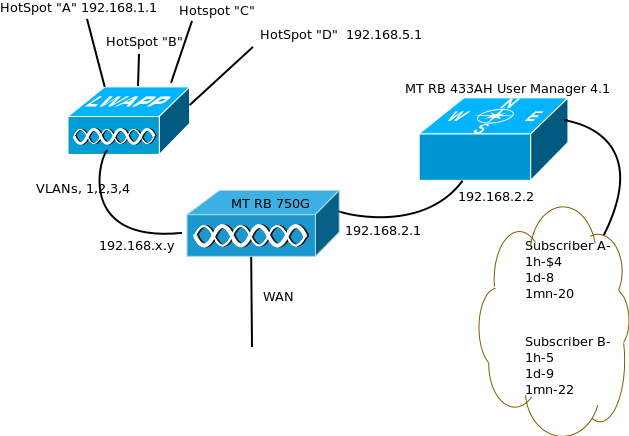
My goal is to have different price package for each hotspot on the same router. You guys say you did it, i can not. This is my config, below.
I don’t use User Manager either, but have worked with it briefly. You should be able to set the locanet ips as the domain of each subscriber (rate). I found by experiment you could not assign more than one subscriber on the same router as User Manager.
If you are using hotspots in external routers (like you are), you should be able to do that. It will require assigning multiple localnet ips to your User Manager “wan” interface (192.168.2.2). Then set the RADIUS server ips (multiple entries in “/radius”) in each router using the “radius-default-domain” setting in each hotspot. That way the User Manager should be able to tell which subscriber to use.
For example, in your User Manager router, you should be able to assign 192.168.2.2/24 (low rate), 192.168.2.3/24 (medium rate) and 192.168.2.4/24 (high rate) to the same interface. Then set a User Manager subscriber to each of those ips.
In each router, presuming three hotspots with different rates:
/ip hotspot profile
set hotspotprof1 radius-default-domain=low
set hotspotprof2 radius-default-domain=medium
set hotspotprof3 radius-default-domain=high

/radius
add service=hotspot address=192.168.2.2 domain=low secret=yoursecret
add service=hotspot address=192.168.2.3 domain=medium secret=yoursecret
add service=hotspot address=192.168.2.4 domain=high secret=yoursecret
Checking the advised configuration. Will keep you informed.
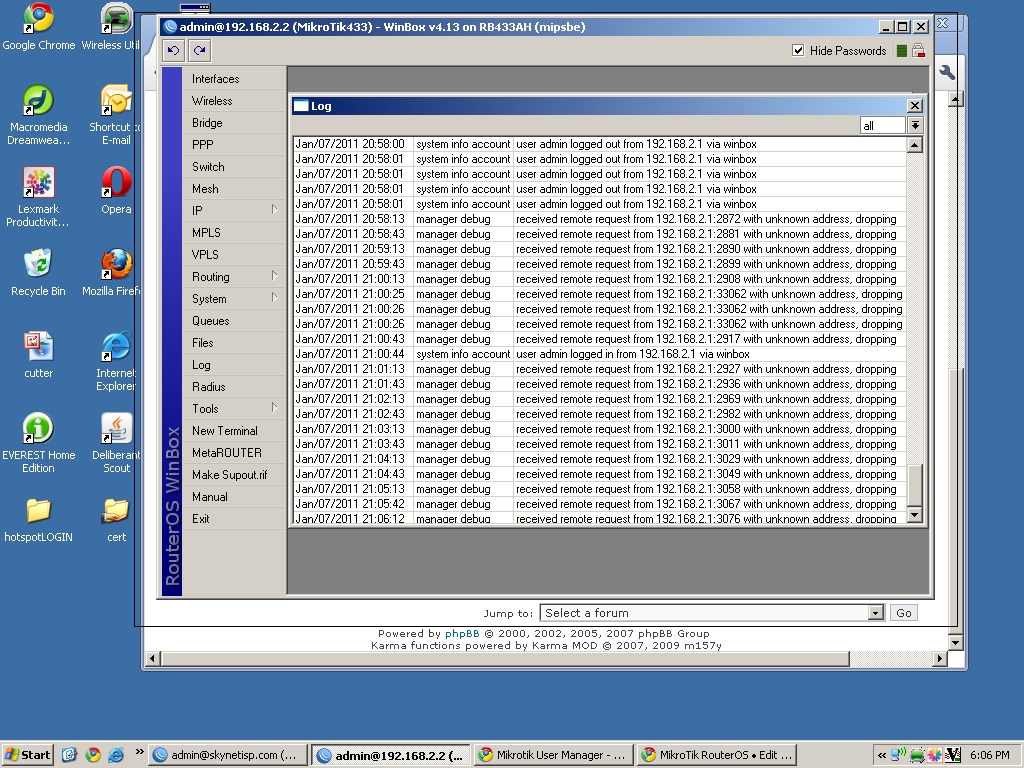
Ok, I did some testing and i doesn’t work. The first thing the user manager does is, checks the source ip of the access request, if the IP is not in any of the subscribers it drops. see screen shot. below.
You might want to browse through the user manual for User Manager, including this: http://wiki.mikrotik.com/wiki/User_Manager/Routers
I use FreeRADIUS because it allows me more flexibility. The “Routers” section is the equivalent of “clients.conf” in FreeRADIUS.
Yea, but you can have only unique router ip address in throughout subscribers, so you can not have Hotspot A, in → ex. User Manager ( RADIUS Srv ) Subscribers 1, 2 and Subscriber_3.
It will give you err msg: “The is address already in use”
And it initial access is base on IP and then other options, attributes etc.
So i guess i will stick to my old config. i will put back all the hotspots on separate subnets with alies addresses being one of the hotspot and the other the User manager Box ( Radius Srv)
This way any requests from any hotspot will be initiated in own subnet so the router Ip will be on own layer 3 ip, so i can add as many routers to my User Manager with Hotspot A as i want. x.x.x.1/24 255 Hotspots router ips heheh.
I like the fact that 1 hardware is dedicated to do one or few things, no need for PC and its components etc.
@Tombee79 I am having the same problem, have you found any solution?
Still have not figure out how to seperate users for each hotspot in one usermanager, users seems to be able to authenticate across subscribers/customer.
Can we use a parameter in hotspot config like domain/realm or location id or anything such that the user manager be able to separate / differentiate users authenticating from different hotspot.
When you add NEW DEVICE ( NAS ) in user Manager it only allows one unique NAS ip address, if you try add the same, User manager will not take it.
I have not played with ID, real, etc. parameters, i heart it is possible but i don’t know how to do it.
What i have done i have had created 3 user manager on one MTik Rboard (450g) and i designed each one for each service let say. Slow Package, Fast Pckg, Extreme Packg, and there i added the the same IPs.
Next i played around muiltiple ips and subnets ( each subnet for one service Plan, total three subnests )
Next i assigned muiltiple ips to interfaces, To fool the User manager that it originates from different device.
It worked.
But i heart there is nicer/simpler solution for this, i played around but could not get it to work with the ,; real, id, etc can not reamember exacly what didn’t work out, cause it was like 6 months ago.
I have this similar quest some time ago and did alot of research on it, in the end i was able to make it work perfectly but under the following conditions only.
Both the RouterOS and the interface hotspot are the same machine.
I have to downgrade to v3.5, any thing higher than that, it does not work, infact Mikrotik say it will not work but I believe it should works, so i kept on trying with older version where you can ping other local loop ip other than 127.0.0.1 ie you can reach 127.0.0.2 … from the routeros.
How I did it, if you are interested may be you can continue from there!
setup diffrent hotspot on different interfaces (NIC) on the router,
configure them with normal radius configuration, on each you use a diffrent loop address say 127.0.0.1, 127.0.0.2, etc also specify diffrent domain say domain1, domain2, etc accordingly, then you configure thier respective customer in the usermanger.
This done cafrefully work perfect. I have removed the configuration otherwise, i would have paste the configuration live but can still see the configuration virtually.