Hi All,
I’m trying to configure an 751 router with two SSID to provide internet for two separate LANs.
I’ve configured the default wifi interfase with SSID01.
This interfase belongs to bridge-local and works fine.
For the second SSID, Iv’e done as follows:
Created a VirtualAP and gave it a SSID02
Created an IP address for wlan2 (SSID02).
Created a separate DHCP Server with a new subnet. (176.168.1.0)
Configured the Network for the DHCP with the wlan2 IP address as gateway.
Created a IP NAT masquerade for all traffic from lan 176.168.1.0 to go through ether1-gateway
I’m able to connect to the SSID02 and get an IP address from the defined pool (176.168.1.200), but I’m unable to connect to the internet through that wifi connection.
The original connection SSID01 works fine.
What am I missing in order to let SSID02 connect to the internet?
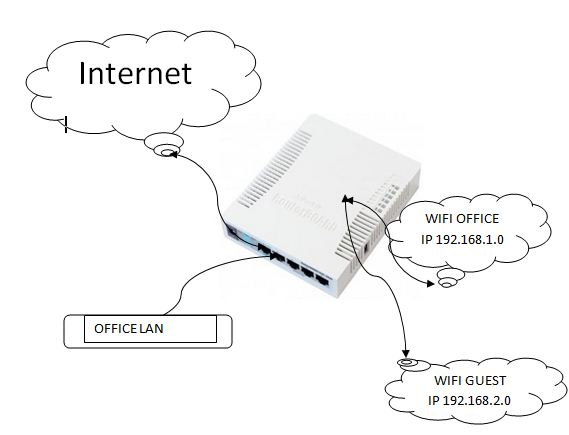
To make things simpler, what I want to achieve is in the attached diagram:
Based on the default configuration I’m connecting:
internet to ether1-gateway
LAN to ether2-master
And configuring WIFI for access from our local users in the OFFICE.
This works out of the box without problems.
Now, I want to add a second wlan for guests that want connect in our offices and maintain them separate from our LAN, just give them internet access with an independent subnet.
Create a bridge for the guest network.
/interface bridge add name=“bridge-guest”/code2]
Assign the Bridge an Address
[code2=ros]/ip address add interface=“bridge-guest” address=172.16.0.1/243) Setup a DHCP Pool
/ip pool add name=“guest-pool” ranges=172.16.0.2-172.16.0.2544) Add a DHCP Network
/ip dhcp-server network add address=172.16.0.0/24 gateway=172.16.0.1 dns=172.16.0.15) Add a DHCP Server
/ip dhcp-server add name=“guest-dhcp” interface=bridge-guest address-pool=guest-pool6) Add a Virtual Access Point and Configure The Security Settings as you wish.
/interface wireless add master-interface=wlan1 name=wlan-guest7) Add Virtual Access Point to Bridge
/interface bridge port add bridge=bridge-guest interface=wlan-guest
To configure the firewall part i’d need to see your firewall rules. Basically you need to block access between the networks, etc. I’d also disable the neighbor discovery and everything else (web-box, etc) from the guest network.
Following the suggested configuration I’m able to connect to the office wlan1 and have internet access, but once again I cannot get internet access using the VirtualAP in wlan2.
wlan2 is part of a new guest-bridge
guest-bridge has a DHCP server assigned with a separate IP pool.
and the guest-bridge has an IP address correspondind to its subnet.
When connecting to wlan2 I get a valid IP address but I’m unable to access the internet.