Multiple Vlan for ISP router

Hi all,
i’m facing an unstandard config:
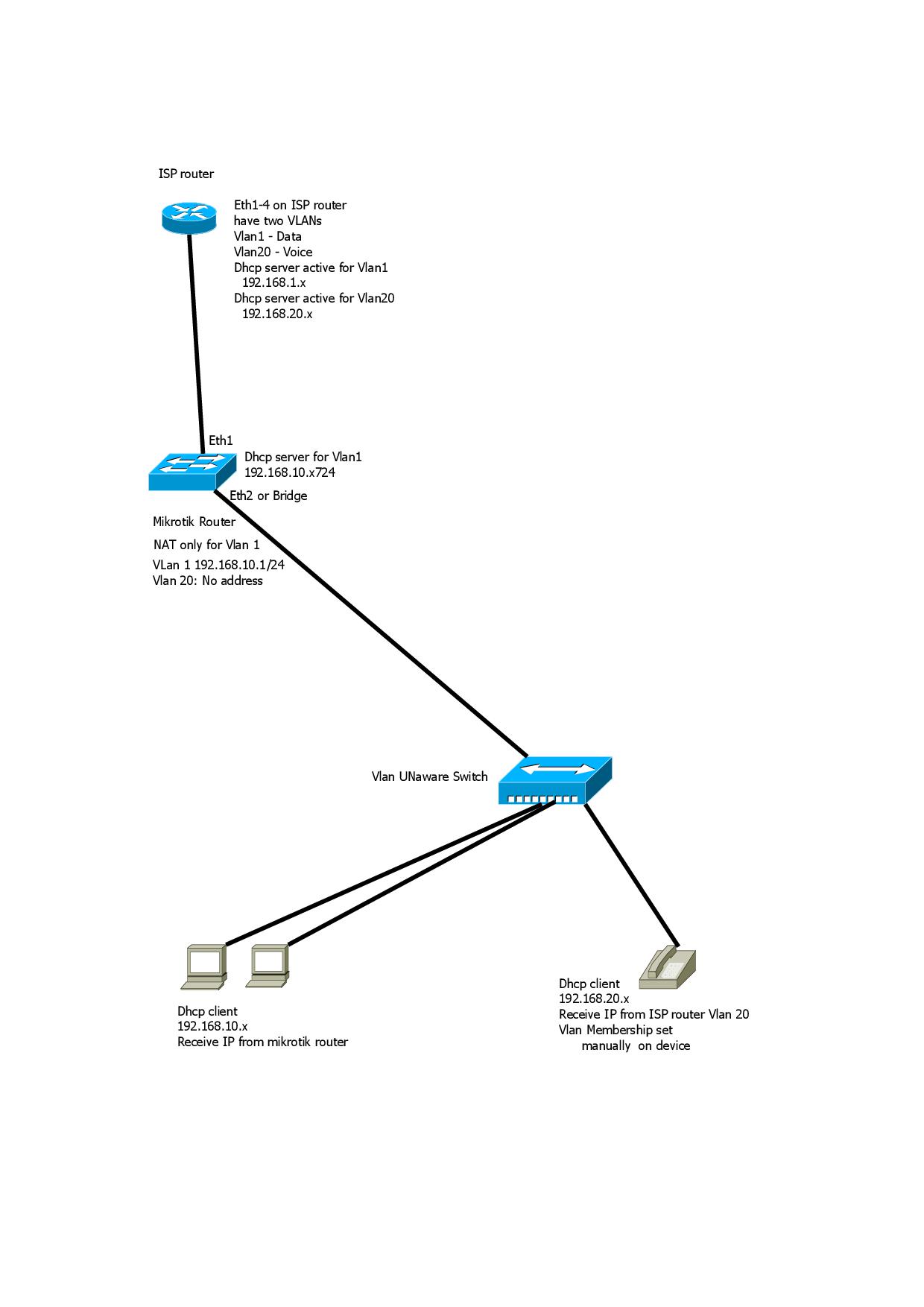
Provider’s router have two Vlan configured on ethernet ports.
I need to install a mikrotik router between the lan and the ISP router.
Isp router use Vlan 20 for voice to connect internal phones to isp’s cloud pbx.
I’d like to know if mikrotik router can be used in this configuration and how to manage Vlans and routing.
In attach there is a scheme of the network.

Thanks
Network.jpg

You can use a bridge on the Mikrotik. Then you can configure the ports like a managed switch.
Including VLAN.

And you can use a VLAN interface on the Mikrotik for router purposes for your vlan

I would not make any promises on the MT product because its not the limiting factor. Sticking an unmanaged switch in-between is your issue, replace it with managed switch and then the MT is golden.

Yeah, it purely depends on the unmanaged switch firmware, which could either ignore or drop VLAN tags, so you can either have expected behavior or no VLANs at all. Better find cheapest managed switch for this purpose. D-Link DGS1100 is very affordable, and you can find some vlan-aware stuff on aliexpress even cheaper.

Ok i made some config using bridges.
eth1 for ISP Wan
eth2 for ISP voice
eth3 for Lan Data
eth4 fot Voice Lan


This is the config:

admin@MikroTik] > export
# jan/03/1970 16:56:14 by RouterOS 7.2
/interface bridge
add comment="Bridge Lan Vlan1" frame-types=admit-only-untagged-and-priority-tagged name=bridgeL1 vlan-filtering=yes
add comment="Bridge Vlan20" frame-types=admit-only-vlan-tagged ingress-filtering=no name=bridgeV20 pvid=20 vlan-filtering=yes
add comment="Bridge Wan Vlan1" frame-types=admit-only-untagged-and-priority-tagged name=bridgeW1 vlan-filtering=yes
/interface ethernet
set [ find default-name=ether1 ] comment="ISP VLan1"
set [ find default-name=ether2 ] comment="ISP Vlan20"
set [ find default-name=ether3 ] comment="Lan Vlan1"
set [ find default-name=ether4 ] comment="Lan Vlan20"
set [ find default-name=ether5 ] comment="Mgmt noip"
/interface list
add name=WAN
add name=LAN
/interface wireless security-profiles
set [ find default=yes ] supplicant-identity=MikroTik
/ip pool
add name=dhcp_pool1 ranges=192.168.10.20-192.168.10.30
/ip dhcp-server
add address-pool=dhcp_pool1 interface=bridgeL1 name=dhcp1
/port
set 0 name=serial0
/interface bridge port
add bridge=bridgeV20 interface=ether4
add bridge=bridgeV20 interface=ether2
add bridge=bridgeW1 frame-types=admit-only-untagged-and-priority-tagged interface=ether1
add bridge=bridgeL1 frame-types=admit-only-untagged-and-priority-tagged interface=ether3
/ip neighbor discovery-settings
set discover-interface-list=!dynamic
/interface list member
add interface=bridgeL1 list=LAN
add interface=bridgeW1 list=WAN
/ip address
add address=192.168.101.190/24 interface=ether1 network=192.168.101.0
add address=192.168.10.1/24 interface=ether2 network=192.168.10.0
/ip dhcp-server network
add address=192.168.10.0/24 gateway=192.168.10.1 netmask=24
/ip dns
set servers=8.8.8.8,1.1.1.1
/ip firewall nat
add action=masquerade chain=srcnat out-interface-list=WAN

With vlan-filtering=yes, it is an overcomplication to use three bridges.

There are two possible ways:

  • the “standard” one is to use a single bridge with vlan-filtering=yes and just make both ether1 and ether2 tagged members of the telephony VLAN 20, ether1 a member (tagged or untagged depending on how the ISP router hands it over) of a WAN VLAN (1 if it comes tagged and any number 1..4094 except 20 if it comes tagless) and ether2 a tagless member of a LAN VLAN (again any number different from the other two). If you plan to run an IKEv2 VPN on the Mikrotik, it may be advantageous to make the bridge IP interface the WAN one (by setting its pvid to the one of the WAN VLAN); if not, it doesn’t matter.
  • the “old” but simpler (in this particular scenario!) one is to attach two vlan interfaces with VID 20 to ether1 and ether2 and bridge these two vlan interfaces together “back to back” using a separate dedicated bridge (with vlan-filtering=no)

In any case - before starting, remove one ethernet interface from the bridge and make sure you can configure the device when connected to that one, as it is very easy to lock yourself out when tampering with bridge configurations.