NAT Table Creation

I am replacing a relatively simple DSL Modem/Router with an RB5009. I have the basics working but now I need to get the NAT table moved to allow me to use my NAS and some other devices that are externally accessible. Mostly by SNMP.

There seems to be a plethora of options in the firewall NAT section of Winbox or the browser interface. If someone could give me a sample of how to enter one of these, particularly the ones that have a range of ports, that would be super helpful.

Thanks!

IPv4 port forwarding in RouterOS is done using rules in the IP -> Firewall -> NAT table with chain=dstnat and action=dst-nat, as you can read here.

First, if you don't have a static public IP address pointing to your router, but only a dynamic one, you should create an address list entry that will has the public IP address that points to the router. You can add using the GUI by going to IP -> Firewall -> Address Lists, or enter this command in the Terminal in WinBox:

/ip firewall address-list
add address=your.domain.name list=PUBLIC_IP

(adjust your.domain.name of course). But if you have a fully static IP address, for example 123.45.67.89, then replace dst-address-list=PUBLIC_IP in the example commands below with dst-address=123.45.67.89 instead.

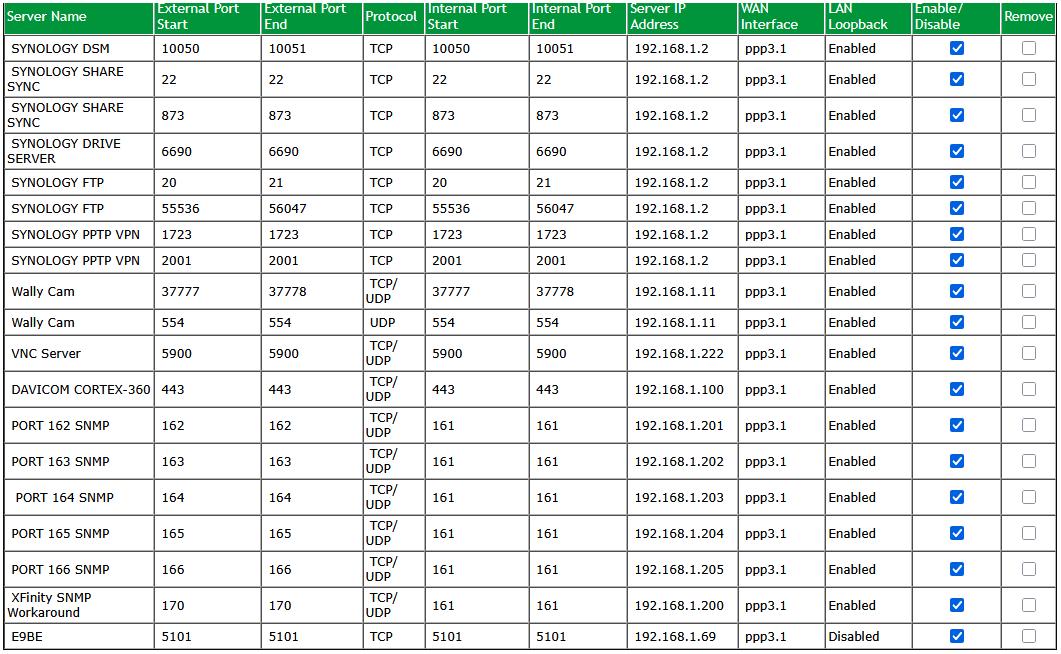
  • Here is the example DSTNAT rules that implement the two "Wally Cam" entries in your screenshot:

    /ip firewall nat
    add action=dst-nat chain=dstnat comment="Wally Cam" \
        dst-address-list=PUBLIC_IP dst-port=37777-37778 protocol=udp \
        to-addresses=192.168.1.11
    add action=dst-nat chain=dstnat comment="Wally Cam" \
        dst-address-list=PUBLIC_IP dst-port=37777-37778 protocol=tcp \
        to-addresses=192.168.1.11
    add action=dst-nat chain=dstnat comment="Wally Cam" \
        dst-address-list=PUBLIC_IP dst-port=554 protocol=udp \
        to-addresses=192.168.1.11
    

    Notice how the port range is specified (comma separated enumeration of port is also allowed), and that you need two separate rules for TCP and UDP.

  • Here is an example for the PORT 162 SNMP rules:

    /ip firewall nat
    add action=dst-nat chain=dstnat comment="PORT 162 SNMP" \
        dst-address-list=PUBLIC_IP dst-port=162 protocol=udp \
        to-addresses=192.168.1.201 to-ports=161
    add action=dst-nat chain=dstnat comment="PORT 162 SNMP" \
        dst-address-list=PUBLIC_IP dst-port=162 protocol=tcp \
        to-addresses=192.168.1.201 to-ports=161
    

    Again, you need two separate rules for UDP and TCP, and with to-ports you can change the destination port (this also accepts a port range/enumeration).

You can create those rules with the GUI in WinBox, but it's probably faster to create them first in a text editor then just copy the commands and paste them in the terminal.

After you've created the rules, port forwarding will work from the outside (from the internet). But the functionality of the "LAN Loopback" column in your table is not yet replicated. That is what called Hairpin-NAT in the MikroTik documentation. Without LAN Loopback / Hairpin-NAT, accessing the port forwarded resources using the public IP address / public domain name from inside the same LAN subnet is not possible. You can add this rule to enable Hairpin-NAT and replicate "LAN Loopback = Enabled". We only add one single rule for the whole 192.168.1.0/24 subnet though, and enable it for all:

/ip firewall nat
add action=masquerade chain=srcnat comment="Hairpin-NAT" \
   src-address=192.168.1.0/24 dst-address=192.168.1.0/24
2 Likes

We need these examples of wonderfully provided explanations and examples readily available.

No idea how to do that without it quickly getting hidden in heaps of discussion and comments and variations and other excellent, helpful, and concise explanations.

If you have single public IP address and don't need to connect to [public IP]:[port] from inside your LAN, then alternative (a better one IMO) would be to use in-interface-list=WAN instead of dst-address-list (or dst-address). This way the NAT table better aligns with default firewall filter rule set (which extensively uses WAN interface list as filtering property).

Thanks. I am creating a text file now to cut and paste into the terminal.

I have a single static IP BTW. Forgot to mention that.

Exactly! But to replicate the table which has LAN Loopback enabled I needed to assume that access from inside with the domain name was needed.

If port forwarding was only needed for things like XBOX live to work (that's my only use for DSTNAT at home) then using in-interface-list=WAN is the preferred way.

For anyone just starting out:

/ip cloud set ddns-enabled=yes ddns-update-interval=1h

/ip/cloud> print

dns-name: <xxxxx>.sn.mynetname.net


/ip firewall address-listaddaddress=<xxxxx>.sn.mynetname.net list=PublicIP


  1. Script or terminal:

:foreach i in=[/ip firewall address-list find list="PublicIP"] do={
:local addr [/ip firewall address-list get $i address]
:if ([/ping address=$addr count=1] = 0) do={
:put "$addr is unreachable"
}
}

Please don't open up ports of internet facing interfaces with the old nat port-forwarding technique.
Use a newer way to handle this situation, i.e. a VPN tunnel into your private network (Home lab), so that you only need to open up "one secure" VPN port.

The Hairpin NAT worked.

The others didn’t work correctly. It put the comments and ports into the table but without the addresses.

Do you mean when pasting the commands? In RouterOS normally commands are limited by new lines (or ;), if you want a command to span multiple lines, you'll need to join the lines with \ (see the examples above). If you miss a \ then you might cause the command to be split into two invalid commands. When pasting commands into the terminal, check if there are error messages. If yes, try pasting the command one by one.

Figured it out. The commands were correct except I should have been using dst-address instead of dst-address-list

Thanks

Now on to making my wAP ax work with the router!

After testing from outside my network I found that, even though my hairpin routes work, they are not accessible from outside my network.

Hairpin configuration is specifically for access to devices that are inside your network from other devices inside your network.

Do you mean the port forwarding from devices outside your network to devices inside your network is not working?

To be clear, I set up the hair pin assuming it was the same as loopback on more consumer routers.
On those routers you can test port forward from the outside from the inside if loopback is enabled.
If that is not correct please let me know.

Port forwarding from the outside is NOT working. I have attached a config file.

anynameyouwish.rsc (10.4 KB)

Please paste the config using the “Preformatted Text” block, which is denoted above by the “</>” icon.

I am not certain, but I would want to run separate tests on (1) port forwarding from the outside – i.e., from a remote location connected only by the public internets and (2) hairpin from within the network. That is, I would not try to run only 1 test to confirm both work.

Have you run either of these “pure” tests?

I have tested both. The hairpin works. The test from another network does not.

# 2025-10-08 11:45:01 by RouterOS 7.18.2
# software id = CXL4-DIT9
#
# model = RB5009UPr+S+
# serial number = HK40ASN94VP
/interface bridge
add admin-mac=04:F4:1C:81:CC:E5 auto-mac=no comment=defconf name=bridge
/interface ethernet
set [ find default-name=ether1 ] name=GlobalNet poe-out=off
set [ find default-name=ether2 ] name="Mikrotik AP"
/interface list
add comment=defconf name=WAN
add comment=defconf name=LAN
/interface wifi datapath
add bridge=bridge bridge-cost=1 bridge-horizon=none client-isolation=no \
    disabled=no interface-list=all name=AP1 vlan-id=none
/interface wifi configuration
add chains="" country="United States" datapath=AP1 datapath.bridge=bridge \
    disabled=no mode=ap name="FALCON AP" ssid=FALCON1
/ip pool
add name=dhcp ranges=192.168.1.50-192.168.1.149
/ip dhcp-server
add address-pool=dhcp interface=bridge name=defconf
/disk settings
set auto-media-interface=bridge auto-media-sharing=yes auto-smb-sharing=yes
/interface bridge port
add bridge=bridge comment=defconf interface="Mikrotik AP"
add bridge=bridge comment=defconf interface=ether3
add bridge=bridge comment=defconf interface=ether4
add bridge=bridge comment=defconf interface=ether5
add bridge=bridge comment=defconf interface=ether6
add bridge=bridge comment=defconf interface=ether7
add bridge=bridge comment=defconf interface=ether8
add bridge=bridge comment=defconf interface=sfp-sfpplus1
/ip neighbor discovery-settings
set discover-interface-list=LAN
/interface list member
add comment=defconf interface=bridge list=LAN
add comment=defconf interface=GlobalNet list=WAN
/interface wifi capsman
set enabled=yes interfaces="Mikrotik AP" package-path="" \
    require-peer-certificate=no upgrade-policy=none
/ip address
add address=192.168.1.1/24 comment=defconf interface=bridge network=\
    192.168.1.0
add address=127.72.201.163/16 interface=GlobalNet network=127.72.0.0
/ip dhcp-client
add comment=defconf disabled=yes interface=GlobalNet
/ip dhcp-server network
add address=192.168.1.0/24 comment=defconf dns-server=192.168.1.1 gateway=\
    192.168.1.1 netmask=24
/ip dns
set allow-remote-requests=yes servers=127.72.18.14
/ip dns static
add address=192.168.1.1 comment=defconf name=router.lan type=A
/ip firewall filter
add action=accept chain=input comment=\
    "defconf: accept established,related,untracked" connection-state=\
    established,related,untracked
add action=drop chain=input comment="defconf: drop invalid" connection-state=\
    invalid
add action=accept chain=input comment="defconf: accept ICMP" protocol=icmp
add action=accept chain=input comment=\
    "defconf: accept to local loopback (for CAPsMAN)" dst-address=127.0.0.1
add action=drop chain=input comment="defconf: drop all not coming from LAN" \
    in-interface-list=!LAN
add action=accept chain=forward comment="defconf: accept in ipsec policy" \
    ipsec-policy=in,ipsec
add action=accept chain=forward comment="defconf: accept out ipsec policy" \
    ipsec-policy=out,ipsec
add action=fasttrack-connection chain=forward comment="defconf: fasttrack" \
    connection-state=established,related hw-offload=yes
add action=accept chain=forward comment=\
    "defconf: accept established,related, untracked" connection-state=\
    established,related,untracked
add action=drop chain=forward comment="defconf: drop invalid" \
    connection-state=invalid
add action=drop chain=forward comment=\
    "defconf: drop all from WAN not DSTNATed" connection-nat-state=!dstnat \
    connection-state=new in-interface-list=WAN
/ip firewall nat
add action=masquerade chain=srcnat comment="defconf: masquerade" \
    ipsec-policy=out,none out-interface-list=WAN
add action=masquerade chain=srcnat comment=Hairpin-NAT dst-address=\
    192.168.1.0/24 src-address=192.168.1.0/24
add action=dst-nat chain=dstnat comment="Synology DSM" dst-address=\
    127.72.201.163 dst-port=10050-10051 protocol=tcp to-addresses=192.168.1.2
add action=dst-nat chain=dstnat comment="Synology SHARE SYNC" dst-address=\
    127.72.201.163 dst-port=22 protocol=tcp to-addresses=192.168.1.2
add action=dst-nat chain=dstnat comment="Synology SHARE SYNC" dst-address=\
    127.72.201.163 dst-port=873 protocol=tcp to-addresses=192.168.1.2
add action=dst-nat chain=dstnat comment="Synology DRIVE SERVER" dst-address=\
    127.72.201.163 dst-port=6690 protocol=tcp to-addresses=192.168.1.2
add action=dst-nat chain=dstnat comment="Synology PPTP VPN" dst-address=\
    127.72.201.163 dst-port=1723 protocol=tcp to-addresses=192.168.1.2
add action=dst-nat chain=dstnat comment="Synology PPTP VPN" dst-address=\
    127.72.201.163 dst-port=2001 protocol=tcp to-addresses=192.168.1.2
add action=dst-nat chain=dstnat comment="Wally Cam" dst-address=\
    127.72.201.163 dst-port=37777-37778 protocol=udp to-addresses=\
    192.168.1.11
add action=dst-nat chain=dstnat comment="Wally Cam" dst-address=\
    127.72.201.163 dst-port=37777-37778 protocol=tcp to-addresses=\
    192.168.1.11
add action=dst-nat chain=dstnat comment="Wally Cam" dst-address=\
    127.72.201.163 dst-port=554 protocol=udp to-addresses=192.168.1.11
add action=dst-nat chain=dstnat comment="VNC Server" dst-address=\
    127.72.201.163 dst-port=5900 protocol=tcp to-addresses=192.168.1.222
add action=dst-nat chain=dstnat comment="VNC Server" dst-address=\
    127.72.201.163 dst-port=5900 protocol=udp to-addresses=192.168.1.222
add action=dst-nat chain=dstnat comment="Davicom Cortex" dst-address=\
    127.72.201.163 dst-port=443 protocol=tcp to-addresses=192.168.1.100
add action=dst-nat chain=dstnat comment="Davicom Cortex" dst-address=\
    127.72.201.163 dst-port=443 protocol=udp to-addresses=192.168.1.100
add action=dst-nat chain=dstnat comment="PORT 161 SNMP" dst-address=\
    127.72.201.163 dst-port=161 protocol=udp to-addresses=192.168.1.200 \
    to-ports=161
add action=dst-nat chain=dstnat comment="PORT 162 SNMP" dst-address=\
    127.72.201.163 dst-port=162 protocol=udp to-addresses=192.168.1.201 \
    to-ports=161
add action=dst-nat chain=dstnat comment="PORT 163 SNMP" dst-address=\
    127.72.201.163 dst-port=163 protocol=udp to-addresses=192.168.1.202 \
    to-ports=161
add action=dst-nat chain=dstnat comment="PORT 164 SNMP" dst-address=\
    127.72.201.163 dst-port=164 protocol=udp to-addresses=192.168.1.203 \
    to-ports=161
add action=dst-nat chain=dstnat comment="PORT 165 SNMP" dst-address=\
    127.72.201.163 dst-port=165 protocol=udp to-addresses=192.168.1.204 \
    to-ports=161
add action=dst-nat chain=dstnat comment="PORT 166 SNMP" dst-address=\
    127.72.201.163 dst-port=166 protocol=udp to-addresses=192.168.1.205 \
    to-ports=161
add action=dst-nat chain=dstnat comment="Xfinity SNMP Workaround" \
    dst-address=127.72.201.163 dst-port=170 protocol=udp to-addresses=\
    192.168.1.200 to-ports=161
add action=dst-nat chain=dstnat comment="E9BE Talarian" dst-address=\
    127.72.201.163 dst-port=5101 protocol=udp to-addresses=192.168.1.69 \
    to-ports=5101
/ipv6 firewall address-list
add address=::/128 comment="defconf: unspecified address" list=bad_ipv6
add address=::1/128 comment="defconf: lo" list=bad_ipv6
add address=fec0::/10 comment="defconf: site-local" list=bad_ipv6
add address=::ffff:0.0.0.0/96 comment="defconf: ipv4-mapped" list=bad_ipv6
add address=::/96 comment="defconf: ipv4 compat" list=bad_ipv6
add address=100::/64 comment="defconf: discard only " list=bad_ipv6
add address=2001:db8::/32 comment="defconf: documentation" list=bad_ipv6
add address=2001:10::/28 comment="defconf: ORCHID" list=bad_ipv6
add address=3ffe::/16 comment="defconf: 6bone" list=bad_ipv6
/ipv6 firewall filter
add action=accept chain=input comment=\
    "defconf: accept established,related,untracked" connection-state=\
    established,related,untracked
add action=drop chain=input comment="defconf: drop invalid" connection-state=\
    invalid
add action=accept chain=input comment="defconf: accept ICMPv6" protocol=\
    icmpv6
add action=accept chain=input comment="defconf: accept UDP traceroute" \
    dst-port=33434-33534 protocol=udp
add action=accept chain=input comment=\
    "defconf: accept DHCPv6-Client prefix delegation." dst-port=546 protocol=\
    udp src-address=fe80::/10
add action=accept chain=input comment="defconf: accept IKE" dst-port=500,4500 \
    protocol=udp
add action=accept chain=input comment="defconf: accept ipsec AH" protocol=\
    ipsec-ah
add action=accept chain=input comment="defconf: accept ipsec ESP" protocol=\
    ipsec-esp
add action=accept chain=input comment=\
    "defconf: accept all that matches ipsec policy" ipsec-policy=in,ipsec
add action=drop chain=input comment=\
    "defconf: drop everything else not coming from LAN" in-interface-list=\
    !LAN
add action=fasttrack-connection chain=forward comment="defconf: fasttrack6" \
    connection-state=established,related
add action=accept chain=forward comment=\
    "defconf: accept established,related,untracked" connection-state=\
    established,related,untracked
add action=drop chain=forward comment="defconf: drop invalid" \
    connection-state=invalid
add action=drop chain=forward comment=\
    "defconf: drop packets with bad src ipv6" src-address-list=bad_ipv6
add action=drop chain=forward comment=\
    "defconf: drop packets with bad dst ipv6" dst-address-list=bad_ipv6
add action=drop chain=forward comment="defconf: rfc4890 drop hop-limit=1" \
    hop-limit=equal:1 protocol=icmpv6
add action=accept chain=forward comment="defconf: accept ICMPv6" protocol=\
    icmpv6
add action=accept chain=forward comment="defconf: accept HIP" protocol=139
add action=accept chain=forward comment="defconf: accept IKE" dst-port=\
    500,4500 protocol=udp
add action=accept chain=forward comment="defconf: accept ipsec AH" protocol=\
    ipsec-ah
add action=accept chain=forward comment="defconf: accept ipsec ESP" protocol=\
    ipsec-esp
add action=accept chain=forward comment=\
    "defconf: accept all that matches ipsec policy" ipsec-policy=in,ipsec
add action=drop chain=forward comment=\
    "defconf: drop everything else not coming from LAN" in-interface-list=\
    !LAN
/system clock
set time-zone-name=America/New_York
/system clock manual
set time-zone=-05:00
/system identity
set name="MikroTik Router"
/system note
set show-at-login=no
/system ntp client
set enabled=yes
/system ntp client servers
add address=time.nist.gov
/tool mac-server
set allowed-interface-list=LAN
/tool mac-server mac-winbox
set allowed-interface-list=LAN

Are you sure that your public WAN IP address is 127.72.201.163? As per RFC5735, whole 127.0.0.0/8 is reserved for host loopback addresses ... so they really shouldn't be used for connections between different machines. And shouldn't be routed around.
Sorry about that. I didn’t think that posting my actual outside IP was a great idea so I substitute 127 for the real first octet.

I did a global search and replace to 127 after I did the export.