Here is a working NAT64 solution for homelab folks wanting to experiment with IPv6-only, or their provider only offers IPv6 with IPv4 over CG-NAT. Full 464XLAT operation is achieved when the client devices include a CLAT, such as Apple devices. This solution does require the ISP provide an IPv4 address, so it won’t work if the provider is IPv6-only and doesn’t provide NAT64 in their network, Ive read that some do.
My network is a fairly typical dual-stack setup where my ISP offers CG-NATed IPv4 to PPPoE client, and DHCPv6-PD over the PPPoE. I have a multi-vlan segmented home network, with v6-enabled DNS cache on the RB5009 gateway and CapsMan ax wifi APs. ROS 7.20.4. It all works very nicely.
So let’s go ahead and break it  .
.
Step 1: I first created a new v6-only vlan, vlan6, correctly added the new vlan tag in all bridges, switches and CAPs, then assigned it a new /64 prefix from my ISP’s PD prefix pool.
/ipv6 address add address=::1 from-pool=<provider_pool> interface=vlan6
To test it, I moved one device, an AppleTV, over to vlan6. I did this simply by setting the VLAN ID field on its capsman access-list entry. I did restart the AppleTV to clear its cache.
In testing, I found Netflix and all the Apple Apps work perfectly without any IPv4 support. Several other Apps eg Prime, Speedtest, Sky News and others had trouble. The AppleTV correctly showed a 169 address under network settings due to not being able to see any DHCPv4 servers.
Many Apps not yet ready to be 100% IPv6 native, along with many servers not being reachable by IPv6, means we need a way for IPv6 addresses to be able to talk to the legacy IPv4 world. NAT64 and DNS64 are the solutions.
Step 2: DNS64 is freely available just by using special Cloudflare or Google DNS64 servers. These work by replying with the special 64:ff9b::/96 prefix prepended to the IPv4 address whenever a hostname doesnt resolve to an AAAA ipv6 address. NAT64 maps this artificial IPv6 address to real IPv4 and back.
/ipv6 nd add dns=2606:4700:4700::64,2606:4700:4700::6400 interface=vlan6 comment="Cloudflare DNS64 resolvers"
Just adding this to my v6-only vlan resulted in the AppleTV noticing and activating its CLAT, as seen in Settings Network by it assigning itself 192.0.0.2 as IPv4 address and 192.0.0.1 as Router ie default gateway. Apps were still broken, but now I am seeing connections in the ipv6 firewall with dest addresses with 64:ff9b:: prefixes
Step 3: There are a couple of NAT64 solutions available, notably Tayga and Jool. I opted for Tayga and proceeded to create a container in the RB5009 running Tayga and route the 64:ff9b::/96 traffic through it.
Refer to the container docs for setup instructions. In our case, the container itself does not require internet access, from either stack, so exclude the /ip fire nat and /ipv6 fire nat config lines in the dual-stack docs.
I generated a ULA and assigned the ::1 to the containers bridge, use the ::2 on the container.
/int br add name=containers
/ip address add address=172.17.0.1/24 interface=containers
/ipv6 address add address=<my ULA prefix>::1/64 advertise=no comment="containers ula" interface=containers
/interface veth add address=172.17.0.2/24,<my ULA prefix>::2/64 comment=container dhcp=no gateway=172.17.0.1 gateway6=<my ULA prefix>::1
/int br port add bridge=containers interface=veth1
Now we need to point the traffic to the container
/ip ro add dst=192.168.255.0/24 gateway=172.17.0.2 comment="tayga v4 pool"
/ipv6 ro add dst=64:ff9b::/96 gateway=<my ULA prefix>::2 comment="tayga v6 prefix"
The 192.168.255.0/24 here is a pool of IPv4 addresses the Tayga package uses to source v4 connections. In our case we will be masquerading these to our provider IPv4. Just by adding the containers bridge interface to the LAN interface list, this should happen by default on the default firewall.
/interface list member add interface=containers list=LAN
Step 4: Now for the container itself. Here are the steps I performed on my Mac M1 laptop in MacOS terminal. It should be fairly portable to linux, but may need some additional/different work on windows. It’s presented here as pseudo script, certainly not cut and paste.
git clone https://github.com/apalrd/tayga
cd tayga
cp Containerfile Dockerfile
vi Dockerfile, remove Stages 2b and 2c

vi launch-nat64.sh

diffs
>     ADDR6=$(ip addr show ${IF6} | grep -E 'inet6 ' | awk '{print $2}' | head -n 1 | cut -d'/' -f1 )
---
<     ADDR6=$(ip addr show ${IF6} | grep -E 'inet6 ' | awk '{print $2}' | cut -d'/' -f1 | head -n 1)
59c59
> data-dir /app
---
< data-dir /app/
I found the launch script needed a couple of tweaks, basically flip the order of the head and cut in the ADDR6 pipeline, and trim the trailing / from the data-dir
brew install podman
podman machine init
podman machine start
podman build --platform linux/arm64 --tag tayga -f Dockerfile
podman save tayga > tayga.tar
I tried using docker but the built packages all failed on ROS containers. Podman is the way to go, it just works.
Now copy the tayga.tar file to ROS /containers directory. I drag-and-dropped it from the Mac folder to winbox.
/container
add envlists=ENV_TAYGA file=containers/tayga.tar interface=veth1 name=tayga workdir=/app
/container envs
add key=TAYGA_ADDR4 list=ENV_TAYGA value=""
add key=TAYGA_ADDR6 list=ENV_TAYGA value=""
add key=TAYGA_POOL4 list=ENV_TAYGA value=192.168.255.0/24
add key=TAYGA_PREF64 list=ENV_TAYGA value=""
add key=TAYGA_WKPF_STRICT list=ENV_TAYGA value=""
Give it a moment to build the container, it should show Stopped, then start it. It should show Running in green.
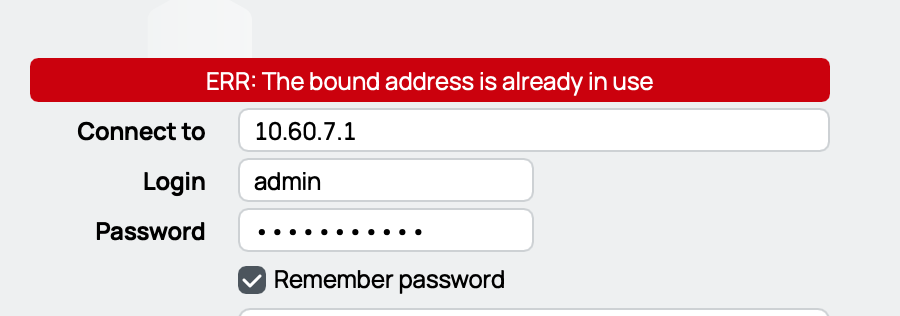
Now when I test the failing Apps on the AppleTV, it all magically works as it should. I see the connections from 192.168.255.x being masqueraded in the v4 firewall connection table as expected. It seems pretty stable and very fast, I've added more and more devices to my vlan6, and it’s 99.9% flawless. Ironically perhaps, the one exception I have found is Winbox4 4.0beta44 does not seem to work properly with the macOS CLAT, ie when accessing a router on its literal IPv4 address from a v6-only vlan, winbox throws this error. I reported it to support. Other apps using v4 literals work fine.
The container uses around 2.5MB of RAM and no disk. I see small spikes of CPU load when running test traffic through it, nothing to worry about on a home lab network for sure. I read that the Jool alternative module might have better cpu performance than Tayga, but haven’t tested it.
Keep in mind here the v4 traffic is now being triple-natted (NAT64, masq, then CG-NAT), so this may very well break some application’s end to end v4-only connections.
Sorry for the rather long post, it took a bit to figure all this out, so I figured it would be useful to share with the community. Its clear that IPv6 is the future, v4 will look more and more legacy, this project is a way to make the big move to v6-only networking, the NAT64 will see less and less usage as Apps and services adopt v6-only behavior going forward, until eventually it won’t be needed at all.
(credit for inspiration and concept goes to: https://packetpushers.net/blog/nat64-setup-using-tayga/ )
(also check out apalrd’s YouTube channel, very nice videos about ipv6, homelabbing and more. Props to him too for maintaining the tayga project on GitHub. )